
What to Look for in a Wi-Fi Extender
 By Theo LangUpdated
When you buy a Wi-Fi extender, match it to your router, the size of the dead zone and the devices that will use it. Check the Wi-Fi standard, the bands, the speed class, the coverage and device figures, and whether it has an Ethernet port. The four extenders below show what those figures look like in practice.
Match the Wi-Fi standard
Start with the Wi-Fi standard, since the extender and the router must share it. The TP-Link RE550 and the NETGEAR EX5000 are Wi-Fi 5 extenders, while the NETGEAR EXS27 is a Wi-Fi 7 extender. The RE315 is an AC1200 dual-band extender with 867 Mbps on 5 GHz and 300 Mbps on 2.4 GHz. Check the standard your router uses, then check the extender's speed class against it.
Check the bands and speed class
Dual-band extenders carry a 2.4 GHz band and a 5 GHz band. The RE315 lists 867 Mbps on 5 GHz and 300 Mbps on 2.4 GHz, and the RE550 lists up to 1300 Mbps on 5 GHz and up to 600 Mbps on 2.4 GHz. The EXS27 lists up to 5 Gbps. Remember that an extender extends coverage and does not increase speed, so read the speed class as a ceiling, not a promise.
Measure the coverage and device count
Coverage and device figures show how far the extender reaches and how many devices it serves. The EX5000 lists up to 1,500 sq. ft. for up to 25 devices, and the EXS27 lists up to 1,500 sq. ft. for up to 45 devices. The RE315 and RE550 list up to 32 devices. Measure the dead zone, count the devices that will connect there, and compare those figures with the extender's figures.
Look for an Ethernet port
An Ethernet port gives one device a wired link through the extender. The RE315 has one Ethernet port, the RE550 has a Gigabit Ethernet port, and the EXS27 has a 2.5 Gigabit Ethernet port. The RE550 also has an access point mode that turns a wired connection into a Wi-Fi hotspot. If a device with an Ethernet port sits near the dead zone, check the port the extender offers.
Check setup and mesh support
Setup and mesh support decide how the extender joins the home network. The RE315 and RE550 work with the TP-Link Tether app and connect to an EasyMesh router for one unified network name, or create a separate network name with a non-EasyMesh router. The EX5000 and EXS27 set up through the NETGEAR Nighthawk app or WPS. Check how the extender joins your network before you buy.
What you need
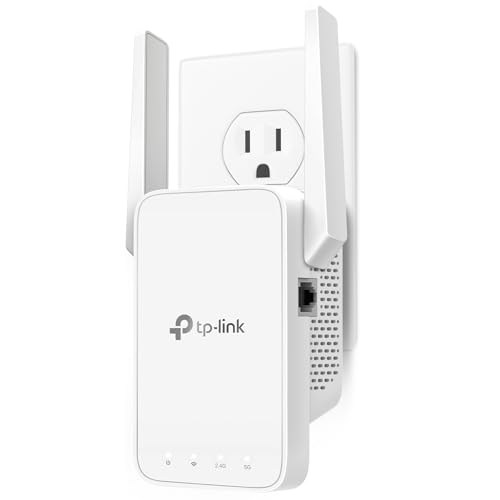
TP-Link AC1200 WiFi Extender Dual Band 5GHz/2.4GHz
A dual-band AC1200 extender with 867 Mbps on 5 GHz, 300 Mbps on 2.4 GHz, one Ethernet port and EasyMesh support for up to 32 devices.
View on Amazon
TP-Link AC1900 WiFi Range Extender RE550
A dual-band AC1900 Wi-Fi 5 extender with up to 1300 Mbps on 5 GHz, a Gigabit Ethernet port, access point mode and support for up to 32 devices.
View on Amazon
NETGEAR WiFi Extender EX5000
A Wi-Fi 5 AC1200 extender with up to 1,500 sq. ft. of coverage for up to 25 devices, set up through the Nighthawk app or WPS.
View on Amazon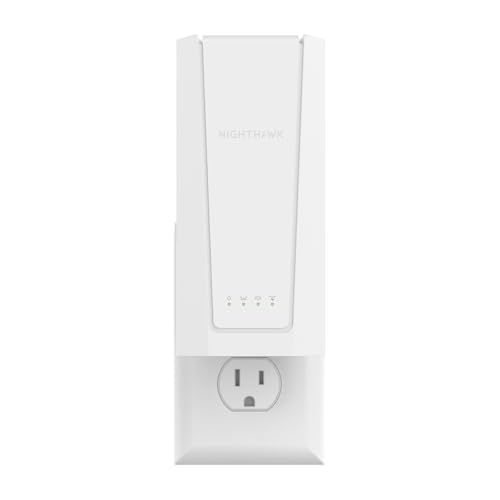
NETGEAR Nighthawk
A Wi-Fi 7 BE5000 extender with up to 5 Gbps, up to 1,500 sq. ft. of coverage for up to 45 devices and a 2.5 Gigabit Ethernet port.
View on AmazonThese come from our ranked list Best Wi-Fi Booster, which compares them spec by spec.
FAQ
Does a Wi-Fi extender increase internet speed?
No. Extenders are designed to improve coverage, not to increase speed. Actual speeds will be 50 percent or less of current speeds, so judge an extender by the coverage it adds.
What is the difference between Wi-Fi 5 and Wi-Fi 7 extenders?
Wi-Fi 7 is the newer standard, and the EXS27 is the Wi-Fi 7 extender here, with up to 5 Gbps. The RE550 and EX5000 are Wi-Fi 5 extenders. Check the standard your router uses and match the extender to it.
Do I need an Ethernet port on an extender?
Not always, but a port gives one device a wired link through the extender. The RE315 has one Ethernet port, the RE550 has a Gigabit Ethernet port, and the EXS27 has a 2.5 Gigabit Ethernet port. Check whether a device near the dead zone has an Ethernet port.
