
Best Wi-Fi Extender (2026): Our 4 Picks Ranked
 By Theo LangUpdated
TP-Link AC1200 WiFi Extender Dual Band 5GHz/2.4GHz (RE315) is the pick for dead zones at home, with AC1200 dual-band WiFi rated up to 867 Mbps on 5 GHz and 300 Mbps on 2.4 GHz for up to 32 devices. The RE550 steps up to AC1900 with a Gigabit Ethernet port, while the NETGEAR EXS27 brings WiFi 7 at BE5000 for up to 45 devices. The EX5000 matches the RE315 at AC1200 for 25 devices.
Your shortlist at a glance
PCKitHQ scores range from 9.2 to 9.8. See how we pick.
| Product and key specifications | Score and retailer |
|---|---|
01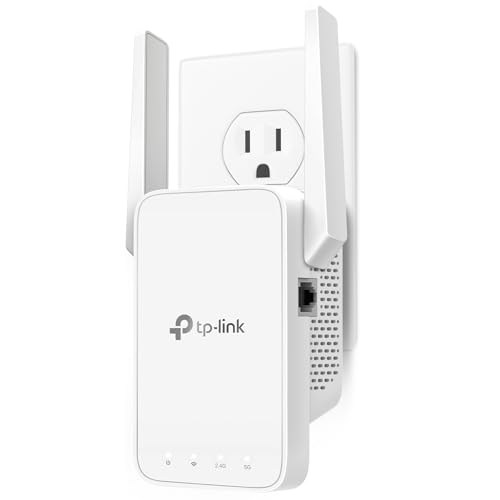 Best Overall TP-Link AC1200 WiFi Extender Dual Band 5GHz/2.4GHzSpeed class: AC1200, Bands: Dual Band, Ethernet: Yes | 9.8PCKitHQ scoreView on Amazon |
02 Second Pick TP-Link AC1900 WiFi Range Extender RE550Wi-Fi standard: WiFi 5, Speed class: AC1900, Bands: Dual-Band | 9.6PCKitHQ scoreView on Amazon |
03 | 9.4PCKitHQ scoreView on Amazon |
04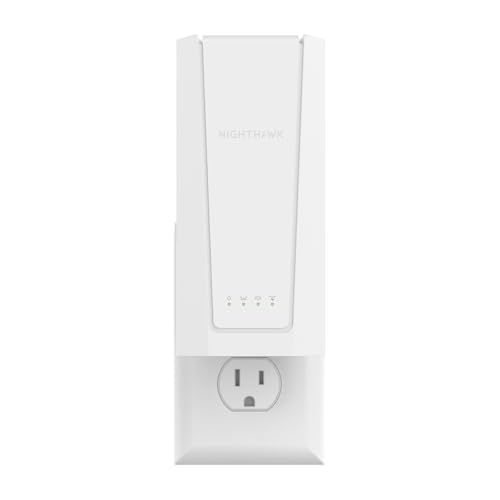 | 9.2PCKitHQ scoreView on Amazon |
A closer look at each configuration
TP-Link AC1200 WiFi Extender Dual Band 5GHz/2.4GHz
score
AC1200 dual-band WiFi with one Ethernet port and EasyMesh support for up to 32 devices.
- Speed class
- AC1200
- Bands
- Dual Band
- Ethernet
- Yes
- Weight
- 0.38 lb
- Warranty
- 2 year manufacturer
The RE315 extends a home network at AC1200, with speeds rated up to 867 Mbps on 5 GHz and 300 Mbps on 2.4 GHz. A Fast Ethernet port gives one wired connection, and EasyMesh support joins the extender to an EasyMesh-compatible router as one unified network. Setup runs through the TP-Link Tether app with an intelligent signal indicator for placement. One-Touch Connection handles setup, and the extender improves coverage without increasing speeds. The extender works with almost all WiFi-enabled devices and routers, and the warranty runs 2 years. Weight is 0.38 lb.
Choose it if
- You want AC1200 WiFi for up to 32 devices
- You want one Ethernet port for a wired device
Consider another if
- You need AC1900 speeds like the RE550
- You need a 2.5G Ethernet port like the EXS27
TP-Link AC1900 WiFi Range Extender RE550
score
AC1900 dual-band WiFi with a Gigabit Ethernet port and AP mode for up to 32 devices.
- Wi-Fi standard
- WiFi 5
- Speed class
- AC1900
- Bands
- Dual-Band
- Ethernet
- Yes
- Weight
- 0.51 lb
- Warranty
- 2 year manufacturer
The RE550 extends a home network at AC1900, with speeds rated up to 1300 Mbps on 5 GHz and 600 Mbps on 2.4 GHz. A Gigabit Ethernet port gives one wired connection and turns a wired connection into a WiFi hotspot in AP mode. EasyMesh support joins the extender to an EasyMesh-compatible router as one unified network. Setup runs through the Tether app with an intelligent signal indicator for placement. The extender works with almost all WiFi-enabled devices and routers or access points. The warranty runs 2 years, and weight is 0.51 lb.
Choose it if
- You want AC1900 WiFi for up to 32 devices
- You want a Gigabit Ethernet port for wired speed
Consider another if
- You need WiFi 7 like the EXS27
- You need 45 devices like the EXS27
NETGEAR WiFi Extender EX5000
score
AC1200 WiFi 5 with up to 1500 sq ft of coverage for up to 25 devices.
- Wi-Fi standard
- WiFi 5
- Speed class
- AC1200
- Weight
- 0.34 lb
- Warranty
- 1 year warranty
The EX5000 brings WiFi 5 to rooms the router cannot reach, with up to 1500 sq ft of added coverage for up to 25 devices from any wall outlet. It plugs into any wall outlet for coverage. Speeds run up to 1.2 Gbps across two bands, and real-world speeds vary with connected devices and the internet plan. Setup runs through the NETGEAR Nighthawk app with guided steps, or by pressing WPS on the router and the extender. The extender connects to any router or gateway and rebroadcasts its signal; it extends the router and does not replace it. The extender works with routers from Xfinity, Spectrum, AT&T, Cox and Verizon. The warranty runs 1 year, and weight is 0.34 lb.
Choose it if
- You want AC1200 WiFi for up to 25 devices
- You want setup by app or WPS
Consider another if
- You need WiFi 7 like the EXS27
- You need a 2-year warranty like the RE315
NETGEAR Nighthawk
score
WiFi 7 at BE5000 with a 2.5G Ethernet port for up to 45 devices.
- Wi-Fi standard
- WiFi 7
- Speed class
- BE5000
- Ethernet
- Yes
- Weight
- 1.12 lb
- Warranty
- 1 Year Limited
The EXS27 brings WiFi 7 to rooms the router cannot reach, with up to 1500 sq ft of added coverage for up to 45 devices from any wall outlet. It works with any router for home coverage. Speeds run up to 5 Gbps on the BE5000 class, and real-world speeds vary with connected devices and the internet plan. A 2.5 Gigabit Ethernet port gives a wired link for a smart TV, game console or desktop. Setup runs through the NETGEAR Nighthawk app, or by pressing WPS on the router and the extender. The warranty is 1 year limited, and weight is 1.12 lb.
Choose it if
- You want WiFi 7 for up to 45 devices
- You want a 2.5G Ethernet port for wired links
Consider another if
- You need the 2-year warranty of the RE315
- You need the 0.34 lb weight of the EX5000
Make the choice for your setup
Compare speed class and bands
Speed class decides the rated ceiling. The RE315 and the EX5000 run AC1200, the RE550 runs AC1900 and the EXS27 runs BE5000. The RE315 rates up to 867 Mbps on 5 GHz and 300 Mbps on 2.4 GHz, while the RE550 rates up to 1300 Mbps on 5 GHz and 600 Mbps on 2.4 GHz. The EX5000 rates up to 1.2 Gbps across two bands, and the EXS27 rates up to 5 Gbps. The RE315, the RE550 and the EX5000 work on dual bands, and these are rated figures, not measured speeds in a home. Extenders improve coverage and do not increase speeds; actual speeds run at 50% or less of current speeds on the TP-Link models. The EX5000 and the EXS27 set up through the Nighthawk app.
Match coverage to device count
Coverage and device count set the fit. The RE315 covers up to 1500 sq ft for up to 32 devices, and the RE550 covers up to 2200 sq ft for up to 32 devices. The EX5000 covers up to 1500 sq ft for up to 25 devices, and the EXS27 covers up to 1500 sq ft for up to 45 devices. Two adjustable external antennas sit on the RE315 and three on the RE550. Actual coverage varies with conditions, distance to devices and obstacles such as walls. The RE315 and the RE550 each carry a 2-year manufacturer warranty. Device counts run from 25 on the EX5000 to 45 on the EXS27. A related shortlist covers the Best Xfinity Wi-Fi Extender.
Ethernet ports and mesh support
Wired connections differ across the four. The RE315 has one Fast Ethernet port, the RE550 has one Gigabit Ethernet port, and the EXS27 has one 2.5 Gigabit Ethernet port. The RE550 turns a wired connection into a WiFi hotspot in AP mode. The RE315 and the RE550 support EasyMesh with a compatible router for one unified network, and neither works with Deco mesh systems. Setup runs through the Tether app on the TP-Link models and the Nighthawk app on the NETGEAR models. With a non-EasyMesh router, the extender creates a separate network name. The EX5000 and the EXS27 carry a 1-year warranty. Weights run from 0.34 lb on the EX5000 to 1.12 lb on the EXS27.
For a more specific shortlist, read Best Wi-Fi Booster.
FAQ: Wi-Fi Extender
What speed classes do these extenders have?
The RE315 and the EX5000 run AC1200, the RE550 runs AC1900 and the EXS27 runs BE5000. The RE315 rates up to 867 Mbps on 5 GHz and 300 Mbps on 2.4 GHz, while the RE550 rates up to 1300 Mbps on 5 GHz and 600 Mbps on 2.4 GHz.
How many devices can these extenders support?
The RE315 and the RE550 each support up to 32 devices, the EX5000 supports up to 25 devices and the EXS27 supports up to 45 devices. Coverage runs up to 1500 sq ft on the RE315, the EX5000 and the EXS27, and up to 2200 sq ft on the RE550.
Which extenders have an Ethernet port?
The RE315 has one Fast Ethernet port, the RE550 has one Gigabit Ethernet port and the EXS27 has one 2.5 Gigabit Ethernet port. The RE550 also turns a wired connection into a WiFi hotspot in AP mode.

