What Is an RJ45 Port on a Laptop?
 By Theo LangUpdated
RJ45 is the name of the socket on a laptop that takes an Ethernet cable. It connects the laptop to a wired network, so the laptop gets its internet connection through the cable instead of Wi-Fi. The port looks like a wide phone jack, and the cable clicks into place with a small plastic tab.
What the RJ45 port does
The RJ45 port is the wired network connection on a laptop. Plugging an Ethernet cable into it links the laptop to a router or a wall socket, and the network then carries the internet connection. A wired link keeps the connection steady when the laptop stays in one place, and it works on its own, so Wi-Fi can stay off while the cable is in.
How to tell it apart from other ports
The RJ45 port is wider than a USB port and has small gold contacts inside. It is about the width of a fingertip, and the Ethernet cable that fits it has a clear plastic plug with a clip that locks when you push it in. Do not force a cable into a port that looks smaller, and check the shape before you push.
Plug in an Ethernet cable
Push the cable plug into the RJ45 port until the clip clicks. The other end goes into a router, a wall socket or a network switch. The laptop then uses the wired connection, and the network icon in the taskbar or menu bar shows the wired link. If nothing happens, push the plug in again until it clicks, and check the other end too.
Connect through a USB-C dock
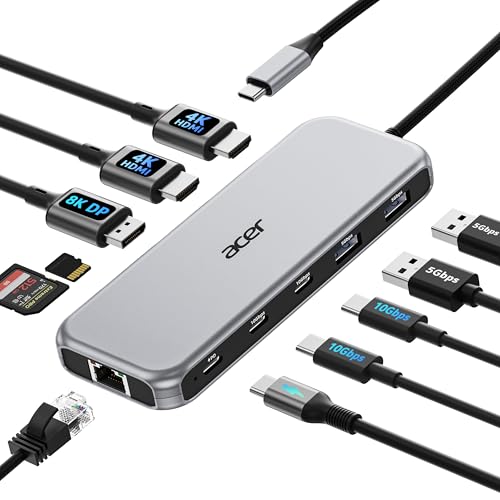
A USB-C dock or hub with an Ethernet port gives a laptop a wired connection. Plug the dock into the laptop's USB-C port, then plug the Ethernet cable into the dock. Check that the laptop's USB-C port supports the dock you plan to use, and check the dock's notes for your laptop.
What you need

Anker Laptop Docking Station Dual Monitor
An 8-in-1 USB-C hub with two HDMI ports, a 1 Gbps Ethernet port, SD and microSD card readers, and up to 85 W pass-through charging.
View on Amazon
Dell Pro Laptop Docking Station WD25
A USB-C dock with HDMI, DisplayPort, Ethernet and USB-A ports, 100 W power delivery and support for up to four displays.
View on Amazon
Acer USB-C Docking Station Dual Monitor
A 9-in-1 USB-C dock with two HDMI ports, three USB-A ports, SD and microSD slots and up to 90 W power delivery to the laptop.
View on Amazon
Dell WD19S 180W Docking Station (130W Power Delivery) USB-C
A USB-C dock with HDMI, two DisplayPort outputs and 130 W power delivery, built around a 180 W power supply.
View on AmazonThese come from our ranked list Best Docking Station, which compares them spec by spec.
FAQ
Is RJ45 the same as Ethernet?
Yes. RJ45 is the name of the plug and socket, while Ethernet is the name of the wired network the cable carries. People use the names for the same cable and port.
Can I use Wi-Fi and an RJ45 cable together?
Yes, Wi-Fi can stay on while the cable is plugged in, and the laptop picks one connection for traffic. Unplug the cable or turn Wi-Fi off if you want the laptop to use only the wired link.
Why does my Ethernet cable not click in?
The clip on the plug may be broken, or the plug may not be lined up with the socket. Look at the plug, line the clip up with the slot in the port, and push it straight in until it clicks.