
Best Docking Station for Dell Laptop (2026): 4 Picks Compared
 By Theo LangUpdated
If your Dell laptop drives two 4K monitors, choose the LIONWEI Docking Station Dual Monitor 4K HDMI 13-in-1 USB C Hub: it gives you two 4K HDMI ports plus DisplayPort, 87W charging, and 10Gbps USB-C ports, all in a 0.31 lb hub. The Dell WD19 suits a Dell desk with 90W delivery and a 3-year warranty, the D3100 covers triple displays over USB 3.0, and the FKA WD19S adds USB-A support for USB-A laptops.
Your shortlist at a glance
PCKitHQ scores range from 9.2 to 9.8. See how we pick.
| Product and key specifications | Score and retailer |
|---|---|
01 | 9.8PCKitHQ scoreView on Amazon |
02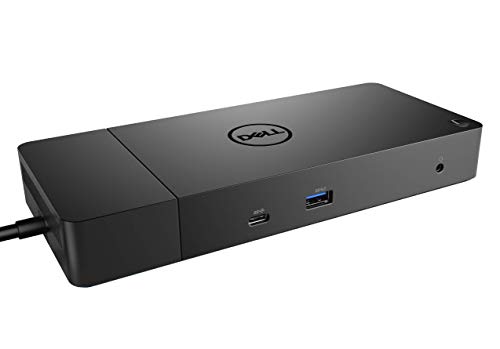 | 9.6PCKitHQ scoreView on Amazon |
03 | 9.4PCKitHQ scoreView on Amazon |
04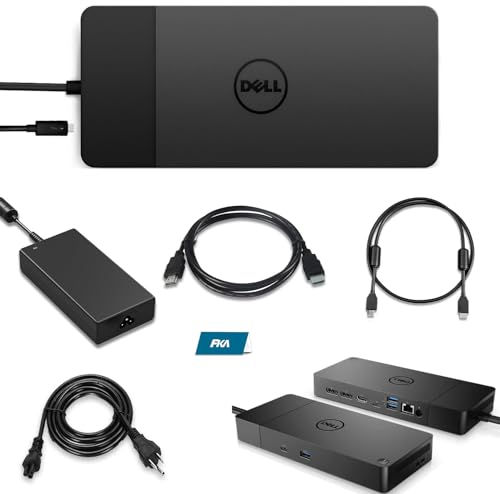 Also Consider WD19S Dell Docking Station | 9.2PCKitHQ scoreView on Amazon |
A closer look at each configuration
Docking Station Dual Monitor 4K
score
A 13-in-1 hub with two 4K HDMI ports, DisplayPort, 87W laptop charging, and 10Gbps USB-C in a 0.31 lb body.
- Power delivery
- 87 W
- Interface
- USB-C 3.1
- HDMI
- Yes
- DisplayPort
- Yes
- Ethernet
- Yes
- USB-C
- Yes
- Weight
- 0.31 lb
- Warranty
- 18 month
It packs 2 4K HDMI ports and a DisplayPort, each up to 4K at 60Hz, plus 2 USB-C ports that each support 100W power delivery and 10Gbps data transfer. The dock itself uses 13W, so 87W reaches your laptop. It also has a USB 3.1 port at 10Gbps, 3 USB 3.0 ports, 2 USB 2.0 ports, a 3.5mm audio and mic jack, and a Gigabit Ethernet port. The 13-in-1 layout covers video, data, network, and audio from one hub. Triple display works on Windows with MST and SST, while Mac extends only one monitor. Plug and play setup needs no drivers, and the dock works with Dell, HP, and Lenovo laptops. It weighs 0.31 lb and carries an 18-month warranty.
Choose it if
- You run two 4K monitors from a Dell laptop
- You want 87W charging and 10Gbps USB-C ports
Consider another if
- You need more than 87W of laptop charging
- You need triple displays on a Mac
Dell WD19 130W Docking Station
score
A Dell 130W dock with 90W power delivery, two DisplayPort 1.4 ports, HDMI 2.0B, and Gigabit Ethernet.
- Power delivery
- 90 W
- Interface
- USB-C
- HDMI
- Yes
- DisplayPort
- Yes
- Ethernet
- Yes
- USB-C
- Yes
- Weight
- 1.29 lb
- Warranty
- 3 YEARS
It uses a 130W power adapter and delivers 90W to your laptop over USB-C. Video runs through 2 DisplayPort 1.4 ports, an HDMI 2.0B port, and a USB-C multifunction DisplayPort. It has a USB-C 3.1 Gen 2 port, 3 USB-A 3.1 ports, a combo audio and headset jack, and an audio out jack, plus a Gigabit Ethernet RJ45 port. One USB-A port has PowerShare for charging another device. The dock's 8.1 by 3.5 by 1.1 inch body sits on a desk beside the laptop. It weighs 1.29 lb and carries a 3-year manufacturer warranty.
Choose it if
- You want a Dell dock with 90W power delivery
- You run dual displays from a Dell laptop
Consider another if
- You need a dock lighter than 1.29 lb
- You need more than 90W of laptop charging
Dell USB 3.0 Ultra HD/4K Triple Display Docking Station (D3100)
score
A USB 3.0 triple-display dock with two HDMI ports, DisplayPort, and a network port for listed Dell models.
- Interface
- USB 3.0
- HDMI
- Yes
- DisplayPort
- Yes
- Weight
- 0.63 lb
- Warranty
- No Warranty
It connects over USB 3.0 and supports a triple monitor setup with 2 HDMI ports, a DisplayPort output, and an included HDMI DVI adapter. The maker gives 4K and a maximum of 2048 x 1152 at 60Hz; check before ordering. It has 3 USB 3.0 ports, 2 USB 2.0 ports, a network RJ-45 port, and headphone input and output. The included HDMI DVI adapter covers monitors with DVI input. It is designed for listed Dell Inspiron, Latitude, and XPS models, works with Windows XP, 7, 8, 8.1, and 10, weighs 0.63 lb, and states no warranty.
Choose it if
- You need a triple monitor setup on your Dell laptop
- You connect your dock over a USB 3.0 port
Consider another if
- You need 4K resolution from your dock
- You need a warranty term in writing
WD19S Dell Docking Station
score
A 130W dock with 90W power delivery, dual 4K displays, USB-C and USB-A ports, and included HDMI and DP cables.
- Interface
- USB-C/USB-A
- HDMI
- Yes
- DisplayPort
- Yes
- Ethernet
- Yes
- USB-C
- Yes
It pairs a 130W power adapter with 90W power delivery over USB-C. Two DisplayPort outputs, an HDMI port, and a USB-C DisplayPort connection support dual displays up to 4K at 60Hz and three displays up to QHD at 60Hz. It has a USB-C 3.2 Gen 2 port, 2 USB 3.2 Gen 1 Type A ports, a USB 3.2 Gen 1 port with PowerShare, and an Ethernet RJ-45 port. It works with HP and Lenovo notebooks that support USB-C docking, includes FKA HDMI and DP cables, and carries a 3-year warranty. FKA offers a 24-hour response time, a one-year replacement service, and three years of maintenance support.
Choose it if
- You want USB-C and USB-A ports on one dock
- You want 90W charging with cables included
Consider another if
- You need triple displays at 4K resolution
- You need more than 90W of laptop charging
Make the choice for your setup
Match ports to your monitors
Count the video outputs before the USB ports. The LIONWEI gives you 2 HDMI ports and a DisplayPort, each up to 4K at 60Hz, and the Dell WD19 gives you 2 DisplayPort 1.4 ports, an HDMI 2.0B port, and a USB-C multifunction DisplayPort. The FKA WD19S gives you 2 DisplayPort outputs, an HDMI port, and a USB-C DisplayPort connection for dual displays up to 4K at 60Hz. The Dell D3100 gives you 2 HDMI ports and a DisplayPort output for a triple monitor setup, with video listed at a maximum of 2048 x 1152 at 60Hz. The LIONWEI also gives you 2 USB-C ports, 3 USB 3.0 ports, and 2 USB 2.0 ports for drives and peripherals. Match the port types to the inputs on your monitors, then count the ports.
Check power delivery and charging
Power delivery decides whether one cable charges your laptop while it drives monitors. The LIONWEI delivers 87W to the laptop from a 100W supply, since the dock itself uses 13W, and its 2 USB-C ports each support 100W power delivery and 10Gbps data transfer. The Dell WD19 and the FKA WD19S each pair a 130W adapter with 90W power delivery. The Dell WD19 also gives one USB-A port PowerShare for charging another device. Compare the stated wattage against your own laptop's charger, and check whether the dock charges through USB-C or needs its own adapter, before you buy the dock. Shoppers with a related need can compare our guide to the Best Universal Docking Station for 2 Monitors.
Match the connection to your laptop
The connection decides which laptops the dock fits. The LIONWEI, the Dell WD19, and the FKA WD19S all connect over USB-C, and the FKA WD19S also connects over USB-A. The Dell D3100 connects over USB 3.0 and is designed for listed Dell Inspiron, Latitude, and XPS models, with Windows XP, 7, 8, 8.1, and 10 as system requirements. The LIONWEI is listed for Dell, HP, and Lenovo laptops. The Dell WD19 uses a USB-C docking interface, and the FKA WD19S is also compatible with notebooks from HP and Lenovo that support USB-C docking. Check that your laptop has the matching port and that your operating system supports the dock's display modes, since the LIONWEI extends only one monitor on Mac.
Before you decide, also read Best Docking Station.
FAQ: Docking Station for Dell Laptop
What power delivery do these docks offer?
The Dell WD19 and the FKA WD19S each deliver 90W to the laptop, while the LIONWEI delivers 87W from a 100W supply, since the dock itself uses 13W. Both 90W docks pair that delivery with a 130W power adapter.
Which docks support two 4K monitors?
The LIONWEI supports two 4K HDMI ports plus DisplayPort, each up to 4K at 60Hz. The FKA WD19S supports dual displays up to 4K at 60Hz, and the Dell WD19 gives two DisplayPort 1.4 ports and an HDMI 2.0B port. The Dell D3100 lists a maximum of 2048 x 1152 at 60Hz.
How much do these docks weigh?
The LIONWEI weighs 0.31 lb. The Dell D3100 weighs 0.63 lb, and the Dell WD19 weighs 1.29 lb. A lighter dock moves between desks more easily, while a heavier dock stays put on a fixed desk.


