
Best Docking Station for HP Laptop (2026): 5 Picks Compared
 By Theo LangUpdated
Choose the HP USB-C Dock G5 if you want a dock with 100 W power delivery, one HDMI port and two DisplayPort outputs for an HP laptop with a USB-C port. The ANYHDD 5TW10AA ships with a 120 W adapter, while the HP USB-C Dock G5 ships with a 100 W adapter, so the adapter rating is the difference between the two. The TobenONE 19-in-1 adds a second HDMI output for 4K displays.
Your shortlist at a glance
PCKitHQ scores range from 9.2 to 9.8. See how we pick.
| Product and key specifications | Score and retailer |
|---|---|
01 | 9.8PCKitHQ scoreView on Amazon |
02 | 9.7PCKitHQ scoreView on Amazon |
03 | 9.5PCKitHQ scoreView on Amazon |
04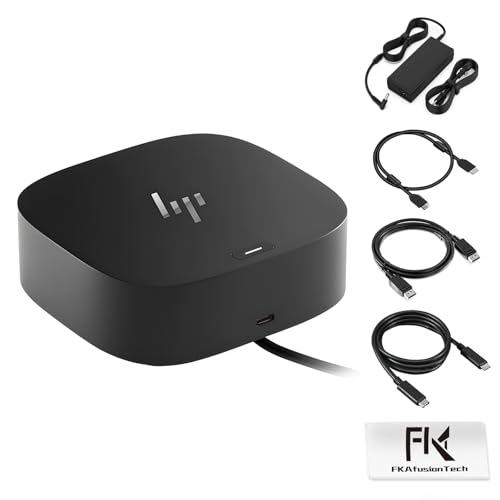 | 9.3PCKitHQ scoreView on Amazon |
05 | 9.2PCKitHQ scoreView on Amazon |
A closer look at each configuration
HP USB-C Dock G5
score
The HP USB-C Dock G5 pairs 100 W power delivery with one HDMI port, two DisplayPort outputs and Gigabit Ethernet.
- Power delivery
- 100 W
- Interface
- USB-C
- HDMI
- Yes
- DisplayPort
- Yes
- Ethernet
- Yes
- USB-C
- Yes
The HP USB-C Dock G5 connects through a single USB-C cable and delivers 100 W of power to the laptop. Its video outputs are one HDMI port and two DisplayPort outputs, and it includes Gigabit Ethernet for wired networking. The port set also includes one powered USB 3.0 port, one USB-C power port, one audio port and one SuperSpeed USB 3.0 port. The dock measures 4.8 inches by 4.8 inches by 1.8 inches and weighs 23.98 ounces. It covers the Elite x2 G4, EliteBook 735 G6, 745 G6, 830 G6 and 850 G6, EliteBook x360 1040 G6, Mobile Thin Client MT45, and ProBook 445R G6, 640 G5 and 650 G5.
Choose it if
- You need 100 W power delivery through one USB-C cable
- You want HDMI and two DisplayPort outputs together
Consider another if
- You need the 120 W adapter of the ANYHDD dock
- You need the 10 USB ports of the TobenONE dock
TobenONE 19-in-1 Laptop Docking Station Dual Monitor
score
The TobenONE 19-in-1 adds 10 USB ports, two 4K HDMI outputs and SD and MicroSD card slots.
- Power delivery
- 100 W
- Interface
- USB-C
- HDMI
- Yes
- Ethernet
- Yes
- USB-C
- Yes
- Weight
- 0.68 lb
- Warranty
- 2 Year Manufacturer
The TobenONE 19-in-1 packs 19 ports into one device, including 10 USB ports, two HDMI outputs, a host port, Gigabit Ethernet, SD and MicroSD card slots and a 3.5mm audio jack. The two HDMI outputs support dual 4K displays, and file transfers run at 5Gbps. The PD port delivers up to 100 W of charging power, but it requires a 65 W or higher power adapter, and the adapter is not included. The dock is designed for Windows and Chrome OS laptops with full-featured USB-C ports and is not recommended for Mac users. It weighs 0.68 pounds and carries a 2 Year Manufacturer warranty.
Choose it if
- You want 10 USB ports for many peripherals at once
- You need two 4K HDMI outputs for dual monitors
Consider another if
- You need an included power adapter with your dock
- You need the 120 W adapter of the ANYHDD dock
5TW10AA USB-C Dock G5 Laptop Docking Station
score
The ANYHDD 5TW10AA pairs a 120 W adapter with HDMI, DisplayPort, USB ports and Gigabit Ethernet.
- Power delivery
- 120 W
- Interface
- USB-C
- HDMI
- Yes
- DisplayPort
- Yes
- Ethernet
- Yes
- USB-C
- Yes
- Weight
- 1.5 lb
- Warranty
- 1 Year
The ANYHDD 5TW10AA ships with a 120 W power adapter and connects through a single USB-C cable. Its ports include one powered USB 3.0 port, one USB-C power port, one audio port, one SuperSpeed USB 3.0 port, one network port, two DisplayPort outputs and one HDMI port, with Gigabit Ethernet for a wired connection. The dock supports up to three displays and is designed for HP and non-HP USB-C and Thunderbolt enabled laptops. It covers the Elite x2 G4, EliteBook 735 G6, 745 G6, 830 G6 and 850 G6, EliteBook x360 1040 G6, Mobile Thin Client MT45, and ProBook 445R G6, 640 G5 and 650 G5. It weighs 1.5 pounds and carries a 1 Year warranty.
Choose it if
- You want a 120 W adapter with the G5 port set
- You need up to three displays from one cable
Consider another if
- You need the 10 USB ports of the TobenONE dock
- You need the two 4K HDMI outputs of the TobenONE dock
HP Docking Station for Dual Monitor Bundle
score
The FKAfusiontech bundle pairs the HP G5 dock with a 120 W adapter, HDMI and DisplayPort cables.
- Power delivery
- 120 W
- Interface
- USB-C
- HDMI
- Yes
- DisplayPort
- Yes
- USB-C
- Yes
- Warranty
- 1 Year
The FKAfusiontech bundle includes the HP G5 docking station with a 120 W AC adapter, HDMI and DisplayPort cables and a USB cable. Its ports include one powered USB 3.0 port, one USB-C power port, one audio port, one SuperSpeed USB 3.0 port, one network port, two DisplayPort outputs and one HDMI port. A single cable connects the laptop to up to three monitors. The dock covers the Elite x2 G4, EliteBook 735 G6, 745 G6, 830 G6 and 850 G6, EliteBook x360 1040 G6, Mobile Thin Client MT45, and ProBook 445R G6, 640 G5 and 650 G5. Non-HP computer users may need to update the dock driver. It carries a 1 Year warranty.
Choose it if
- You want HDMI and DisplayPort cables included in the box
- You need a 120 W adapter for your HP laptop
Consider another if
- You need the 10 USB ports of the TobenONE dock
- You need the SD and MicroSD card slots of the TobenONE dock
HP Docking Station for Laptop Dual Monitor and Charging
score
The Koncept dock pairs two DisplayPort outputs with one HDMI port, Gigabit Ethernet and USB-C.
- Interface
- USB-C
- HDMI
- Yes
- DisplayPort
- Yes
- Ethernet
- Yes
- USB-C
- Yes
- Weight
- 3.59 lb
- Warranty
- 1 year
The Koncept dock connects through USB-C and includes one HDMI port, two DisplayPort outputs, Gigabit Ethernet, one USB 3.0 port, one USB-C port, one audio port and one SuperSpeed USB 3.0 port. Its energy supply is rated at 100, and Gigabit Ethernet provides a wired network connection. The dock covers the Elite x2 G4, EliteBook 735 G6, 745 G6, 830 G6 and 850 G6, EliteBook x360 1040 G6, Mobile Thin Client MT45, and ProBook 445R G6, 640 G5 and 650 G5. It weighs 3.59 pounds and carries a 1 year warranty.
Choose it if
- You want two DisplayPort outputs and one HDMI port
- You need Gigabit Ethernet for a wired network connection
Consider another if
- You need the 120 W adapter of the ANYHDD dock
- You need the 10 USB ports of the TobenONE dock
Make the choice for your setup
Match the dock to your HP laptop
Start with the HP models each dock supports. The HP USB-C Dock G5, the ANYHDD 5TW10AA, the FKAfusiontech bundle and the Koncept dock all cover the Elite x2 G4, EliteBook 735 G6, 745 G6, 830 G6 and 850 G6, EliteBook x360 1040 G6, Mobile Thin Client MT45, and ProBook 445R G6, 640 G5 and 650 G5. The TobenONE 19-in-1 is designed for Windows and Chrome OS laptops with full-featured USB-C ports, including HP laptops, and is not recommended for Mac users. Check the model on your laptop against those models before choosing. A dock that covers your model keeps the comparison grounded in the models each dock supports.
Compare power delivery and adapters
The HP USB-C Dock G5 delivers 100 W of power and ships with a 100 W power adapter. The ANYHDD 5TW10AA and the FKAfusiontech bundle each ship with a 120 W adapter. The TobenONE 19-in-1 supports 100 W passthrough charging, but it requires a 65 W or higher power adapter, and the adapter is not included, so the adapter must come from elsewhere. The Koncept dock has an energy supply rated at 100. Compare the adapter each dock ships with against the power your laptop needs through its USB-C port. A dock with its own adapter in the box removes the separate adapter question. For a closely related choice, read our guide to the Best Docking Station for Three Monitors.
Count displays and ports
The HP USB-C Dock G5 has one HDMI port and two DisplayPort outputs, and the ANYHDD 5TW10AA, the FKAfusiontech bundle and the Koncept dock share that same video output set. The TobenONE 19-in-1 has two 4K HDMI outputs for dual monitors and 10 USB ports for many peripherals. The ANYHDD 5TW10AA and the FKAfusiontech bundle support up to three displays from a single cable. Every dock in this group includes a network port and a USB-C connection. Count the monitors you plan to connect and the peripherals that stay plugged in, then match those numbers to the port counts shown just above.
Before you decide, also read Best Docking Station.
FAQ: Docking Station for HP Laptop
Which dock suits an HP laptop with a USB-C port?
The HP USB-C Dock G5 delivers 100 W through USB-C with one HDMI port, two DisplayPort outputs and Gigabit Ethernet. The ANYHDD 5TW10AA and the FKAfusiontech bundle add a 120 W adapter with the same video outputs. Check your model against the EliteBook and ProBook models first.
How many displays can these docks connect?
The HP USB-C Dock G5, ANYHDD 5TW10AA, FKAfusiontech bundle and Koncept dock each have one HDMI port and two DisplayPort outputs. The ANYHDD 5TW10AA and the FKAfusiontech bundle support up to three displays from a single cable. The TobenONE 19-in-1 has two 4K HDMI outputs for dual monitors.
Which dock includes its own power adapter?
The HP USB-C Dock G5 ships with a 100 W power adapter, and the ANYHDD 5TW10AA and the FKAfusiontech bundle each ship with a 120 W adapter. The TobenONE 19-in-1 needs a 65 W or higher adapter, which is not included. Check the adapter each dock ships with before choosing.


