Best Docking Station for Three Monitors (2026): 4 Picks Compared
 By Theo LangUpdated
Choose the Plugable USB-C Triple Monitor Docking Station if you need three HDMI displays from one USB-C dock on Windows, macOS, or ChromeOS. It drives three extended HDMI displays through DisplayLink, with up to 4K 30Hz on HDMI 1 and up to 1920x1200 60Hz on HDMI 2 and 3. It charges the laptop at up to 100W, and the front USB-C port adds 20W charging for phones.
Your shortlist at a glance
PCKitHQ scores range from 9.2 to 9.8. See how we pick.
| Product and key specifications | Score and retailer |
|---|---|
01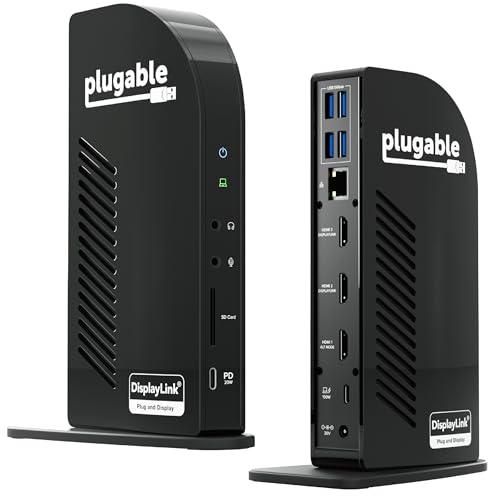 | 9.8PCKitHQ scoreView on Amazon |
02 | 9.6PCKitHQ scoreView on Amazon |
03 | 9.4PCKitHQ scoreView on Amazon |
04 | 9.2PCKitHQ scoreView on Amazon |
A closer look at each configuration
Plugable USB-C Triple Monitor Docking Station
score
The Plugable dock drives three extended HDMI displays through DisplayLink and charges the laptop at up to 100W.
- Power delivery
- 100 W
- Interface
- USB-C
- HDMI
- Yes
- Ethernet
- Yes
- USB-C
- Yes
- Weight
- 0.88 lb
- Warranty
- 2 Year Limited Parts and Labor
The Plugable USB-C Triple Monitor Docking Station is a 13-in-1 dock with three HDMI ports for three extended displays. HDMI 1 delivers up to 4K 30Hz, and HDMI 2 and 3 deliver up to 1920x1200 60Hz. It supports M1, M2, M3, M4, M5, and MacBook Neo systems, and macOS needs DisplayLink Manager installation for multiple displays. The rear USB-C port charges the laptop at up to 100W, and the front USB-C port delivers 20W charging for phones and accessories. Four USB-A 5Gbps ports, an SD card reader, gigabit ethernet, and audio in and out cover peripherals, storage, and networking. The dock works with Windows 10+, macOS 11+, and ChromeOS systems. It weighs 0.88 lb and carries a 2 Year Limited Parts and Labor warranty.
Choose it if
- You want three extended HDMI displays on a Mac
- You want 100W laptop charging with 20W phone charging
Consider another if
- You need triple 4K@60Hz on all three HDMI ports
- You need HDCP playback like Netflix or Hulu
Selore 3 HDMI Docking Station Triple Monitor
score
The Selore dock drives three HDMI displays at up to 4K@60Hz on one port and charges at 100W.
- Power delivery
- 100 W
- Interface
- USB C
- HDMI
- Yes
- Ethernet
- Yes
- USB-C
- Yes
- Weight
- 0.71 lb
- Warranty
- 2 Years
The Selore 3 HDMI Docking Station Triple Monitor Docking Station 3 is a 16-in-1 dock with three HDMI ports. One port reaches 4K@60Hz on its own, while three monitors together run at 4K@30Hz, and dual monitors run at 1080@60Hz. On Mac devices it supports mirror mode only and cannot extend two different screens. A 100W PD charging port powers the laptop, and the product is not equipped with a power adapter, so an 87W+ charger is needed for all functions. USB-A 3.1 and USB-C ports move data at up to 10Gbps, and three USB 3.0 ports move data at up to 5Gbps. An SD slot, a microSD slot, a 1000Mbps ethernet port, and a 3.5mm audio and mic jack complete the dock. It weighs 0.71 lb and carries a 2 Years warranty.
Choose it if
- You want three 4K HDMI ports with 10Gbps data transfer
- You want a 16-in-1 dock with SD and microSD slots
Consider another if
- You need a power adapter included in the box
- You need extended displays on macOS like the Plugable dock
Selore USB C Docking Station 3 Monitors 3
score
The Selore 13-in-1 dock drives three HDMI displays at 4K@60Hz on Windows with no drivers required.
- Power delivery
- 100 W
- Interface
- USB C
- HDMI
- Yes
- Ethernet
- Yes
- USB-C
- Yes
- Warranty
- 2 Year Manufacturer
The Selore USB C Docking Station 3 Monitors 3 HDMI 13-in-1 is a 13-in-1 hub with three HDMI ports at 4K@60Hz. On Windows with MST support it extends three independent displays, or mirrors identical content across them. On macOS it supports up to two displays, one extended and one mirrored, since triple monitor extend is not supported. Two USB-C 3.1 ports and one USB-A 3.1 port move data at up to 10Gbps, and two USB-A 2.0 ports cover other peripherals. An SD card slot, a microSD card slot, gigabit ethernet, and a 100W PD 3.0 charging port round out the hub. A one-touch screen control button switches between mirror and extend modes, and the dock needs no drivers. It carries a 2 Year Manufacturer warranty.
Choose it if
- You want triple 4K extend mode on Windows with MST
- You want a one-touch button to switch mirror and extend
Consider another if
- You need triple monitor extend on macOS
- You need a DisplayPort output like the UANTIN dock
UANTIN Laptop Docking Station 3 Monitors
score
The UANTIN dock drives three displays through two HDMI and one DisplayPort at 4K@30Hz.
- Power delivery
- 100 W
- Interface
- USB C
- HDMI
- Yes
- DisplayPort
- Yes
- USB-C
- Yes
- Warranty
- 2 Year
The UANTIN Laptop Docking Station 3 Monitors is an 8-in-1 dock with two HDMI ports and one DisplayPort. On Windows it drives three independent external displays at 4K@30Hz through MST, with each HDMI port and the DisplayPort reaching up to 4K@60Hz on its own. Three USB-A 5Gbps ports and one USB-C 5Gbps data port connect peripherals and drives, and a 100W PD USB-C port charges the laptop through pass-through power. The dock has a 0.98FT braided cable and an aluminum body. It supports Windows and macOS laptops with DisplayPort Alt Mode, though MST triple monitor is exclusive to Windows and Mac OS extends up to two displays. It carries a 2 Year warranty.
Choose it if
- You want a DisplayPort alongside two HDMI ports
- You want a braided cable and aluminum body for travel
Consider another if
- You need three HDMI ports like the Plugable dock
- You need triple monitor extend on macOS
Make the choice for your setup
Compare three-monitor display options
All four docks drive three external displays, but the ports and resolutions differ. The Plugable dock has three HDMI ports through DisplayLink, with up to 4K 30Hz on HDMI 1 and up to 1920x1200 60Hz on HDMI 2 and 3. The Selore 16-in-1 dock has three HDMI ports, with one port at 4K@60Hz and three monitors together at 4K@30Hz. The Selore 13-in-1 dock has three HDMI ports at 4K@60Hz for Windows triple extend through MST. The UANTIN dock has two HDMI ports and one DisplayPort, with three displays at 4K@30Hz on Windows. Match the port mix to the monitors you own.
Check macOS and Windows display limits
Windows and macOS treat triple displays differently across these docks. The Plugable dock extends three displays on macOS through DisplayLink Manager, and it supports M1 through M5 MacBooks. The Selore 16-in-1 dock supports mirror mode only on Mac devices and cannot extend two different screens. The Selore 13-in-1 dock supports up to two displays on macOS, one extended and one mirrored. The UANTIN dock extends up to two displays on Mac OS, and MST triple monitor is exclusive to Windows. Confirm how many separate displays your system supports before choosing. The Plugable dock is the only dock here that extends three separate displays on a Mac. A related shortlist covers the Best Powered Docking Station.
Compare charging, ports, and cables
All four docks charge the laptop at up to 100W through a USB-C PD port. The Plugable dock adds a front USB-C port with 20W charging for phones and accessories, and its power adapter and 1 meter USB-C host cable are included. The Selore 16-in-1 dock ships with a USB-C to USB-C cable but no power adapter, and an 87W+ charger is needed for all functions. The Selore 13-in-1 dock has two USB-C 3.1 ports and one USB-A 3.1 port at up to 10Gbps. The UANTIN dock has three USB-A 5Gbps ports, one USB-C 5Gbps data port, and a 0.98FT braided cable.
Before you decide, also read Best Docking Station.
FAQ: Docking Station for Three Monitors
Which docks here drive three monitors on a Mac?
The Plugable dock extends three displays on macOS through DisplayLink Manager. The Selore 13-in-1 dock and the UANTIN dock extend up to two displays on macOS. The Selore 16-in-1 dock supports mirror mode only on Mac devices.
Which docks here charge at 100W, and what is included?
All four docks charge the laptop at up to 100W. The Plugable dock includes its power adapter and a 1 meter USB-C host cable. The Selore 16-in-1 dock includes a USB-C to USB-C cable but no power adapter. The UANTIN dock needs your own charger for pass-through power.
Which dock here has a DisplayPort for a third monitor?
The UANTIN dock has two HDMI ports and one DisplayPort for three displays at 4K@30Hz on Windows. The Plugable dock and both Selore docks use three HDMI ports instead. The UANTIN DisplayPort reaches up to 4K@60Hz on its own.