
Best USB Docking Station for Laptop (2026): 4 Picks Compared
 By Theo LangUpdated
Choose the Acer Laptop Docking Station 3 Monitors when you want three displays at up to 4K@60Hz, 4K@60Hz, and 1080P@60Hz from one USB-C dock, with 85W of charging power for your laptop. The MOKiN dock also drives three monitors at up to 1080P@60Hz each with DP1.4, while the Giq dock and the HP G5 dock cover two monitors each.
Your shortlist at a glance
PCKitHQ scores range from 9.2 to 9.8. See how we pick.
| Product and key specifications | Score and retailer |
|---|---|
01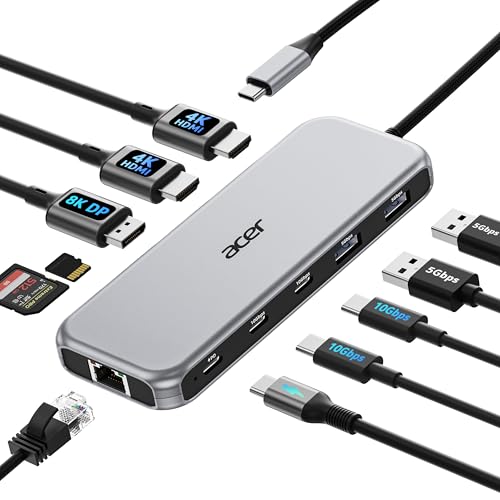 | 9.8PCKitHQ scoreView on Amazon |
02 | 9.6PCKitHQ scoreView on Amazon |
03 Also Consider USB 3.0 Docking Station Dual Monitor M1-M5 | 9.4PCKitHQ scoreView on Amazon |
04 | 9.2PCKitHQ scoreView on Amazon |
A closer look at each configuration
Acer Laptop Docking Station 3 Monitors
score
An 11-in-1 dock with triple displays up to 8K on DisplayPort and 85W charging defines this Acer dock.
- Power delivery
- 85 W
- Interface
- USB C
- HDMI
- Yes
- Ethernet
- Yes
- USB-C
- Yes
- Warranty
- 1 Year
The Acer Laptop Docking Station 3 Monitors is an 11-in-1 USB C dock with 2 HDMI ports at 4K@60Hz and 1 DisplayPort at 8K@30Hz. It supports a single display up to 8K@30Hz on DisplayPort or 4K@60Hz on HDMI, and triple displays up to 4K@60Hz plus 4K@60Hz plus 1080P@60Hz. It has 2 USB-C ports at 10Gbps, 2 USB-A ports at 5Gbps, a 1000Mbps RJ45 Ethernet port, and SD and MicroSD slots at 104Mbps. It carries a 1 Year warranty.
Choose it if
- You want triple displays from one USB-C dock
- You want 85W charging with 10Gbps data ports
Consider another if
- You need a 2-year warranty like the MOKiN dock
- You need three 4K@60Hz displays at once
USB C Laptop Docking Station Dual Monitor Dual
score
A 13-in-1 dock with dual 4K HDMI, DisplayPort, and 85W charging defines this MOKiN dock.
- Power delivery
- 85 W
- Interface
- USB C
- HDMI
- Yes
- Ethernet
- Yes
- USB-C
- Yes
- Weight
- 0.29 lb
- Warranty
- 2 Years
The MOKiN USB C Laptop Docking Station Dual Monitor Dual HDMI 4K is a 13-in-1 dock with 2 HDMI ports at 4K, DisplayPort outputs, Gigabit Ethernet, and 85W laptop charging. It supports two or three monitors, with triple displays up to 3 x 1080@60Hz when the signal source is DP1.4. It takes up to 100W input and gives 85W output to your laptop when using a 100W power adapter. It has 3 USB 3.1 ports at 10Gbps and 2 USB 2.0 ports for a mouse and keyboard, with SD and microSD slots that read two memory cards at the same time. A 3.5mm audio and microphone 2-in-1 jack connects a headset. It needs no driver installation. On macOS, only one 4K@60Hz display extends. It weighs 0.29 lb and carries a 2 Years warranty.
Choose it if
- You want two 4K HDMI displays from one dock
- You want Gigabit Ethernet with a card reader
Consider another if
- You need a single 8K display like the Acer dock
- You need triple 4K@60Hz displays at once
USB 3.0 Docking Station Dual Monitor M1-M5
score
A USB 3.0 dual-monitor dock with HDMI, Gigabit Ethernet, and card readers defines this Giq dock.
- Interface
- USB 3.0
- HDMI
- Yes
- Ethernet
- Yes
- USB-C
- Yes
- Weight
- 0.23 lb
The Giq USB 3.0 Docking Station Dual Monitor is a DisplayLink dock with 2 HDMI ports for dual monitors and triple display through an HDMI splitter. It mirrors or extends your screen to stream UHD video at 30Hz or Full HD 1080p video to a monitor or projector. It has a 1000Mbps Gigabit RJ45 Ethernet port, TF and microSD card readers, and 3 USB ports for charging devices and connecting a hard drive, keyboard, and mouse. USB 3.0 ports transfer data at up to 5Gbps, and the SD and microSD slots transfer data at up to 480Mbps. The USB-C port charges the docking station only and does not charge your laptop. It works with Mac OS X 10.6 or higher, Windows XP, 7 or higher, and Chrome OS. It weighs 0.23 lb.
Choose it if
- You want dual monitors through a USB 3.0 dock
- You want Gigabit Ethernet with TF and microSD readers
Consider another if
- You need laptop charging from the dock
- You need a single 8K display like the Acer dock
HP Docking Station for Laptop Dual Monitor and Charging
score
A USB-C dock with dual DisplayPort, HDMI, and Gigabit Ethernet defines this HP G5 dock.
- Interface
- USB-C
- HDMI
- Yes
- DisplayPort
- Yes
- Ethernet
- Yes
- USB-C
- Yes
- Weight
- 1.5 lb
- Warranty
- 1 year
The HP Docking Station for Laptop Dual Monitor and Charging is a USB-C dock with 2 DisplayPort outputs and 1 HDMI port for dual monitors. It has Gigabit Ethernet for network connectivity, plus USB 3.0 ports, a USB-C port, an audio port, and a network port for peripherals and displays. It is designed for HP Elite x2 G4, EliteBook 735 G6, 745 G6, 830 G6, 850 G6, EliteBook x360 1040 G6, mobile thin client MT45, ProBook 445R G6, 640 G5, and 650 G5 laptops. It weighs 1.5 lb and carries a 1 year warranty.
Choose it if
- You want dual monitors on HP EliteBook laptops
- You want 2 DisplayPort outputs with HDMI
Consider another if
- You need triple displays like the Acer dock
- You need 10Gbps data ports like the Acer dock
Make the choice for your setup
Compare monitors and display outputs
The Acer dock supports a single display up to 8K@30Hz on DisplayPort or 4K@60Hz on HDMI, and triple displays up to 4K@60Hz plus 4K@60Hz plus 1080P@60Hz. The MOKiN dock supports two or three monitors, with triple displays up to 3 x 1080@60Hz when the signal source is DP1.4. The Giq dock mirrors or extends to UHD video at 30Hz or Full HD 1080p video through 2 HDMI ports. The HP G5 dock gives dual monitors through 2 DisplayPort outputs and 1 HDMI port. On macOS, the Acer dock mirrors the same content across all external monitors, and the MOKiN dock extends only one display.
Compare charging and data speeds
The Acer dock takes up to 100W input and delivers 85W to your laptop, with the power adapter and cable not included. The MOKiN dock takes up to 100W input and gives 85W output to your laptop when using a 100W power adapter. The Giq dock does not charge your laptop, since its USB-C port charges the docking station only. The HP G5 dock charges a laptop through USB-C. Data speeds differ: the Acer dock has 2 USB-C ports at 10Gbps and 2 USB-A ports at 5Gbps, the MOKiN dock has USB 3.1 ports at up to 10Gbps, and the Giq dock has USB 3.0 ports at up to 5Gbps. If that fits your setup better, see our guide to the Best Docking Station for 3 Monitors.
Check Ethernet, weight, and warranty
The Acer dock has a 1000Mbps RJ45 Ethernet port, the MOKiN dock has Gigabit Ethernet, the Giq dock has a 1000Mbps Gigabit RJ45 Ethernet port, and the HP G5 dock has Gigabit Ethernet. The Acer dock has SD and MicroSD slots at 104Mbps, and the MOKiN dock has SD and microSD slots that read two memory cards at the same time. The Giq dock has TF and microSD card readers. The MOKiN dock weighs 0.29 lb, the Giq dock weighs 0.23 lb, and the HP G5 dock weighs 1.5 lb. The Acer dock carries a 1 Year warranty, the MOKiN dock carries a 2 Years warranty, and the HP G5 dock carries a 1 year warranty.
Before you decide, also read Best Docking Station.
FAQ: USB Docking Station for Laptop
Which docks drive three monitors?
The Acer dock supports triple displays up to 4K@60Hz plus 4K@60Hz plus 1080P@60Hz. The MOKiN dock supports two or three monitors, with triple displays up to 3 x 1080@60Hz on DP1.4. The Giq dock and the HP G5 dock each cover two monitors.
Which docks charge the laptop?
The Acer dock delivers 85W to your laptop from up to 100W input. The MOKiN dock gives 85W output from 100W input when using a 100W power adapter. The HP G5 dock charges a laptop through USB-C. The Giq dock does not charge your laptop.
Which docks have Gigabit Ethernet?
All four docks have Ethernet. The Acer dock has a 1000Mbps RJ45 Ethernet port, the MOKiN dock has Gigabit Ethernet, the Giq dock has a 1000Mbps Gigabit RJ45 Ethernet port, and the HP G5 dock has Gigabit Ethernet.


