
Best Displaylink Docking Station for Mac (2026): 6 Picks Compared
 By Theo LangUpdated
Choose the Plugable USB C Docking Station for a Mac that needs two 4K monitors at 60Hz through one USB-C cable with 100W charging. The Plugable triple-monitor dock adds a third HDMI display, while both WAVLINK docks reach three displays at up to 4K plus 2K plus 2K.
Your shortlist at a glance
PCKitHQ scores range from 9.2 to 9.8. See how we pick.
| Product and key specifications | Score and retailer |
|---|---|
01 | 9.8PCKitHQ scoreView on Amazon |
02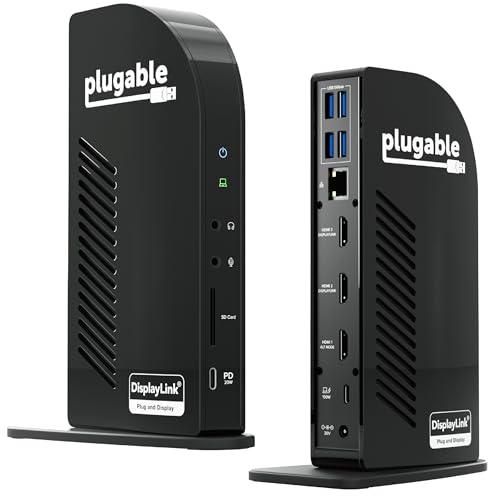 | 9.7PCKitHQ scoreView on Amazon |
03 Also Consider WAVLINK Displaylink Docking Station 3 Monitors for Mac(M1-M5/Neo) &Power delivery: 100 W | 9.6PCKitHQ scoreView on Amazon |
04 | 9.4PCKitHQ scoreView on Amazon |
05 | 9.3PCKitHQ scoreView on Amazon |
06 | 9.2PCKitHQ scoreView on Amazon |
A closer look at each configuration
Plugable USB C Docking Station
score
The dual 4K monitors at 60Hz, 100W charging, and 2 Year warranty define this Plugable dock.
- Power delivery
- 100 W
- HDMI
- Yes
- DisplayPort
- Yes
- Ethernet
- Yes
- USB-C
- Yes
- Weight
- 0.73 lb
- Warranty
- 2 Year
This Plugable USB C Docking Station is a 14-in-1 dock that supports 2x 4K monitors in HDMI, DisplayPort or both, with front-facing USB-C and USB ports for charging. It enables 2x 4K 60Hz monitors via HDMI and DisplayPort on M1-M5 Macs and Neo devices that natively support only one external display. It uses DisplayLink technology to work around Mac display limits. It is compatible with macOS 11+, Windows 10+, and ChromeOS 100+ on supported Thunderbolt, USB4, or USB-C systems. Driver installation is required for full functionality. It weighs 0.73 lb and carries a 2 Year warranty.
Choose it if
- You want two 4K monitors at 60Hz on a Mac
- You want 100W charging through one USB-C cable
Consider another if
- You need three extended displays for your desk
- You need a warranty longer than 2 years
Plugable USB-C Triple Monitor Docking Station
score
The triple HDMI displays, 100W charging, and 20W front USB-C port define this Plugable dock.
- Power delivery
- 100 W
- HDMI
- Yes
- Ethernet
- Yes
- USB-C
- Yes
- Weight
- 0.88 lb
- Warranty
- 2 Year
This Plugable USB-C Triple Monitor Docking Station is a 13-in-1 dock that connects up to three extended HDMI displays. It delivers up to 4K 30Hz on HDMI 1 and up to 1920x1200 60Hz on HDMI 2 and 3. It charges the laptop through the rear USB-C port with up to 100W, and the front USB-C port delivers 20W charging for phones and accessories. It is compatible with Windows 10+, macOS 11+, and ChromeOS systems with USB-C, USB4, or Thunderbolt ports. It includes a power adapter with AC power cord. It weighs 0.88 lb and carries a 2 Year warranty.
Choose it if
- You want three extended HDMI displays for work
- You want 100W laptop charging plus 20W device charging
Consider another if
- You need dual 4K monitors at 60Hz
- You need a dock that weighs 0.73 lb
WAVLINK Displaylink Docking Station 3 Monitors for Mac(M1-M5/Neo) &
score
The triple displays up to 4K plus 2K plus 2K and 100W charging define this WAVLINK dock.
- Power delivery
- 100 W
- HDMI
- Yes
- DisplayPort
- Yes
- Ethernet
- Yes
- USB-C
- Yes
- Weight
- 0.82 lb
- Warranty
- 2 year
This WAVLINK Displaylink Docking Station 3 Monitors for Mac(M1-M5/Neo) & Windows supports up to three external monitors at up to 4K plus 2K plus 2K. Its output spec is 4K 60Hz HDMI plus 2x 2K 60Hz HDMI or DisplayPort. It uses a single USB-C cable to power the laptop at 100W PD, and it includes a 130W power adapter. All 6 USB ports, 2 USB-C plus 4 USB-A, support 10Gbps high-speed transfer individually. It weighs 0.82 lb and carries a 2 year warranty.
Choose it if
- You want three displays at up to 4K plus 2K plus 2K
- You want 100W charging with a 130W adapter included
Consider another if
- You need dual 4K monitors at 60Hz
- You need a dock that weighs 0.73 lb
Baseus Nomos Air 12-in-1 DisplayLink Docking Station
score
The dual 2K monitors at 60Hz, 12 ports, and 100W PD input define this Baseus dock.
- Power delivery
- 100 W
- HDMI
- Yes
- DisplayPort
- Yes
- Ethernet
- Yes
- USB-C
- Yes
This Baseus Nomos Air 12-in-1 DisplayLink Docking Station has 2 HDMI, 2 DisplayPort, 2 USB-C at 10Gbps, 2 USB-A at 5Gbps, 2 USB-A 2.0, 100W PD input, and Gigabit Ethernet. It supports dual external monitors at 2K at 60Hz on macOS M1, M2, and M3, Windows, Linux, and ChromeOS. It uses dynamic power allocation to reallocate unused power back to the laptop. A screen-lock button locks the screen with one press for privacy, and a 2-second hold enters Energy-Saving Mode while keeping PD charging on. The PD charger and cables are not included.
Choose it if
- You want two monitors at 2K and 60Hz
- You want a screen-lock button for privacy
Consider another if
- You need dual 4K monitors at 60Hz
- You need a power adapter included in the box
UGREEN USB C DisplayLink Docking Station
score
The dual 4K monitors at 60Hz, 9-in-1 ports, and 100W charging define this UGREEN dock.
- Power delivery
- 100 W
- HDMI
- Yes
- Ethernet
- Yes
- USB-C
- Yes
- Weight
- 1.12 lb
- Warranty
- 24 months
This UGREEN USB C DisplayLink Docking Station is a 9-in-1 dock that extends dual 4K at 60Hz monitors for macOS and Windows systems through DisplayLink Technology. It has 2x HDMI 4K, 2x DP 4K, 1x PD 3.0 100w, 2x USB A 3.2 at 10Gbps, 1x USB C 3.2 at 10Gbps, and 1x Gigabit Ethernet. Driver installation is required for display and network functions. It has a 100W PD 3.0 charging port, and the charger is not included. It weighs 1.12 lb and carries a 24 months warranty.
Choose it if
- You want dual 4K monitors at 60Hz on macOS
- You want 10Gbps USB-C and USB-A ports
Consider another if
- You need three displays for your desk
- You need a power adapter included in the box
WAVLINK Displaylink Docking Station 3 Monitors For Mac(M1-M5
score
The triple displays, 130W power supply, and 100W charging define this WAVLINK dock.
- Power delivery
- 100 W
- HDMI
- Yes
- DisplayPort
- Yes
- Ethernet
- Yes
- USB-C
- Yes
- Weight
- 0.94 lb
- Warranty
- 2 Year
This WAVLINK Displaylink Docking Station 3 Monitors For Mac(M1-M5, Neo), Windows supports 3 extended displays even on M1-M5 and Neo. It has 1x Alt HDMI output capable of 4K at 60Hz, and 2x HDMI or 2x DisplayPorts outputs capable of 2K at 60Hz. It uses DisplayLink USB Graphics Technology, and the driver must be installed before usage. Its self-contained 130W DC power supply charges the laptop with up to 100W directly through the dock. It weighs 0.94 lb and carries a 2 Year Warranty.
Choose it if
- You want three extended displays on M1-M5 Macs
- You want 10Gbps USB 3.1 ports for file transfers
Consider another if
- You need a dock that works with Linux
- You need dual 4K monitors at 60Hz
Make the choice for your setup
Compare display counts and resolutions
The Plugable USB C Docking Station supports 2x 4K monitors at 60Hz. The Plugable USB-C Triple Monitor Docking Station connects up to three extended HDMI displays at up to 4K 30Hz on HDMI 1 and up to 1920x1200 60Hz on HDMI 2 and 3. The WAVLINK Displaylink Docking Station 3 Monitors for Mac(M1-M5/Neo) & Windows supports three external monitors at up to 4K plus 2K plus 2K. The Baseus Nomos Air 12-in-1 DisplayLink Docking Station supports dual external monitors at 2K at 60Hz. The UGREEN USB C DisplayLink Docking Station extends dual 4K 60Hz monitors. The WAVLINK Displaylink Docking Station 3 Monitors For Mac(M1-M5, Neo), Windows supports 3 extended displays at 4K at 60Hz on one output and 2K at 60Hz on two outputs.
Compare charging and box contents
Power delivery is 100W on every dock in this guide. The Plugable USB-C Triple Monitor Docking Station charges the laptop with up to 100W and delivers 20W through the front USB-C port. The WAVLINK Displaylink Docking Station 3 Monitors for Mac(M1-M5/Neo) & Windows includes a 130W power adapter and powers the laptop at 100W PD. The Baseus Nomos Air 12-in-1 DisplayLink Docking Station supports up to 100W PD input, but the PD charger and cables are not included. The UGREEN USB C DisplayLink Docking Station has a 100W PD 3.0 charging port, but the charger is not included. The WAVLINK Displaylink Docking Station 3 Monitors For Mac(M1-M5, Neo), Windows has a self-contained 130W DC power supply that charges the laptop with up to 100W. Shoppers with a related need can compare our guide to the Best Windows Docking Station.
Match the dock to your Mac
Every dock in this guide needs a DisplayLink driver. The Plugable USB C Docking Station requires driver installation for full functionality and works with macOS 11 and later. The Plugable USB-C Triple Monitor Docking Station needs DisplayLink Manager installation on macOS to enable multiple displays. The WAVLINK Displaylink Docking Station 3 Monitors for Mac(M1-M5/Neo) & Windows requires a DisplayLink driver on MacBook M1, M2, M3, M4, and M5. The Baseus Nomos Air 12-in-1 DisplayLink Docking Station requires the DisplayLink driver and supports macOS M1, M2, and M3. The UGREEN USB C DisplayLink Docking Station requires driver installation for display and network functions. The WAVLINK Displaylink Docking Station 3 Monitors For Mac(M1-M5, Neo), Windows requires driver installation on macOS 11 and newer.
Before you decide, also read Best Docking Station.
FAQ: Displaylink Docking Station for Mac
Which docks support three displays?
The Plugable USB-C Triple Monitor Docking Station connects up to three extended HDMI displays. The WAVLINK Displaylink Docking Station 3 Monitors for Mac(M1-M5/Neo) & Windows supports up to three external monitors. The WAVLINK Displaylink Docking Station 3 Monitors For Mac(M1-M5, Neo), Windows supports 3 extended displays.
Do all six docks need a DisplayLink driver?
Yes. The Plugable USB C Docking Station requires driver installation for full functionality. The Plugable USB-C Triple Monitor Docking Station needs DisplayLink Manager installation on macOS. The WAVLINK Displaylink Docking Station 3 Monitors for Mac(M1-M5/Neo) & Windows requires a DisplayLink driver. The Baseus dock, the UGREEN dock, and the second WAVLINK dock require driver installation before use.
Which docks include a power adapter?
The Plugable USB-C Triple Monitor Docking Station includes a power adapter with AC power cord. The WAVLINK Displaylink Docking Station 3 Monitors for Mac(M1-M5/Neo) & Windows includes a 130W power adapter. The WAVLINK Displaylink Docking Station 3 Monitors For Mac(M1-M5, Neo), Windows has a self-contained 130W DC power supply. The UGREEN dock and the Baseus dock ship without a charger.

