
Best Mac Air Docking Station (2026): 4 Picks Compared
 By Theo LangUpdated
If you run two 4K monitors from an M4 or M5 MacBook Air, choose the Plugable Thunderbolt 4 Dock for M4/M5 MacBook Air & Pro: it drives dual 4K 60Hz HDMI displays with 100W charging and 13 ports, driverless. The Plugable USB-C dock also drives dual 4K displays through DisplayLink, and the MOKiN hub adds dual HDMI in a 0.23 lb body. The TobenONE dock pairs dual 4K HDMI with a vertical stand.
Your shortlist at a glance
PCKitHQ scores range from 9.2 to 9.8. See how we pick.
| Product and key specifications | Score and retailer |
|---|---|
01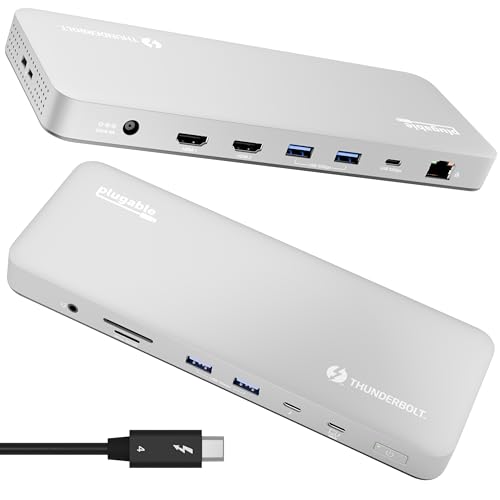 | 9.8PCKitHQ scoreView on Amazon |
02 | 9.6PCKitHQ scoreView on Amazon |
03 | 9.4PCKitHQ scoreView on Amazon |
04 | 9.2PCKitHQ scoreView on Amazon |
A closer look at each configuration
Plugable Thunderbolt 4 Dock for M4/M5 MacBook Air & Pro
score
A 13-port Thunderbolt 4 dock with dual 4K 60Hz HDMI, 100W charging and driverless setup for M4 and M5 MacBooks.
- Power delivery
- 100 W
- Interface
- Thunderbolt 4
- HDMI
- Yes
- Ethernet
- Yes
- USB-C
- Yes
- Weight
- 2.85 lb
- Warranty
- 2 Year Limited Parts and Labor
The Plugable TBT-UDM is a 13-port Thunderbolt 4 dock in a space gray aluminum body, with dual 4K 60Hz HDMI displays on M4 and M5 systems and a single 6K display. It carries 1 downstream Thunderbolt 4 port at 40Gbps, 1 USB-C port, 4 USB-A ports, SD and microSD UHS-II readers, Ethernet and a 3.5mm audio jack, with 100W host charging. No driver is needed, and the dock works with M4 and M5 MacBooks, M1, M2 and M3 MacBooks with Pro or Max chips, and Windows systems with Thunderbolt 4 or USB4 connections. It weighs 2.85 lb and carries a 2-year limited parts and labor warranty with lifetime support.
Choose it if
- You run two 4K monitors from an M4 or M5 MacBook
- You want 100W charging with 13 ports and no driver
Consider another if
- You need more than 13 ports on one dock
- You need a dock under 2.85 lb
Plugable USB C Docking Station
score
A 14-in-1 USB-C dock with dual 4K 60Hz displays through DisplayLink, 100W charging and a 0.73 lb body.
- Power delivery
- 100 W
- Interface
- USB-C
- HDMI
- Yes
- DisplayPort
- Yes
- Ethernet
- Yes
- USB-C
- Yes
- Weight
- 0.73 lb
- Warranty
- 2 Year Limited Parts and Labor
The Plugable UD-6950PDH is a 14-in-1 USB-C dock in a space gray aluminum housing, with 2 4K 60Hz monitors through HDMI, DisplayPort or both. DisplayLink technology enables dual displays on M1 through M5 Macs and Neo devices that natively support only one external display. It carries a front USB-C port and a USB port for charging, 3 additional USB 3.0 ports, SD and microSD card readers, a 3.5mm headset jack, Ethernet and 100W charging. A driver install is required for full functionality, and HDCP is not supported. It weighs 0.73 lb and carries a 2-year limited parts and labor warranty with lifetime support.
Choose it if
- You need dual 4K displays on a Mac that supports one
- You want 14 ports with 100W charging at 0.73 lb
Consider another if
- You want a dock with no driver to install
- You need more than 14 ports on one dock
MOKiN MacBook Pro Docking Station Dual Monitor MacBook Pro/Air
score
A 9-in-1 Thunderbolt 3 hub with dual HDMI, gigabit Ethernet and 100W charging in a 0.23 lb aluminum body.
- Power delivery
- 100 W
- Interface
- Thunderbolt 3
- HDMI
- Yes
- Ethernet
- Yes
- USB-C
- Yes
- Weight
- 0.23 lb
- Warranty
- 2 Years
The MOKiN hub adds 9 ports to a MacBook Pro or Air through dual USB-C connectors: 2 HDMI ports, 3 USB ports, SD and microSD readers, gigabit Ethernet, a 100W USB-C power delivery port and a Thunderbolt 3 port. A single HDMI port runs up to 4K at 60Hz, while dual HDMI runs up to 4K at 30Hz, in mirror or extend mode. USB devices run at up to 5Gbps, and the SD card reader runs at up to 104 Mbp/s. The slim anodized aluminum body weighs 0.23 lb, and the hub is plug and play with no driver or software to install. It carries a 2-year warranty.
Choose it if
- You want a 0.23 lb hub for a 2018 to 2021 MacBook
- You need dual HDMI with gigabit Ethernet on the go
Consider another if
- You need more than 9 ports on one hub
- You need dual 4K at 60Hz on both HDMI ports
TobenONE MacBook Pro/Air Docking Station Stand
score
A vertical stand dock with dual 4K HDMI, VGA, gigabit Ethernet and up to 87W charging for MacBook Pro and Air.
- Power delivery
- 87 W
- Interface
- USB-C
- HDMI
- Yes
- Ethernet
- Yes
- USB-C
- Yes
- Warranty
- 24 Month
The TobenONE dock combines a USB-C docking station with a vertical stand that holds a MacBook Pro or Air and saves desk space. It carries 2 4K HDMI ports, 1 VGA port, USB 3.0 and USB 2.0 ports, SD and microSD readers with simultaneous read and write, gigabit Ethernet and a 3.5mm audio jack. The dock takes 100W PD3.0 power input and delivers up to 87W charging for MacBooks, with a 100W charger included. It works with MacBook Pro 2016 to 2026 models, while M1, M2 and M3 chip MacBooks support a single display only. It does not work with Windows, Linux or ChromeOS, and it carries 24-month support coverage.
Choose it if
- You want a vertical stand that holds your MacBook
- You need dual 4K HDMI with a 100W charger included
Consider another if
- You need a dock that works with Windows
- You want more than 87W charging for your MacBook
Make the choice for your setup
Dual displays and Mac limits
Two 4K monitors are the deciding question for a MacBook Air dock. The Plugable Thunderbolt 4 dock drives two 4K 60Hz HDMI displays on M4 and M5 systems, and on M3 Macs in clamshell mode, while base M1 and M2 MacBooks support only a single external display. The Plugable USB-C dock uses DisplayLink to enable two 4K 60Hz monitors on M1 through M5 Macs and Neo devices that natively support only one display, and it needs a driver install. The MOKiN hub runs dual HDMI at 4K at 30Hz, and the TobenONE dock runs dual 4K at 60Hz while M1, M2 and M3 chip MacBooks support a single display only. Check your MacBook chip before you buy.
Charging power and ports
Charging power differs between these docks, so read the figure for the dock you pick. The Plugable Thunderbolt 4 dock and the Plugable USB-C dock each give 100W charging, and the MOKiN hub gives 100W power delivery through USB-C. The TobenONE dock takes 100W PD3.0 power input and delivers up to 87W charging for MacBooks, with a 100W charger included. Port counts differ too: the Thunderbolt 4 dock has 13 ports, the USB-C dock has 14 ports, and the MOKiN hub has 9 ports. The TobenONE dock adds a VGA port beside its 2 HDMI ports for a projector or second screen. Count the ports you need, then check the charging figure. Shoppers with a related need can compare our guide to the Best USB 3.0 Docking Station.
Driver setup and desk fit
Setup differs between these docks. The Plugable Thunderbolt 4 dock is driverless, and the MOKiN hub is plug and play with no driver or software to install. The Plugable USB-C dock requires a driver installation for full functionality, since it uses DisplayLink to work around Mac display limits. Desk fit differs too: the Thunderbolt 4 dock weighs 2.85 lb, the USB-C dock weighs 0.73 lb, and the MOKiN hub weighs 0.23 lb in a slim aluminum body. The TobenONE dock pairs its ports with a vertical stand that holds a MacBook and saves desk space. Both Plugable docks include lifetime support from a North American team.
For a wider shortlist, start with Best Docking Station.
FAQ: Mac Air Docking Station
Which dock drives two 4K monitors on an M4 MacBook Air?
The Plugable Thunderbolt 4 dock drives two 4K 60Hz HDMI displays on M4 systems with no driver to install. The Plugable USB-C dock also enables two 4K 60Hz monitors through DisplayLink, and it needs a driver install. The TobenONE dock runs dual 4K at 60Hz as well.
Do these docks need a driver installed?
The Plugable Thunderbolt 4 dock is driverless, and the MOKiN hub is plug and play with no driver or software to install. The Plugable USB-C dock requires a driver installation for full functionality, since it uses DisplayLink.
How much charging power do these docks give?
The Plugable Thunderbolt 4 dock, the Plugable USB-C dock and the MOKiN hub each give 100W charging. The TobenONE dock takes 100W PD3.0 power input and delivers up to 87W charging for MacBooks, with a 100W charger included.


