
Best USB 3.0 Docking Station (2026): Our 6 Picks Ranked
 By Theo LangUpdated
Buy the Dell D3100 USB 3.0 Docking Station if you want triple display support with 65W charging from one dock. It gives Ultra HD 4K resolution through 2 HDMI ports and 1 DisplayPort output, plus 3 superspeed USB 3.0 ports and an RJ-45 network port. The Plugable UD-3900Z suits dual 1080p HDMI work, while the Giq dock suits travel at 0.23 lb.
Your shortlist at a glance
PCKitHQ scores range from 9.2 to 9.8. See how we pick.
| Product and key specifications | Score and retailer |
|---|---|
01 | 9.8PCKitHQ scoreView on Amazon |
02 Second Pick Plugable Dual | 9.7PCKitHQ scoreView on Amazon |
03 Also Consider USB 3.0 Docking Station Dual Monitor M1-M5 | 9.6PCKitHQ scoreView on Amazon |
04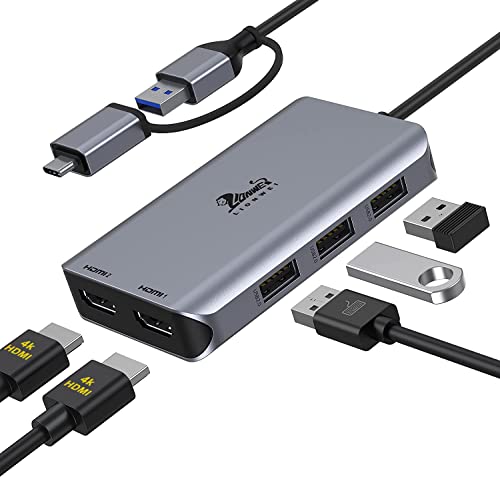 Also Consider LIONWEI USB 3.0 to Dual | 9.4PCKitHQ scoreView on Amazon |
05 | 9.3PCKitHQ scoreView on Amazon |
06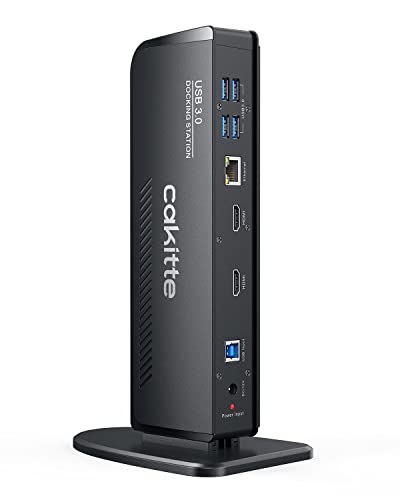 Also Consider USB 3.0 Docking Station Dual Monitor | 9.2PCKitHQ scoreView on Amazon |
A closer look at each configuration
Dell D3100 USB 3.0 Docking Station
score
The 65W charging, triple display support, DisplayPort and dual HDMI define this Dell D3100.
- Power delivery
- 65 W
- Interface
- USB 3.0
- HDMI
- Yes
- DisplayPort
- Yes
- Weight
- 1 lb
- Warranty
- 1 year
The Dell D3100 USB 3.0 Docking Station delivers 65W charging and Ultra HD 4K resolution for triple display setups. It has 2 HDMI ports for dual display support, 1 DisplayPort output, and an HDMI to DVI adapter for display flexibility. Its ports include 3 superspeed USB 3.0 ports, 2 USB 2.0 ports, 1 RJ-45 network port, and a 3.5mm headphone input and output. It works with Microsoft Windows XP, 7, 8, 8.1, and 10. The package includes the dock, an HDMI cable, and a USB 3.0 cable. It weighs 1 lb and carries a 1 year warranty.
Choose it if
- You want 65W charging through the dock
- You want triple display support from one dock
Consider another if
- You need a dock lighter than 1 lb
- You need USB-C host cables like the Plugable
Plugable Dual
score
The dual 1080p HDMI outputs, 10 ports, and Gigabit Ethernet define this Plugable UD-3900Z.
- Interface
- USB 3.0
- HDMI
- Yes
- Ethernet
- Yes
- USB-C
- Yes
- Weight
- 0.73 lb
- Warranty
- 2 Year
The Plugable Dual 1080p HDMI Universal Docking Station enables dual HDMI displays up to 1920x1200 from a single USB connection. It has 10 ports: two HDMI ports, two 5Gbps USB ports, four USB 2.0 ports, Gigabit Ethernet, and a 3.5mm audio jack. Both USB-C and USB-A host cables are included. It supports M1 to M5 MacBooks and expands multi-monitor support on M1-M3 systems. It does not charge laptops. It works with Windows, macOS, and ChromeOS, with DisplayLink software required on macOS. It weighs 0.73 lb and carries a 2 Year Limited Parts and Labor warranty.
Choose it if
- You want dual HDMI displays up to 1920x1200
- You want Gigabit Ethernet on the dock
Consider another if
- You need laptop charging through the dock
- You need DisplayPort monitors on the dock
USB 3.0 Docking Station Dual Monitor M1-M5
score
The dual HDMI outputs, Gigabit Ethernet, and 0.23 lb weight define this Giq docking station.
- Interface
- USB 3.0
- HDMI
- Yes
- Ethernet
- Yes
- USB-C
- Yes
- Weight
- 0.23 lb
The Giq USB 3.0 Docking Station Dual Monitor connects to a display or TV through HDMI and adds 3 USB ports, a 1000Mbps Gigabit RJ45 ethernet port, and TF and micro SD card readers. Its USB 3.0 ports support data transfer rates up to 5Gbps, and the Gigabit Ethernet port supports 10/100/1000Mbps network speeds. The USB-C port charges the docking station only and does not charge the laptop. It mirrors or extends a screen at HP UHD 30Hz or Full HD 1080p. It weighs 0.23 lb.
Choose it if
- You want a 0.23 lb dock for travel
- You want Gigabit Ethernet in a compact hub
Consider another if
- You need laptop charging through the dock
- You need DisplayPort output on the dock
LIONWEI USB 3.0 to Dual
score
The dual HDMI outputs at 4K at 30Hz and 1080p at 60Hz define this LIONWEI dock.
- Interface
- USB 3.0
- HDMI
- Yes
- USB-C
- Yes
- Weight
- 0.21 lb
The LIONWEI USB 3.0 to Dual HDMI Docking Station turns a single USB-C or USB 3.0 port into 2 HDMI ports and 3 USB 2.0 ports. One HDMI port runs at 4K at 30Hz and the other at 1080p at 60Hz, and the dock mirrors or extends the display across two independent HDMI monitors. It supports SST and MST and works with MacBook Air and Pro with M1 and M2, iMac, PS4 Pro, Surface Pro, Chromebook Pixel, Dell, ASUS, HP, and Lenovo. A driver must be installed first. It weighs 0.21 lb and carries an 18 month's warranty.
Choose it if
- You want two HDMI monitors from one port
- You want an 18-month warranty on the dock
Consider another if
- You need Gigabit Ethernet on the dock
- You need a dock under 0.21 lb
Dell USB 3.0 Ultra HD/4K Triple Display Docking Station (D3100)
score
The triple monitor setup, DisplayPort output, and dual HDMI define this Dell D3100 dock.
- Interface
- USB 3.0
- HDMI
- Yes
- DisplayPort
- Yes
- Weight
- 0.63 lb
- Warranty
- No Warranty
The Dell USB 3.0 Ultra HD/4K Triple Display Docking Station (D3100) allows a triple monitor setup with compatible Dell models. It has 1 DisplayPort output, 2 HDMI ports, and 1 HDMI DVI adapter included. Its ports include 3 superspeed USB 3.0 ports, 2 USB 2.0 ports, 1 RJ-45 network port, and a 3.5mm headphone input and output. Video resolution reaches a maximum of 2048 x 1152 at 60Hz. It works with Microsoft Windows XP, 7, 8, 8.1, and 10. It weighs 0.63 lb.
Choose it if
- You want a triple monitor setup
- You want DisplayPort and HDMI on one dock
Consider another if
- You need USB-C host cables like the Plugable
- You need a dock lighter than 0.63 lb
USB 3.0 Docking Station Dual Monitor
score
The dual HDMI outputs, 6 USB 3.0 ports, and Gigabit Ethernet define this cakitte dock.
- Interface
- USB 3.0
- HDMI
- Yes
- Ethernet
- Yes
- USB-C
- Yes
The cakitte USB 3.0 Docking Station Dual Monitor expands one USB 3.0 port into 6 USB 3.0 ports, 2 HDMI ports, a 3.5mm headphone jack, a 3.5mm microphone jack, and a 1000M Gigabit Ethernet port. Its dual HDMI outputs mirror or extend to two monitors at up to 2K at 60Hz, and a single HDMI port reaches up to 4K at 30Hz, so the laptop plus two monitors gives triple displays. Data transfer runs at up to 5 Gbps, and the Ethernet port runs at 10/100/1000Mbps. A DisplayLink driver must be installed first, and a USB-C plug adapter is included.
Choose it if
- You want 6 USB 3.0 ports on the dock
- You want dual HDMI up to 2K at 60Hz
Consider another if
- You need DisplayPort output on the dock
- You need 4K at 60Hz across dual monitors
Make the choice for your setup
Compare display outputs
Display outputs differ across the six docks. The two Dell D3100 docks both have 1 DisplayPort output and 2 HDMI ports, while the Plugable UD-3900Z has two HDMI ports and no DisplayPort support. The Giq, LIONWEI, and cakitte docks each have 2 HDMI ports. The Dell D3100 with 65W charging gives Ultra HD 4K resolution for triple display setups, the cakitte dock reaches 2K at 60Hz across dual monitors and 4K at 30Hz on a single port, and the LIONWEI dock runs one HDMI port at 4K at 30Hz and the other at 1080p at 60Hz. Match the outputs to the monitors you own.
Check charging and ports
Charging differs across the six docks. The Dell D3100 with 65W charging delivers 65W through the dock, while the Plugable UD-3900Z does not charge laptops and the Giq USB-C port charges the docking station only. The cakitte package includes a power adapter, and the LIONWEI dock combines 5 ports in one solution. Port counts also differ: the Plugable dock has 10 ports, the Giq dock has 3 USB ports plus card readers, the LIONWEI dock has 3 USB 2.0 ports, and the cakitte dock has 6 USB 3.0 ports. Gigabit Ethernet appears on the Plugable, Giq, and cakitte docks. Match charging and ports to your desk setup. If that fits your setup better, see our guide to the Best Docking Station with Power Delivery.
Compare weight and warranties
Weight runs from 0.21 lb to 1 lb across the docks that state it. The LIONWEI dock weighs 0.21 lb, the Giq dock weighs 0.23 lb, the Plugable dock weighs 0.73 lb, and the Dell D3100 with 65W charging weighs 1 lb. The other Dell D3100 weighs 0.63 lb. Warranties differ too: the Dell D3100 with 65W charging carries a 1 year warranty, the Plugable dock carries a 2 Year Limited Parts and Labor warranty, and the LIONWEI dock carries an 18 month's warranty. The cakitte package includes a power adapter, a base plate, and a driver CD. Match weight and warranty to how you will use the dock.
For a wider shortlist, start with Best Docking Station.
FAQ: USB 3.0 Docking Station
Which docks here charge a laptop?
The Dell D3100 with 65W charging delivers 65W through the dock. The Plugable UD-3900Z does not charge laptops, and the Giq USB-C port charges the docking station only. The LIONWEI and cakitte listings state no laptop charging wattage.
Which docks here have DisplayPort?
The two Dell D3100 docks each have 1 DisplayPort output. The Plugable UD-3900Z does not support DisplayPort monitors, and the Giq, LIONWEI, and cakitte docks name HDMI only. The Dell D3100 with 65W charging also includes an HDMI to DVI adapter.
How heavy are these docking stations?
The LIONWEI dock weighs 0.21 lb and the Giq dock weighs 0.23 lb. The Plugable dock weighs 0.73 lb, the other Dell D3100 weighs 0.63 lb, and the Dell D3100 with 65W charging weighs 1 lb.

