
Best USB 3 Docking Station (2026): 7 Picks Compared
 By Theo LangUpdated
Plugable Dual 1080p HDMI Universal Docking Station suits office desks that need two HDMI screens from one USB connection, with 10 ports including two 5Gbps USB ports, Gigabit Ethernet, and a 3.5mm audio jack. It works with Windows, macOS, and ChromeOS, and includes both USB-C and USB-A host cables.
Your shortlist at a glance
PCKitHQ scores range from 9.2 to 9.8. See how we pick.
| Product and key specifications | Score and retailer |
|---|---|
01 Best Overall Plugable Dual | 9.8PCKitHQ scoreView on Amazon |
02 Second Pick USB 3.0 Docking Station Dual Monitor M1-M5 | 9.7PCKitHQ scoreView on Amazon |
03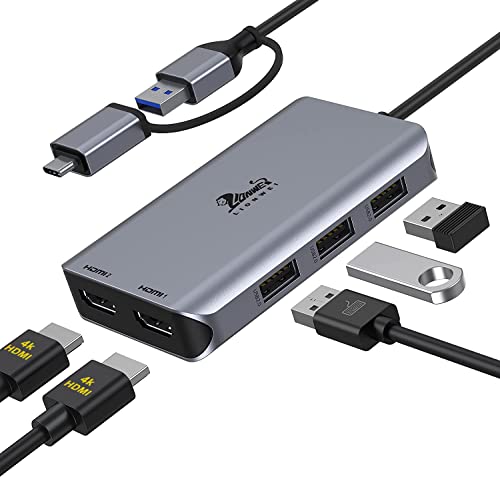 Also Consider LIONWEI USB 3.0 to Dual | 9.6PCKitHQ scoreView on Amazon |
04 Also Consider Dell D3100 USB 3.0 Docking Station | 9.5PCKitHQ scoreView on Amazon |
05 | 9.4PCKitHQ scoreView on Amazon |
06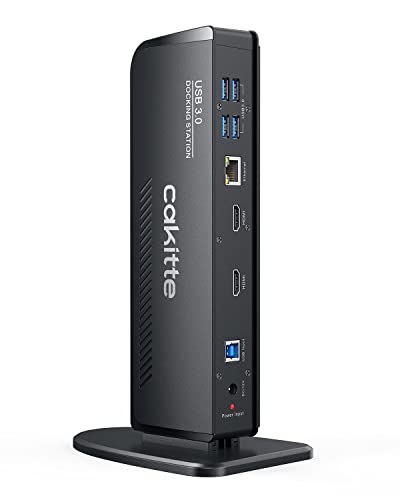 Also Consider USB 3.0 Docking Station Dual Monitor | 9.3PCKitHQ scoreView on Amazon |
07 Also Consider USB Docking Station Dual Monitor | 9.2PCKitHQ scoreView on Amazon |
A closer look at each configuration
Plugable Dual
score
Dual HDMI displays up to 1920x1200, 10 ports, and USB-C and USB-A host cables make this dock a fit for shared office desks.
- Interface
- USB 3.0
- HDMI
- Yes
- Ethernet
- Yes
- USB-C
- Yes
- Weight
- 0.73 lb
- Warranty
- 2 Year Limited Parts and Labor
This Plugable dock connects through USB 3.0 and drives two HDMI displays up to 1920x1200 from a single USB connection. Its 10 ports include two HDMI ports, two 5Gbps USB ports, four USB 2.0 ports, Gigabit Ethernet, and a 3.5mm audio jack. Both USB-C and USB-A host cables come in the box, and the dock weighs 0.73 lb with a 2 Year Limited Parts and Labor warranty.
Choose it if
- You run two HDMI monitors up to 1920x1200
- You work across Windows, macOS, and ChromeOS
Consider another if
- You need the dock to charge your laptop
- You need DisplayPort monitors on your desk
USB 3.0 Docking Station Dual Monitor M1-M5
score
Two HDMI outputs, a 1000Mbps Gigabit Ethernet port, and TF and micro SD card readers pack a compact 0.23 lb hub for travel desks.
- Interface
- USB 3.0
- HDMI
- Yes
- Ethernet
- Yes
- USB-C
- Yes
- Weight
- 0.23 lb
This Giq dock connects through USB 3.0 and extends or mirrors a screen to an HDTV, monitor, or projector at HP UHD 30Hz or Full HD 1080p. Its layout includes 2 HDMI outputs, 3 USB ports, a 1000Mbps Gigabit RJ45 Ethernet port, and TF and micro SD card readers. USB 3.0 ports move data at up to 5Gbps. The dock weighs 0.23 lb and suits a travel bag.
Choose it if
- You want two HDMI outputs with 1000Mbps Ethernet
- You carry a 0.23 lb dock between home and work
Consider another if
- You need the dock to charge your laptop
- You need more than 3 USB ports
LIONWEI USB 3.0 to Dual
score
Two HDMI outputs at 4K@30Hz and 1080P@60Hz, plus 3 USB 2.0 ports, fit a MacBook desk that needs a driver install.
- Interface
- USB 3.0
- HDMI
- Yes
- USB-C
- Yes
- Weight
- 0.21 lb
- Warranty
- 18-Month Warranty
This LIONWEI dock turns a single USB-C or USB 3.0 port into 2 HDMI ports and 3 USB 2.0 ports. One HDMI port runs 4K@30Hz and the other runs 1080P@60Hz, and the dock mirrors or extends a display across two independent HDMI monitors. A driver install is required, using INSTANTVIEW software from a USB flash drive. The dock weighs 0.21 lb and carries an 18-Month warranty.
Choose it if
- You extend a MacBook across two HDMI monitors
- You want a 0.21 lb dock with 18-Month warranty
Consider another if
- You need a wired Ethernet port
- You need dual 4K output from both HDMI ports
Dell D3100 USB 3.0 Docking Station
score
Two HDMI ports, one DisplayPort output, and triple-display support suit a Dell desk with wired network access.
- Interface
- USB 3.0
- HDMI
- Yes
- DisplayPort
- Yes
- Weight
- 1 lb
- Warranty
- 1 year
This Dell D3100 connects through USB 3.0 and supports a triple-display setup with 2 HDMI ports and 1 DisplayPort output. It has 3 USB 3.0 ports, 2 USB 2.0 ports, 1 RJ-45 network port, and a 3.5mm headphone input and output. The box includes the dock, Original 65, 1 HDMI cable, 1 USB 3.0 cable, and a microfiber cleaning cloth. The dock weighs 1 lb and carries a 1 year warranty.
Choose it if
- You run three displays from a Dell laptop
- You want HDMI and DisplayPort outputs
Consider another if
- You need the 0.21 lb weight of the LIONWEI dock
- You need six USB 3.0 ports for peripherals
Dell USB 3.0 Ultra HD/4K Triple Display Docking Station (D3100)
score
Two HDMI ports, a DisplayPort output, and a 2048 x 1152 maximum at 60Hz suit a triple-monitor Dell desk.
- Interface
- USB 3.0
- HDMI
- Yes
- DisplayPort
- Yes
- Weight
- 0.63 lb
This Dell D3100 connects through USB 3.0 and supports a triple monitor setup with 2 HDMI ports and 1 DisplayPort output. It has 3 super speed USB 3.0 ports, 2 USB 2.0 ports, 1 RJ-45 network port, and a 3.5mm headphone input and output. Video resolution reaches a maximum of 2048 x 1152 at 60Hz, and 1 HDMI to DVI adapter comes in the box. The dock weighs 0.63 lb.
Choose it if
- You run a triple-monitor setup from a Dell
- You connect a monitor through the HDMI to DVI adapter
Consider another if
- You need the 0.23 lb weight of the Giq dock
- You need a 2 Year Limited Parts and Labor warranty
USB 3.0 Docking Station Dual Monitor
score
Six USB 3.0 ports, dual HDMI up to 2K@60Hz, and a 1000M Gigabit Ethernet port fit a busy multi-monitor desk.
- Interface
- USB 3.0
- HDMI
- Yes
- Ethernet
- Yes
- USB-C
- Yes
This cakitte dock connects through USB 3.0 and expands one laptop port into 11 extra ports. Its ports include 6 USB 3.0 ports, 2 HDMI ports, 1 3.5mm headphone port, 1 3.5mm microphone port, and 1 1000M Gigabit Ethernet port. Dual HDMI monitors run up to 2K@60Hz (2560x1440), while a single HDMI port runs up to 4K@30Hz (4096x2160). Data moves at up to 5 Gbps through the USB 3.0 ports.
Choose it if
- You connect six USB 3.0 devices and two monitors
- You want a wired 1000M Ethernet link
Consider another if
- You need a DisplayPort output for a monitor
- You need dual 4K output at 60Hz from both HDMI ports
USB Docking Station Dual Monitor
score
Two HDMI ports, a VGA port, and 10Gbps USB 3.1 transfers fit a triple-display desk with older monitors.
- Interface
- USB A 3.0 / USB C
- HDMI
- Yes
- Ethernet
- Yes
- USB-C
- Yes
- Warranty
- 1 Year
This GIISSMO dock converts a USB-C or USB-A port into 2 HDMI ports, 1 VGA port, 2 USB 3.1 ports, 2 USB 2.0 ports, and 1 USB charging port. Its triple-display layout pairs the laptop screen with one HDMI1 display and one display from HDMI2 or VGA. The 2 USB 3.1 ports move data at up to 10Gbps and stay backward compatible with USB 3.0 and 2.0. HDMI2 runs 4K@30Hz only for DP1.4 laptops.
Choose it if
- You drive three displays from a USB-C laptop
- You connect a VGA monitor beside two HDMI monitors
Consider another if
- You need the dock to charge your laptop
- You need a DisplayPort output on the dock
Make the choice for your setup
Match the dock to your monitors
Start with the video outputs each dock names. The Plugable dock drives two HDMI displays up to 1920x1200 from one USB connection. The Giq dock extends or mirrors a screen at HP UHD 30Hz or Full HD 1080p. The LIONWEI dock gives one HDMI port at 4K@30Hz and one at 1080P@60Hz. The cakitte dock runs dual HDMI up to 2K@60Hz (2560x1440), with a single HDMI port up to 4K@30Hz (4096x2160). The two Dell D3100 docks pair 2 HDMI ports with 1 DisplayPort output, and one D3100 lists a maximum of 2048 x 1152 at 60Hz. The GIISSMO dock adds a VGA port.
Count ports and check the host cable
Count the ports you will use every day, then check the cable that links the dock to your laptop. The Plugable dock has 10 ports and includes both USB-C and USB-A host cables. The Giq dock has 3 USB ports plus TF and micro SD card readers. The LIONWEI dock has 3 USB 2.0 ports beside its two HDMI ports. Each Dell D3100 has 3 USB 3.0 ports and 2 USB 2.0 ports. The cakitte dock has 6 USB 3.0 ports and comes with a USB-C plug adapter. The GIISSMO dock has 2 USB 3.1 ports at up to 10Gbps and 2 USB 2.0 ports. Shoppers with a related need can compare our guide to the Best TB4 Dock for Mac.
Drivers, charging, and warranties
Drivers differ across these docks. The Plugable dock installs drivers automatically on Windows through Windows Update, while macOS needs DisplayLink software for external displays. The LIONWEI dock needs an INSTANTVIEW driver install from a USB flash drive. The cakitte dock needs a DisplayLink driver matched to your computer system. The GIISSMO dock needs a SiliconMotion driver running before use. On charging, the Plugable dock does not charge laptops, and the USB-C ports on the Giq and GIISSMO docks charge the dock only. The Plugable dock carries a 2 Year Limited Parts and Labor warranty, and the LIONWEI dock carries an 18-Month warranty, and the GIISSMO dock carries a 1 Year warranty.
For a wider shortlist, start with Best Docking Station.
FAQ: USB 3 Docking Station
Which dock here drives two HDMI monitors at once?
All seven docks drive two HDMI monitors: the Plugable, Giq, LIONWEI, both Dell D3100 docks, cakitte, and GIISSMO each name two HDMI outputs. Resolutions differ across the docks, so check the named figures for each dock before choosing.
Do any of these docks charge a laptop?
The Giq and GIISSMO docks use their USB-C ports to charge the dock itself, and every dock here links to the laptop through a USB host cable. The Plugable dock includes USB-C and USB-A host cables in the box. Keep your laptop charger connected beside the dock.
Which docks need a driver install?
The Plugable dock needs DisplayLink software on macOS for external displays. The LIONWEI dock needs an INSTANTVIEW driver install, the cakitte dock needs a DisplayLink driver, and the GIISSMO dock needs a SiliconMotion driver running before use.

