
Best USB Docking Station (2026): Our 8 Picks Ranked
 By Theo LangUpdated
Choose the Dell Pro Laptop Docking Station WD25 for a desk that needs up to four high-res displays, 100W power delivery, and HDMI and DisplayPort outputs through one USB-C cable. The Selore dual monitor dock and the Plugable UD-3900 cover two displays, while the Anker Nano, the Plugable UD-ULTCDL, the Anker 13-in-1, the VVB dock, and the MOKiN dock cover three.
Your shortlist at a glance
PCKitHQ scores range from 9.2 to 9.8. See how we pick.
| Product and key specifications | Score and retailer |
|---|---|
01 | 9.8PCKitHQ scoreView on Amazon |
02 | 9.7PCKitHQ scoreView on Amazon |
03 | 9.6PCKitHQ scoreView on Amazon |
04 | 9.5PCKitHQ scoreView on Amazon |
05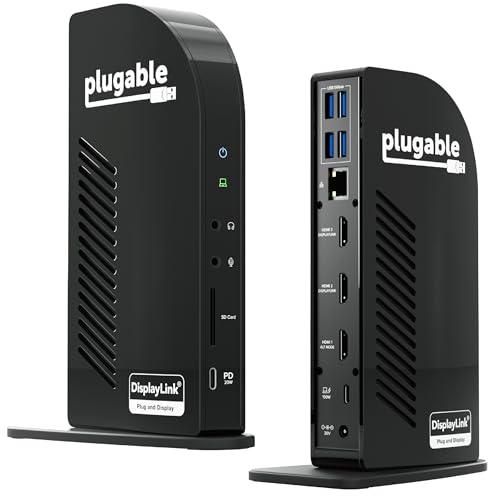 | 9.5PCKitHQ scoreView on Amazon |
06 | 9.4PCKitHQ scoreView on Amazon |
07 Also Consider MOKiN Laptop Docking Station Dual Monitor 4K | 9.3PCKitHQ scoreView on Amazon |
08 Also Consider Plugable USB 3.0 Universal Laptop Docking Station | 9.2PCKitHQ scoreView on Amazon |
A closer look at each configuration
Dell Pro Laptop Docking Station WD25
score
Four high-res displays, 100W power delivery, and HDMI and DisplayPort outputs make this Dell dock the desk anchor.
- Power delivery
- 100 W
- Interface
- USB-C
- HDMI
- Yes
- DisplayPort
- Yes
- Ethernet
- Yes
- USB-C
- Yes
- Weight
- 1.21 lb
- Warranty
- 3-Year
This Dell dock connects through USB-C and drives up to 100W of power to Dell AI PCs and non-Dell PCs. It supports up to four high-res displays natively, with HDMI and DisplayPort outputs, Gigabit Ethernet, USB-A ports, and USB-C ports. An ambidextrous USB-C cable routes left or right, and a robust USB-C connector supports enhanced durability. The dock uses at least 65% postconsumer recycled materials and comes in packaging made from 100% recycled or renewable materials. It weighs 1.21 lb and carries a 3-year limited hardware warranty with advanced exchange.
Choose it if
- You want up to four high-res displays
- You want 100W power delivery through USB-C
Consider another if
- You need the 0.22 lb weight of the Selore dock
- You need dual 4K at 60Hz over HDMI
Selore USB C Docking Station Dual Monitor
score
Dual 4K at 60Hz over HDMI, 85W power delivery, and a 0.22 lb form suit a two-display desk.
- Power delivery
- 85 W
- Interface
- USB C 3.0
- HDMI
- Yes
- USB-C
- Yes
- Weight
- 0.22 lb
- Warranty
- 2-year
This Selore dock turns one USB-C port into dual 4K at 60Hz HDMI ports, a 100W PD charging port, a USB-C port up to 5Gbps, two USB 3.0 ports up to 5Gbps, and an SD and microSD card slot up to 104 Mbps. Power delivery output is 85W from a 100W input. It supports MST mode under Windows for extending two monitors at the same time. On macOS it supports mirroring only. The dock needs a Thunderbolt or full-featured USB-C port. It weighs 0.22 lb and carries a 2-year refund or replacement warranty for defective products.
Choose it if
- You want dual 4K at 60Hz over HDMI
- You want a 0.22 lb dock for a small desk
Consider another if
- You need up to four high-res displays
- You need 100W power delivery for your laptop
Anker Nano Laptop Docking Station
score
A detachable 6-in-1 hub, triple display support, and 100W charging suit desk and mobile work.
- Power delivery
- 100 W
- Interface
- USB C
- HDMI
- Yes
- DisplayPort
- Yes
- Ethernet
- Yes
- USB-C
- Yes
- Warranty
- 18 months
This Anker Nano dock is a 13-in-1 desktop docking station with a detachable 6-in-1 portable hub that snaps off. It connects up to 3 monitors through 2 HDMI ports and 1 DisplayPort, with up to 4K at 60Hz on a single display, dual 2K at 60Hz on two displays, or triple 1080p at 60Hz on three displays. It delivers up to 100W Power Delivery and includes a 140W power adapter. One USB-C data port transfers files at 10Gbps. The dock has 3 USB-A ports, Gigabit Ethernet, 3.5mm audio, and SD and TF card slots. It carries an 18-month warranty.
Choose it if
- You want three displays from 2 HDMI and 1 DP
- You want a detachable hub for mobile work
Consider another if
- You need up to four high-res displays
- You need the 0.22 lb weight of the Selore dock
USB C Laptop Docking Station Dual Monitor
score
Dual 4K and triple display support with 87W power delivery suit a three-display Windows desk.
- Power delivery
- 87 W
- Interface
- USB C
- HDMI
- Yes
- Ethernet
- Yes
- USB-C
- Yes
- Warranty
- 1 Year
This VVB dock extends one USB-C or Thunderbolt 3 or 4 port into 14 ports: 2 HDMI ports at 4K, a DisplayPort at 4K, a 100W USB-C Power Delivery port, Ethernet at 1Gbps, USB-C and USB-A ports, an SD and microSD card reader, and a 3.5mm mic and audio jack. Power delivery output is 87W. A single HDMI 1 or DisplayPort display reaches up to 4K at 60Hz, and a single HDMI 2 display reaches up to 4K at 30Hz. Dual monitors run at 4K at 30Hz and 1080p at 60Hz, and triple monitors run at 1080p. It carries a 1-year warranty.
Choose it if
- You want two HDMI 4K ports and a DisplayPort
- You want 87W power delivery through USB-C
Consider another if
- You need up to four high-res displays
- You need the 0.22 lb weight of the Selore dock
Plugable USB-C Triple Monitor Docking Station
score
Three HDMI displays, 100W laptop charging, and 20W device charging suit a triple-display desk.
- Power delivery
- 100 W
- Interface
- USB-C
- HDMI
- Yes
- Ethernet
- Yes
- USB-C
- Yes
- Weight
- 0.88 lb
- Warranty
- 2 Year
This Plugable dock connects up to three extended HDMI displays through DisplayLink, with up to 4K at 30Hz on HDMI 1 and up to 1920x1200 at 60Hz on HDMI 2 and 3. It charges a laptop with up to 100W through the rear USB-C port, and the front USB-C port delivers 20W charging for phones and accessories. The dock has 4 USB-A ports at 5Gbps, an SD card reader, Gigabit Ethernet, and audio in and out. It works with Windows 10 and newer, macOS 11 and newer, and ChromeOS. It weighs 0.88 lb and carries a 2-year limited parts and labor warranty.
Choose it if
- You want three extended HDMI displays
- You want 20W charging for a phone
Consider another if
- You need up to four high-res displays
- You need a DisplayPort output on the dock
Anker Laptop Docking Station
score
Three external monitors, 85W charging, and 10Gbps USB-C data suit a triple-display Windows desk.
- Power delivery
- 85 W
- Interface
- USB-C
- HDMI
- Yes
- DisplayPort
- Yes
- Ethernet
- Yes
- USB-C
- Yes
- Weight
- 0.82 lb
- Warranty
- 18-month
This Anker dock turns one cable into 13 ports: 2 HDMI ports, a DisplayPort, 3 USB-C ports, 3 USB-A ports at 5Gbps, Gigabit Ethernet, SD and microSD slots, 3.5mm audio, and DC power input. It runs up to 3 external monitors at 1080p and 60Hz, or a single 4K at 60Hz display through HDMI or DisplayPort. It charges a laptop at 85W and a phone at 18W at the same time, and it includes a 135W power adapter. Files transfer at 10Gbps through USB-C. It weighs 0.82 lb and carries an 18-month warranty.
Choose it if
- You want three monitors at 1080p and 60Hz
- You want 85W laptop charging and 18W phone charging
Consider another if
- You need up to four high-res displays
- You need 100W power delivery for your laptop
MOKiN Laptop Docking Station Dual Monitor 4K
score
Two HDMI outputs and triple 4K support suit a multi-display desk setup.
- Interface
- USB-C 3.0
- HDMI
- Yes
- Ethernet
- Yes
- USB-C
- Yes
- Warranty
- 2 Year
This MOKiN dock mixes 2 HDMI ports and 2 DP ports for multi-display setups, with configurations such as 2 HDMI plus DP or 2 DP plus HDMI. It supports triple 4K displays. The dock has an RJ45 Ethernet port at 1000Mbps, 2 USB-C 3.0 ports, USB-A 3.0 and 2.0 ports, SD and microSD slots, and a USB-C power charging port. A screen lock button turns off the screens with a short press. The dock works with laptops that have a full-functional USB-C port. It carries a 2-year warranty.
Choose it if
- You want two HDMI outputs for a dual-display desk
- You want a screen lock button for privacy
Consider another if
- You need up to four high-res displays
- You need the 0.22 lb weight of the Selore dock
Plugable USB 3.0 Universal Laptop Docking Station
score
Dual HDMI displays, Gigabit Ethernet, and USB 3.0 suit a two-display productivity desk.
- Interface
- USB 3.0
- HDMI
- Yes
- Ethernet
- Yes
- USB-C
- Yes
- Weight
- 0.81 lb
- Warranty
- 2 years
This Plugable dock connects through a hybrid 2-in-1 USB 3.0 and USB-C cable. It supports dual HDMI displays up to 1920x1200 at 60Hz, and a single HDMI display reaches 2560x1440 at 50Hz. The dock has wired Gigabit Ethernet, 3.5mm headphone and microphone jacks, 2 USB 3.0 ports, and 4 USB 2.0 ports. It works with Windows 11 and 10, macOS 14 or later with a manual DisplayLink driver installation, and ChromeOS 100 or later. The dock leaves laptop charging to the laptop's own charger. It weighs 0.81 lb and carries a 2-year warranty.
Choose it if
- You want dual HDMI displays up to 1920x1200
- You want a USB 3.0 dock for Windows and Mac
Consider another if
- You need up to four high-res displays
- You need 100W power delivery for your laptop
Make the choice for your setup
Count the displays first
The Dell WD25 supports up to four high-res displays. The Selore dock and the Plugable UD-3900 support two displays. The Anker Nano, the VVB dock, the Plugable UD-ULTCDL, the Anker 13-in-1, and the MOKiN dock support three displays. Match the display count to the monitors on the desk. A two-display dock suits a desk with two monitors, and a three-display dock suits a desk with three monitors. Check the resolution at each display count: the Selore dock runs dual 4K at 60Hz, the Anker Nano runs triple 1080p at 60Hz, and the Plugable UD-ULTCDL runs 4K at 30Hz on HDMI 1. The VVB dock runs dual monitors at 4K at 30Hz and 1080p at 60Hz.
Compare charging wattage
The Dell WD25 delivers 100W power delivery. The Anker Nano delivers up to 100W Power Delivery and includes a 140W power adapter. The Plugable UD-ULTCDL charges a laptop with up to 100W and charges phones and accessories with 20W. The VVB dock delivers 87W power output from a 100W input. The Selore dock delivers 85W power output from a 100W input. The Anker 13-in-1 charges a laptop at 85W and a phone at 18W, and it includes a 135W power adapter. Match the wattage to the laptop: a laptop that draws 100W needs a dock that delivers 100W. The Plugable UD-3900 leaves laptop charging to the laptop's own charger. Shoppers with a related need can compare our guide to the Best Docking Station for Dell Laptop.
Check ports and operating systems
The Anker Nano and the Anker 13-in-1 have HDMI and DisplayPort outputs with Gigabit Ethernet, USB-A ports, and SD card slots. The Plugable UD-ULTCDL has three HDMI outputs, 4 USB-A ports, an SD card reader, Gigabit Ethernet, and audio in and out. The Selore dock has dual HDMI ports, USB-C and USB-A ports, and an SD and microSD card slot. The VVB dock has 2 HDMI ports, a DisplayPort, Ethernet, USB ports, and an SD and microSD card reader. On macOS, the Selore dock supports mirroring only, and the Anker Nano supports mirrored mode only on multiple external displays. The Plugable UD-3900 needs a manual DisplayLink driver installation on macOS 14 or later.
For a wider shortlist, start with Best Docking Station.
FAQ: USB Docking Station
How many displays does the Dell WD25 support?
The Dell WD25 supports up to four high-res displays through USB-C, with HDMI and DisplayPort outputs. The Selore dock and the Plugable UD-3900 support two displays. The Anker Nano, the VVB dock, the Plugable UD-ULTCDL, the Anker 13-in-1, and the MOKiN dock support three displays.
Which docks charge a laptop at 100W?
The Dell WD25 delivers 100W power delivery. The Anker Nano delivers up to 100W Power Delivery and includes a 140W power adapter. The Plugable UD-ULTCDL charges a laptop with up to 100W. The VVB dock delivers 87W power output, the Selore dock delivers 85W power output, and the Anker 13-in-1 charges a laptop at 85W.
Do these docks work with macOS?
The Plugable UD-ULTCDL works with macOS 11 and newer, and the Plugable UD-3900 works with macOS 14 or later with a DisplayLink driver installation. On macOS, the Selore dock supports mirroring only, and the Anker Nano supports mirrored mode only on multiple external displays.


