Best Docking Station for Mac (2026): 4 Models Side by Side
 By Theo LangUpdated
The Anker USB C Hub suits a MacBook owner who needs one display at 4K@30Hz, up to 85W charging, and 5Gbps data ports at 0.09 lb. The Anker Laptop Docking Station Dual Monitor adds a second HDMI port for two 4K@30Hz displays, while the Acer USB-C Docking Station Dual Monitor drives two displays at 4K@60Hz. The WAVLINK Displaylink Docking Station drives three monitors up to 4K plus 2K plus 2K.
Your shortlist at a glance
PCKitHQ scores range from 9.2 to 9.8. See how we pick.
| Product and key specifications | Score and retailer |
|---|---|
01 | 9.8PCKitHQ scoreView on Amazon |
02 | 9.6PCKitHQ scoreView on Amazon |
03 | 9.4PCKitHQ scoreView on Amazon |
04 Most Power Delivery WAVLINK Displaylink Docking Station 3 Monitors for Mac(M1-M5/Neo) &Power delivery: 100 W | 9.2PCKitHQ scoreView on Amazon |
A closer look at each configuration
Anker USB C Hub
score
The single 4K@30Hz HDMI port, up to 85W pass-through charging, and 5Gbps data ports define this Anker USB C Hub.
- Power delivery
- 85 W
- Interface
- USB-C
- HDMI
- Yes
- USB-C
- Yes
- Weight
- 0.09 lb
- Warranty
- 18-month
This Anker USB C Hub connects through a single USB-C port and gives one 4K HDMI port, one 5Gbps USB-C data port, two 5Gbps USB-A ports, and a USB-C 100W PD-IN port for charging only. The HDMI port streams or mirrors content to an external monitor at up to 4K@30Hz, while the USB-C ports do not support video output. Pass-through charging reaches up to 85W with a charger that is not included. Files move at up to 5Gbps through the USB-C and USB-A data ports. The hub works with MacBook on macOS 12 and newer, Windows 10 and 11, and ChromeOS, and it supports USB-C, USB4, and Thunderbolt connections. It is not compatible with Linux. Warranty is 18-month.
Choose it if
- You want one 4K@30Hz display for a MacBook
- You want up to 85W pass-through charging
Consider another if
- You need two displays at 4K@30Hz
- You need 100W power delivery to a laptop
Anker Laptop Docking Station Dual Monitor
score
Two HDMI ports, 1Gbps Ethernet, a microSD/SD card reader, and up to 85W pass-through charging define this Anker docking station.
- Power delivery
- 85 W
- Interface
- USB-C
- HDMI
- Yes
- Ethernet
- Yes
- USB-C
- Yes
- Weight
- 0.2 lb
- Warranty
- 18 months
This Anker Laptop Docking Station Dual Monitor connects through a single USB-C port and gives two USB-A data ports, two HDMI ports, an Ethernet port, and a microSD/SD card reader. One display runs at 4K@60Hz, or two displays run at 4K@30Hz each, and on macOS the display on both external monitors will be identical. Pass-through charging reaches up to 85W and requires a 100W PD wall charger and a USB-C to C cable. The Ethernet port runs at 1Gbps. The dock works with Windows 10 and 11, ChromeOS, and laptops with DP Alt Mode and Power Delivery, and it supports USB-C, USB4, and Thunderbolt connections. It is not compatible with Linux. Warranty is 18 months.
Choose it if
- You want two displays from one USB-C port
- You want 1Gbps Ethernet and a card reader
Consider another if
- You need 100W power delivery to a laptop
- You need three displays from one dock
Acer USB-C Docking Station Dual Monitor
score
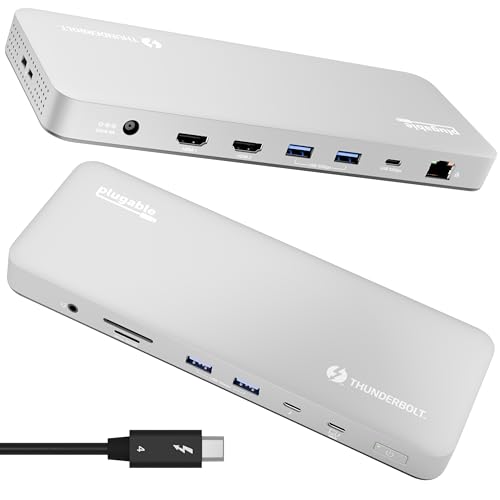
Two HDMI ports at 4K@60Hz, three 5Gbps USB-A ports, and up to 90W delivery define this Acer docking station.
- Power delivery
- 90 W
- Interface
- USB-C
- HDMI
- Yes
- USB-C
- Yes
- Warranty
- 1 Year Manufacturer
This Acer USB-C Docking Station Dual Monitor gives two HDMI ports at 4K@60Hz, three USB-A ports at 5Gbps, one USB-C port at 5Gbps, and SD and MicroSD slots at up to 104Mbps. It supports up to 100W input and delivers up to 90W to a laptop, with a 100W or higher power adapter that is not included. For Mac users, dual display output only supports A-AA or A-BB modes, and macOS can only mirror the same content across all external monitors. The 0.65FT built-in cable, aluminum alloy body, and lock button round out the dock, and the lock button secures the device with a single click on Windows and a press and hold of 3s on Mac. Warranty is 1 Year Manufacturer.
Choose it if
- You want two displays at 4K@60Hz
- You want SD and MicroSD slots at 104Mbps
Consider another if
- You need 100W power delivery to a laptop
- You need three displays from one dock
WAVLINK Displaylink Docking Station 3 Monitors for Mac(M1-M5/Neo) &
score
Three monitors up to 4K plus 2K plus 2K, 100W power delivery, and six 10Gbps USB ports define this WAVLINK dock.
- Power delivery
- 100 W
- Interface
- USB-C
- HDMI
- Yes
- Ethernet
- Yes
- USB-C
- Yes
- Weight
- 0.82 lb
- Warranty
- 2 year
This WAVLINK Displaylink Docking Station drives up to three external monitors at up to 4K plus 2K plus 2K, with an output spec of 4K 60Hz HDMI plus two 2K 60Hz HDMI or DisplayPort outputs. MacBook M1, M2, M3, M4, and M5 models require a DisplayLink driver, and the USB-C port must support video output. A single USB-C cable delivers 100W power delivery, and the dock includes a 130W power adapter. All six USB ports, two USB-C and four USB-A, support 10Gbps transfer, and Gigabit Ethernet gives a wired connection for online classes and meetings. The dock works with MacBook M1 through M5, Dell, HP, Lenovo, Surface USB-C, and Chromebook models, and it does not support USB-A laptops or gaming consoles. Warranty is 2 year.
Choose it if
- You want three monitors from one dock
- You want 100W power delivery to a MacBook
Consider another if
- You need a dock without driver installation
- You need a dock under 0.2 lb
Make the choice for your setup
Count the displays first
The Anker USB C Hub drives one display at 4K@30Hz through its single HDMI port. The Anker Laptop Docking Station Dual Monitor drives one display at 4K@60Hz or two displays at 4K@30Hz, and on macOS both external monitors show identical content. The Acer USB-C Docking Station Dual Monitor drives two displays at 4K@60Hz, though for Mac users dual display output only supports A-AA or A-BB modes, and macOS mirrors the same content across all external monitors. The WAVLINK Displaylink Docking Station drives three monitors at up to 4K plus 2K plus 2K, with MacBook M1 through M5 models requiring a DisplayLink driver. Match the display count and refresh rate to the monitors on your desk.
Compare power delivery and ports
The Anker USB C Hub and the Anker Laptop Docking Station Dual Monitor each deliver up to 85W pass-through charging, while the Acer USB-C Docking Station Dual Monitor delivers up to 90W from up to 100W input, and the WAVLINK Displaylink Docking Station delivers 100W and includes a 130W power adapter. Data speeds differ too: the Anker USB C Hub and the Acer dock move files at up to 5Gbps, while all six USB ports on the WAVLINK dock support 10Gbps transfer. The Anker Laptop Docking Station Dual Monitor includes a 1Gbps Ethernet port, and the WAVLINK dock includes Gigabit Ethernet, while the Anker Laptop Docking Station Dual Monitor and the Acer dock both include SD and MicroSD card slots. Match charging wattage and port mix to your laptop and peripherals. For a closely related choice, read our guide to the Best Docking Station for Laptop and 2 Monitors.
Check Mac compatibility before buying
The Anker USB C Hub works with MacBook on macOS 12 and newer and supports USB-C, USB4, and Thunderbolt connections, and it is not compatible with Linux. The Anker Laptop Docking Station Dual Monitor works with Windows 10 and 11 and ChromeOS and supports USB-C, USB4, and Thunderbolt connections, and it is not compatible with Linux, while on macOS both external monitors show identical content. The Acer dock needs a laptop USB-C port with video output, and for Mac users the setup guide sets Accessories to Always Allow. The WAVLINK dock works with MacBook M1 through M5 with a DisplayLink driver and supports USB-C, USB4, and Thunderbolt 3 and 4. Confirm the port and driver requirements against your MacBook.
Before you decide, also read Best Docking Station.
FAQ: Docking Station for Mac
Which docks drive two displays at 4K@60Hz?
The Acer USB-C Docking Station Dual Monitor drives two displays at 4K@60Hz, though for Mac users dual display output only supports A-AA or A-BB modes. The Anker Laptop Docking Station Dual Monitor drives two displays at 4K@30Hz, and a single display at 4K@60Hz.
Which dock delivers 100W power delivery?
The WAVLINK Displaylink Docking Station delivers 100W power delivery through a single USB-C cable and includes a 130W power adapter. The Acer dock delivers up to 90W from up to 100W input, and both Anker docks deliver up to 85W pass-through charging.
Which docks need a driver on a MacBook?
The WAVLINK Displaylink Docking Station requires a DisplayLink driver on MacBook M1 through M5 models, and its USB-C port must support video output. The Acer dock needs a laptop USB-C port with video output, and Mac users set Accessories to Always Allow.