Best Docking Station for Business (2026): 6 Picks Compared
 By Theo LangUpdated
The Anker 7-in-1 USB-C Hub suits a two-screen desk setup with dual HDMI output at 1080p at 60Hz, 85W power delivery, and 10Gbps data transfer. The ANYHDD dock delivers 90W over Thunderbolt 4, while the Opluz dock drives 4K at 60Hz with 72W for Surface devices. The choice turns on power output, display resolution, and device compatibility.
Your shortlist at a glance
PCKitHQ scores range from 9.2 to 9.8. See how we pick.
| Product and key specifications | Score and retailer |
|---|---|
01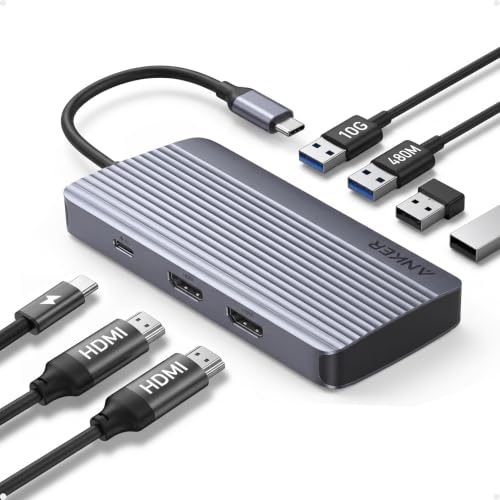 | 9.8PCKitHQ scoreView on Amazon |
02 | 9.7PCKitHQ scoreView on Amazon |
03 | 9.6PCKitHQ scoreView on Amazon |
04 | 9.4PCKitHQ scoreView on Amazon |
05 Also Consider HyperDrive Next 10 Port Class USB C Docking Station for PC/Mac/ChromebookPower delivery: 85 W | 9.3PCKitHQ scoreView on Amazon |
06 Also Consider Surface Pro Docking Station | 9.2PCKitHQ scoreView on Amazon |
A closer look at each configuration
Anker 7-in-1 USB-C Hub
score
The Anker 7-in-1 USB-C Hub pairs dual HDMI output at 1080p at 60Hz with 85W power delivery and 10Gbps data transfer.
- Power delivery
- 85 W
- Interface
- USB4
- HDMI
- Yes
- USB-C
- Yes
- Weight
- 0.21 lb
- Warranty
- 18-month
This Anker hub connects through USB4 and supports USB-C, USB4, and Thunderbolt connections. It extends a workspace across two screens at 1080p at 60Hz through dual HDMI. One port moves data at 10Gbps. The hub takes 100W input and delivers 85W output, and the wall charger is not included. It works with MacBook models on macOS 12 and newer, Windows 10 and 11, and ChromeOS. It is not compatible with Linux. The hub weighs 0.21 lb and carries an 18-month warranty.
Choose it if
- You want dual HDMI output at 1080p at 60Hz
- You want 85W power delivery from a 0.21 lb hub
Consider another if
- You need a 4K display output from your dock
- You need an Ethernet port on your dock
40AY0090US Docking Station Dual Monitor
score
The ANYHDD 40AY0090US dock pairs Thunderbolt 4 with a 90W adapter and 4K display support over HDMI and DisplayPort.
- Power delivery
- 90 W
- Interface
- Thunderbolt 4
- HDMI
- Yes
- DisplayPort
- Yes
- USB-C
- Yes
- Weight
- 1 lb
- Warranty
- 1
This ANYHDD dock connects through Thunderbolt 4 and includes a 90W AC adapter for power delivery. It supports a 4K display and ships with a USB-C cable, a 4K HDMI cable, and a 4K DisplayPort cable. The dock carries HDMI, DisplayPort, and USB-C ports for external monitors and devices. The package adds a microfiber cloth. The dock weighs 1 lb. Check that your computer is USB-C or Thunderbolt compatible before choosing this dock.
Choose it if
- You want 90W power delivery from the included adapter
- You want 4K display support over HDMI and DisplayPort
Consider another if
- You want a hub that weighs less than 1 lb
- You want 100W power delivery from your dock
Surface Docking Station
score
The Opluz Surface Docking Station pairs 4K HDMI output at 60Hz with a 72W Surface charger and 11 ports.
- Power delivery
- 72 W
- Interface
- USB4
- HDMI
- Yes
- Ethernet
- Yes
- USB-C
- Yes
This Opluz dock is an 11-in-1 Surface Dock 2 that drives external monitors at 4K at 60Hz through HDMI. It includes a 72W Surface charger at 15V and 4.8A. Ports include a 1000/100Mbps RJ45 Ethernet port, two USB-C data ports, three USB-A 3.0 ports at 5Gbps, and an SD/TF card slot with speeds up to 104MB/s. It works with Surface Pro, Surface Laptop, Surface Go, and Surface Book models. The package includes the dock, the 72W adapter, and an instruction manual. It carries a 24-month manufacturer warranty.
Choose it if
- You want 4K HDMI output at 60Hz for a Surface device
- You want a 1000Mbps RJ45 Ethernet connection
Consider another if
- You need 90W power delivery from your dock
- You need a dock for a non-Surface laptop
Lenovo 40B30090US Docking Station USB-C Universal Dock
score
The Lenovo 40B30090US dock pairs dual 4K display output at 60Hz with 65W power delivery and five USB ports.
- Power delivery
- 65 W
- Interface
- USB 3.2 Gen 2
- HDMI
- Yes
- DisplayPort
- Yes
- USB-C
- Yes
- Weight
- 0.57 lb
- Warranty
- 1 Year
This Lenovo dock drives two external monitors at up to 4K resolution at 60Hz through one DisplayPort and one HDMI port. It provides up to 65W to a connected notebook from its standard 90W adapter, and an optional 135W adapter can raise output to 100W. The dock has five USB ports: two USB-C 3.2 Gen 2 and three USB 3.2 Gen 2. It works with notebooks that support USB-C Alt-Mode or Thunderbolt protocols. The dock weighs 0.57 lb, carries a 1-year warranty, and ships with a USB-C cable, a power adapter, DisplayPort and HDMI cables, and a cleaning cloth.
Choose it if
- You want dual 4K display output at 60Hz
- You want five USB ports across USB-C and USB-A
Consider another if
- You need 90W power delivery from the standard adapter
- You need a dock that weighs less than 0.57 lb
HyperDrive Next 10 Port Class USB C Docking Station for PC/Mac/Chromebook
score
The HyperDrive Next 10 Port dock pairs dual 4K monitor support with 10Gbps data transfer and 85W charging.
- Power delivery
- 85 W
- Interface
- USB 3.2
- HDMI
- Yes
- Ethernet
- Yes
- USB-C
- Yes
- Weight
- 1.76 lb
This HyperDrive dock has 10 ports and supports dual 4K monitors for M1 and M2 MacBook, PC, and Chromebook, with a software download required. It moves data at 10Gbps over USB 3.2 and transfers photos and video through SD 4.0 at 312MB/s. It charges devices up to 85W with 100W PD 3.0 pass-through charging. Ports include USB-C, USB-A, HDMI, and Ethernet. The dock weighs 1.76 lb.
Choose it if
- You want dual 4K monitor support for PC, Mac, or Chromebook
- You want SD 4.0 photo transfer at 312MB/s
Consider another if
- You need 90W power delivery from your dock
- You need a dock that weighs less than 1.76 lb
Surface Pro Docking Station
score
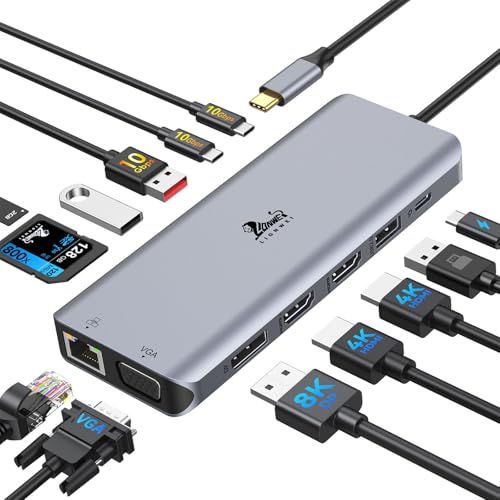
The Derwav Surface Pro Docking Station pairs triple display output with dual 4K HDMI at 30Hz and 12 ports.
- HDMI
- Yes
- Ethernet
- Yes
- USB-C
- Yes
- Warranty
- 1
This Derwav dock is a 12-in-1 docking station with dual HDMI ports, a VGA port, RJ45 Ethernet, two USB-C ports, two USB 3.0 ports, SD/TF card readers, and a 3.5mm audio jack. It supports up to three external displays: dual HDMI ports deliver up to 4K at 30Hz while the VGA port supports 1080p at 60Hz. Triple-display extension needs a system with an 11th Gen Intel processor or newer. Dual USB 3.0 and dual USB-C data ports move data at up to 5Gbps, and the SD and TF card slots reach up to 104MB/s. It works with Surface Pro, Surface Laptop, Surface Go, and Surface Book models.
Choose it if
- You want triple display output from a single dock
- You want VGA output at 1080p at 60Hz alongside HDMI
Consider another if
- You need dual 4K HDMI output at 60Hz
- You want a dock with 10Gbps data transfer
Make the choice for your setup
Compare power delivery
Power delivery separates these docks most clearly. The Anker hub delivers 85W from a 100W input. The ANYHDD dock includes a 90W AC adapter and delivers 90W. The Opluz Surface Docking Station includes a 72W Surface charger. The Lenovo dock provides 65W from its standard 90W adapter, with an optional 135W adapter raising output to 100W. The HyperDrive dock charges devices up to 85W with 100W PD 3.0 pass-through charging. The Derwav dock lists DC power input among its ports. Compare the stated output against the power your laptop draws, and keep the input and output figures separate when comparing docks.
Compare display output
Display output differs across these docks in resolution and refresh rate. The Anker hub drives two screens at 1080p at 60Hz through dual HDMI. The ANYHDD dock supports a 4K display over HDMI and DisplayPort. The Opluz dock drives monitors at 4K at 60Hz through HDMI. The Lenovo dock drives two monitors at up to 4K at 60Hz through DisplayPort and HDMI. The HyperDrive dock supports dual 4K monitors. The Derwav dock supports up to three external displays, with dual HDMI at up to 4K at 30Hz and VGA at 1080p at 60Hz. Compare the stated resolution and refresh rate before choosing. A related shortlist covers the Best Docking Station for Mac.
Match the dock to your device
Device compatibility decides whether a dock fits your desk. The Anker hub works with MacBook models on macOS 12 and newer, Windows 10 and 11, ChromeOS, and laptops equipped with DP Alt Mode and Power Delivery, and it is not compatible with Linux. The ANYHDD dock needs a USB-C or Thunderbolt compatible computer. The Opluz and Derwav docks are built for Surface Pro, Surface Laptop, Surface Go, and Surface Book models. The Lenovo dock works with notebooks that support USB-C Alt-Mode or Thunderbolt protocols. The HyperDrive dock supports M1 and M2 MacBook, PC, and Chromebook, with a software download required. Check the stated compatibility against your own device before choosing.
For a wider shortlist, start with Best Docking Station.
FAQ: Docking Station for Business
How much power does each dock deliver?
The Anker hub delivers 85W from a 100W input. The ANYHDD dock delivers 90W. The Opluz dock includes a 72W charger. The Lenovo dock provides 65W from its standard 90W adapter, with an optional 135W adapter raising output to 100W. The HyperDrive dock charges devices up to 85W with 100W PD 3.0 pass-through charging.
Which docks support 4K displays?
The ANYHDD dock supports 4K over HDMI and DisplayPort. The Opluz dock drives monitors at 4K at 60Hz through HDMI. The Lenovo dock drives two monitors at up to 4K at 60Hz. The HyperDrive dock supports dual 4K monitors. The Derwav dock runs dual HDMI at up to 4K at 30Hz. The Anker hub drives two screens at 1080p at 60Hz.
Which docks include an Ethernet port?
The Opluz dock includes a 1000/100Mbps RJ45 Ethernet port. The HyperDrive dock includes Ethernet among its ports. The Derwav dock includes an RJ45 Ethernet port. The Anker hub includes no Ethernet port. The ANYHDD and Lenovo docks list HDMI, DisplayPort, and USB-C ports.