
Best Dual Displayport Docking Station (2026): 8 Picks Compared
 By Theo LangUpdated
The Dell WD19S 180W Docking Station (130W Power Delivery) USB-C suits laptop users who need dual DisplayPort outputs with 130W power delivery over one USB-C connection. Its 130W delivery sits above the 100W charging of the MOKiN, Plugable UD-6950PDH, Selore, and UGREEN docks, and above the 85W output of the two WAVLINK docks, while the Plugable UD-6950Z charges nothing at all.
Your shortlist at a glance
PCKitHQ scores range from 9.2 to 9.8. See how we pick.
| Product and key specifications | Score and retailer |
|---|---|
01 | 9.8PCKitHQ scoreView on Amazon |
02 | 9.7PCKitHQ scoreView on Amazon |
03 | 9.6PCKitHQ scoreView on Amazon |
04 | 9.5PCKitHQ scoreView on Amazon |
05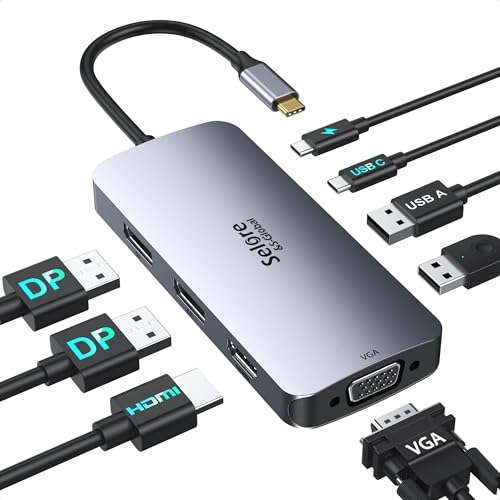 | 9.5PCKitHQ scoreView on Amazon |
06 | 9.4PCKitHQ scoreView on Amazon |
07 Also Consider Plugable Dual | 9.3PCKitHQ scoreView on Amazon |
08 | 9.2PCKitHQ scoreView on Amazon |
A closer look at each configuration
Dell WD19S 180W Docking Station (130W Power Delivery) USB-C
score
Dual DisplayPort, HDMI, and 130W power delivery over USB-C define this dock for laptop desks with two monitors.
- Power delivery
- 130 W
- Interface
- USB-C
- HDMI
- Yes
- DisplayPort
- Yes
- USB-C
- Yes
- Weight
- 1.28 lb
The Dell WD19S 180W Docking Station connects over USB-C with dual DisplayPort and HDMI for two monitors, and delivers 130W of power to the laptop. The 180W dock carries the 130W delivery, so one cable covers display and charging. The dock weighs 1.28 lb and connects through a single USB-C cable, keeping the host connection to one port. Its part number is FPFY9 and its model is WD19.
Choose it if
- You need dual DisplayPort for two monitors
- You want 130W power delivery over USB-C
Consider another if
- You need the 0.22 lb weight of the MOKiN
- You need VGA output like the MOKiN dock
USB C Docking Station Dual
score
Two DisplayPort outputs at 4K 60Hz, HDMI, VGA, and 100W charging define this 8-in-1 dock for laptop desks.
- Power delivery
- 100 W
- Interface
- USB C
- HDMI
- Yes
- DisplayPort
- Yes
- USB-C
- Yes
- Weight
- 0.22 lb
The MOKiN dock pairs 2 DisplayPort outputs at 4K 60Hz with HDMI at 4K 60Hz and VGA at 1080P 60Hz, plus a USB C 2.0 port and 2 USB A 2.0 ports. The PD charging port supplies up to 100W, and data transfer runs at up to 480Mbps. The dock works with full-featured USB Type-C ports on Dell, HP, and Lenovo laptops. On a MacBook it supports mirror mode only, with no extended mode. The dock weighs 0.22 lb.
Choose it if
- You need two DisplayPort outputs at 4K 60Hz
- You want VGA output for an older monitor
Consider another if
- You need 130W power delivery like the Dell
- You need extended mode on a MacBook
Plugable USB C Docking Station
score
DisplayLink dual 4K 60Hz over HDMI or DisplayPort and 100W charging define this dock for M1 to M5 Macs.
- Power delivery
- 100 W
- Interface
- USB C
- HDMI
- Yes
- DisplayPort
- Yes
- Ethernet
- Yes
- USB-C
- Yes
- Weight
- 0.73 lb
- Warranty
- 2 Year Limited Parts and Labor
The Plugable UD-6950PDH uses DisplayLink technology to run two 4K 60Hz monitors over HDMI, DisplayPort, or both, even on Macs that natively support one external display. The 14-in-1 dock adds Ethernet, SD and microSD card readers, a 3.5mm headset jack, and 100W charging. Driver installation is required for full functionality, and HDCP is not supported. The dock weighs 0.73 lb and carries a 2 Year Limited Parts and Labor warranty.
Choose it if
- You use a Mac that supports one external display
- You want dual 4K monitors over HDMI or DisplayPort
Consider another if
- You need 130W power delivery like the Dell
- You want a driver-free dock like the Selore
WAVLINK Laptop Docking Station
score
Dual DisplayPort with single 4K 60Hz, triple 1080P displays, and 85W charging define this 12-in-1 dock for Windows.
- Power delivery
- 85 W
- Interface
- USB C
- HDMI
- Yes
- Ethernet
- Yes
- USB-C
- Yes
- Weight
- 0.36 lb
The WAVLINK UMD303 pairs one HDMI port with dual DisplayPort outputs and 85W power delivery, with 100W input at the charging port. It supports a single 4K 60Hz display and triple 1080P 60Hz displays under DP1.4. The 12-in-1 dock adds Gigabit Ethernet, SD and TF slots, and a 2-in-1 audio and mic port. The charger is not included with the dock, and the dock weighs 0.36 lb.
Choose it if
- You want triple displays at 1080P 60Hz
- You need Gigabit Ethernet and SD card slots
Consider another if
- You need 100W laptop charging like the UGREEN
- You need dual 4K displays like the Plugable
USB C Docking Station Dual
score
Two DisplayPort outputs at 4K 60Hz, HDMI, VGA, and 100W charging define this dock for four-monitor Windows desks.
- Power delivery
- 100 W
- Interface
- USB C
- HDMI
- Yes
- DisplayPort
- Yes
- USB-C
- Yes
- Weight
- 0.2 lb
The Selore dock connects up to four monitors with 2 DisplayPort outputs at 4K 60Hz, HDMI at 4K 60Hz, and VGA at 1080p 60Hz. The 100W USB-C PD 3.0 charging port provides pass-through charging, with the charger not included. USB-C 2.0 and dual USB-A 2.0 ports transfer data at 480Mbps each. Windows supports extend mode on all four displays, while macOS supports mirror mode or single extend mode only. The dock weighs 0.2 lb.
Choose it if
- You want four monitors on a Windows laptop
- You need 100W charging with DisplayPort outputs
Consider another if
- You need 130W power delivery like the Dell
- You need extended mode on all four Mac displays
UGREEN USB C DisplayLink Docking Station
score
DisplayLink dual 4K 60Hz, 10Gbps USB ports, Gigabit Ethernet, and 100W charging define this 9-in-1 dock.
- Power delivery
- 100 W
- Interface
- USB C
- HDMI
- Yes
- Ethernet
- Yes
- USB-C
- Yes
- Weight
- 1.12 lb
- Warranty
- 24 months
The UGREEN dock uses DisplayLink technology to extend dual 4K 60Hz monitors for macOS and Windows, with driver installation required for display and network functions. The 9-in-1 dock adds 2 HDMI 4K ports, 2 DisplayPort 4K ports, 10Gbps USB-C and USB-A ports, and Gigabit Ethernet. The 100W PD 3.0 charging port charges through the dock, with the charger not included. The dock weighs 1.12 lb and carries a 24 months warranty.
Choose it if
- You want dual 4K monitors on macOS or Windows
- You need 10Gbps USB-C and USB-A ports
Consider another if
- You need 130W power delivery like the Dell
- You want a driver-free dock like the Selore
Plugable Dual
score
Dual 4K monitors over HDMI or DisplayPort, Gigabit Ethernet, and six USB 3.0 ports define this dock for office work.
- Interface
- USB 3.0 & USB-C
- HDMI
- Yes
- DisplayPort
- Yes
- Ethernet
- Yes
- USB-C
- Yes
- Weight
- 0.77 lb
The Plugable UD-6950Z runs two 4K monitors at 3840x2160 at 60Hz over DisplayPort or HDMI through DisplayLink technology. The dock adds Gigabit Ethernet, an audio jack, and six USB 3.0 ports, and connects over USB-C or USB 3.0. It does not charge the host computer, and it is not compatible with Linux. Driver installation is required on Mac, and the dock does not support gaming or HDCP playback. The dock weighs 0.77 lb.
Choose it if
- You want dual 4K monitors for office work
- You need six USB 3.0 ports for peripherals
Consider another if
- You need the dock to charge your laptop
- You need Linux support for your system
Laptop Docking Station
score
Dual DisplayPort with single 8K 30Hz, dual 4K 60Hz, and 85W charging define this dock for Windows desks.
- Power delivery
- 85 W
- Interface
- USB-C
- HDMI
- Yes
- DisplayPort
- Yes
- Ethernet
- Yes
- USB-C
- Yes
- Weight
- 0.28 lb
The WAVLINK UMD306B pairs 2 DisplayPort outputs with 1 HDMI port, expanding a single display to 8K 30Hz or 4K 144Hz under DP1.4 with DSC and dual displays to 4K 60Hz. The dock supplies 100W power delivery in and 85W for laptop charging, with a 2.5G Ethernet port and 10Gbps USB-A and USB-C ports. It is not compatible with any Mac OS computer, and the charger is not included. The dock weighs 0.28 lb.
Choose it if
- You want a single 8K display at 30Hz
- You need 2.5G Ethernet for your network
Consider another if
- You need 100W laptop charging like the UGREEN
- You need Mac compatibility for your laptop
Make the choice for your setup
Compare power delivery first
Power delivery separates these docks more than any other figure. The Dell WD19S delivers 130W over USB-C, while the MOKiN, Plugable UD-6950PDH, Selore, and UGREEN docks deliver 100W. The two WAVLINK docks take 100W in and deliver 85W to the laptop. The Plugable UD-6950Z delivers nothing, since it does not charge the host computer. Match the delivery figure to the power your laptop draws, and keep in mind that the WAVLINK docks ship without a charger. The Dell dock carries 180W in total behind its 130W delivery. The UGREEN dock charges a MacBook Pro 15 inch in 1.5 hours through its 100W port. The Selore dock needs a 100W USB-C adapter, since its charger is not included. The MOKiN PD port supplies a maximum of 100W.
Match display outputs to your monitors
Dual DisplayPort outputs appear on the Dell, MOKiN, Selore, UGREEN, and both WAVLINK docks, so count the rest of the video ports. The MOKiN and Selore docks add HDMI at 4K 60Hz and VGA at 1080P 60Hz, and the Selore connects up to four monitors. The Plugable UD-6950PDH and UGREEN docks use DisplayLink to run dual 4K 60Hz monitors, even on Macs that natively support one external display. The WAVLINK UMD303 runs a single 4K 60Hz display and triple 1080P 60Hz displays, while the WAVLINK UMD306B runs a single 8K 30Hz display and dual 4K 60Hz displays. The Plugable UD-6950Z runs two 4K monitors at 3840x2160 at 60Hz. Shoppers with a related need can compare our guide to the Best Docking Station for Dell.
Check drivers, systems, and ports
Driver needs split this guide. The Plugable UD-6950PDH needs driver installation for full functionality, and the UGREEN dock needs driver installation for display and network functions. The Plugable UD-6950Z needs a manual driver install on Mac. The Selore dock needs no drivers, and the WAVLINK UMD306B needs no driver. The Plugable UD-6950Z does not work with Linux, and the WAVLINK UMD306B does not work with any Mac OS computer. The MOKiN dock supports mirror mode only on a MacBook. The Selore dock supports mirror mode or single extend mode only on macOS. Ethernet appears on the Plugable UD-6950PDH, WAVLINK docks, UGREEN, and Plugable UD-6950Z. The WAVLINK UMD303 adds SD and TF slots with a 2-in-1 audio and mic port.
Comparing more options? See Best Docking Station.
FAQ: Dual Displayport Docking Station
Which dock delivers the highest power to a laptop?
The Dell WD19S delivers 130W over USB-C, the highest figure in this guide. The MOKiN, Plugable UD-6950PDH, Selore, and UGREEN docks deliver 100W, and the two WAVLINK docks deliver 85W. The Plugable UD-6950Z delivers nothing, since it does not charge the host computer.
Which docks need driver installation?
The Plugable UD-6950PDH needs driver installation for full functionality, and the UGREEN dock needs driver installation for display and network functions. The Plugable UD-6950Z needs a manual driver install on Mac. The Selore dock needs no drivers, and the WAVLINK UMD306B needs no driver.
Which docks work with Mac computers?
The Plugable UD-6950PDH and UGREEN docks extend dual 4K monitors on Macs through DisplayLink. The MOKiN dock supports mirror mode only on a MacBook. The Selore dock supports mirror mode or single extend mode only on macOS. The WAVLINK UMD306B does not work with any Mac OS computer.

