
How to Connect Three Monitors to a Laptop
 By Theo LangUpdated
Connect three monitors to a laptop through one USB-C docking station with three video outputs. The dock takes the laptop's video signal and splits it across the three monitors, while the same cable charges the laptop. Check that your laptop's USB-C port supports video output first, since a data-only port leaves the monitors blank.
Check which ports your laptop has
A USB-C port does not always carry video. Look in your laptop's manual or spec sheet for DisplayPort Alt Mode, Thunderbolt or USB4 on that port. If the port only carries data, the monitors stay blank even though the USB ports on the dock still work. The Plugable dock works with USB-C, USB4 or Thunderbolt ports. The Selore docks need a USB-C port with DisplayPort Alt Mode or Thunderbolt 3/4 for triple display. The UANTIN dock needs a USB-C port with DisplayPort Alt Mode.
Pick a dock with three video outputs
Count the video outputs on the dock and match them to your monitors. The Plugable dock has 3 HDMI ports, the Selore 16-in-1 dock has 3 HDMI ports, and the Selore 13-in-1 dock has 3 HDMI ports. The UANTIN dock has 2 HDMI ports and 1 DisplayPort, so it also drives three monitors. Match the dock's HDMI and DisplayPort outputs to the inputs on your three monitors.
Set the resolution for three monitors
Compare the resolution the dock lists for one monitor with the figure it lists for three monitors. The Plugable dock delivers up to 4K 30Hz on HDMI 1 and up to 1920x1200 60Hz on HDMI 2 and 3. The Selore 16-in-1 dock runs triple monitors at 4K@30Hz and a single port at 4K@60Hz. The UANTIN dock drives 3 displays at 4K@30Hz on Windows through MST. Check the resolution the dock lists for three monitors before you buy.
Mind the Mac limits and charging
On a Mac, triple extended displays need care. The Plugable dock needs the DisplayLink driver installed for HDMI 2 and 3 on Mac. The Selore 16-in-1 dock only mirrors on Mac and cannot extend two different screens. The Selore 13-in-1 dock and the UANTIN dock extend up to 2 displays on macOS, since triple monitor extend through MST works on Windows only. All four docks pass up to 100W of charging to the laptop through USB-C.
What you need
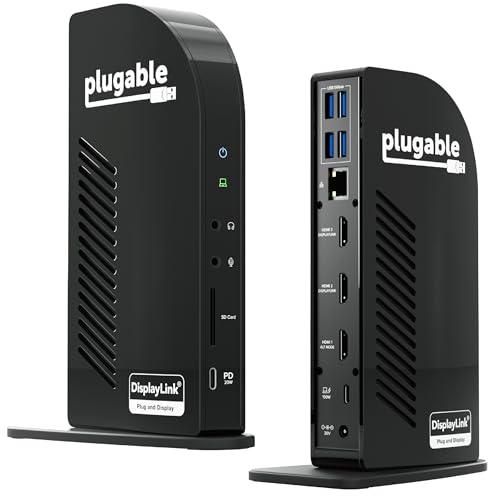
Plugable USB-C Triple Monitor Docking Station
A 13-in-1 USB-C dock with 3 HDMI ports, 100W laptop charging, Gigabit Ethernet and a DisplayLink driver for triple monitors on Mac.
View on Amazon
Selore 3 HDMI Docking Station Triple Monitor
A 16-in-1 USB-C dock with 3 HDMI ports at up to 4K, 100W PD charging, 10Gbps USB ports and Gigabit Ethernet.
View on Amazon
Selore USB C Docking Station 3 Monitors 3
A 13-in-1 USB-C dock with 3 HDMI ports, 100W PD charging, Gigabit Ethernet and triple 4K extend on Windows through MST.
View on Amazon
UANTIN Laptop Docking Station 3 Monitors
An 8-in-1 USB-C dock with 2 HDMI ports, 1 DisplayPort, 100W PD charging and triple monitors at 4K@30Hz on Windows.
View on AmazonThese come from our ranked list Best Docking Station for Three Monitors, which compares them spec by spec.
FAQ
Can I connect three monitors with one USB-C cable?
Yes, with a docking station that has three video outputs. The Plugable dock and both Selore docks have 3 HDMI ports. The UANTIN dock has 2 HDMI ports and 1 DisplayPort. Plug the dock into a USB-C port that supports video output.
Will three monitors work on a MacBook?
It depends on the dock. The Plugable dock needs the DisplayLink driver for its second and third HDMI ports on Mac. The Selore 16-in-1 dock only mirrors on Mac, and the Selore 13-in-1 and UANTIN docks extend up to 2 displays on macOS.
Does the dock charge my laptop?
All four docks pass up to 100W of charging to the laptop through USB-C. The Selore 16-in-1 dock needs an 87W or stronger charger for all functions to work, and it ships with a USB-C to USB-C cable and a manual.



