What Is an External SSD Used For?
 By Theo LangUpdated
An external SSD is a small drive that plugs into a computer, phone or console through a USB cable and stores files outside the device. People use one to carry files between devices, hold games, photos and video, and keep a second copy of files they do not want to lose. The four drives below hold 1TB to 4TB and connect over USB.
Carry files between devices
Plug the drive into a USB port with the cable that comes with it, and the device shows it as extra storage. Move photos, documents, music and video onto the drive, then plug it into another computer to open the same files there. The Lexar drive attaches to a compatible smartphone with MagSafe, and it works with USB-C smartphones, including iPhone 15 and 16 or above. The P50 comes with an 18-inch USB Type-A to Micro-B cable.
Hold games and media
The drives below hold 1TB to 4TB, so a larger drive holds more games, photos and video. The P50 holds 4TB, the Lexar holds 2TB, and the P40 and My Passport each hold 1TB. The P50, P40 and Lexar drives list read speeds up to 2000 MB/s, and the My Passport lists read speeds up to 1050 MB/s. The P50 and P40 list PlayStation, Xbox, PC and Mac, and on the P40, PS4 games can be played and stored while PS5 games are archived on the drive.
Keep a second copy of your files
An external SSD works as a second copy of files that matter, such as photos, documents and video. Copy the files onto the drive and keep the drive somewhere apart from the computer, so one lost device does not take both copies. The Lexar App can auto back up media from a mobile device, and the My Passport drive has password-enabled 256-bit AES hardware encryption. A drive is one copy, so it does not replace a second backup.
Check the port and the cable
The P50 uses a SuperSpeed USB 20Gb/s interface, the P40 and Lexar drives use USB 3.2 Gen 2x2, and the My Passport uses USB 3.2 Gen-2 with USB-C. A drive reaches its listed speed only on a port that supports that interface, and on the Lexar drive, performance on Mac and other systems not supporting USB 3.2 Gen 2x2 may be lower. Check the port on your device and the cable in the box before you buy, so the plug matches the port.
What you need

Western Digital P50
A 4TB portable SSD with read speeds up to 2000 MB/s, a SuperSpeed USB 20Gb/s interface, and a shock-resistant form for games on PlayStation, Xbox, PC and Mac.
View on Amazon
Western Digital P40
A 1TB portable SSD with read speeds up to 2000 MB/s over USB 3.2 Gen2x2, RGB lighting, and a shock-resistant structure.
View on Amazon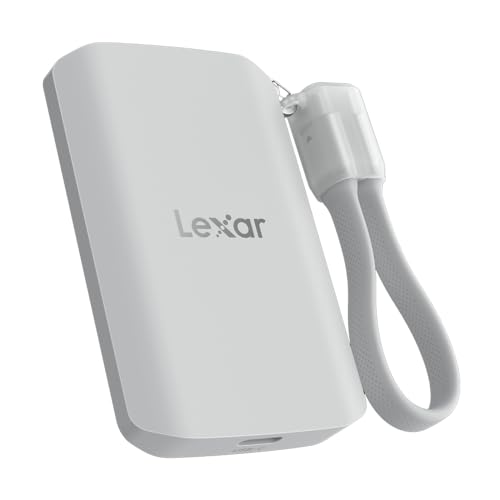
Lexar 2TB ES5 Magnetic External SSD
A 2TB magnetic SSD with read and write speeds up to 2000 MB/s, a MagSafe-compatible design for smartphones, and IP65 dust and water resistance.
View on Amazon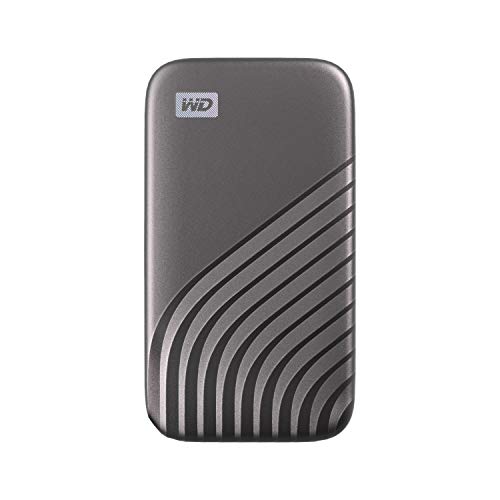
Western Digital WDBAGF0010BGY-WESN
A 1TB portable SSD with read speeds up to 1050 MB/s over USB 3.2 Gen-2, password-enabled 256-bit AES hardware encryption, and a USB-C connection.
View on AmazonThese come from our ranked list Best External SSD, which compares them spec by spec.
FAQ
Can I play games from an external SSD?
The P50 and P40 list PlayStation, Xbox, PC and Mac. The P40 notes say PS4 games can be played and stored on the drive, while PS5 games are archived on it. Check the console maker's notes for your games before you move them.
Will an external SSD work with my phone?
The Lexar drive attaches to a compatible smartphone with MagSafe and works with USB-C smartphones, including iPhone 15 and 16 or above. A phone can record Apple ProRes at 4K120FPS and Samsung Pro Video at 8K 30FPS to the drive. Check that your phone's port matches the drive's cable.
What is the best way to back up files on an external SSD?
Copy the files onto the drive and keep a second copy elsewhere, since one drive is one copy. The My Passport drive has password-enabled 256-bit AES hardware encryption. Eject the drive before you unplug it.