
What Is a Trackball Mouse?
 By Theo LangUpdated
A trackball mouse is a pointing device with a ball you roll to move the cursor, while the mouse itself stays in one place. Instead of sliding a mouse across a desk, you spin the ball with your thumb or fingers. The ball sits in a fixed base with buttons and a scroll wheel or ring around it.
How a trackball moves the cursor
A sensor under the ball reads how the ball turns and moves the cursor on screen. Roll the ball with your thumb on a thumb-control model. The Kensington Expert has a large 55mm ball and an ambidextrous design. The mouse does not move, so it works on a small desk, a sofa or a bed, and the cursor speed follows the DPI setting you pick.
Pick the ball size and control
Trackballs come in different ball sizes and control styles. The PORLEI mouse has a 34mm thumb-control ball, while the Kensington Expert has a 55mm ball. Try the style that matches how you hold the mouse, and check the ball size, buttons and scroll control before you buy.
Wired or wireless, and how it connects
The PORLEI mouse plugs in by USB-C and USB-A with a 1.8m cable and needs no driver download. The Kensington Expert connects by wired USB-A. The Nulea M501 and the ProtoArc EM02 connect by Bluetooth or a 2.4GHz dongle and switch between 3 devices. Check the port and the system the mouse will plug into.
DPI, buttons and cleaning
DPI sets how far the cursor moves for each roll of the ball, and a button switches it. The PORLEI mouse has 5 adjustable DPI levels from 100 to 1200 DPI, and the ProtoArc EM02 has five settings from 200 to 1600 DPI. The Kensington Expert has 4 buttons and a scroll ring, and the Nulea M501 has 6 buttons. Pop the ball out and wipe it and the socket with a soft cloth when the cursor sticks or drags.
What you need

PORLEI Wired Ergonomic Trackball Mouse
A wired trackball mouse with a 34mm thumb-control ball, 5 adjustable DPI levels from 100 to 1200 DPI, RGB lighting and USB-C and USB-A.
View on Amazon
Nulea M501 Wireless Trackball Mouse Ergonomic Thumb Control
A wireless trackball mouse with thumb control, Bluetooth or USB dongle for 3 devices, a rechargeable battery and 6 buttons.
View on Amazon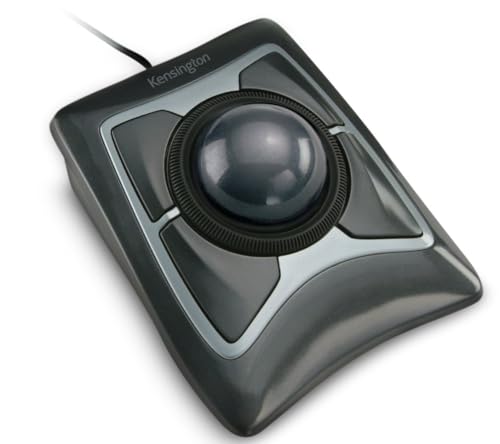
Kensington Expert Trackball Mouse (K64325)
A wired trackball mouse with a large 55mm ball, a scroll ring, a detachable wrist rest and a 5 Year Warranty.
View on Amazon
ProtoArc EM02 Wireless Trackball Mouse
A wireless trackball mouse with a 0 or 15 degree tilt angle, Bluetooth and 2.4GHz for 3 devices, USB-C charging and 5 DPI settings.
View on AmazonThese come from our ranked list Best Trackball Mouse, which compares them spec by spec.
FAQ
Is a trackball mouse better than a regular mouse?
It depends on your desk and how you work. A trackball stays put, so it fits a small desk and works on a sofa or bed, while a regular mouse needs room to slide. Try one if you want a mouse that does not move.
Do trackball mice work with Mac?
The PORLEI mouse works with Windows and Mac, and the Nulea M501 works with PC and Mac. The Kensington Expert works with Windows and ChromeOS, and the ProtoArc EM02 works across systems, though its forward and back buttons do not work with Mac.
How do I clean a trackball?
Pop the ball out of its socket and wipe the ball and the socket with a soft cloth. The PORLEI ball comes out for cleaning, and on the ProtoArc EM02, clean the ball and the three white rollers when the cursor sticks.

