
How Does a Roller Ball Mouse Work?
 By Theo LangUpdated
A roller ball mouse, also called a trackball mouse, has a ball set in a socket on top of the mouse instead of a sensor underneath. You roll the ball with your thumb or fingers, and an optical sensor inside the mouse watches the ball turn and moves the cursor to match. The mouse body stays still, so only the ball moves.
The ball moves, the mouse stays put
A trackball mouse keeps the ball in a socket on the top or side of the mouse, and the rest of the mouse does not move while you work. You roll the ball with your thumb or fingers to point, and you click the buttons around it as you would on a regular mouse. Because the base stays in one place, the mouse needs no room to slide, which suits a crowded desk or a small tray. Your hand rests on the mouse while only your thumb or fingers move.
How the sensor reads the ball
An optical sensor inside the mouse watches the surface of the ball as it turns. The ball rests on small rollers in the socket, so it spins freely in any direction. As the ball turns, the sensor measures the direction and speed of the spin and sends that to the computer as cursor movement. A fast roll moves the cursor farther, and a slow roll moves it a short way, which is how the cursor follows the ball.
Buttons, scrolling and pointer speed
The buttons on a trackball mouse work the same way as the buttons on a regular mouse, with left and right click and often back and forward buttons. Scrolling uses a scroll wheel or a scroll ring around the ball. A DPI or sensitivity button changes how far the cursor moves for the same roll of the ball, so a higher setting covers more of the screen with a small roll and a lower setting gives finer control.
Why the base does not need desk space
A regular mouse needs a clear surface to slide across, and it stops working well when the surface runs out. A trackball mouse turns its ball inside the mouse while the mouse stays where it is. That makes it easy to use in a tight spot, on a small desk, or with the mouse resting on a chair arm or a tray. The trade-off is that your thumb or fingers do all the pointing work.
Keep the ball and socket clean
Dust and skin oils build up on the ball and inside the socket over time, and the cursor can start to stick or jump when that happens. Take the ball out of the socket and wipe the ball and the inside of the socket with a soft cloth. Put the ball back and roll it a few times to check that the cursor moves smoothly again. Cleaning the ball first is the simplest fix when the pointer acts up.
What you need

PORLEI Wired Ergonomic Trackball Mouse
A wired trackball mouse with a 34mm ball, five adjustable DPI levels, USB-C and USB-A connection, and RGB lighting.
View on Amazon
Nulea M501 Wireless Trackball Mouse Ergonomic Thumb Control
A wireless trackball mouse that connects by Bluetooth or USB dongle, pairs with up to three devices, and has a rechargeable battery.
View on Amazon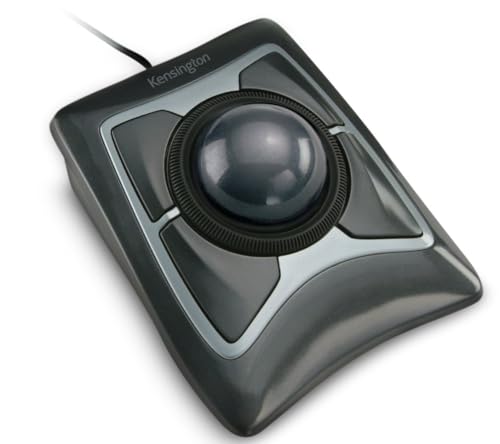
Kensington Expert Trackball Mouse (K64325)
A wired USB-A trackball mouse with a 55mm ball, a scroll ring, a detachable wrist rest, and four buttons.
View on Amazon
ProtoArc EM02 Wireless Trackball Mouse
A wireless trackball mouse with a tilt angle that adjusts between flat and 15 degrees, Bluetooth and 2.4GHz connection, and five adjustable DPI settings.
View on AmazonThese come from our ranked list Best Trackball Mouse, which compares them spec by spec.
FAQ
Is a trackball mouse the same as a regular mouse?
It does the same job with a different motion. A regular mouse moves across the desk to point, while a trackball mouse stays still and you roll the ball to point.
Can I use a trackball mouse on my lap?
Yes, because the mouse does not need to slide across a surface. You can rest it on your lap or a tray and roll the ball to move the cursor.
Why does my trackball cursor stick or jump?
Dust on the ball or inside the socket can cause that. Take the ball out, wipe the ball and the socket with a soft cloth, and put the ball back.

