
Best Trackball Mouse (2026): Our 5 Picks Ranked
 By Theo LangUpdated
You should choose the PORLEI Wired Ergonomic Trackball Mouse if you work in a tight workspace and want thumb control on a wired connection. Its 34mm trackball, 1.8m cable and five DPI settings from 100 to 1200 suit that setup, with Back and Forward buttons and a scroll wheel.
Your shortlist at a glance
PCKitHQ scores range from 9.2 to 9.8. See how we pick.
| Product and key specifications | Score and retailer |
|---|---|
01 | 9.8PCKitHQ scoreView on Amazon |
02 | 9.7PCKitHQ scoreView on Amazon |
03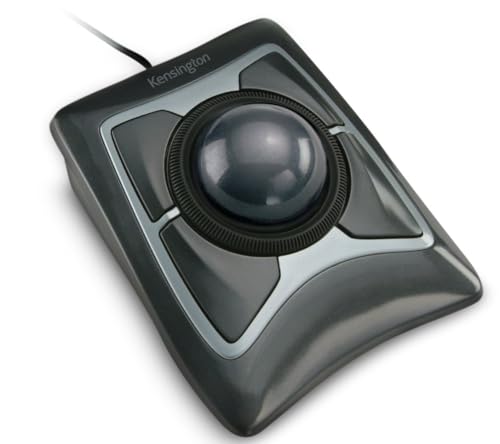 Also Consider Kensington Expert Trackball Mouse (K64325) | 9.5PCKitHQ scoreView on Amazon |
04 Also Consider ProtoArc EM02 Wireless Trackball Mouse | 9.3PCKitHQ scoreView on Amazon |
05 Also Consider Ergonomic Wireless Trackball Mouse | 9.2PCKitHQ scoreView on Amazon |
A closer look at each configuration
PORLEI Wired Ergonomic Trackball Mouse
score
A 34mm thumb trackball, a 1.8m wired cable and DPI settings from 100 to 1200 define this PORLEI mouse.
- Sensor resolution
- 1200 DPI
This PORLEI mouse has a sculpted shape with a 34mm thumb trackball, an optical sensor and 3-point positioning technology. Five DPI settings run from 100 to 1200, switched with DPI buttons. The 1.8m cable connects by USB-A, with Windows and Mac OS in its compatibility figures. Back and Forward buttons and a scroll wheel handle page movement, and the trackball removes for cleaning access. All buttons are non-programmable, and the Back and Forward buttons are not compatible with Mac OS. RGB lighting is built in. The warranty is an 18-month limited warranty for dead trackballs, sensors and switches.
Choose it if
- You work in a tight workspace with thumb control
- You want DPI settings from 100 to 1200
Consider another if
- You need Bluetooth for three devices like the Nulea M501
- You need a 1600 DPI setting like the ProtoArc EM02
Nulea M501 Wireless Trackball Mouse Ergonomic Thumb Control
score
Bluetooth and USB dongle connection for three devices and four DPI levels define this Nulea M501 mouse.
- Wireless
- Yes
- Connection
- Bluetooth or USB dongle
- Weight
- 0.28 lb
- Warranty
- 12 months
This Nulea M501 mouse connects by Bluetooth or USB dongle to up to 3 devices, switched with a button on the bottom. The 2.4G USB receiver stores at the bottom of the mouse. Thumb control moves the cursor on the curved shape, with four DPI levels in its configuration. Six buttons include back and forward buttons, and all buttons are not programmable. The built-in rechargeable battery charges with the included charging cable. Documented surfaces include a messy desktop, couch, bed and small writing board. The mouse weighs 0.28 lb and carries a 12-month warranty.
Choose it if
- You switch among three devices by Bluetooth or USB dongle
- You want a rechargeable wireless trackball with thumb control
Consider another if
- You need five DPI settings like the ProtoArc EM02
- You need a 5-year warranty like the Kensington Expert
Kensington Expert Trackball Mouse (K64325)
score
A 55mm ball, a scroll ring and four customizable buttons define this Kensington Expert trackball.
- Connection
- Wired USB-A
- Weight
- 0.74 lb
- Warranty
- 5 Year Warranty
This Kensington Expert trackball measures 5 inches wide, 5-3/4 inches deep and 2-1/2 inches high, and weighs 0.74 lb. The 55mm ball uses Diamond Eye optical tracking, and a scroll ring scans up and down pages. A detachable wrist rest is included, and the design is ambidextrous. Four buttons, scroll speed and cursor speed customize through KensingtonKonnect software. Windows ARM-based computers are not supported for that software, and ChromeOS users get HID functions without customization through KensingtonKonnect. Connection is wired USB-A. The warranty is 5 years.
Choose it if
- You want a 55mm ball with a scroll ring
- You want four buttons customizable through software
Consider another if
- You need Bluetooth wireless connection like the ProtoArc EM02
- You need 0 and 15 degree angle settings like the ProtoArc EM02
ProtoArc EM02 Wireless Trackball Mouse
score
0 and 15 degree angle settings, DPI settings to 1600 and three-device wireless define this ProtoArc EM02.
- Wireless
- Yes
- Connection
- 2.4GHz wireless or Bluetooth
- Weight
- 0.66 lb
- Warranty
- 2 Year
This ProtoArc EM02 mouse sets to a flat 0 degree position or a tilted 15 degree position with its hinge. Thumb control rolls the trackball in tight or cluttered workspaces. Connection runs by 2.4GHz wireless or Bluetooth for three devices, switched with one button, and the forward and backward buttons are not compatible with Mac OS. Five DPI settings run at 200, 400, 800, 1200 and 1600, with quiet-touch buttons. The USB-C charging port charges the rechargeable battery, with a manufacturer-rated standby time of up to 90 days on a full charge. The mouse weighs 0.66 lb and carries a 2-year warranty.
Choose it if
- You want 0 and 15 degree angle settings
- You want DPI settings from 200 to 1600
Consider another if
- You need a 4800 DPI level like the SABLUTE MAM1 Pro
- You need a wired USB-A connection like the Kensington Expert
Ergonomic Wireless Trackball Mouse
score
0 and 18 degree angle settings, DPI levels to 4800 and three-device wireless define this SABLUTE mouse.
- Wireless
- Yes
- Connection
- Bluetooth and 2.4GHz
- Weight
- 0.79 lb
- Warranty
- 2 Year warranty
This SABLUTE mouse sets to 0 degree or 18 degree tilt positions, with thumb trackball control for tight or cluttered workspaces. Connection runs by Bluetooth and 2.4GHz to up to three devices, switched with one button across a PC, laptop or tablet. Five DPI levels run from 800 to 4800, with quiet-touch buttons. The rechargeable battery charges by USB-C, a backlight turns on or off, and the USB receiver stores in the base. A downloadable driver customizes settings, and that driver is not compatible with Mac OS. The mouse weighs 0.79 lb and carries a 2-year warranty.
Choose it if
- You want 0 and 18 degree angle settings
- You want five DPI levels from 800 to 4800
Consider another if
- You need a 1.8m wired cable like the PORLEI mouse
- You need a scroll ring like the Kensington Expert
Make the choice for your setup
DPI settings and sensor figures
DPI settings are rated figures for cursor speed steps. The PORLEI mouse has five DPI settings at 100, 200, 400, 800 and 1200, with an optical sensor and 3-point positioning technology. The ProtoArc EM02 has five DPI settings at 200, 400, 800, 1200 and 1600. The SABLUTE mouse has five DPI levels from 800 to 4800. The Nulea M501 has four DPI levels in its configuration. The Kensington Expert customizes scroll speed and cursor speed through KensingtonKonnect software, with Diamond Eye optical tracking and a 55mm ball. The PORLEI sensor resolution figure is 1200 DPI. Rated DPI figures here run from 100 to 4800.
Wired, Bluetooth and device switching
Connection type decides how each mouse links to a computer. The PORLEI mouse uses a 1.8m wired cable with a USB-A connection. The Kensington Expert uses a wired USB-A connection. The Nulea M501 connects by Bluetooth or USB dongle to up to 3 devices, switched with a button on the bottom, and its 2.4G USB receiver stores at the bottom. The ProtoArc EM02 connects by 2.4GHz wireless or Bluetooth for three devices, switched with one button. The SABLUTE mouse connects by Bluetooth and 2.4GHz to up to three devices, switched with one button, and its USB receiver stores in the base. Wired cable length here is 1.8m. If that fits your setup better, see our guide to the Best Thumb Trackball.
Ball size, buttons and angle settings
Ball size, button layout and angle settings differ across the five picks. The PORLEI mouse has a 34mm thumb trackball with Back and Forward buttons and a scroll wheel, and all buttons are non-programmable. The Kensington Expert has a 55mm ball with a scroll ring, a detachable wrist rest and four customizable buttons. The Nulea M501 has six buttons with back and forward buttons, and all buttons are not programmable. The ProtoArc EM02 sets to 0 degree or 15 degree positions with quiet-touch buttons. The SABLUTE mouse sets to 0 degree or 18 degree positions with quiet-touch buttons and a backlight. Angle settings here are 0, 15 and 18 degrees.
Comparing more options? See Best M570 Wireless Trackball Mouse.
FAQ: Trackball Mouse
How many DPI settings do these trackball mice have?
The PORLEI mouse, the ProtoArc EM02 and the SABLUTE mouse each have five DPI settings. The PORLEI settings run from 100 to 1200, the ProtoArc settings run from 200 to 1600, and the SABLUTE levels run from 800 to 4800. The Nulea M501 has four DPI levels.
Which trackball mice connect to three devices?
The Nulea M501 connects to up to 3 devices by Bluetooth or USB dongle. The ProtoArc EM02 connects for three devices by 2.4GHz wireless or Bluetooth. The SABLUTE mouse connects to up to three devices by Bluetooth and 2.4GHz. Each of the three switches devices with one button.
What ball sizes do trackball mice use?
The PORLEI mouse uses a 34mm thumb trackball. The Kensington Expert uses a 55mm ball with Diamond Eye optical tracking and a scroll ring. Those two ball figures, 34mm and 55mm, are the ball sizes in this lineup with a stated millimeter figure.
