
What Is a Trackball Mouse Used For?
 By Theo LangUpdated
A trackball mouse moves the cursor with a ball you roll, instead of sliding the whole mouse across the desk. You keep your hand in one place and spin the ball with your thumb or fingers, which makes it useful in tight spaces and on uneven surfaces, since the mouse body stays still. It works for everyday pointing, browsing and office work.
How a trackball moves the cursor
A trackball mouse has a ball set in a socket on top of the mouse. Rolling the ball with your thumb or fingers moves the cursor on screen, while the mouse body stays still. Buttons and a scroll wheel or scroll ring sit around the ball for clicking and moving through pages, so the whole device works from one spot on the desk.
Where a trackball helps
A trackball suits desks with little room, since the mouse never slides. It also works on a couch, bed or chair arm, since the mouse body stays in one place and only the ball moves. Because the hand stays in place, the mouse is a fit for small workspaces and for people who want to keep the pointer moving without sweeping their arm across the desk.
Thumb ball or finger ball
Trackballs come in two layouts. A thumb trackball puts a smaller ball under your thumb, while a finger trackball puts a larger ball in the center for your index and middle fingers. Thumb models keep the hand in a fixed grip, and finger models let either hand drive the ball. Try both shapes if you can, since the layout decides how the mouse feels over a long session.
What to check before buying
Check the connection first: some trackballs plug in over USB, while others connect by Bluetooth or a wireless receiver and switch between devices. Check the ball size, the number of buttons and whether the buttons work with your system, since some extra buttons do not work on Mac. Also check the DPI steps, which set how fast the cursor moves for each roll of the ball.
What you need

PORLEI Wired Ergonomic Trackball Mouse
A wired trackball mouse with a 34mm thumb ball, 5 adjustable DPI levels up to 1200 DPI, RGB lighting and a USB-A cable.
View on Amazon
Nulea M501 Wireless Trackball Mouse Ergonomic Thumb Control
A wireless trackball mouse with thumb control, Bluetooth and USB receiver connections for up to 3 devices and a rechargeable battery.
View on Amazon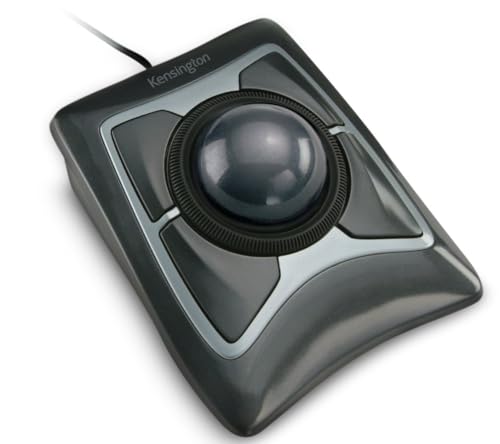
Kensington Expert Trackball Mouse (K64325)
A wired USB-A trackball mouse with a 55mm ball, a scroll ring, a detachable wrist rest and 4 customizable buttons.
View on Amazon
ProtoArc EM02 Wireless Trackball Mouse
A wireless trackball mouse with a 0 or 15 degree tilt angle, thumb control, Bluetooth and 2.4G connections for 3 devices and adjustable DPI.
View on AmazonThese come from our ranked list Best Trackball Mouse, which compares them spec by spec.
FAQ
Can you use a trackball mouse on any surface?
Yes. The mouse body stays still, so the ball works on a couch, bed or chair arm as well as on a desk. The ball only needs your thumb or fingers to roll it, not a flat surface under the mouse.
Do trackball mice need software to work?
No. The basic pointing and clicking work when you plug the mouse in or pair it, with no drivers to download. Some extra buttons do not work on every system, so check the notes for your computer before you buy.
Is a trackball mouse hard to learn?
Rolling the ball instead of moving your whole hand feels different at first. Give it 1 to 2 weeks of regular use and try different hand positions before deciding whether the layout suits you.

