
What Is a Trackball Mouse?
 By Theo LangUpdated
A trackball mouse is a pointing device with a ball set into its body. You move the cursor by rolling the ball with your thumb or fingers while the mouse body stays in place, instead of sliding the whole mouse across the desk. Buttons and a scroll wheel or ring handle clicks and scrolling.
How the ball moves the cursor
The ball sits in a socket on the top or side of the mouse, and rolling it moves the cursor on screen. On thumb-control models such as the PORLEI wired mouse and the Nulea M501, your thumb rolls a ball on the side of the body. On the Kensington Expert, a large 55mm ball sits on top and you roll it with your fingers. Because the body stays still, a trackball works in a tight workspace where there is no room to slide a mouse.
Thumb ball and finger ball designs
Thumb-control trackballs put a smaller ball under your thumb. The PORLEI wired mouse uses a 34mm trackball with thumb control, a scroll wheel and Back and Forward buttons. Finger-control designs put a larger ball on top. The Kensington Expert uses a 55mm ball with a scroll ring around it for scanning up and down pages, plus a detachable wrist rest and an ambidextrous shape. The ProtoArc EM02 adds an adjustable hinge that sets the body flat at 0 degrees or tilted at 15 degrees.
Wired and wireless connections
Trackball mice connect by cable or wirelessly. The PORLEI mouse is wired, with a 1.8m cable that connects by USB-A without drivers, and the Kensington Expert uses a wired USB-A connection. The Nulea M501 connects by Bluetooth or a USB dongle and switches between up to 3 devices with a button on the bottom. The ProtoArc EM02 connects by 2.4GHz wireless or Bluetooth and switches between devices with one button. The Nulea M501 is rechargeable. The ProtoArc EM02 is rechargeable and charges by USB-C.
DPI settings and cleaning the ball
DPI settings change how fast the cursor moves when you roll the ball. The PORLEI mouse has 5 adjustable DPI levels at 100, 200, 400, 800 and 1200 DPI. The ProtoArc EM02 has five adjustable DPI settings at 200, 400, 800, 1200 and 1600. The Nulea M501 has 4 DPI levels. Dust collects around the ball over time. The PORLEI ball removes so you can wipe the hole and ball with a soft cloth, and the ProtoArc cleaning steps cover the ball and the three white rollers under it.
What you need

PORLEI Wired Ergonomic Trackball Mouse
A wired thumb-control trackball with a 34mm ball, 5 adjustable DPI levels and a 1.8m USB-A cable.
View on Amazon
Nulea M501 Wireless Trackball Mouse Ergonomic Thumb Control
A wireless thumb-control trackball with Bluetooth and USB dongle connections for up to 3 devices and a rechargeable battery.
View on Amazon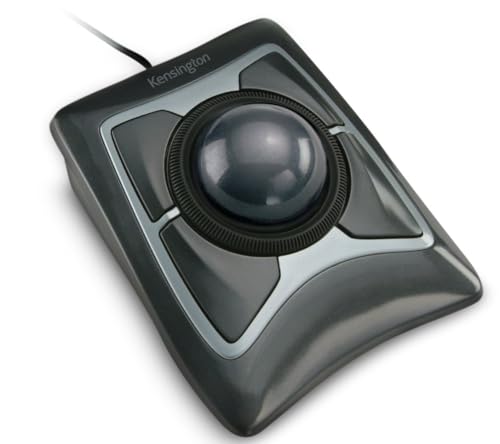
Kensington Expert Trackball Mouse (K64325)
A wired finger-control trackball with a 55mm ball, a scroll ring, a detachable wrist rest and customizable buttons.
View on Amazon
ProtoArc EM02 Wireless Trackball Mouse
A wireless thumb-control trackball with a 0 or 15 degree adjustable angle, five DPI settings and USB-C charging.
View on AmazonThese come from our ranked list Best Trackball Mouse, which compares them spec by spec.
FAQ
What is the difference between a trackball and a regular mouse?
A regular mouse moves the cursor when you slide the whole body across the desk. A trackball body stays in place, and you move the cursor by rolling the ball with your thumb or fingers.
Do trackball mice need a mouse pad?
No pad is required for the ball to roll, since the body does not slide. The PORLEI mouse is made for flat surfaces and also for a leg, sofa, bed or carpet, and the Nulea M501 is made for narrow spaces such as a couch or bed.
How do you clean a trackball mouse?
Remove the ball where the design allows it and wipe the ball and the socket with a soft cloth, as on the PORLEI mouse. On the ProtoArc EM02, clean the ball and the three white rollers under it when movement feels sticky or less precise.

