
Best USB Trackball (2026): Our 6 Picks Ranked
 By Theo LangUpdated
Choose the Nulea Wireless Trackball Mouse Ergonomic 55mm Large Ball Ambidextrous if you work with both hands or share your desk, because its mode switch swaps key functions for left or right use. Its 55mm ball, four DPI levels up to 1600, and Bluetooth or 2.4 GHz connection to three devices suit a desk where you switch between a laptop, a tablet and a phone during the day.
Your shortlist at a glance
PCKitHQ scores range from 9.2 to 9.8. See how we pick.
| Product and key specifications | Score and retailer |
|---|---|
01 Best Overall Nulea Wireless Trackball Mouse Ergonomic 55mm Large Ball AmbidextrousSensor resolution: 1600 DPI | 9.8PCKitHQ scoreView on Amazon |
02 | 9.7PCKitHQ scoreView on Amazon |
03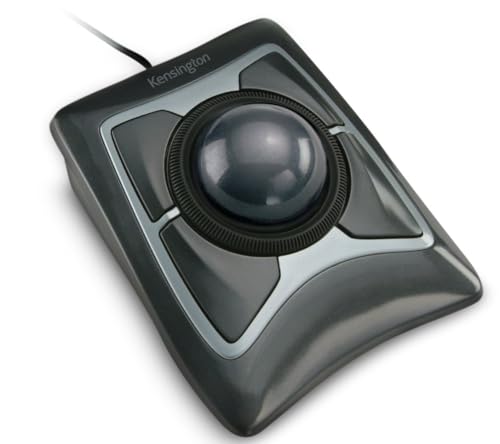 Also Consider Kensington Expert Trackball Mouse (K64325) | 9.6PCKitHQ scoreView on Amazon |
04 | 9.4PCKitHQ scoreView on Amazon |
05 | 9.3PCKitHQ scoreView on Amazon |
06 Also Consider Wired Ergonomic Trackball Mouse for Large Hands | 9.2PCKitHQ scoreView on Amazon |
A closer look at each configuration
Nulea Wireless Trackball Mouse Ergonomic 55mm Large Ball Ambidextrous
score
The 55mm ball, ambidextrous mode switch and Bluetooth or 2.4 GHz connection define this wireless Nulea trackball.
- Sensor resolution
- 1600 DPI
- Wireless
- Yes
- Connection
- Bluetooth or 2.4 GHz wireless
- Warranty
- 12 months
This Nulea trackball uses a 55mm large ball with four adjustable DPI levels at 400, 800, 1200 and 1600. It connects by Bluetooth or 2.4 GHz wireless to up to three devices, and the maker states compatibility with laptops, tablets and smartphones. The ambidextrous design uses a mode switch button that swaps all key functions to match your dominant hand. A free spin scroll wheel and quiet clicks are included, and the mouse is rechargeable. Warranty coverage is 12 months.
Choose it if
- You switch between left and right hand use
- You connect a laptop, tablet and phone together
Consider another if
- You need the wired USB-A connection of the Kensington
- You need the thumb control of the PORLEI
PORLEI Wired Ergonomic Trackball Mouse
score
The 34mm thumb ball, five DPI levels and 1.8m wired cable define this PORLEI ergonomic trackball mouse.
- Sensor resolution
- 1200 DPI
- Connection
- USB-C & USB-A
This PORLEI trackball uses a 34mm thumb-controlled ball in a sculpted ergonomic shape, with five adjustable DPI levels at 100, 200, 400, 800 and 1200. It connects with a 1.8m cable to a USB A port, and the maker states USB-C and USB-A compatibility with Windows and Mac OS. Back and Forward buttons and a precision scroll wheel are included, and the maker states the buttons are non-programmable and the Back and Forward buttons are not compatible with Mac OS. RGB lighting is included. Warranty coverage is an 18-month limited warranty.
Choose it if
- You want thumb control in a tight workspace
- You want five DPI levels from 100 to 1200
Consider another if
- You need the wireless connection of the Nulea M512
- You need the 55mm ball of the Kensington Expert
Kensington Expert Trackball Mouse (K64325)
score
The 55mm ball, scroll ring and detachable wrist rest define this wired Kensington Expert trackball mouse.
- Connection
- USB-A
- Weight
- 0.74 lb
- Warranty
- 5 Year Warranty
This Kensington trackball uses a large 55mm ball with Diamond Eye optical tracking and a patented scroll ring for scanning up and down pages. A detachable ergonomic wrist rest supports the hand and wrist, and the design is ambidextrous. Four buttons, scroll speed and cursor speed are customizable through KensingtonKonnect software, with the maker stating Windows ARM-based computers are not supported and ChromeOS users get HID functions without customization. Connection is wired USB-A. Weight is 0.74 lb, and warranty coverage is 5 years.
Choose it if
- You want a scroll ring around a 55mm ball
- You want a detachable wrist rest included
Consider another if
- You need the wireless connection of the Nulea M512
- You need the thumb control of the SANWA
SANWA Wired Trackball Mouse
score
The 34mm thumb ball, silent clicks and remap software define this wired SANWA trackball mouse.
- Sensor resolution
- 1600 DPI
- Weight
- 0.36 lb
- Warranty
- 1 year
This SANWA trackball is a right-hand thumb control design with a 34mm ball and four DPI levels at 600, 800, 1200 and 1600, with an LED indicator for the current level. Left and right buttons are silent, and downloadable SANWA software remaps the buttons. Connection uses a USB-A port with a snap-on USB-C adapter for plug-and-play use. The maker states compatibility with Windows 11, 10, 8.1, 8 and 7 and macOS 10.13 to 10.15, with some functions possibly not fully supported on macOS. Weight is 0.36 lb, and warranty coverage is 1 year.
Choose it if
- You want silent clicks for quiet rooms
- You want remap software for the buttons
Consider another if
- You need the ambidextrous design of the Kensington Expert
- You need the wireless connection of the Nulea M512
Nulea M509 Wired Trackball Mouse Ergonomic Thumb Control Type C USB
score
The thumb control, six buttons and dual Type A and Type C interface define this wired Nulea M509.
- Connection
- Type C & USB
- Warranty
- 1 Year Manufacturer
This Nulea M509 is a wired thumb control trackball with six buttons, including back and forward buttons, and the maker states all buttons are non-programmable. Five DPI levels adjust responsiveness for tailored control. A 5.9ft cable carries a dual interface with Type A and Type C connections for laptops and PCs running Windows and Mac systems. No drivers are required for plug and play use. Warranty coverage is 1 year manufacturer.
Choose it if
- You want six buttons with back and forward keys
- You want a 5.9ft cable with dual interface
Consider another if
- You need the wireless connection of the Nulea M512
- You need the remap software of the SANWA
Wired Ergonomic Trackball Mouse for Large Hands
score
The 44mm index finger ball and large-hand shape define this wired PORLEI trackball mouse.
- Connection
- USB-A
- Weight
- 0.6 lb
- Warranty
- 18-Month Limited Warranty
This PORLEI trackball is shaped for larger hands and uses a 44mm index finger operated ball with five customizable DPI levels. It connects with a 1.8m cable to a USB-A port with no drivers needed, for Windows and Mac OS systems. The maker states forward and backward buttons are not supported on Mac systems, and that the mouse is not recommended for gaming due to its tracking profile. Weight is 0.6 lb, and warranty coverage is an 18-month limited warranty.
Choose it if
- You have larger hands and want finger control
- You want a 44mm ball with five DPI levels
Consider another if
- You need the thumb control of the SANWA
- You need the wireless connection of the Nulea M512
Make the choice for your setup
Choose the ball and control style
Ball size and control style separate these trackballs. The Nulea M512 and the Kensington Expert use a 55mm ball, the PORLEI for large hands uses a 44mm index finger ball, and the PORLEI TM551 and the SANWA use a 34mm thumb ball. The Nulea M509 uses thumb control with six buttons, including back and forward buttons. Match the control style to your hand: thumb balls keep your fingers on the buttons, while the 55mm and 44mm balls move under your fingers. The Nulea M512 and the Kensington are ambidextrous, and the SANWA is a right-hand design. The PORLEI for large hands is shaped for larger hands, and its 44mm ball is operated by the index finger.
Compare the DPI levels
Stated DPI levels differ across these picks. The Nulea M512 adjusts through 400, 800, 1200 and 1600 DPI, and the SANWA adjusts through 600, 800, 1200 and 1600 DPI. The PORLEI TM551 adjusts through 100, 200, 400, 800 and 1200 DPI. The Nulea M509 and the PORLEI for large hands each offer five DPI levels. The Kensington lists Diamond Eye optical tracking for precise cursor control. The SANWA flashes an LED to show the current DPI level, and the PORLEI TM551 switches levels with DPI buttons. Compare the stated levels with your tasks: lower levels suit precise work, and higher levels move the cursor faster across the screen. A related shortlist covers the Best Vertical Trackball Mouse.
Check connection and system support
Connection decides where each trackball fits. The Nulea M512 is the wireless pick, with Bluetooth or 2.4 GHz for up to three devices. The Kensington uses wired USB-A, and the two PORLEI models use a 1.8m cable to a USB-A port. The SANWA uses USB-A with a snap-on USB-C adapter, the PORLEI TM551 connects by USB-C and USB-A, and the Nulea M509 uses a 5.9ft cable with Type A and Type C. Check the stated limits before you buy: PORLEI states its Back and Forward buttons are not compatible with Mac OS, SANWA states some functions may not be fully supported on macOS, and Kensington states Windows ARM-based computers are not supported for customization.
For a wider shortlist, start with Best Ergo Trackball Mouse.
FAQ: USB Trackball
Which of these trackballs connect wirelessly?
The Nulea M512 is the wireless pick, connecting by Bluetooth or 2.4 GHz to up to three devices. The PORLEI TM551, Kensington Expert, SANWA, Nulea M509 and PORLEI for large hands are wired models with stated cable connections.
Which trackballs suit left-handed use?
The Nulea M512 is ambidextrous, with a mode switch that swaps all key functions for your dominant hand, and the Kensington Expert is an ambidextrous design with a detachable wrist rest. The SANWA is a right-hand thumb control design, and the Nulea M509 uses thumb control with six buttons.
Which trackballs have programmable buttons?
The SANWA remaps buttons through downloadable software, and the Kensington customizes four buttons, scroll speed and cursor speed through KensingtonKonnect software. The PORLEI TM551 and the Nulea M509 state their buttons are non-programmable, so those two cannot change their button functions.
