What Is a TB External Hard Drive?
 By Theo LangUpdated
A TB external hard drive is a portable drive that plugs into a computer through USB and stores files outside the computer. You use one to back up files, move files between computers, or free space on a full internal drive.
What TB means on a drive
TB stands for terabyte. It is the capacity of the drive. The drives shown here come in 500 GB, 1 TB and 2 TB sizes. A larger number means more room for the same kinds of files: documents, photos, videos and game data. Pick the size by counting what you plan to store and leaving room for the files you will add later.
Hard drive or solid state drive
The drives shown here are all solid state drives, which store files on flash memory. A hard drive stores files on spinning disks inside the case. Both types plug into a computer through USB and show up as a drive you can copy files to.
Check the port and cable
Check which USB ports your computer has before you buy a drive. The drives shown here use USB-C, USB 3.2 Gen 2 and USB 3.0 connections. Match the drive's connection to a port on your computer, and check the drive's notes for the systems it works with, such as PC and Mac.
Move files and back up
Plug the drive in, open it on your computer, and copy the files you want to keep. Keep a second copy of files that matter, since one copy on one drive is the only copy you have if the drive is lost. Eject the drive before you unplug it so a copy in progress is not cut off.
What you need

Samsung T7 Portable SSD
A 2 TB portable SSD with USB 3.2 Gen 2, read speeds up to 1,050 MB/s, a 0.13 lb aluminum body and a 3 year limited warranty.
View on Amazon
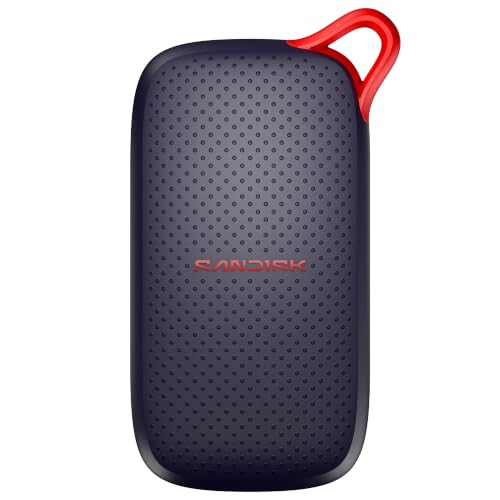
SanDisk 500GB Extreme Portable SSD
A 500 GB portable SSD with USB-C, transfer speeds up to 2000 MB/s, IP65 water and dust protection and 256-bit AES encryption.
View on Amazon
WD 1TB Elements SE
A 1 TB portable SSD with USB 3.0, read speeds up to 400 MB/s, drop resistance up to 2 meters and plug-and-play use.
View on Amazon
Lexar ES3 512GB Portable SSD Silver
A 512 GB portable SSD with USB 3.2 Gen 2, read speeds up to 1050 MB/s, a Type-C cable and 256-bit AES encryption software.
View on AmazonThese come from our ranked list Best Portable SSD Hard Drive, which compares them spec by spec.
FAQ
What does TB mean on an external hard drive?
TB is short for terabyte, the capacity of the drive. A 1 TB drive holds more than a 500 GB drive, and a 2 TB drive holds more than a 1 TB drive.
Is a TB external hard drive the same as a USB stick?
No. Both plug into USB and store files, but an external drive holds far more and is built to stay plugged in for backups and large file moves.
Do I need software to use an external hard drive?
No. Plug the drive into a USB port and it shows up as storage on your computer. Copy files to it the same way you copy files between folders.