How to Set Up a Wireless Keyboard and Mouse
 By Theo LangUpdated
Plug the USB receiver into a USB port, switch the keyboard and mouse on, and start typing. Bluetooth combos pair without a receiver, so open the Bluetooth settings on the computer, put the keyboard and mouse in pairing mode, and select them. If the cursor or keys do not respond, check the receiver, the switches and the batteries.
Plug in the receiver or open Bluetooth
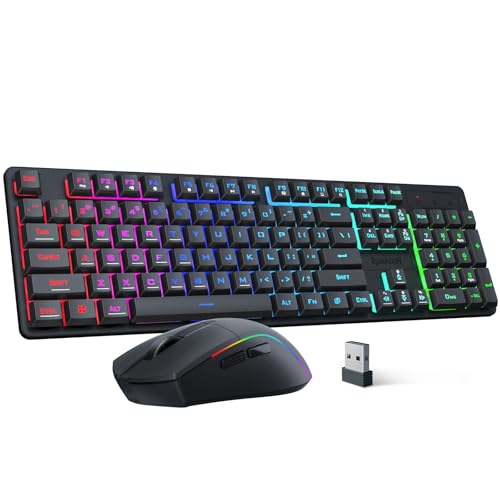
For a receiver combo, plug the receiver into a USB port on the computer. The Logitech MK270 uses one USB-A Nano Receiver for the keyboard and mouse, and the RedThunder K10 wireless combo shares one USB receiver, stored in the bottom of the mouse. For a Bluetooth combo, open the Bluetooth settings on the computer instead, since the Logitech MK250 needs no dongle or USB port.
Switch the keyboard and mouse on
Turn on the keyboard and the mouse with their switches. The Logitech MK270 has on/off switches, and the RedThunder K10 wireless combo needs charging for 8 hours before use, so plug it in first if it is new. The keyboard and mouse then connect on their own, since the RedThunder K10 wireless combo arrives with the pairing code already set.
Pair the keyboard and mouse
Receiver combos are plug and play, so start typing and move the mouse once the receiver is in and the switches are on. For Bluetooth, put the keyboard and mouse in pairing mode and select them in the computer's Bluetooth settings. If the RedThunder K10 wireless combo loses its connection, reset the code pairing as the maker describes.
Check typing, cursor and range
Type a few lines, move the cursor across the screen, and try the number pad and arrow keys. The Logitech MK270 lists a wireless connection up to 33 ft, so move away from the computer and check that the keys and cursor still respond. If a key sticks or the cursor stops, check the switches, the receiver and the batteries.
What you need

RedThunder K10 Wired Gaming Keyboard and Mouse and Wrist Rest Combo
A wired keyboard and mouse combo with a 104-key keyboard, 26 anti-ghosting keys, a 7200 DPI mouse and a leather wrist rest, connecting by cable through a USB port.
View on Amazon
Logitech MK270 Full Size Wireless Keyboard and Mouse Combo
A full-size wireless keyboard and mouse combo that connects through one USB-A Nano Receiver, with a 36-month keyboard battery life and a 12-month mouse battery life.
View on Amazon
RedThunder K10 Wireless Gaming Keyboard and Mouse Combo
A wireless keyboard and mouse combo on 2.4G with a rechargeable 3000 mAh keyboard battery and an 800 mAh mouse battery, sharing one USB receiver.
View on Amazon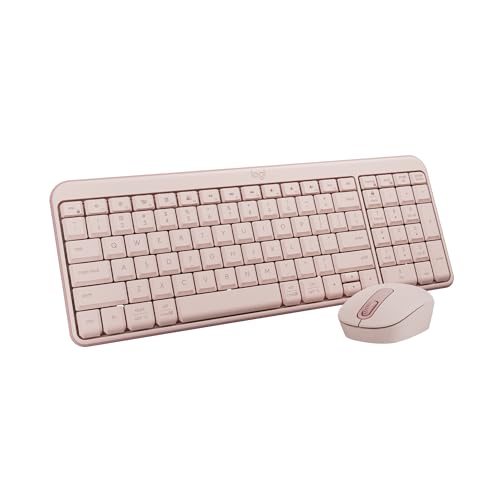
Logitech MK250 Compact Wireless Bluetooth Keyboard and Mouse Combo
A compact Bluetooth keyboard and mouse combo that pairs without a dongle or USB port, with a 12-month keyboard battery life and a number pad.
View on AmazonThese come from our ranked list Best Pink Keyboard and Mouse, which compares them spec by spec.
FAQ
Do I need a USB port for a Bluetooth keyboard and mouse?
No. The Logitech MK250 pairs over Bluetooth without a dongle or USB port. The Logitech MK270 and the RedThunder K10 wireless combo need a USB port for their receivers, so check for a free port first.
How do I wake the keyboard and mouse after they sleep?
The RedThunder K10 wireless combo goes to sleep after 2 minutes with no operation, so press any key to wake it. The Logitech MK270 has on/off switches, so switch it on if it stays off.
How long do the batteries last?
The Logitech MK270 lists a 36-month keyboard battery life and a 12-month mouse battery life, and the Logitech MK250 lists a 12-month keyboard battery life. The RedThunder K10 wireless combo has rechargeable batteries, so charge it when the keys or cursor stop responding.