How to Use an Internal Drive Externally
 By Theo LangUpdated
An internal drive works outside a computer when it sits in an enclosure that connects to a USB port. Match the enclosure to the drive: M.2 NVMe drives need an NVMe enclosure, and M.2 SATA drives need an enclosure that takes SATA. Slide the drive in, close the case, plug in the USB cable, and the computer sees it as an external drive.
Identify the drive you have
Look at the drive's size and connector before buying anything. An M.2 drive is a small stick with a notch at one end, and its length is printed as a number such as 2280. Check whether it is NVMe or SATA: the SABRENT EC-SNVE and the UGREEN 20Gbps enclosure take both, while the SABRENT EC-PNVO and the UGREEN 10Gbps enclosure take NVMe only.
Pick an enclosure that fits
Match the enclosure to the drive's length: all four enclosures here take 2242, 2260 and 2280 drives, and all but the SABRENT EC-SNVE also take 2230. Check the USB side too: the UGREEN 20Gbps enclosure runs at up to 20Gbps on a USB 3.2 Gen 2x2 port, while the other three run at up to 10Gbps. The SABRENT EC-SNVE takes bare drives in 2242, 2260 and 2280 lengths.
Fit the drive into the enclosure
Shut the computer down and unplug it before you remove the drive, and follow the maker's manual for your computer. Open the enclosure, slide the M.2 drive into the slot at a slight angle and press it flat, then lock it in place. The SABRENT EC-PNVO and EC-SNVE and the UGREEN 10Gbps enclosure are tool-free, while the UGREEN 20Gbps enclosure secures the drive with one screw.
Plug it in and check it appears
Connect the enclosure to the computer with the USB-C cable and wait for the drive to appear in the file manager. All four enclosures work with no drivers. The SABRENT EC-PNVO, the SABRENT EC-SNVE and the UGREEN 20Gbps enclosure need no external power, so the computer should list the drive without extra software. If the drive does not appear, try another USB-C port and check that the cable is a data cable.
Use the drive for files or a backup
Once the drive appears, it works like any external drive: copy files to it, or point your backup software at it. For long transfers, the aluminum cases with thermal pads on the SABRENT EC-PNVO and the UGREEN 20Gbps enclosure help move heat off the drive. Eject the drive in the operating system before you unplug the cable.
What you need

SABRENT USB-C NVMe Enclosure & Reader
A tool-free aluminum enclosure for M.2 NVMe drives in 2230 to 2280 sizes, with USB 3.2 Gen 2 at up to 10Gbps and a thermal pad against the drive.
View on Amazon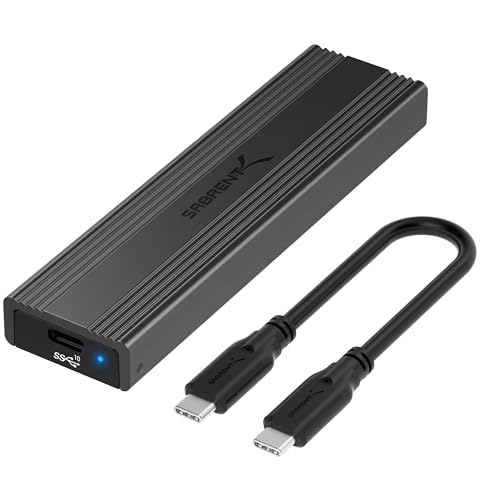
SABRENT Tool-Free NVMe & SATA M.2 SSD Enclosure
A tool-free enclosure that takes both M.2 NVMe and M.2 SATA drives in 2242, 2260 and 2280 lengths, with USB 3.2 Type-C at up to 10Gbps.
View on Amazon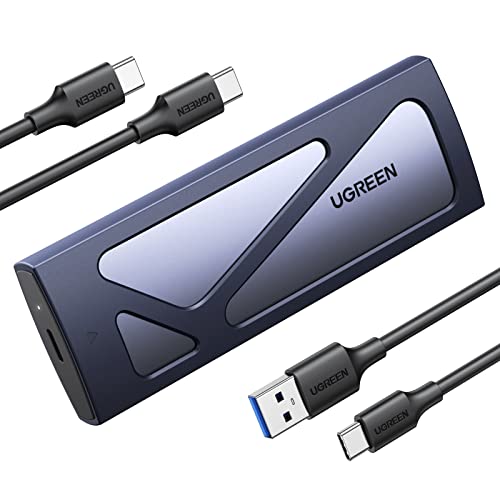
UGREEN USB-C M.2 NVMe SSD Enclosure
A tool-free USB-C enclosure for M.2 NVMe drives in 2230 to 2280 sizes, with USB 3.2 Gen2 at up to 10Gbps and a silicone case included.
View on Amazon
UGREEN USB-C M.2 NVMe SSD Enclosure,20Gbps
An enclosure for M.2 NVMe and SATA drives in 2230 to 2280 sizes, with USB 3.2 Gen 2x2 at up to 20Gbps and UASP and TRIM support.
View on AmazonThese come from our ranked list Best SSD Drive Enclosure, which compares them spec by spec.
FAQ
Can I use an internal hard drive as an external drive?
Yes, with an enclosure that matches the drive. Fit the drive into the enclosure, connect the USB cable, and the computer treats it as an external drive.
Does an M.2 enclosure work with any M.2 drive?
No. Check whether the drive is NVMe or SATA and match it to the enclosure: the SABRENT EC-SNVE and the UGREEN 20Gbps enclosure take both, while the SABRENT EC-PNVO and the UGREEN 10Gbps enclosure take NVMe only.
Do I need a power supply for an M.2 enclosure?
The SABRENT EC-PNVO, the SABRENT EC-SNVE and the UGREEN 20Gbps enclosure need no external power and run from the USB connection. Check the notes for any other enclosure before buying.