
Best M 2 Enclosure (2026): Top 5 by the Specs
 By Theo LangUpdated
You should choose the UGREEN USB-C M.2 NVMe SSD Enclosure,20Gbps if you need one enclosure for both PCIe NVMe and SATA NGFF SSDs up to 8TB. It supports 2230, 2242, 2260 and 2280 sizes, uses USB 3.2 Gen 2x2 with UASP and TRIM, and secures the SSD with one screw.
Your shortlist at a glance
PCKitHQ scores range from 9.2 to 9.8. See how we pick.
| Product and key specifications | Score and retailer |
|---|---|
01 Best Overall UGREEN USB-C M.2 NVMe SSD Enclosure,20Gbps | 9.8PCKitHQ scoreView on Amazon |
02 Second Pick FIDECO M.2 NVMe SSD Enclosure | 9.7PCKitHQ scoreView on Amazon |
03 Also Consider SSK M.2 NVME SATA SSD Enclosure | 9.5PCKitHQ scoreView on Amazon |
04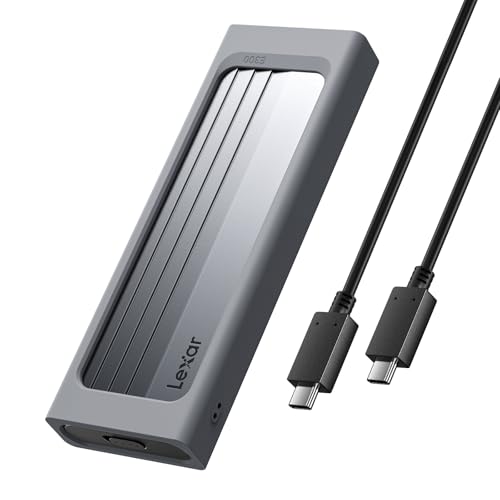 Also Consider Lexar E300 M.2 NVMe SSD Enclosure | 9.3PCKitHQ scoreView on Amazon |
05 Also Consider LINTYLE M.2 NVMe SSD Enclosure | 9.2PCKitHQ scoreView on Amazon |
A closer look at each configuration
UGREEN USB-C M.2 NVMe SSD Enclosure,20Gbps
score
This enclosure supports PCIe NVMe and SATA NGFF SSDs up to 8TB at up to 20Gbps with USB 3.2 Gen 2x2.
- Interface
- USB 3.2 Gen 2x2
- USB-C
- Yes
- Warranty
- 2 year
The UGREEN enclosure supports M and B+M Key SSDs in 2230, 2242, 2260 and 2280 sizes, for both PCIe NVMe and SATA NGFF drives up to 8TB. Transfer is stated at up to 20Gbps with a USB 3.2 Gen 2x2 port, and at up to 10Gbps on Mac mini and MacBooks, including Thunderbolt 3 and 4 ports, with actual speeds varying by SSD and host device. The aluminum case has a thermal pad, UASP and TRIM support, and an RTL9220 chip with short-circuit and over-current protection. Setup is plug-and-play with no extra power supply or drivers, securing the SSD with one screw. SSD is not included. Warranty is stated as 2 year.
Choose it if
- You need support for both NVMe and SATA NGFF SSDs
- You need capacity support up to 8TB for your SSD
Consider another if
- You need capacity support above 8TB for your SSD
- You need to use an m-SATA SSD in the enclosure
FIDECO M.2 NVMe SSD Enclosure
score
This enclosure supports M.2 NVMe SSDs in 2230, 2242, 2260 and 2280 sizes at up to 10Gbps with USB 3.2 Gen 2 and UASP.
- Interface
- USB 3.2 Gen 2
- USB-C
- Yes
- Warranty
- ONE YEAR
The FIDECO enclosure supports M.2 NVMe SSDs with M and M+B Key in 2230, 2242, 2260 and 2280 sizes, and cannot support M.2 SATA SSDs. It uses USB 3.2 Gen 2 with UASP, with maximum speed stated to reach 10Gbps in theory. The sandwich style design allows installation with no tools, and the thermal pad contacts the enclosure for cooler operation in the maker description. A USB C to USB C cable with an attached USB A adapter is included. Compatible systems are Windows, Mac OS and Linux. For a new SSD, initialization is stated as needed before recognition. Warranty is stated as ONE YEAR.
Choose it if
- You need tool-free installation for M.2 NVMe SSDs
- You need sizes 2230, 2242, 2260 or 2280 supported
Consider another if
- You need to use a SATA M.2 SSD
- You need transfer speed above 10Gbps from the enclosure
SSK M.2 NVME SATA SSD Enclosure
score
This enclosure supports NVMe and SATA M.2 SSDs in 2242, 2260 and 2280 sizes at 10Gbps with USB 3.2 Gen 2.
- Interface
- USB 3.2 Gen 2
- Weight
- 0.22 lb
The SSK enclosure is for NVMe PCIe and SATA M-Key and B+M connector M.2 SSDs in 2242, 2260 and 2280 sizes. It does not support M.2 PCIe AHCI SSDs, M.2 PCIe devices such as WiFi and capture cards, mSATA SSDs, or non-M.2 form factor SSDs, and SSDs are not included. The Type C interface is stated with USB-C Gen 2 10Gbps or Thunderbolt 3 recommended, and backward compatibility with USB 3.1 Gen1 and USB 3.0 up to 5Gbps. The aluminum alloy shell is slim, and the package includes thermal pads, USB Type-C and USB 3.0 cables, and a screw driver. A blue indicator shows transfer status. The RTL9210B chip supports UASP and Trim, with plug-and-play and bus power.
Choose it if
- You need support for NVMe and SATA M.2 SSDs
- You need a 0.22 lb enclosure with included cables
Consider another if
- You need to use a 2230 M.2 SSD
- You need transfer speed above 10Gbps from the enclosure
Lexar E300 M.2 NVMe SSD Enclosure
score
This enclosure supports M.2 NVMe SSDs up to 4TB at up to 10Gbps with USB 3.2 Gen 2 and tool-free setup.
- Interface
- USB 3.2 Gen 2
- USB-C
- Yes
- Warranty
- 2 years
The Lexar E300 enclosure uses USB 3.2 Gen 2 and NVMe protocol, delivering up to 10Gbps theoretical transfer speed. It supports M Key and B+M Key interfaces for 2230, 2242, 2260 and 2280 M.2 NVMe SSDs, with maximum capacity support of 4TB, and does not support SATA SSDs. Compatibility with computers equipped with a Type-C interface is stated, including Lexar NM790 and NM1090 PRO SSDs in the product name description. The aluminum alloy casing has a built-in thermal pad for heat dissipation. The design includes a lanyard hole and shock-absorbing buffer structure. Installation is tool-free. Warranty is stated as 2 years limited manufacturer warranty.
Choose it if
- You need NVMe support up to 4TB capacity
- You need tool-free setup with a lanyard hole design
Consider another if
- You need capacity support above 4TB for your SSD
- You need to use a SATA SSD in the enclosure
LINTYLE M.2 NVMe SSD Enclosure
score
This enclosure supports M.2 NVMe PCIe SSDs only, in 2230, 2242, 2260 and 2280 sizes, at up to 10Gbps with USB 3.2 Gen2.
- Interface
- USB 3.2 Gen2
- USB-C
- Yes
- Warranty
- 2 Year
The LINTYLE enclosure is compatible only with M.2 NVMe PCIe SSDs with M Key and M+B Key in 2230, 2242, 2260 and 2280 sizes, and is not compatible with SATA NGFF SSDs. It is powered by USB 3.2 Gen2, with transfer stated at up to 10Gbps and actual speed depending on SSD, host port and cable quality. The aluminum alloy housing has a thermal pad, and the chip design includes short-circuit, over-current and overheating protection in the maker description. Installation is slide-open with no screws or tools, using retention clips. The package includes the enclosure, USB-C to USB-A cable, USB-C adapter, thermal pad, retention clips and user manual. Warranty is stated as 2 Year Manufacturer.
Choose it if
- You need NVMe PCIe support for your M.2 SSD
- You need slide-open tool-free installation with retention clips
Consider another if
- You need to use a SATA NGFF SSD
- You need transfer speed above 10Gbps from the enclosure
Make the choice for your setup
Match interface and SSD type
Check the SSD type before the speed figure. The UGREEN enclosure supports both PCIe NVMe and SATA NGFF SSDs. The SSK enclosure supports NVMe PCIe and SATA M.2 SSDs. The FIDECO, Lexar E300 and LINTYLE enclosures support NVMe SSDs and state that SATA SSDs are not supported. Interface figures also differ: UGREEN uses USB 3.2 Gen 2x2 at up to 20Gbps, while FIDECO, SSK, Lexar and LINTYLE use USB 3.2 Gen 2 or Gen2 at up to 10Gbps. Keep the rated interface figure separate from actual transfer speed, which UGREEN and LINTYLE state varies by SSD, host device, host port and cable quality.
Check size and capacity support
Size support is stated in M.2 length numbers. UGREEN, FIDECO, Lexar and LINTYLE support 2230, 2242, 2260 and 2280 sizes. SSK supports 2242, 2260 and 2280 sizes. Capacity support is stated for two picks: UGREEN supports SSDs up to 8TB, and Lexar supports up to 4TB maximum capacity. Compare FIDECO, SSK and LINTYLE by size support, SSD type and interface figures in their own descriptions. Key support also matters: each pick supports M Key, M+B Key, or both, in its own description. Check the length of your own SSD against these figures before you buy, since a drive in an unsupported length will not seat in the enclosure. Shoppers with a related need can compare our guide to the Best Thunderbolt NVMe Enclosure.
Compare installation and included parts
Installation methods differ in stated detail. FIDECO uses a sandwich style design with no tools. Lexar uses tool-free setup. LINTYLE uses a slide-open design with retention clips and no screws or tools. UGREEN secures the SSD with one screw and states plug-and-play with no extra power supply or drivers. SSK states plug-and-play, bus power and no additional drivers, and includes thermal pads, USB Type-C and USB 3.0 cables, and a screw driver. LINTYLE includes a cable, adapter, thermal pad, retention clips and manual. FIDECO includes a USB C to USB C cable with an attached USB A adapter. Thermal pads come with UGREEN, FIDECO, SSK, Lexar and LINTYLE in different forms.
Before you decide, also read Best SSD Enclosure.
FAQ: M 2 Enclosure
Which enclosures support both NVMe and SATA SSDs?
The UGREEN enclosure supports both PCIe NVMe and SATA NGFF SSDs up to 8TB. The SSK enclosure supports NVMe PCIe and SATA M.2 SSDs in 2242, 2260 and 2280 sizes. The FIDECO, Lexar and LINTYLE enclosures state NVMe support and state that SATA SSDs are not supported.
What transfer speeds are stated for these enclosures?
UGREEN states up to 20Gbps with USB 3.2 Gen 2x2, and up to 10Gbps on Mac mini and MacBooks. FIDECO, SSK, Lexar and LINTYLE state up to 10Gbps with USB 3.2 Gen 2 or Gen2. UGREEN and LINTYLE state actual speed varies by SSD and host factors.
Which M.2 sizes does each enclosure support?
UGREEN, FIDECO, Lexar and LINTYLE support 2230, 2242, 2260 and 2280 sizes. SSK lists 2242, 2260 and 2280 sizes. Capacity support figures given here are up to 8TB for UGREEN and up to 4TB for Lexar.

