Best Graphics Tablet with Stylus (2026): 4 Picks Compared
 By Theo LangUpdated
You should choose the XP-Pen XPPen Artist12 Pro 11.6" Drawing Tablet with Screen Pen Display if you want to draw directly on an 11.6-inch screen with a battery-free stylus. It pairs 8192 levels of pressure sensitivity and 60 degrees of tilt support with 8 customizable shortcut keys and a Red Dial for zoom and brush size changes.
Your shortlist at a glance
PCKitHQ scores range from 9.2 to 9.8. See how we pick.
| Product and key specifications | Score and retailer |
|---|---|
01 Best Overall XPPen Artist12 Pro 11.6-inch Drawing Tablet | 9.8PCKitHQ scoreView on Amazon |
02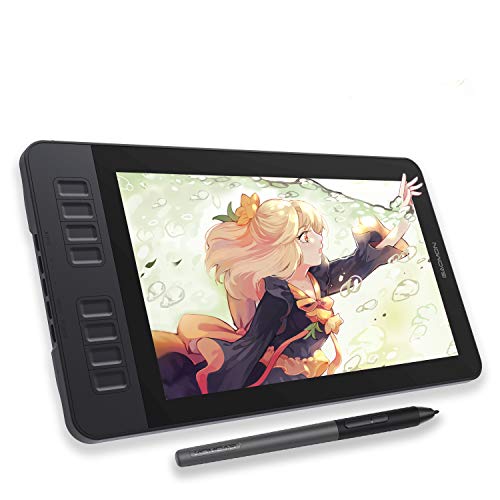 Second Pick GAOMON PD1161 Drawing Tablet | 9.6PCKitHQ scoreView on Amazon |
03 Also Consider DIGIDRAW T610 Drawing Tablet 10x6-inch | 9.4PCKitHQ scoreView on Amazon |
04 Also Consider UGEE Drawing Tablet Graphics | 9.2PCKitHQ scoreView on Amazon |
A closer look at each configuration
XPPen Artist12 Pro 11.6-inch Drawing Tablet
score
The XP-Pen Artist12 Pro combines an 11.6-inch fully-laminated screen with 8192 pressure levels and a battery-free stylus.
- Screen size
- 11.6 in
- Weight
- 3.31 lb
This pen display has an 11.6-inch IPS screen with fully-laminated construction and a built-in anti-glare protective film. The battery-free stylus requires no charging and provides 8192 levels of pressure sensitivity with tilt support up to 60 degrees. Controls include a Red Dial for zoom and brush size changes plus 8 customizable shortcut keys. It must be connected to a host device through a 3-in-1 cable and cannot be used as a standalone tablet. System compatibility covers Windows 7 or later, macOS 10.10 or later, ChromeOS 88 or later, and Linux. Weight is 3.31 lb. Creative software named includes Photoshop, Illustrator, and SAI. When connected, it also enables digital writing, document annotation, and real-time screen sharing on Zoom, Microsoft Teams, and Google Meet.
Choose it if
- You want to draw directly on an 11.6-inch IPS screen
- You want 8192 pressure levels with 60 degrees of tilt
Consider another if
- You need a screen larger than 11.6 inches for drawing
- You need a standalone tablet that works without a host device
GAOMON PD1161 Drawing Tablet
score
The GAOMON PD1161 combines an 11.6-inch FHD screen with 8192 pressure levels, tilt support, and a battery-free AP50 pen.
- Screen size
- 11.6 in
- Weight
- 1.9 lb
- Warranty
- 1-year warranty
This pen display has a full HD 11.6-inch IPS screen with a pre-installed matte film. Color figures include 72% NTSC (100% SRGB) color gamut and 16.7 million display colors. The battery-free AP50 pen provides 8192 levels of pressure sensitivity and tilt function. The side has 8 press keys and the pen has 2 programmable buttons. It must be connected to a laptop or computer, with HDMI and USB ports or an extra converter for connection. Compatibility covers Windows 7 or later and macOS 10.12 or later. Weight is 1.9 lb. Warranty is a 1-year warranty under non human made damage, with accident damage not covered. The box contents include a pen holder, 8 replacement nibs, a drawing glove, a 3 in 2 USB cable, an AC adapter, and a quick guide.
Choose it if
- You want an 11.6-inch FHD screen with a pre-installed matte film
- You want 8 press keys plus 2 programmable pen buttons
Consider another if
- You need a screen larger than 11.6 inches for drawing
- You need a standalone tablet that works without a computer
DIGIDRAW T610 Drawing Tablet 10x6-inch
score
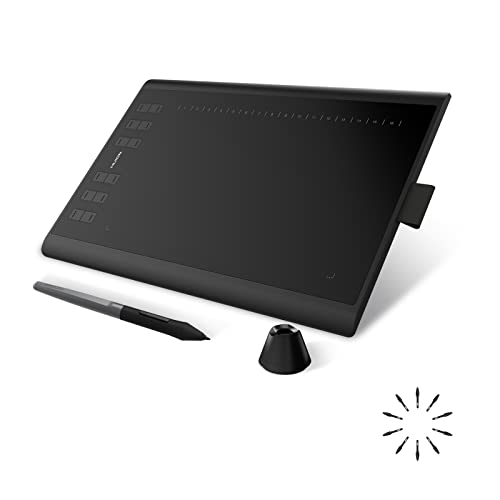
The DIGIDRAW T610 is a screenless 10 by 6 inch tablet with 16,384 pressure levels and a battery-free stylus.
- Active area
- 10"x6"
- Weight
- 1.01 lb
- Warranty
- 1-year warranty
This screenless tablet has a 10 by 6 inch drawing area with a textured paper-like surface and a 0.30-inch body. The battery-free stylus provides 16,384 pressure levels, and MagicPen 3.0 supports brush dynamics including size, opacity, flow, smudge blending, grain texture, and edge hardness. Connection is by USB-C with a 300 PPS report rate figure. Compatibility covers Windows, macOS, ChromeOS, and Android 14+ devices. InkBoard annotation software is included for PDFs, lecture notes, and slides. Weight is 1.01 lb. Warranty is a 1-year warranty. Stated uses include online classes, digital signatures, and document annotation with the included InkBoard software.
Choose it if
- You want a 10 by 6 inch drawing area without a screen
- You want 16,384 pressure levels from a battery-free stylus
Consider another if
- You need a drawing area larger than 10 by 6 inches
- You need pressure levels above 16,384 for your brush work
UGEE Drawing Tablet Graphics
score
The UGEE M708 V2 is a screenless tablet with a 10 by 6.25-inch working area and 8 customizable express keys.
- Active area
- 10 x 6.25
- Weight
- 1.45 lb
This screenless graphics tablet has a 10 by 6.25-inch working area with a paper-like surface and a slim panel. It includes a battery-free stylus and supports up to 60 degrees of tilt brush effect for shading. The side has 8 customizable express keys for shortcuts such as eraser, zoom in and out, scrolling, and undo. It requires connection to a computer or compatible mobile device and does not operate as a standalone tablet. Compatibility covers Windows, macOS, Chrome OS, and Android 6.0 or later devices, and iPhone is not supported. Weight is 1.45 lb. For Mac OS 10.12 or above, the driver is downloaded from the UGEE official website before use.
Choose it if
- You want a 10 by 6.25-inch working area without a screen
- You want 8 customizable express keys with 60 degrees of tilt
Consider another if
- You need a working area larger than 10 by 6.25 inches
- You need a tablet that works with an iPhone
Make the choice for your setup
Screen display or screenless tablet
Two picks draw directly on a screen and two use a separate drawing area. The XP-Pen Artist12 Pro and the GAOMON PD1161 each have an 11.6-inch screen, so your pen moves on the same surface that shows the image. The DIGIDRAW T610 has a 10 by 6 inch drawing area and the UGEE M708 V2 has a 10 by 6.25-inch working area, so you draw on the tablet surface while the image appears on a connected computer or device screen. Compare the 11.6-inch screen size with the 10 by 6 inch and 10 by 6.25-inch working areas against the desk space and canvas size you plan to use. The XP-Pen screen is fully-laminated with a built-in anti-glare protective film, and the GAOMON screen has a pre-installed matte film.
Pressure levels and tilt support
Pressure level figures differ by pick and belong to each stylus. The XP-Pen Artist12 Pro stylus provides 8192 levels of pressure sensitivity with tilt support up to 60 degrees. The GAOMON PD1161 AP50 pen also provides 8192 levels of pressure sensitivity and tilt function. The DIGIDRAW T610 stylus provides 16,384 pressure levels with MagicPen 3.0 brush dynamics. The UGEE M708 V2 supports up to 60 degrees of tilt brush effect. Compare 8192 and 16,384 as stated figures for the named stylus, and match tilt support to the shading work you plan to do in your software. All four picks name a battery-free stylus, so pen charging is not part of the stated setup for any of them. For a closely related choice, read our guide to the Best Pen Tablet for Online Teaching.
Connection and system compatibility
Each pick connects to a host device, and the stated systems differ. The XP-Pen Artist12 Pro must be connected to a host device and covers Windows 7 or later, macOS 10.10 or later, ChromeOS 88 or later, and Linux. The GAOMON PD1161 must be connected to a laptop or computer and covers Windows 7 or later and macOS 10.12 or later, with HDMI and USB ports or an extra converter for connection. The DIGIDRAW T610 connects by USB-C and covers Windows, macOS, ChromeOS, and Android 14+ devices. The UGEE M708 V2 covers Windows, macOS, Chrome OS, and Android 6.0 or later devices. Check the named operating system versions against your own computer or device before you choose, since each pick lists different versions.
For a wider shortlist, start with Best Graphics Tablet for Digital Art.
FAQ: Graphics Tablet with Stylus
Which picks have a built-in screen?
The XP-Pen Artist12 Pro and the GAOMON PD1161 each have an 11.6-inch screen for drawing directly on the display. The DIGIDRAW T610 has a 10 by 6 inch drawing area and the UGEE M708 V2 has a 10 by 6.25-inch working area.
Do these styluses need charging?
Each pick names a battery-free stylus. The XP-Pen Artist12 Pro stylus requires no charging, the GAOMON PD1161 includes a battery-free AP50 pen, the DIGIDRAW T610 stylus is battery-free, and the UGEE M708 V2 includes a battery-free stylus.
Can these tablets work without a computer?
The XP-Pen Artist12 Pro must be connected to a host device and cannot be used as a standalone tablet. The GAOMON PD1161 must be connected to a laptop or computer. The UGEE M708 V2 requires connection to a computer or compatible mobile device. The DIGIDRAW T610 connects by USB-C to compatible Windows, macOS, ChromeOS, and Android 14+ devices.