
Best Pen Tablet with Screen (2026): Our 8 Picks Ranked
 By Theo LangUpdated
Choose the Simbans PicassoTab 10" Standalone Drawing Tablet for beginners who want a 10-inch standalone screen with no computer needed, rather than a 13.3-inch pen display that must connect to a computer. It pairs a paper-like laminated screen with a 4096-level pen, preloaded creative apps and tutorials for drawing, painting and animation anywhere.
Your shortlist at a glance
PCKitHQ scores range from 9.2 to 9.8. See how we pick.
| Product and key specifications | Score and retailer |
|---|---|
01 Best Overall PicassoTab 10-inch Standalone Drawing Tablet | 9.8PCKitHQ scoreView on Amazon |
02 Second Pick HUION Kamvas 13 (Gen 3) Drawing Tablet | 9.7PCKitHQ scoreView on Amazon |
03 Also Consider HUION Kamvas 13 (Gen 3) Drawing Tablet | 9.6PCKitHQ scoreView on Amazon |
04 Also Consider 11-inch Standalone Drawing Tablet | 9.5PCKitHQ scoreView on Amazon |
05 Also Consider 14-inch Standalone Drawing Tablet | 9.5PCKitHQ scoreView on Amazon |
06 Also Consider XPPen Artist12 Pro 11.6-inch Drawing Tablet | 9.4PCKitHQ scoreView on Amazon |
07 Also Consider XPPen 15.6-inch Drawing Tablet | 9.3PCKitHQ scoreView on Amazon |
08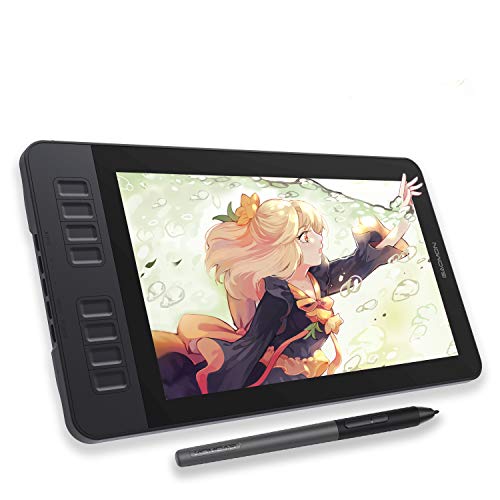 Also Consider GAOMON PD1161 Drawing Tablet | 9.2PCKitHQ scoreView on Amazon |
A closer look at each configuration
PicassoTab 10-inch Standalone Drawing Tablet
score
A 10-inch standalone tablet with a 4096-level pen and preloaded apps for beginners learning to draw.
- Screen size
- 10 in
- Weight
- 3.31 lb
- Warranty
- 1 Year
This PicassoTab A10 is a standalone 10-inch tablet, so drawing, painting, animation, tutorials and guided lessons run directly on the device with no computer needed. The laminated screen reduces glare and parallax, and the 4096-level pressure-sensitive stylus supports sketching and illustration. An octa-core processor with 6GB RAM handles drawing apps, schoolwork, streaming and multitasking, with storage expandable up to 1TB. Preloaded creative apps, lifetime tutorial upgrades, a tablet case, drawing glove, power adapter and pre-installed screen protector are included. The weight is 3.31 lb, and the warranty is 1 Year.
Choose it if
- You want to draw anywhere with no computer needed
- You are a beginner who wants tutorials and guided lessons
Consider another if
- You need a 13.3-inch screen for your computer
- You need 16384 pressure levels from the pen
HUION Kamvas 13 (Gen 3) Drawing Tablet
score
A 13.3-inch pen display with 16384 pressure levels and dual dials for designers and illustrators.
- Screen size
- 13.3 in
- Weight
- 1.96 lb
- Warranty
- 1 Year
This black Kamvas 13 (Gen 3) is a pen display, not a standalone product, and it must connect to a computer or laptop to work. The fully laminated 13.3-inch screen uses Canvas Glass 2.0 for reduced glare, with 99% sRGB coverage, 16.7 million display colors and a factory calibration report. PenTech 4.0 provides 16384 levels of pressure sensitivity, 2g IAF and three customized pen side buttons. A USB-C single cable connection, five programmable shortcut keys and dual dial buttons support the workflow, with an adjustable ST300 stand. Compatibility covers Windows 10 or later, Mac OS 10.12 or later, Android and Linux, the weight is 1.96 lb, and the warranty is 1 Year.
Choose it if
- You connect a pen display to a computer or laptop
- You want 16384 pressure levels and dual dial buttons
Consider another if
- You need a standalone tablet with no computer
- You need a 15.6-inch screen for drawing
HUION Kamvas 13 (Gen 3) Drawing Tablet
score
The pink 13.3-inch Kamvas 13 (Gen 3) pen display with 16384 pressure levels and dual dials.
- Screen size
- 13.3 in
- Weight
- 1.91 lb
- Warranty
- 1 Year
This pink Kamvas 13 (Gen 3) differs from the black version in color and weight, at 1.91 lb, while the pen display hardware stays the same. It must connect to a computer or laptop, with a fully laminated 13.3-inch Canvas Glass 2.0 screen, 99% sRGB coverage and 16.7 million display colors. PenTech 4.0 provides 16384 pressure levels, 2g IAF and three pen side buttons, and a USB-C single cable, five shortcut keys and dual dials support the workflow. The adjustable ST300 stand sets the working angle, compatibility covers Windows, Mac, Android and Linux, and the warranty is 1 Year.
Choose it if
- You want the pink color option in a 13.3-inch pen display
- You work on Windows, Mac, Android or Linux systems
Consider another if
- You need a standalone tablet with no computer
- You need a 14-inch standalone screen for drawing
11-inch Standalone Drawing Tablet
score
An 11-inch standalone tablet with a 2K laminated screen and 4096-level pen for students and artists.
- Screen size
- 11 in
- Warranty
- 1 Year
This PicassoTab X11 is a standalone 11-inch tablet that needs no computer, with five preloaded creative apps for sketching, painting, animation, tutorials and guided lessons. The fully laminated 11-inch 2K screen reduces parallax and glare, and the 4096-level pressure-sensitive stylus supports sketching, shading and illustration. An octa-core processor with 6GB RAM and 128GB storage, expandable up to 1TB, handles drawing apps, schoolwork, streaming and multitasking. Lifetime app upgrades, a tablet case, drawing glove, power adapter and pre-installed screen protector are included, and the warranty is 1 Year.
Choose it if
- You want an 11-inch standalone screen with no computer
- You learn with tutorials, guided practice and drawing guides
Consider another if
- You need a 13.3-inch pen display for a computer
- You need 16384 pressure levels from the pen
14-inch Standalone Drawing Tablet
score
A 14-inch standalone tablet with a laminated FHD screen and 4096-level pen for graphics artists.
- Screen size
- 14 in
- Warranty
- 1 Year
This PicassoTab X14 is a standalone 14-inch tablet with no computer needed for drawing, painting, animation, tutorials and guides. The fully laminated 14-inch FHD screen reduces parallax and glare, and the 4096-level pressure-sensitive pen supports sketching and illustration. An octa-core CPU with 6GB RAM and 128GB storage, expandable to 1TB, runs drawing apps, schoolwork, streaming and multitasking. Five preloaded apps, lifetime app upgrades, a tablet case, drawing glove, power adapter and pre-installed screen protector are included, and the warranty is 1 Year.
Choose it if
- You want a 14-inch standalone PicassoTab screen
- You draw and learn with no computer needed
Consider another if
- You need a 10-inch compact screen for travel
- You need 16384 pressure levels from the pen
XPPen Artist12 Pro 11.6-inch Drawing Tablet
score
An 11.6-inch pen display with 8192 pressure levels, tilt support and eight shortcut keys.
- Screen size
- 11.6 in
- Weight
- 3.31 lb
This XP-Pen Artist12 Pro is a drawing monitor that must connect to a host device and cannot be used as a standalone tablet. The 11.6-inch IPS display is fully laminated with an anti-glare protective film, and the battery-free stylus provides 8192 levels of pressure sensitivity with tilt support up to 60 degrees. A Red Dial and eight customizable shortcut keys support zoom and brush size changes, and a 3-in-1 cable connects the tablet. Compatibility covers Windows 7 or later, macOS 10.10 or later, ChromeOS 88 or later and Linux, with software including Photoshop, Illustrator and SAI. The weight is 3.31 lb.
Choose it if
- You connect a drawing monitor to a host device
- You want a battery-free stylus with 60-degree tilt support
Consider another if
- You need a standalone tablet with no computer
- You need 16384 pressure levels from the pen
XPPen 15.6-inch Drawing Tablet
score
A 15.6-inch pen display with 16384 pressure levels, a Red Dial and eight shortcut keys.
- Screen size
- 15.6 in
- Weight
- 7.28 lb
- Warranty
- 12-month warranty
This XP-Pen Artist 15.6 Pro must connect with a computer or laptop and is not a standalone drawing tablet. The 15.6-inch full-laminated IPS display has 1920x1080 full HD resolution, 88% NTSC and 120% sRGB color accuracy with a 178-degree visual angle. The battery-free stylus provides up to 16384 levels of pressure sensitivity, and eight customizable shortcut keys plus a Red Dial support zoom and scrolling. The profile measures 11 mm, with a screen-brightness button for adjustment. Compatibility covers Windows, Mac OS X and Chrome OS with software including Photoshop, Painter and Illustrator, the weight is 7.28 lb, and the warranty is 12-month warranty.
Choose it if
- You need a 15.6-inch screen for drawing and editing
- You want 16384 pressure levels with a battery-free stylus
Consider another if
- You need a standalone tablet with no computer
- You need a tablet weight below 7.28 lb
GAOMON PD1161 Drawing Tablet
score
An 11.6-inch pen display with 8192 pressure levels and eight shortcut keys for digital art.
- Screen size
- 11.6 in
- Weight
- 1.9 lb
- Warranty
- 1 year warranty
This GAOMON PD1161 is not a standalone tablet and must connect to a laptop or computer running Windows or Mac OS. The full HD 11.6-inch IPS screen has a pre-installed matte film, with 72% NTSC and 100% sRGB color gamut and 16.7 million display colors. The battery-free AP50 stylus provides 8192 levels of pressure sensitivity and tilt function, and eight press keys plus two pen buttons can be programmed in the driver. The box includes the stylus, pen holder, eight replacement nibs, a drawing glove, a 3 in 2 USB cable and an AC adapter. The weight is 1.9 lb, and the warranty is 1 year warranty.
Choose it if
- You draw on an 11.6-inch FHD IPS screen with a computer
- You want a battery-free stylus with tilt function
Consider another if
- You need a standalone tablet with no computer
- You need a 15.6-inch screen for drawing
Make the choice for your setup
Standalone tablets and pen displays
Standalone tablets in this guide run drawing apps directly on the device with no computer needed: the PicassoTab A10 at 10 inches, the PicassoTab X11 at 11 inches and the PicassoTab X14 at 14 inches. Pen displays must connect to a computer or laptop: both Kamvas 13 (Gen 3) models at 13.3 inches, the XP-Pen Artist12 Pro and GAOMON PD1161 at 11.6 inches, and the XP-Pen Artist 15.6 Pro at 15.6 inches. Standalone models include preloaded creative apps and tutorials, while the Kamvas 13 (Gen 3) models connect by a USB-C single cable and the XP-Pen Artist12 Pro connects by a 3-in-1 cable to host software. Screen sizes here run from 10 inches to 15.6 inches.
Pen pressure levels and tilt
Pressure levels differ across these picks. The PicassoTab standalone tablets provide 4096-level pressure-sensitive pens, the XP-Pen Artist12 Pro and GAOMON PD1161 provide 8192 levels, and both Kamvas 13 (Gen 3) models and the XP-Pen Artist 15.6 Pro provide 16384 levels. Tilt support is stated up to 60 degrees on the XP-Pen Artist12 Pro, and the GAOMON AP50 stylus includes tilt function. Battery-free styluses appear on the XP-Pen Artist12 Pro, XP-Pen Artist 15.6 Pro and GAOMON PD1161, so those pens need no charging. The highest pressure figure here is 16384 levels on the Kamvas 13 (Gen 3) models and the XP-Pen Artist 15.6 Pro, at 16384 levels. If that fits your setup better, see our guide to the Best Pen Tablet for Teaching.
Screen size, storage and weight
Screen sizes run from 10 inches on the PicassoTab A10 to 15.6 inches on the XP-Pen Artist 15.6 Pro, with 11-inch, 11.6-inch, 13.3-inch and 14-inch models between them. Standalone storage figures include 128GB on the PicassoTab X11 and X14, each expandable up to 1TB, with 6GB RAM on the standalone PicassoTab models. Weights run from 1.9 lb on the GAOMON PD1161 and 1.91 lb on the pink Kamvas 13 to 3.31 lb on the PicassoTab A10 and XP-Pen Artist12 Pro and 7.28 lb on the XP-Pen Artist 15.6 Pro. The PicassoTab X14 screen measures 14 inches, and the XP-Pen Artist 15.6 Pro screen measures 15.6 inches.
Comparing more options? See Best Mouse with Side Buttons.
FAQ: Pen Tablet with Screen
Which pen tablets with screens work without a computer?
The PicassoTab A10, PicassoTab X11 and PicassoTab X14 are standalone tablets that run drawing apps directly on the device with no computer needed. The Kamvas 13 (Gen 3) models, XP-Pen models and GAOMON PD1161 are pen displays that must connect to a computer or laptop.
How many pressure levels do these pen tablets have?
The PicassoTab standalone tablets provide 4096-level pens, the XP-Pen Artist12 Pro and GAOMON PD1161 provide 8192 levels, and both Kamvas 13 (Gen 3) models and the XP-Pen Artist 15.6 Pro provide 16384 levels. The XP-Pen Artist12 Pro also states tilt support up to 60 degrees.
What screen sizes do these drawing tablets offer?
Screen sizes here run from 10 inches on the PicassoTab A10 to 15.6 inches on the XP-Pen Artist 15.6 Pro. Models between them include 11 inches on the PicassoTab X11, 11.6 inches on the XP-Pen Artist12 Pro and GAOMON PD1161, 13.3 inches on the Kamvas 13, and 14 inches on the PicassoTab X14.


