
Best Digital Pen Tablet (2026): Top 4 by the Specs
 By Theo LangUpdated
If you want a compact tablet for drawing, writing and note-taking on Mac, Windows, Linux or Android, buy the HUION Inspiroy H640P 6x4 inch Drawing Tablet 8192 Pen Pressure: its 6x4 inch active area, battery-free stylus and 6 hot keys fit a crowded desk at 0.61 lb. The H1060P moves up to a 10 x 6.25 inch active area, while the G430S drops to a 4 x 3 inch area built for OSU.
Your shortlist at a glance
PCKitHQ scores range from 9.2 to 9.8. See how we pick.
| Product and key specifications | Score and retailer |
|---|---|
01 | 9.8PCKitHQ scoreView on Amazon |
02 | 9.6PCKitHQ scoreView on Amazon |
03 Also Consider GAOMON S620 Graphics Drawing Tablet | 9.4PCKitHQ scoreView on Amazon |
04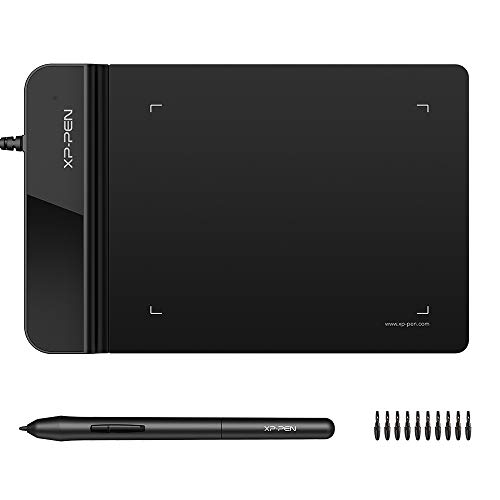 Also Consider Drawing Tablet XPPen G430S OSU | 9.2PCKitHQ scoreView on Amazon |
A closer look at each configuration
HUION Inspiroy H640P 6x4-inch Drawing Tablet 8192 Pen Pressure
score
The H640P pairs a 6x4 inch active area with 8192 pressure levels, a battery-free stylus, tilt and 6 hot keys.
- Active area
- 6x4 inch
- Warranty
- 1 year warranty
The H640P comes with the battery-free PW100 stylus, 8192 levels of pressure sensitivity, 5080 LPI resolution and a 233 PPS report rate, plus tilt and pen side buttons that switch between pen and eraser. Its 6 customizable press keys take commands like undo, zoom, brush switch and save, and the driver saves different shortcut profiles for different apps. The tablet is 0.3 inches thin, weighs 0.61 lb and has a 6x4 inch active area. It works with Mac, Windows, Linux PCs and Android 6.0 or later, and it does not support iPhone or iPad. Left-handed use works by flipping the tablet and adjusting the driver settings. The warranty is 1 year.
Choose it if
- You want a 6x4 inch active area on a 0.61 lb tablet
- You want 6 hot keys for undo, zoom and brush switching
Consider another if
- You need the 10 x 6.25 inch active area of the H1060P
- You need 12 press keys and 16 soft keys like the H1060P
HUION Inspiroy H1060P Graphics Drawing Tablet
score
The H1060P pairs a 10 x 6.25 inch active area with 12 press keys, 16 soft keys, ±60° tilt and a battery-free stylus.
- Active area
- 10 x 6.25 inches
- Warranty
- 1 year manufacturer
The H1060P has a 10 x 6.25 inch working area and a 10mm slim structure, with a battery-free PW100 stylus and ±60° tilt. Its 12 programmable press keys and 16 programmable soft keys take shortcuts like erase, zoom in and out, and scroll up and down, set in the driver. The tablet supports Windows 7 or later, macOS 10.12 or later, Android 6.0 or later and Linux on Ubuntu, and a USB adapter is required to connect to a Mac. A phone connects through the OTG connector, while iPhone and iPad are not supported. On Ubuntu it requires the Xorg display server, and Wayland is not supported. The symmetrical design suits right- and left-handed use, with a 180° adjustment in the driver for left-handed use. The warranty is 1 year manufacturer.
Choose it if
- You want a 10 x 6.25 inch active area for drawing
- You want 12 press keys plus 16 soft keys for shortcuts
Consider another if
- You need a 6x4 inch active area like the H640P
- You need the 4 x 3 inch active area of the G430S
GAOMON S620 Graphics Drawing Tablet
score
The S620 pairs a 6.5x4 inch active area with 8192 pressure levels, 266 PPS, 5080 LPI and 4 express keys.
- Active area
- 6.5*4 INCHES
- Warranty
- 1 year warranty
The S620 has a 6.5x4 inch active area with 8192 levels of pen pressure, a 266 PPS report rate, 5080 LPI resolution and a 10mm pen reading height. Its battery-free pen needs no charging, and its 4 customizable express keys take the functions you set. The tablet works with Windows 7 or later and macOS 10.12 or later, and it is not compatible with iPad or iPhone. It works with Photoshop, Illustrator, Clip Studio, Lightroom and other art programs, and with Zoom for online meetings and classes. Four rubber feet keep the tablet from slipping, and left- or right-handed use is set with a 180 degree rotation in the driver. The warranty is 1 year under non human made damage.
Choose it if
- You want a 6.5x4 inch active area for drawing and note-taking
- You want 4 express keys and a 10mm pen reading height
Consider another if
- You need a 4 x 3 inch active area like the G430S
- You need 6 hot keys like the H640P
Drawing Tablet XPPen G430S OSU
score
The G430S pairs a 4 x 3 inch active area with 8192 pressure levels, a battery-free stylus and a 2 mm thick body.
- Active area
- 4 x 3 inches
- Warranty
- 12-month warranty
The G430S has a 4 x 3 inch active area with 8192 levels of pen pressure, a battery-free PN01 stylus and a 266 RPS report rate, in a body 2 mm thick. It is designed for OSU gameplay, and no driver install is needed for OSU. It works with Windows 11, 10, 8 and 7 and Mac OS X 10.10 or later, and it is incompatible with iOS and iPadOS. The interface is micro USB to USB-A, so a Mac without a USB-A port needs an OTG transfer adapter. The tablet suits right- and left-handed use, and the box holds the tablet, the stylus, 10 replacement nibs, a pen-clipper and a quick guide. The warranty is 12 months.
Choose it if
- You want a 4 x 3 inch active area for OSU gameplay
- You want a 2 mm thick tablet you can hold in one hand
Consider another if
- You need the 10 x 6.25 inch active area of the H1060P
- You need an active area larger than 4 x 3 inches
Make the choice for your setup
Active area size
Active area is the first decision, because the four tablets span from 4 x 3 inches to 10 x 6.25 inches. The H640P has a 6x4 inch active area, the S620 has a 6.5x4 inch active area, the G430S has a 4 x 3 inch active area, and the H1060P has a 10 x 6.25 inch active area. A larger area gives your pen more room to move, while a smaller area keeps the tablet compact on a crowded desk. The G430S 4 x 3 inch area is very small, so confirm it meets your needs before you buy. The H1060P area is 10 x 6.25 inches, and its structure is 10mm slim.
Pressure levels, report rate and tilt
All four tablets share 8192 levels of pen pressure, so that figure does not separate them. The report rate does: the H640P reports at 233 PPS, the S620 reports at 266 PPS, and the G430S reports at 266 RPS. Resolution is 5080 LPI on the H640P and the S620. Tilt is the other split: the H1060P supports ±60° tilt, and the H640P has tilt as well. The S620 adds a 10mm pen reading height. All four styluses are battery-free, so drawing starts with the pen in hand. Compare these figures side by side: 8192 pressure levels, 233 PPS, 266 PPS, 266 RPS, 5080 LPI and ±60° tilt. A related shortlist covers the Best Pen Tablet with Screen.
Compatibility and operating systems
Check the operating system first, because none works with iPhone or iPad. The H640P works with Mac, Windows, Linux PCs and Android 6.0 or later. The H1060P supports Windows 7 or later, macOS 10.12 or later, Android 6.0 or later and Linux on Ubuntu, with a USB adapter required for Mac. The S620 works with Windows 7 or later and macOS 10.12 or later. The G430S works with Windows 11, 10, 8 and 7 and Mac OS X 10.10 or later; a Mac without a USB-A port needs an OTG adapter for its micro USB to USB-A interface. On Ubuntu, H1060P requires Xorg; Wayland is not supported.
Before you decide, also read Best Creative Pen Tablet.
FAQ: Digital Pen Tablet
Which tablets work with Android?
The H640P works with Android 6.0 or later, and the H1060P supports Android 6.0 or later. The S620 works with Windows 7 or later and macOS 10.12 or later, and the G430S works with Windows and Mac OS X 10.10 or later.
Do these tablets need a battery in the stylus?
No. All four tablets come with battery-free styluses: the H640P and H1060P use the PW100, the S620 has a battery-free pen, and the G430S uses the PN01. Each battery-free pen is ready to draw when you pick it up.
What active area sizes do these tablets have?
The H640P has a 6x4 inch active area, the H1060P has a 10 x 6.25 inch area, the S620 has a 6.5x4 inch area, and the G430S has a 4 x 3 inch area. The G430S 4 x 3 inch area is very small, so confirm it meets your needs.

