
Best Pen Tablet Price (2026): 6 Models Side by Side
 By Theo LangUpdated
You should choose the HUION Inspiroy H640P 6x4 inch Drawing Tablet 8192 Pen Pressure if you are starting digital drawing on a laptop and want a compact 6x4 inch active area with 8192 pressure levels. Its 6 customizable press keys and 0.61 lb weight suit beginners who draw at a crowded desk. Compare its area and pressure figures with the larger picks below.
Your shortlist at a glance
PCKitHQ scores range from 9.2 to 9.8. See how we pick.
| Product and key specifications | Score and retailer |
|---|---|
01 | 9.8PCKitHQ scoreView on Amazon |
02 Second Pick XPPen Deco 01 V3 10x6 Drawing Tablet | 9.7PCKitHQ scoreView on Amazon |
03 Also Consider PicassoTab 10-inch Standalone Drawing Tablet | 9.6PCKitHQ scoreView on Amazon |
04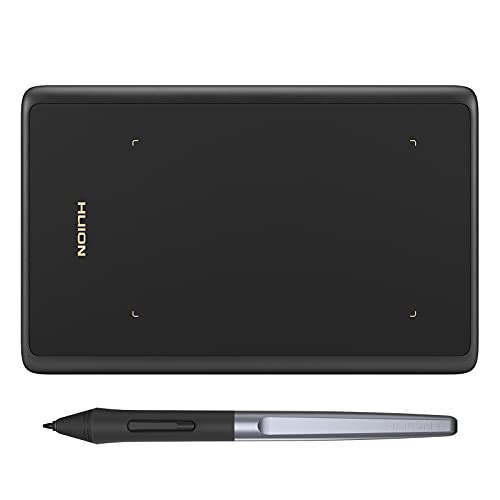 Also Consider HUION Drawing Tablet H420X Graphics Tablet | 9.4PCKitHQ scoreView on Amazon |
05 | 9.3PCKitHQ scoreView on Amazon |
06 Also Consider XOPPOX Graphics Drawing Tablet | 9.2PCKitHQ scoreView on Amazon |
A closer look at each configuration
HUION Inspiroy H640P 6x4-inch Drawing Tablet 8192 Pen Pressure
score
The H640P pairs a 6x4 inch active area with 8192 pressure levels, tilt, and 6 customizable press keys at 0.61 lb.
- Active area
- 6x4 inch
- Weight
- 0.61 lb
- Warranty
- 1 year warranty
This HUION Inspiroy H640P has a 6x4 inch active area and a battery-free PW100 stylus with 8192 levels of pressure sensitivity, 5080 LPI resolution, and a 233 PPS report rate. It is 0.3 inches thin and weighs 0.61 lb, so it fits a laptop bag for class or studio use. The 6 customizable press keys can hold commands such as undo, zoom, brush switch, and save, and the driver saves shortcut profiles per app. It works with Mac, Windows, and Linux PCs and Android 6.0 or later, supports left-handed use by flipping the tablet, and carries a 1 year warranty.
Choose it if
- You want a 6x4 inch active area for a crowded laptop desk
- You want 6 customizable press keys for undo and zoom
Consider another if
- You need the 10 x 6.25-inch active area of the Deco 01 V3
- You need the 10-inch standalone screen of the PicassoTab
XPPen Deco 01 V3 10x6 Drawing Tablet
score
The Deco 01 V3 offers a 10 x 6.25-inch active area with 16,384 pressure levels, 60 degrees of tilt, and 8 shortcut keys.
- Active area
- 10 x 6.25-inch
- Weight
- 2.2 lb
- Warranty
- 12-Month
This XP-Pen Deco 01 V3 has a 10 x 6.25-inch active area and weighs 2.2 lb. Its battery-free stylus provides 16,384 levels of pressure sensitivity and supports up to 60 degrees of tilt. The 8 customizable shortcut keys work for right and left-hand users. Connection is USB-C to USB-C with adapters included, and the box includes the tablet, stylus, 10 nibs, a stylus stand, a glove, a protective film, and cables. It works with Windows 7 or later, mac OS 10.13 or later, Android 10.0 or later, Chrome OS 88 or later, and Linux, and carries a 12-Month warranty.
Choose it if
- You want a 10 x 6.25-inch active area for laptop drawing
- You want 16,384 pressure levels with 60 degrees of tilt
Consider another if
- You need the 0.61 lb carrying weight of the HUION H640P
- You need the 10-inch standalone screen of the PicassoTab
PicassoTab 10-inch Standalone Drawing Tablet
score
The PicassoTab A10 is a standalone 10-inch tablet with a 4096-level pen, 6GB RAM, and preloaded creative apps.
- Screen size
- 10 in
- Weight
- 3.31 lb
- Warranty
- 1 Year
The Simbans PicassoTab A10 is a standalone drawing tablet with a laminated 10-inch screen, so no computer is needed. It weighs 3.31 lb. The active pen provides 4096 levels of pressure sensitivity. An octa-core processor with 6GB RAM runs the preloaded apps. The package includes 5 creative apps, 2 app upgrades, a tablet case, a drawing glove, a universal power adapter, and a pre-installed screen protector. Keep its standalone screen separate from the computer-connected active areas of the other picks. It carries a 1 Year warranty.
Choose it if
- You want a standalone 10-inch screen with no computer needed
- You want 5 preloaded creative apps with tutorials included
Consider another if
- You need the 16,384 pressure levels of the Deco 01 V3
- You need the 0.24 lb carrying weight of the HUION H420X
HUION Drawing Tablet H420X Graphics Tablet
score
The H420X provides a 4.17x2.6 inch active area with 8192 pressure levels and a 300 PPS report rate at 0.24 lb.
- Active area
- 4.17x2.6 inches
- Weight
- 0.24 lb
- Warranty
- 1 year
This HUION H420X has a 4.17x2.6 inch active area with dimensions of 6.77x4.3 inches, and it weighs 0.24 lb at 7mm thickness. Its battery-free stylus provides 8192 levels of pressure sensitivity with a 300 PPS report rate and 2 customizable side buttons. Setup is plug and play with no driver install needed. It works with Windows 7 or later, Mac OS 10.12 or later, and Android 6.0 or later, and it is not compatible with iOS. Documented uses include OSU games, signing documents, and note taking. It carries a 1 year warranty.
Choose it if
- You want a 4.17x2.6 inch active area for limited desk space
- You want plug and play setup with no driver install
Consider another if
- You need the 10 x 6.25-inch active area of the Deco 01 V3
- You need the 10-inch standalone screen of the PicassoTab
Drawing Tablet-XPPen Deco 01 V3 10x6.25-inch Graphics Tablet Digital Drawing Tablet for Chromebook
score
This Deco 01 V3 version offers a 10x6.25 inch active area with 16384 pressure levels, tilt, and 8 shortcut keys in pink.
- Active area
- 10x6.25 Inch
- Weight
- 1.25 lb
This XP-Pen Deco 01 V3 in pink has a 10x6.25 inch active area and weighs 1.25 lb. Its battery-free stylus provides 16384 levels of pressure sensitivity and supports up to 60 degrees of tilt. The eight round customizable shortcut keys can be programmed for software programs. It works with Windows 10, 8, and 7, MAC OS X 10.10 and above, Android 6.0 and above, and Chrome OS 88.0.4324.109 or above. Compared with the other Deco 01 V3 here, this version weighs less at 1.25 lb and documents Android 6.0 support. Keep the two versions separate when you compare weight.
Choose it if
- You want a 10x6.25 inch active area in a pink finish
- You want 16384 pressure levels with tilt support included
Consider another if
- You need the 2.2 lb weight of the other Deco 01 V3
- You need the 0.61 lb carrying weight of the HUION H640P
XOPPOX Graphics Drawing Tablet
score
The XOPPOX offers a 10×6 inch active area with 8192 pressure levels, 12 hot keys, and 20 replacement nibs included.
- Active area
- 10×6 Inch
- Weight
- 2.65 lb
- Warranty
- 12-month
This XOPPOX graphics tablet has a 10×6 inch active area and weighs 2.65 lb. Its battery-free pen provides 8192 levels of pressure sensitivity, and the package includes 20 replacement nibs. The 12 customizable shortcut keys work with 10 multimedia keys that are compatible with Windows only. Setup uses an installation driver on the removable disk, followed by settings and a computer restart. It works with Windows XP, 7, 8, 10, and 11, Android 4.4 and above, and macOS 11 or later, and it is not compatible with Chromebook. It carries a 12-month warranty.
Choose it if
- You want a 10×6 inch active area with 12 hot keys
- You want 20 replacement nibs included in the package
Consider another if
- You need the 16,384 pressure levels of the Deco 01 V3
- You need the 0.24 lb carrying weight of the HUION H420X
Make the choice for your setup
Active area and screen size
Active area decides how much of your screen one pen stroke covers. The HUION H420X gives 4.17x2.6 inches for limited desk space. The HUION H640P gives a 6x4 inch area. The two Deco 01 V3 versions and the XOPPOX give a 10 inch class area: 10 x 6.25 inches for both Deco versions and 10×6 inches for the XOPPOX. The PicassoTab A10 replaces the mapped area with a 10-inch standalone screen you draw on directly. Stated weights are 0.24 lb for the H420X, 0.61 lb for the H640P, 1.25 lb and 2.2 lb for the two Deco versions at the same 10x6.25 inch area, 2.65 lb for the XOPPOX, and 3.31 lb for the PicassoTab.
Pressure levels and report rates
Pressure figures split these picks into three groups. The PicassoTab pen documents 4096 levels. The H640P, H420X, and XOPPOX document 8192 levels. The two Deco 01 V3 versions document 16,384 and 16384 levels. Report rate figures appear on two picks: 233 PPS for the H640P and 300 PPS for the H420X. Tilt support is documented at up to 60 degrees for both Deco versions, and the H640P includes tilt support. Keep each figure with its own pen, because a level count is a pen figure, not a measured drawing result. Compare the documented counts directly when you choose between the 4096, 8192, and 16384 figures. For a closely related choice, read our guide to the Best Pen Tablet for Teaching.
Computer connection or standalone
Connection type separates these picks more than size does. The PicassoTab A10 is standalone with a 10-inch screen and 6GB RAM, so no computer is needed. The other five connect to a computer. The Deco 01 V3 in black documents USB-C to USB-C connectivity with adapters. The H420X documents plug and play with no driver install. The XOPPOX documents a driver install followed by settings and a restart. Operating system floors also differ, from Android 4.4 and above on the XOPPOX to Android 10.0 or later on the black Deco 01 V3. Shortcut counts run from 6 press keys on the H640P to 12 hot keys on the XOPPOX.
For a wider shortlist, start with Best Creative Pen Tablet.
FAQ: Pen Tablet Price
What active area sizes do these pen tablets have?
The HUION H420X documents 4.17x2.6 inches and the HUION H640P documents 6x4 inches. The two Deco 01 V3 versions document a 10x6.25 inch class area, and the XOPPOX documents 10×6 inches. The PicassoTab A10 documents a 10-inch standalone screen instead of a mapped area.
How many pressure levels do these drawing tablets have?
The PicassoTab pen documents 4096 levels. The HUION H640P, HUION H420X, and XOPPOX document 8192 levels. The two XP-Pen Deco 01 V3 versions document 16,384 and 16384 levels. Each figure belongs to that pick's own pen.
Which of these pen tablets works without a computer?
The Simbans PicassoTab A10 is standalone with a 10-inch laminated screen, a 4096-level pen, an octa-core processor and 6GB RAM, with 5 creative apps preloaded for drawing, painting and animation. The other five picks connect to a computer or phone by cable or adapter.
