
Best Pen Tablet for Teaching (2026): Our 6 Picks Ranked
 By Theo LangUpdated
The HUION Inspiroy H950P 8x5 inch Drawing Tablet 8192 Pen Pressure suits teachers who annotate slides and whiteboards: its 8 by 5 inch active area, battery-free stylus with 8192 levels of pressure sensitivity and 8 hot keys cover writing, drawing and shortcut commands on Mac, Windows, Linux and Android. The five other tablets below trade area, keys and wireless connection against that balance.
Your shortlist at a glance
PCKitHQ scores range from 9.2 to 9.8. See how we pick.
| Product and key specifications | Score and retailer |
|---|---|
01 | 9.8PCKitHQ scoreView on Amazon |
02 | 9.7PCKitHQ scoreView on Amazon |
03 Also Consider GAOMON M10K Drawing Tablet | 9.6PCKitHQ scoreView on Amazon |
04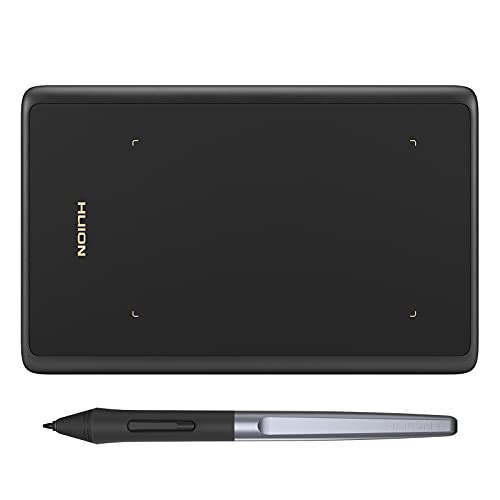 Also Consider HUION Drawing Tablet H420X Graphics Tablet | 9.4PCKitHQ scoreView on Amazon |
05 Also Consider XOPPOX Graphics Drawing Tablet | 9.3PCKitHQ scoreView on Amazon |
06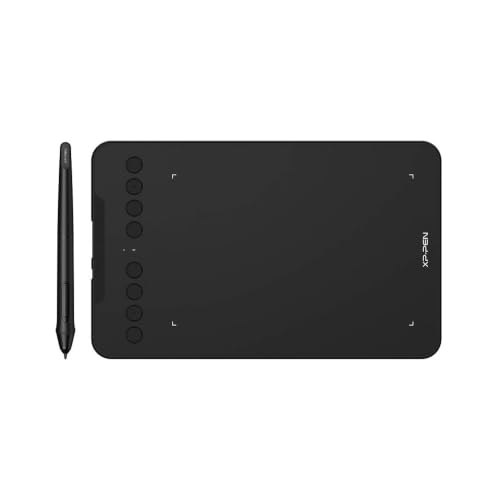 | 9.2PCKitHQ scoreView on Amazon |
A closer look at each configuration
HUION Inspiroy H950P 8x5-inch Drawing Tablet 8192 Pen Pressure
score
The 8 by 5 inch area, battery-free stylus with 8192 levels of pressure sensitivity and 8 hot keys suit teaching on Mac, Windows, Linux and Android.
- Active area
- 8x5
- Weight
- 1.76 lb
The HUION Inspiroy H950P pairs an 8 by 5 inch active area with a battery-free PW100 stylus at 8192 levels of pressure sensitivity and pen side buttons that switch between pen and eraser. Its 8 press keys can be customized in the Huion driver, with different shortcut settings for different apps. The tablet weighs 1.76 lb and measures 0.3 inch thick, and it works with Mac, Windows and Linux PCs as well as Android smartphones and tablets running OS version 6.0 or later. It works with Photoshop, SAI and Medibang Paint, and with OneNote, Microsoft Whiteboard and Zoom for online education and remote work.
Choose it if
- You teach with OneNote, Microsoft Whiteboard or Zoom
- You want 8 hot keys for shortcut commands
Consider another if
- You need the 10 by 6.25 inch area of the GAOMON M10K
- You need the Bluetooth connection of the XP-Pen Deco mini7W
XPPen Updated Deco Mini7 V2 Drawing Tablet-16384 Levels of Pressure Battery-Free Stylus
score
The 7 by 4 inch area, 16,384 levels of pressure sensitivity and 8 shortcuts suit beginners and students who draw on Chrome, PC, Mac and Android.
- Active area
- 7 x 4
- Weight
- 1.17 lb
- Warranty
- 12-month warranty
The XP-Pen Deco Mini7 V2 has a 7 by 4 inch active area and a battery-free stylus with 16,384 levels of pressure sensitivity, 60 degree tilt recognition and 8 customizable shortcuts for right and left-hand users. The tablet measures 10.2 by 6.3 by 0.36 inches and weighs 1.17 lb, and it connects by USB-C with an included USB to USB-C adapter. It works with Windows 7 or later, Mac OS X 10.10 or later, Android 10.0 or later, Harmony OS 2 or later, Chrome OS 88 or later and Linux. A 12-month warranty applies to this tablet.
Choose it if
- You want 16,384 levels of pressure sensitivity
- You want a 1.17 lb tablet to carry
Consider another if
- You need the 8 by 5 inch area of the HUION H950P
- You need the 10 by 6.25 inch area of the GAOMON M10K
GAOMON M10K Drawing Tablet
score
The 10 by 6.25 inch area, 10 press keys and touch ring suit teachers who want a large drawing space for design, writing and editing.
- Active area
- 10 x 6.25
- Weight
- 1.53 lb
- Warranty
- 1 year warranty under non human made damage
The GAOMON M10K has a 10 by 6.25 inch drawing space with a papery texture surface and a battery-free stylus AP31 with 8192 levels of pressure sensitivity. Its 10 press keys can be customized to favourite shortcuts, and a touch ring can be programmed for canvas zooming, brush adjusting and page scrolling. Two pen side buttons switch between pen and eraser. The tablet weighs 1.53 lb and works with Windows 7 or later, macOS 10.12 or later and certain Android phones and tablets running Android 11, 12, 13 and 14. It connects by USB cable, and the driver comes from the official GAOMON website. A 1 year warranty under non human made damage applies.
Choose it if
- You want the 10 by 6.25 inch drawing space
- You want 10 press keys and a touch ring
Consider another if
- You need the Bluetooth connection of the XP-Pen Deco mini7W
- You need the 0.73 lb weight of the XP-Pen Deco mini7W
HUION Drawing Tablet H420X Graphics Tablet
score
The 4.17 by 2.6 inch area, battery-free stylus and 167g weight suit teachers who need a small tablet for notes and annotation.
- Active area
- 4.17x2.6
- Warranty
- 1 year
The HUION H420X has a 4.17 by 2.6 inch active area in a 6.77 by 4.3 inch body that is 7mm thick and weighs 167g. Its battery-free stylus has 8192 levels of pressure sensitivity and a 300 PPS report rate, with 2 customizable side buttons that switch between right-clicking and the eraser. The tablet works with Windows 7 or later, Mac OS 10.12 or later and Android 6.0 or later, and it needs no driver install. It works with Photoshop, Clip Studio Paint, SAI and other major graphics applications. A 1 year warranty applies.
Choose it if
- You want a 167g tablet that fits a small desk
- You want plug-and-play use with no driver install
Consider another if
- You need the 8 by 5 inch area of the HUION H950P
- You need the 10 by 6.25 inch area of the GAOMON M10K
XOPPOX Graphics Drawing Tablet
score
The 10 by 6 inch area, 12 hot keys and 10 multimedia keys suit teachers who run lessons from Word, Excel and PowerPoint.
- Active area
- 10×6
- Weight
- 2.65 lb
- Warranty
- We provide a 12-month warranty for the drawing tablet from the date of purchase.
The XOPPOX drawing tablet has a 10 by 6 inch active area and a battery-free pen with 8192 levels of pressure sensitivity. The package includes 20 replacement nibs. It has 12 customizable shortcut keys and 10 multimedia keys, though the multimedia keys work only with Windows. The tablet weighs 2.65 lb and works with Windows XP, 7, 8, 10 and 11, Android 4.4 and above and macOS 11 or later, but not with iPhone, iPad or Chromebook. It works with Microsoft Word, Excel and PowerPoint, and with Photoshop, SAI and MediBang. A 12-month warranty applies from the date of purchase.
Choose it if
- You want 12 hot keys plus 10 multimedia keys
- You want the 10 by 6 inch area for lessons
Consider another if
- You need the Bluetooth connection of the XP-Pen Deco mini7W
- You need the 0.73 lb weight of the XP-Pen Deco mini7W
Drawing Tablet-XPPen Deco mini7W 7 x 4-inch Bluetooth 5.0 Graphic Tablet Pen Tablet
score
The Bluetooth 5.0 connection, 7 by 4 inch area and 0.73 lb weight suit teachers who move between rooms and teach wirelessly.
- Active area
- 7 x 4
- Wireless
- Yes
- Weight
- 0.73 lb
- Warranty
- 1-YEAR
The XP-Pen Deco mini7W has a 7 by 4 inch active area and a battery-free stylus with tilt response. It connects by Bluetooth 5.0 through the included USB dongle, and it also supports a USB-C to USB-C connection with the included adapter. It has 8 customizable press keys. The tablet weighs 0.73 lb and works with Windows 7 and above, Mac OS X 10.10 and higher, Android 6.0 and higher and Chrome OS 88.0.4324.109 or above. A 1-year warranty applies.
Choose it if
- You want a Bluetooth 5.0 wireless connection
- You want a 0.73 lb tablet with wireless connection
Consider another if
- You need the 10 by 6.25 inch area of the GAOMON M10K
- You need the 12 hot keys of the XOPPOX tablet
Make the choice for your setup
Match the active area to the board
A larger area suits broad strokes and full-slide annotation, while a small area suits a crowded desk. The GAOMON M10K offers 10 by 6.25 inches and the XOPPOX offers 10 by 6 inches. The HUION H950P offers 8 by 5 inches, and the XP-Pen Deco Mini7 V2 and Deco mini7W offer 7 by 4 inches. The HUION H420X offers 4.17 by 2.6 inches and suits short notes and signatures. A 10 by 6 inch tablet needs more desk room than a 7 by 4 inch tablet. Measure the desk space before choosing, since the tablet sits beside the keyboard during a lesson.
Count the shortcut keys you will use
Hot keys carry the commands a teacher repeats: undo, eraser, zoom and switching tools. The XOPPOX has 12 hot keys and 10 multimedia keys, though the multimedia keys work only with Windows. The GAOMON M10K has 10 press keys and a touch ring for canvas zooming, brush adjusting and page scrolling. The HUION H950P and the XP-Pen Deco Mini7 V2 each have 8 hot keys, and the Deco mini7W has 8 customizable press keys. The HUION H420X carries its shortcuts on 2 customizable side buttons on the pen. Match the key count to the commands you repeat in every lesson, since a key you never press adds nothing. For a closely related choice, read our guide to the Best Pen Tablet Price.
Check the connection and the software
A teaching tablet must connect to the computer or phone in the room and work with the apps on it. The XP-Pen Deco mini7W connects by Bluetooth 5.0 through a USB dongle and also by USB-C. The GAOMON M10K connects by USB cable. The XP-Pen Deco Mini7 V2 connects by USB-C cable with an included USB to USB-C adapter. The HUION H950P works with Mac, Windows, Linux and Android 6.0 or later, and the XP-Pen Deco Mini7 V2 adds Chrome OS 88 or later and Harmony OS 2 or later. The GAOMON M10K works with certain Android phones and tablets running Android 11, 12, 13 and 14. Check the apps on your system before the first lesson.
Comparing more options? See Best Pen Tablet with Screen.
FAQ: Pen Tablet for Teaching
Which pen tablet suits teaching best?
The HUION Inspiroy H950P 8x5 inch Drawing Tablet 8192 Pen Pressure suits teaching: its 8 by 5 inch area, battery-free stylus with 8192 levels of pressure sensitivity and 8 hot keys cover writing and annotation on Mac, Windows, Linux and Android, with OneNote, Microsoft Whiteboard and Zoom.
Can you use a pen tablet with a phone?
Some of these tablets work with Android phones and tablets. The HUION H950P works with Android 6.0 or later, the XP-Pen Deco Mini7 V2 works with Android 10.0 or later, and the GAOMON M10K works with certain Android phones and tablets running Android 11, 12, 13 and 14. Check the Android version on your device first.
Do these pen tablets need a driver installed?
Two of these tablets state installing a driver, and one works without it. The HUION H420X needs no driver install and works by plug and play. The GAOMON M10K needs its driver from the GAOMON website, and the driver must be installed before the computer recognizes the tablet. The XP-Pen Deco Mini7 V2 uses an updated driver with a simplified interface for students and beginners.

