
Best Pen Tablet for Online Teaching (2026): 6 Picks Compared
 By Theo LangUpdated
HUION Inspiroy H950P 8x5 inch Drawing Tablet 8192 Pen Pressure suits teachers who write live during online lessons, with an 8x5 inch active area, 8192 levels of pressure sensitivity and 8 press keys for shortcuts. It works with Mac, Windows, Linux and Android. The GAOMON M10K offers a larger 10 x 6.25 inch drawing space, while the G430S keeps a 4 x 3 inch area.
Your shortlist at a glance
PCKitHQ scores range from 9.2 to 9.8. See how we pick.
| Product and key specifications | Score and retailer |
|---|---|
01 | 9.8PCKitHQ scoreView on Amazon |
02 Second Pick GAOMON M10K Drawing Tablet | 9.7PCKitHQ scoreView on Amazon |
03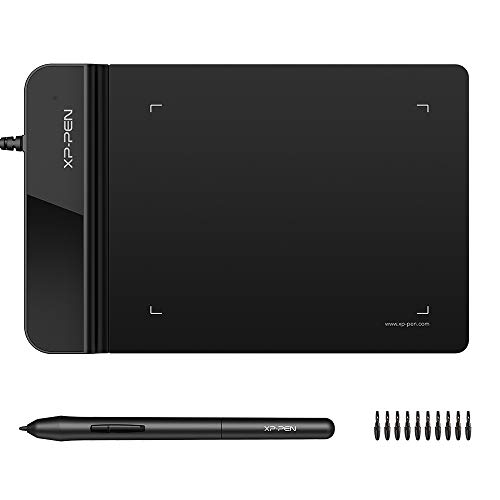 Also Consider Drawing Tablet XPPen G430S OSU | 9.6PCKitHQ scoreView on Amazon |
04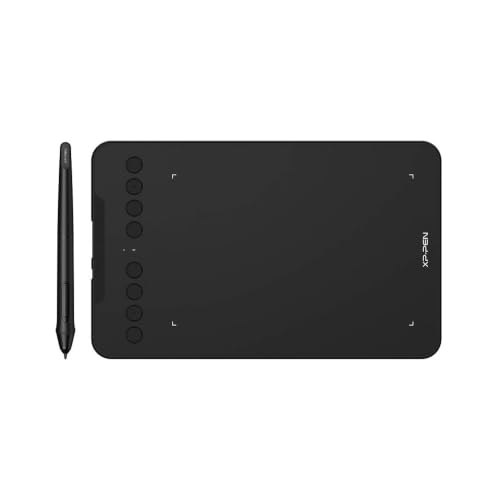 | 9.4PCKitHQ scoreView on Amazon |
05 Also Consider VEIKK VK430 Drawing Tablet 4x3-inch OSU Tablet | 9.3PCKitHQ scoreView on Amazon |
06 Also Consider VEIKK VK1060PRO Drawing Tablet 16384 Levels Pressure | 9.2PCKitHQ scoreView on Amazon |
A closer look at each configuration
HUION Inspiroy H950P 8x5-inch Drawing Tablet 8192 Pen Pressure
score
The 8x5 inch active area, 8192 pressure levels and 8 press keys make this HUION the pick for live online teaching.
- Active area
- 8x5
The H950P pairs an 8x5 inch active area with 8192 levels of pressure sensitivity and a battery-free PW100 stylus that switches between pen and eraser from side buttons. Eight press keys sit on the tablet for shortcuts. At 0.3 inch thick and 1.76 lbs, it carries easily between home and class. It works with Mac, Windows, Linux and Android 6.0 or later, and suits left-handed users.
Choose it if
- You teach live lessons over Zoom, OneNote or Microsoft Whiteboard
- You want 8 press keys for shortcuts during a lesson
Consider another if
- You need the 10 x 6.25 inch drawing space of the GAOMON
- You need the 10 press keys of the GAOMON M10K
GAOMON M10K Drawing Tablet
score
The 10 x 6.25 inch drawing space, touch ring and 10 press keys give this GAOMON room for broad teaching canvases.
- Active area
- 10 x 6.25
- Warranty
- 1 year warranty under non human made damage
The M10K pairs a 10 x 6.25 inch drawing space with 8192 levels of pressure sensitivity and a battery-free AP31 stylus. Ten press keys and a touch ring sit on the tablet, and the ring programs for zooming and page scrolling. Two pen side buttons switch between pen and eraser. The tablet connects by USB cable and works with Windows 7 or later, macOS 10.12 or later, and Android 11, 12, 13 and 14. The warranty runs 1 year under non human made damage.
Choose it if
- You want the 10 x 6.25 inch drawing space for long equations
- You teach with a touch ring for zooming and scrolling
Consider another if
- You need the Bluetooth 5.0 wireless connection of the Deco mini7W
- You need the 16384 levels of pressure sensitivity of the VEIKK tablets
Drawing Tablet XPPen G430S OSU
score
The 4 x 3 inch active area, 2 mm thickness and 266 RPS report rate define this XPPen for a small desk.
- Active area
- 4 x 3
- Warranty
- 12-month warranty
The G430S pairs a 4 x 3 inch active area with 8192 levels of pressure sensitivity and a battery-free PN01 stylus that needs no charging. The tablet is only 2 mm thick, and its report rate is 266 RPS. No drivers are needed for OSU, and the tablet suits right and left hand users. It works with Windows 11, 10, 8 and 7, Mac OS X 10.10 or later, OneNote, Zoom and Xsplit for online teaching.
Choose it if
- You want a 2 mm thick tablet that fits in one hand
- You teach on Windows 11, 10, 8 or 7, or Mac OS X 10.10 or later
Consider another if
- You need the 10 x 6.25 inch drawing space of the GAOMON
- You need the Bluetooth 5.0 wireless connection of the Deco mini7W
Drawing Tablet-XPPen Deco mini7W 7 x 4-inch Bluetooth 5.0 Graphic Tablet Pen Tablet
score
The 7 x 4 inch active area, Bluetooth 5.0 connection and 8 press keys define this XPPen for cable-free teaching.
- Active area
- 7 x 4
- Wireless
- Yes
- Warranty
- 1-YEAR
The Deco mini7W pairs a 7 x 4 inch active area with a battery-free pen that has tilt response and smooth tracking without delays. It connects by Bluetooth 5.0 and a USB dongle, and a USB-C to USB-C connection is also supported with the included adapter. Eight press keys sit on the tablet for shortcuts. It works with Windows 7 and above, Mac OS X 10.10 and higher, and Android 6.0 and higher. The warranty runs 1 year.
Choose it if
- You teach away from your desk with a Bluetooth 5.0 connection
- You want a USB-C to USB-C connection for your devices
Consider another if
- You need the 10 x 6.25 inch drawing space of the GAOMON
- You need the 10 press keys of the GAOMON M10K
VEIKK VK430 Drawing Tablet 4x3-inch OSU Tablet
score
The 4x3 inch active area, 16384 pressure levels and 4 express keys define this VEIKK for portable online teaching.
- Active area
- 4x3
- Warranty
- 1 Year Warrenty
The VK430 pairs a 4x3 inch active area with 16384 levels of pressure sensitivity and a battery-free P05 pen. Its report rate is 290 PPS, and its surface is 2 mm thick with a weight of 82.5g. Four express keys switch programs and shortcuts such as undo and zoom. It works with Windows 7 or later, Mac OS 10.12 or later, Android 6.0 or later and Linux, and it suits right and left handed users. The warranty runs 1 year for hardware.
Choose it if
- You carry the tablet in a laptop case between classes
- You want 4 express keys for undo and zoom shortcuts
Consider another if
- You need the 10 x 6.25 inch drawing space of the GAOMON
- You need the Bluetooth 5.0 wireless connection of the Deco mini7W
VEIKK VK1060PRO Drawing Tablet 16384 Levels Pressure
score
The 10 x 6 inch working area, 16384 pressure levels and dual scroll wheels define this VEIKK for broad teaching canvases.
- Active area
- 10 x 6
- Warranty
- one-year
The VK1060PRO pairs a 10 x 6 inch working area with 16384 levels of pressure sensitivity, 60 degree tilt support and a battery-free P05 pen. Two scroll wheels and 6 shortcut keys sit on the tablet, and each wheel takes 4 groups of functions for zooming, scrolling and shortcuts. Its report rate is 290 PPS. The box holds 28 replacement nibs, a pen holder, an artist glove and an OTG-C adapter. It works with Windows 7, 8, 10 and 11, macOS 10.12 and above, Linux, and Android 6.0 or later except Samsung.
Choose it if
- You want a 10 x 6 inch working area for broad diagrams
- You want 2 scroll wheels and 6 shortcut keys for software control
Consider another if
- You need the 10 x 6.25 inch drawing space of the GAOMON
- You need the 8 press keys of the HUION H950P
Make the choice for your setup
Match the active area to the lesson
Active areas here run from 4 x 3 inches on the XPPen G430S and the VEIKK VK430 to 10 x 6.25 inches on the GAOMON M10K, with the HUION H950P at 8x5 inches and the VEIKK VK1060PRO at 10 x 6 inches. The XPPen Deco mini7W sits between them at 7 x 4 inches. A larger area gives more room for long equations and broad diagrams, while a smaller area keeps hand movement compact. Compare the active area against the desk space: a 4 x 3 inch area suits short annotations, while a 10 x 6.25 inch area suits full whiteboard work.
Count press keys and scroll wheels
Press keys run from 4 express keys on the VEIKK VK430 to 10 press keys on the GAOMON M10K, with 8 press keys on the HUION H950P and the XPPen Deco mini7W. The VEIKK VK1060PRO pairs 6 shortcut keys with 2 scroll wheels, and each scroll wheel takes 4 groups of functions. The GAOMON M10K adds a touch ring for canvas zooming, brush adjusting and page scrolling. Shortcuts matter in a live lesson: the teacher switches tools and zooms the canvas without reaching for the keyboard. A ring or wheel keeps zooming off the keyboard. Count the keys against the shortcuts used. If that fits your setup better, see our guide to the Best Pen Tablet with Screen.
Check the connection and the system
The XPPen Deco mini7W connects by Bluetooth 5.0 or a USB dongle, and by USB-C to USB-C. The GAOMON M10K connects by USB cable, the XPPen G430S uses micro USB to USB-A, and the VEIKK VK430 uses a USB-C port. The HUION H950P works with Mac, Windows, Linux and Android 6.0 or later, while the GAOMON M10K works with Windows 7 or later, macOS 10.12 or later, and Android 11, 12, 13 and 14. The VEIKK VK1060PRO works with Windows 7, 8, 10 and 11, macOS 10.12 and above, Linux, and Android 6.0 or later except Samsung. Match the connection to the computer.
Comparing more options? See Best Pen Tablet for Teaching.
FAQ: Pen Tablet for Online Teaching
Which tablets here connect without a cable?
The Deco mini7W connects without a cable, by Bluetooth 5.0 or the included USB dongle. The GAOMON M10K connects by USB cable, the XPPen G430S uses micro USB to USB-A, and the VEIKK VK430 uses USB-C.
What active areas do these tablets offer?
The GAOMON M10K offers 10 x 6.25 inches and the VEIKK VK1060PRO offers 10 x 6 inches. The HUION H950P offers 8x5 inches and the Deco mini7W offers 7 x 4 inches. The G430S and the VK430 each offer 4 x 3 inches.
Which tablets include a warranty term?
The M10K carries 1 year warranty under non human made damage and the G430S carries a 12-month warranty. The Deco mini7W carries a 1-YEAR warranty, the VK430 carries a 1 year warranty, and the VK1060PRO carries a one-year warranty for hardware.

