Best Graphics Tablet for Windows 11 (2026): 5 Picks Compared
 By Theo LangUpdated
Choose the HUION Inspiroy H1060P Graphics Drawing Tablet if you are a right- or left-handed artist who wants a 10 x 6.25-inch active area, 12 programmable press keys, 16 programmable soft keys and a battery-free stylus with ±60° tilt support. The XP-Pen Artist 12 Pro adds an 11.6-inch display for drawing on screen, while the VEIKK A15Pro and XP-Pen Deco 01 V3 offer 16,384 pressure levels.
Your shortlist at a glance
PCKitHQ scores range from 9.2 to 9.8. See how we pick.
| Product and key specifications | Score and retailer |
|---|---|
01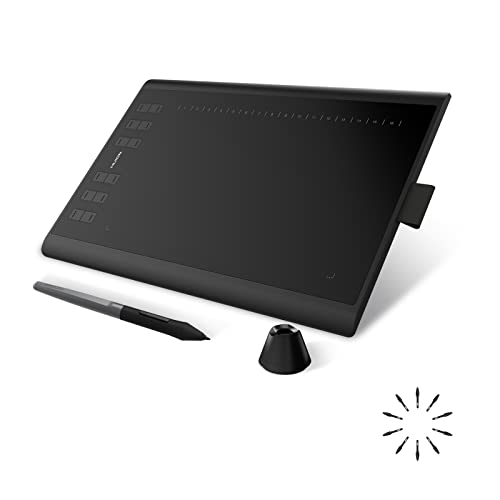 Best Overall HUION Inspiroy H1060P Graphics Drawing Tablet | 9.8PCKitHQ scoreView on Amazon |
02 Second Pick XPPen Artist12 Pro 11.6-inch Drawing Tablet | 9.7PCKitHQ scoreView on Amazon |
03 Also Consider XPPen Updated Deco 01 V3 Drawing Tablet | 9.5PCKitHQ scoreView on Amazon |
04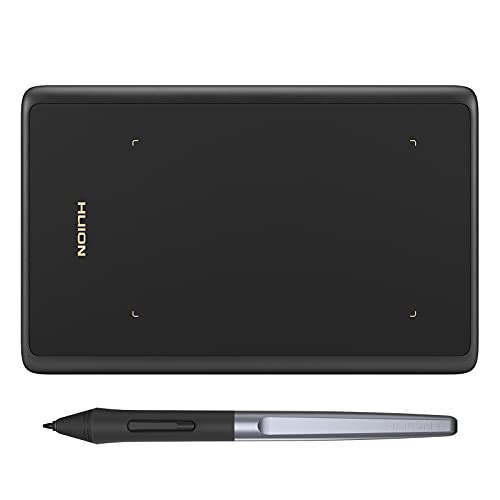 Also Consider HUION Drawing Tablet H420X Graphics Tablet | 9.3PCKitHQ scoreView on Amazon |
05 | 9.2PCKitHQ scoreView on Amazon |
A closer look at each configuration
HUION Inspiroy H1060P Graphics Drawing Tablet
score
The 10 x 6.25-inch active area, 12 programmable press keys, 16 programmable soft keys and battery-free stylus with ±60° tilt support define this HUION configuration.
- Active area
- 10 x 6.25
- Weight
- 1.7 lb
- Warranty
- 1 year manufacturer
This HUION H1060P has a battery-free PW100 stylus with ±60° tilt support and 8192 pressure levels. Its 10mm slim structure carries a 10 x 6.25-inch working area, and the symmetrical design suits right- and left-handed users, with a 180° rotation setting in the driver. The tablet supports Windows 7 or later, macOS 10.12 or later, Android 6.0 or later and Linux (Ubuntu), and works with PS, SAI, AI and CDR. A USB adapter is required to connect to a Mac computer. The tablet weighs 1.7 lb and carries a 1 year manufacturer warranty.
Choose it if
- You want a 10 x 6.25-inch active area for drawing
- You want 12 press keys and 16 soft keys for shortcuts
Consider another if
- You need the 11.6-inch display of the Artist 12 Pro
- You need the 16,384 pressure levels of the Deco 01 V3
XPPen Artist12 Pro 11.6-inch Drawing Tablet
score
The 11.6-inch IPS display, Red Dial and 8 customizable express keys define this pen display for drawing directly on screen.
- Screen size
- 11.6 in
- Weight
- 3.31 lb
This XP-Pen Artist 12 Pro has an 11.6-inch IPS display with fully-laminated glass and an anti-glare protective film. Its battery-free stylus delivers 8192 levels of pressure sensitivity with tilt support up to 60 degrees. The Red Dial adjusts zoom and brush size, and 8 customizable express keys sit beside it. The tablet must connect to a host device and cannot work as a standalone tablet. It supports Windows 7 or later, macOS 10.10 or later, ChromeOS 88 or later and Linux, and connects through a 3-in-1 cable. It weighs 3.31 lb.
Choose it if
- You want an 11.6-inch display for drawing on screen
- You want a Red Dial for zoom and brush size
Consider another if
- You need the 10 x 6.25-inch area of the H1060P
- You need the 16,384 pressure levels of the A15Pro
XPPen Updated Deco 01 V3 Drawing Tablet
score
The 16,384 pressure levels, 60° tilt support and 6.25x10-inch active area define this XP-Pen Deco 01 V3.
- Active area
- 6.25x10
- Weight
- 1.26 lb
- Warranty
- One Year Warranty
This XP-Pen Deco 01 V3 uses the X3 Smart Chip stylus with 16,384 pressure levels and 60° tilt support. Its active area measures 6.25x10 inches inside an 8mm ultra-slim body, and the tablet weighs 1.26 lb. The ambidextrous layout has 8 custom shortcuts, and the stylus has a 220 report rate. It connects to Android phones and tablets through USB-C, and supports Windows 7 and later, Android 10.0 and above, macOS 10.13 and newer, Chrome OS 88 and later and Linux. It works with Photoshop, Corel Painter, Illustrator and Clip Studio. The purchase includes 10 nibs, a stylus stand, a glove and a protective film, and the tablet carries a One Year Warranty.
Choose it if
- You want 16,384 pressure levels for detailed strokes
- You want a 6.25x10-inch area in an 8mm body
Consider another if
- You need the 11.6-inch display of the Artist 12 Pro
- You need the 12 press keys of the H1060P
HUION Drawing Tablet H420X Graphics Tablet
score
The 4.17x2.6-inch active area, 300 PPS report rate and 7mm body define this compact HUION H420X.
- Active area
- 4.17x2.6
- Warranty
- 1 year
This HUION H420X has a 4.17x2.6-inch active area in a 6.77x4.3-inch body that is 7mm thick and weighs 167g. Its battery-free stylus has 8192 levels of pressure and 2 customizable side buttons, and the report rate is 300 PPS. The tablet is plug and play with no driver install. It supports Windows 7 or later, Mac OS 10.12 or later and Android 6.0 or later, and is not compatible with iOS. It works with Adobe Photoshop, Paint Tool SAI, Corel Painter, Illustrator, Sketchbook, Manga Studio and Clip Studio Paint. It also suits OSU games, signing documents and taking notes, and works with Zoom, Microsoft Teams, Word, Excel, PowerPoint and OneNote. It carries a 1 year warranty.
Choose it if
- You want a 4.17x2.6-inch area for small desks
- You want plug-and-play use with no driver install
Consider another if
- You need the 10 x 6.25-inch area of the H1060P
- You need the 11.6-inch display of the Artist 12 Pro
VEIKK A15Pro Graphics Drawing Tablet 10 x 6-inch Digital Pen Tablet
score
The 10x6-inch active area, 12 shortcut keys, quick dial and 16,384 pressure levels define this VEIKK A15Pro.
- Active area
- 10x6
- Weight
- 1.23 lb
- Warranty
- 1 year manufacturer
This VEIKK A15Pro has a 10x6-inch working area with 12 customized soft keys and 1 quick dial for brush and canvas control. Its battery-free passive stylus has 16,384 levels of pressure sensitivity with tilt function, and the pen switches between pen and eraser with one click. The tablet weighs 1.23 lb and includes 28 spare nibs. It supports Linux, Chrome OS, Windows 11/10/8/7, Mac OS 10.12 and Android phones 6.0 or above except Samsung. It works with Microsoft Office Word, Excel, PowerPoint and OneNote, and with Photoshop, SAI, Illustrator, Corel Painter, Clip Studio, Krita and Gimp. It carries a 1-year warranty with lifetime technical support.
Choose it if
- You want a 10x6-inch area with a quick dial
- You want 16,384 pressure levels for drawing work
Consider another if
- You need the 11.6-inch display of the Artist 12 Pro
- You need the 12 press keys of the H1060P
Make the choice for your setup
Match the active area to your desk
The HUION H1060P offers a 10 x 6.25-inch active area, the XP-Pen Deco 01 V3 offers 6.25x10 inches, and the VEIKK A15Pro offers 10x6 inches. The HUION H420X offers 4.17x2.6 inches in a 6.77x4.3-inch body, which fits a small desk and travels easily. The XP-Pen Artist 12 Pro is different: it has an 11.6-inch IPS display, so you draw on the screen itself. Measure the desk space you have before choosing. A larger area gives your hand more room for broad strokes, while a smaller area keeps the tablet close to your keyboard. Match the area to the space you draw in every day.
Choose between a screen and a pad
Only the XP-Pen Artist 12 Pro has a built-in display: an 11.6-inch IPS screen with fully-laminated glass and an anti-glare film. The other four tablets are screen-free pads, so you draw on the pad while looking at your computer monitor. The Artist 12 Pro must connect to a host device and cannot work as a standalone tablet, and it connects through a 3-in-1 cable. A screen tablet shows the cursor where the pen touches, while a pad asks you to watch the monitor instead. Decide which way of working fits your habits before you buy. The H1060P, Deco 01 V3 and H420X and A15Pro keep your eyes on the monitor at all times. Shoppers with a related need can compare our guide to the Best Standalone Graphics Tablet.
Check keys, tilt and Windows support
Shortcut keys differ across the five tablets. The HUION H1060P has 12 programmable press keys and 16 programmable soft keys. The VEIKK A15Pro has 12 customized soft keys and 1 quick dial. The XP-Pen Artist 12 Pro has 8 customizable express keys and a Red Dial. The XP-Pen Deco 01 V3 has 8 custom shortcuts, and the HUION H420X has 2 customizable side buttons on the stylus. Tilt support is ±60° on the H1060P, up to 60 degrees on the Artist 12 Pro and the Deco 01 V3, and the A15Pro lists a tilt function. For Windows 11, the VEIKK A15Pro names Windows 11 in its compatibility list, while the other four list Windows 7 or later.
Before you decide, also read Best Wireless Mouse for Windows 11.
FAQ: Graphics Tablet for Windows 11
Which tablet should I choose for Windows 11?
Choose the HUION H1060P for a 10 x 6.25-inch active area with 12 press keys and 16 soft keys. The VEIKK A15Pro names Windows 11 in its compatibility list and offers a 10x6-inch area with 16,384 pressure levels. The other three list Windows 7 or later, which covers Windows 11.
Which tablets have a built-in display?
Only the XP-Pen Artist 12 Pro has a built-in display, an 11.6-inch IPS screen with fully-laminated glass and an anti-glare film. The HUION H1060P, XP-Pen Deco 01 V3, HUION H420X and VEIKK A15Pro are screen-free pads, so you draw on the pad while watching your monitor.
How many pressure levels do these tablets offer?
The XP-Pen Deco 01 V3 and the VEIKK A15Pro offer 16,384 pressure levels. The HUION H1060P, the XP-Pen Artist 12 Pro and the HUION H420X offer 8192 pressure levels. All five tablets use battery-free styluses.