Best Graphics Tablet for Digital Art (2026): 5 Picks Compared
 By Theo LangUpdated
You want to sketch and paint without a computer, and the Simbans PicassoTab 12 suits that need with a 12-inch 2K screen, a 4096-level pen, and an octa-core CPU with 6GB of RAM and 128GB storage. The PicassoTab 11 gives that setup on an 11-inch screen, while the GAOMON PD1161 and VEIKK VK1200 V2 use 11.6-inch screens connected to a computer, and the XP-Pen G430S has a 4 x 3 inch area.
Your shortlist at a glance
PCKitHQ scores range from 9.2 to 9.8. See how we pick.
| Product and key specifications | Score and retailer |
|---|---|
01 Best Overall PicassoTab 12-inch Standalone Drawing Tablet | 9.8PCKitHQ scoreView on Amazon |
02 Second Pick 11-inch Standalone Drawing Tablet | 9.7PCKitHQ scoreView on Amazon |
03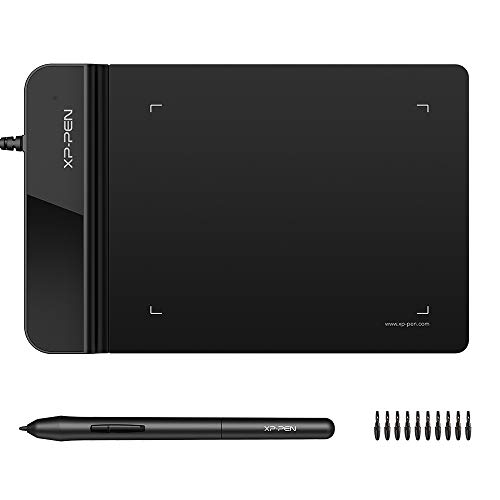 Also Consider Drawing Tablet XPPen G430S OSU | 9.5PCKitHQ scoreView on Amazon |
04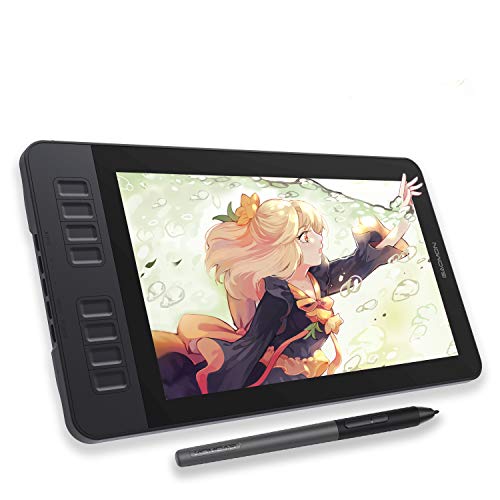 Also Consider GAOMON PD1161 Drawing Tablet | 9.3PCKitHQ scoreView on Amazon |
05 Also Consider VEIKK VK1200 V2 Drawing Tablet | 9.2PCKitHQ scoreView on Amazon |
A closer look at each configuration
PicassoTab 12-inch Standalone Drawing Tablet
score
The 12-inch laminated 2K screen, 4096-level pen, and standalone Android 15 setup make this the pick for drawing without a computer.
- Screen size
- 12 in
- Warranty
- 1-year warranty
This Simbans PicassoTab 12 works on its own with no computer, cables, or setup. Its 12-inch laminated 2K screen reduces parallax, and the Picasso Pen 3 has 4096 pressure levels with palm rejection. An octa-core CPU, 6GB of RAM, and 128GB of storage, expandable to 1TB, run drawing apps and schoolwork. It runs Android 15. The box adds 6 bonus items: a tablet case, a drawing glove, a universal power adapter, a pre-installed screen protector, a lifetime PRO upgrade for the Concepts drawing app, and a lifetime VIP upgrade for the Artixo tutorials app. It carries a 1-year warranty with GMS, FCC, and CE certification.
Choose it if
- You draw, paint, and animate without a computer nearby
- You want a 12-inch laminated 2K screen and 128GB storage
Consider another if
- You want 8192 pressure levels like the GAOMON PD1161
- You want two battery-free pens like the VEIKK VK1200 V2
11-inch Standalone Drawing Tablet
score
The 11-inch laminated 2K screen and 4096-level stylus give this standalone tablet the same portable setup in a smaller size.
- Screen size
- 11 in
- Warranty
- 1 Year
This PicassoTab X11 works on its own with no computer. Its laminated 11-inch 2K screen reduces parallax and glare, and the upgraded stylus has 4096 pressure levels for sketching, shading, and illustration. An octa-core processor with 6GB of RAM and 128GB of storage, expandable to 1TB, runs drawing apps and schoolwork. Five creative apps come preloaded for sketching, painting, animation, and tutorials. The box adds 6 bonus items: a tablet case, a drawing glove, a power adapter, a pre-installed screen protector, a lifetime PRO upgrade for Concepts, and a lifetime VIP upgrade for Artixo. It carries a 1-year warranty.
Choose it if
- You want an 11-inch standalone tablet with a 2K screen
- You learn to draw with step-by-step Artixo lessons
Consider another if
- You want the 12-inch screen of the Simbans PicassoTab 12
- You want 8192 pressure levels like the GAOMON PD1161
Drawing Tablet XPPen G430S OSU
score
The 4 x 3 inch active area and 8192-level battery-free stylus make this a compact tablet for OSU play and sketching.
- Active area
- 4 x 3
- Weight
- 0.55 lb
- Warranty
- 12-month warranty
This XP-Pen G430S has a 4 x 3 inch active area with 8192 levels of pen pressure and a battery-free PN01 stylus that needs no charging. It is 2 mm thick and weighs 0.55 lb. It is designed for OSU gameplay, drawing, sketching, E-signatures, and online teaching. It runs on Windows 11, 10, 8, and 7 and Mac OS X 10.10 or later, and it is incompatible with iOS and iPadOS. Its interface is micro USB to USB-A, so a Mac without a USB-A port needs an OTG transfer adapter. The box holds the tablet, the stylus, 10 replacement nibs, a pen clipper, and a quick guide. It carries a 12-month warranty.
Choose it if
- You play OSU and sketch on a 4 x 3 inch area
- You want a 0.55 lb tablet that is 2 mm thick
Consider another if
- You want a screen you draw on directly
- You want a standalone tablet with no computer needed
GAOMON PD1161 Drawing Tablet
score
The 11.6-inch FHD IPS screen, 8192-level tilt stylus, and 8 shortcut keys suit drawing directly on screen.
- Screen size
- 11.6 in
- Weight
- 1.9 lb
- Warranty
- 1-year warranty
This GAOMON PD1161 is not a standalone tablet and must connect to a laptop or computer. You sketch, draw, and paint on its 11.6-inch full HD IPS screen, and the pre-installed matte film gives a paper-like feel while reducing glare. Its 72% NTSC color gamut shows 16.7 million display colors. The battery-free AP50 stylus has 8192 pressure levels and tilt, and 8 press keys plus 2 pen buttons can be programmed in the driver. It works with Windows 7 or later and macOS 10.12 or later, and with Krita, Medibang, Blender, and Photoshop. The box holds the stylus, a pen holder, 8 replacement nibs, a drawing glove, a 3-in-2 USB cable, and an AC adapter. It carries a 1-year warranty.
Choose it if
- You draw on an 11.6-inch FHD IPS screen
- You want 8 shortcut keys and a tilt stylus
Consider another if
- You want a standalone tablet with no computer needed
- You want the 12-inch screen of the Simbans PicassoTab 12
VEIKK VK1200 V2 Drawing Tablet
score
The 11.6-inch full-laminated 1920 x 1080 screen and two 8192-level pens suit drawing with tilt on screen.
- Active area
- 11.6
- Screen size
- 11.6 in
- Weight
- 1.78 lb
- Warranty
- 1 year
This VEIKK VK1200 V2 must connect to a computer to work. Its 11.6-inch active area uses full-laminated technology with anti-glare glass to reduce parallax, with a 72% NTSC color gamut. Two battery-free pens have 8192 pressure levels and 60-degree tilt recognition, and 6 shortcut keys can be customized in software. A single full-featured USB-C cable carries data, power, and display signals, and HDMI and USB-A to C cables come in the box. It works with Windows 7 or later, macOS 10.12 or later, and Linux. It weighs 1.78 lb. The box holds 28 replacement nibs, a pen holder, a glove, and a cleaning cloth. It carries a 1-year hardware warranty.
Choose it if
- You draw on an 11.6-inch 1920 x 1080 IPS screen
- You want two battery-free pens with 60-degree tilt
Consider another if
- You want a standalone tablet with no computer needed
- You want the 12-inch screen of the Simbans PicassoTab 12
Make the choice for your setup
Standalone tablets or computer-connected screens
The two PicassoTab tablets work on their own with no computer or cables, so you can sketch, paint, and animate anywhere you carry them. The Simbans PicassoTab 12 has an octa-core CPU, 6GB of RAM, and 128GB of storage for drawing apps and schoolwork. The PicassoTab 11 pairs an octa-core processor with 6GB of RAM and 128GB of storage on an 11-inch screen. The GAOMON PD1161 and VEIKK VK1200 V2 must connect to a laptop or computer, and the XP-Pen G430S also needs a computer. A standalone tablet suits drawing away from a desk, while a screen tablet suits a desk setup.
Screen size, resolution, and pressure levels
Screen size runs from the 4 x 3 inch active area of the XP-Pen G430S to the 12-inch laminated 2K screen of the Simbans PicassoTab 12. The PicassoTab 11 has an 11-inch laminated 2K screen, and the GAOMON PD1161 and VEIKK VK1200 V2 each have an 11.6-inch screen. The GAOMON shows full HD on an IPS panel with a 72% NTSC gamut, and the VEIKK shows 1920 x 1080 on an IPS display with the same gamut. Pressure levels run from 4096 on both PicassoTab pens to 8192 on the XP-Pen, GAOMON, and VEIKK pens. The GAOMON pen adds tilt, and the VEIKK pens add 60-degree tilt. Shoppers with a related need can compare our guide to the Best Wireless Graphics Tablet.
Shortcut keys, pens, and what comes in the box
The GAOMON PD1161 has 8 press keys and 2 pen buttons you can program in the driver, and the VEIKK VK1200 V2 has 6 programmable shortcut keys. The GAOMON, VEIKK, and XP-Pen pens are battery-free. The Simbans pen has 4096 pressure levels with palm rejection. The VEIKK box holds two pens and 28 replacement nibs, and the GAOMON box holds one pen and 8 nibs. The XP-Pen box holds one stylus and 10 nibs. Both PicassoTab tablets add 6 bonus items, including a case and a glove. The GAOMON, VEIKK, and both PicassoTab tablets carry a 1-year warranty, and the XP-Pen carries a 12-month warranty.
For a wider shortlist, start with Best Graphics Tablet for Windows 11.
FAQ: Graphics Tablet for Digital Art
Which tablet works without a computer?
The Simbans PicassoTab 12 and the PicassoTab 11 are standalone tablets that need no computer. The Simbans runs Android 15 with an octa-core CPU, 6GB of RAM, and 128GB of storage. The GAOMON, VEIKK, and XP-Pen must connect to a computer to work.
What screen sizes do these drawing tablets have?
The Simbans PicassoTab 12 has a 12-inch laminated 2K screen, and the PicassoTab 11 has an 11-inch laminated 2K screen. The GAOMON PD1161 and VEIKK VK1200 V2 each have an 11.6-inch screen, and the XP-Pen G430S has a 4 x 3 inch active area.
Which tablets work with Windows and Mac computers?
The GAOMON PD1161 works with Windows 7 or later and macOS 10.12 or later. The VEIKK VK1200 V2 works with Windows 7 or later, macOS 10.12 or later, and Linux. The XP-Pen G430S works with Windows 11, 10, 8, and 7 and Mac OS X 10.10 or later.