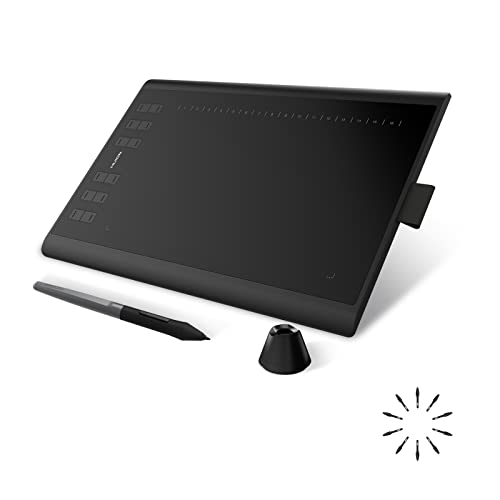
Best Wireless Graphics Tablet (2026): Top 5 by the Specs
 By Theo LangUpdated
Choose the XP-Pen XPPen Deco mini7W V2 Wireless Drawing Tablet if you draw on PC, Mac, Android, ChromeOS or Linux and want a 7x4.37 inch active area with Bluetooth 5.0. Its battery-free stylus provides 16384 pressure levels and 60 degree tilt, and 8 shortcut keys handle repeated commands. The maker states up to 13 hours of continuous work per charge.
Your shortlist at a glance
PCKitHQ scores range from 9.2 to 9.8. See how we pick.
| Product and key specifications | Score and retailer |
|---|---|
01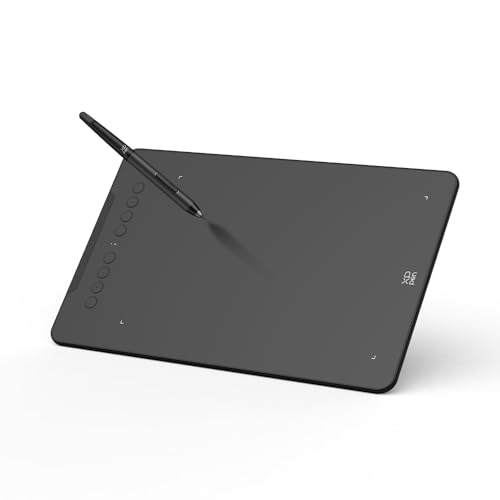 Best Overall XPPen Deco mini7W V2 Wireless Drawing Tablet | 9.8PCKitHQ scoreView on Amazon |
02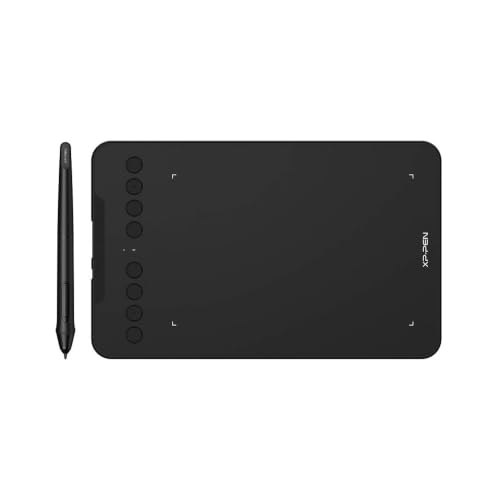 | 9.7PCKitHQ scoreView on Amazon |
03 Also Consider DIGIDRAW TW410 Wireless Drawing Tablet | 9.5PCKitHQ scoreView on Amazon |
04 Also Consider GAOMON WH851 Bluetooth Graphics Drawing Tablet | 9.3PCKitHQ scoreView on Amazon |
05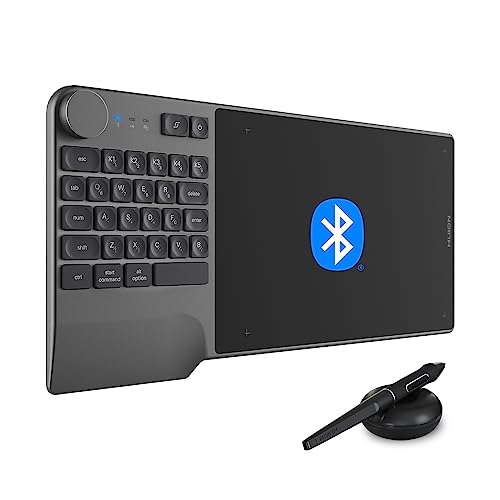 | 9.2PCKitHQ scoreView on Amazon |
A closer look at each configuration
XPPen Deco mini7W V2 Wireless Drawing Tablet
score
The Deco mini7W V2 combines a 7x4.37 inch active area with Bluetooth 5.0 and 16384 pressure levels.
- Active area
- 7x4.37
- Weight
- 0.75 lb
- Warranty
- 1 Year
This tablet has a 7x4.37 inch active area and weighs 0.75 lb. The P05D battery-free stylus provides 16384 pressure levels and 60 degree tilt support. Bluetooth 5.0 handles the wireless connection, and an L-shaped USB-C cable handles wired use. The maker states up to 13 hours of continuous work on a single charge. Eight customizable shortcut keys sit on the tablet. Compatibility covers Windows 7 and later, macOS 10.10 and later, Android 6.0 and later, ChromeOS 88 and later, and Linux. Warranty is 1 Year.
Choose it if
- You draw across Windows, macOS, Android, ChromeOS or Linux systems
- You want 8 shortcut keys beside a 7x4.37 inch active area
Consider another if
- You need an active area larger than 7x4.37 inches
- You need a warranty term longer than 1 Year
Drawing Tablet-XPPen Deco mini7W 7 x 4-inch Bluetooth 5.0 Graphic Tablet Pen Tablet
score
The Deco mini7W pairs a 7 x 4 inch active area with Bluetooth 5.0 and a battery-free pen.
- Active area
- 7 x 4
- Weight
- 0.73 lb
- Warranty
- 1-YEAR
This tablet has a 7 x 4 inch active area and weighs 0.73 lb. The battery-free pen provides 16384 pressure levels and tilt response. Wireless connection uses Bluetooth 5.0 with the included USB dongle, and wired connection uses USB-C to USB-C with the included adapter. Eight customizable press keys can be assigned to shortcuts. Compatibility covers Windows 7 and above, Mac OS X 10.10 and higher, Android 6.0 and higher, and Chrome OS 88.0.4324.109 or above. Warranty is 1-YEAR.
Choose it if
- You connect by Bluetooth 5.0 or the included USB dongle
- You want 8 customizable press keys for repeated commands
Consider another if
- You need an active area larger than 7 x 4 inches
- You need a warranty term longer than 1-YEAR
DIGIDRAW TW410 Wireless Drawing Tablet
score
The DIGIDRAW TW410 uses a compact 6x4 inch active area with Bluetooth 5.0 and a paper-like surface.
- Active area
- 6x4
- Weight
- 0.55 lb
- Warranty
- 2 Years
This tablet has a 6x4 inch active area and weighs 0.55 lb. The passive battery-free pen provides 16384 pressure levels with no pen charging required. Bluetooth 5.0 handles wireless connection, and wired mode is available for fine line drafting. The surface has a paper-like matte texture with a palm rest. InkBoard annotation software is included with lifetime free access stated by the maker, for annotating PDFs, lecture notes and slides. Warranty is 2 Years.
Choose it if
- You carry a tablet in a school bag between classes
- You want a 6x4 inch area with a paper-like matte surface
Consider another if
- You need an active area larger than 6x4 inches
- You need the 8.9x5.6 inch active area of the HUION KD200
GAOMON WH851 Bluetooth Graphics Drawing Tablet
score
The GAOMON WH851 adds a center dial to an 8x5 inch active area with Bluetooth 5.0.
- Active area
- 8x5
- Weight
- 0.88 lb
- Warranty
- 1 year
This tablet has an 8x5 inch active area and weighs 0.88 lb. The AP519 battery-free pen provides 16384 pressure levels and tilt detection. Connection options are USB Type-C wired and Bluetooth 5.0 wireless. The maker states the battery can operate 18 hours. A center dial handles zoom canvas, brush and scroll operations, and 8 customizable press keys sit alongside it. Compatibility covers Windows, Android and Mac. The drawing area ratio can switch to 16:10 or 20:10. Warranty is 1 year.
Choose it if
- You want a dial for zoom, brush and scroll operations
- You need an 8x5 inch active area for larger strokes
Consider another if
- You need an active area larger than 8x5 inches
- You need ChromeOS or Linux among the named systems
Wireless Drawing Tablet HUION Inspiroy Keydial KD200 Art Tablet
score
The HUION Inspiroy Keydial KD200 combines an 8.9x5.6 inch area with a dial and a 23-key keypad.
- Active area
- 8.9x5.6
- Weight
- 1.43 lb
- Warranty
- 1 Year
This tablet has an 8.9x5.6 inch active area and weighs 1.43 lb, with an 8.5mm thickness design. The PW517 battery-free pen provides 8192 pressure levels and 60 degree tilt. Bluetooth 5.0 connects to Mac, PC or Android devices, with connection stated up to 33ft. The maker states 18 hours minimum of continuous creation with 1.2 hours of charging time. A dial handles zoom and brush size, 5 press keys are user-defined, and the keypad has 23 standard keys. Warranty is 1 Year.
Choose it if
- You want keyboard shortcuts built into the tablet body
- You need an 8.9x5.6 inch active area for drawing work
Consider another if
- You need a carrying weight below 1.43 lb
- You need ChromeOS or Linux among the named systems
Make the choice for your setup
Compare active area sizes
Active area decides how far your hand travels for each stroke. The DIGIDRAW TW410 has a 6x4 inch area. The XP-Pen XPPen Deco mini7W V2 has a 7x4.37 inch area, and the XP-Pen Deco mini7W has a 7 x 4 inch area. The GAOMON WH851 has an 8x5 inch area, and the HUION Inspiroy Keydial KD200 has an 8.9x5.6 inch area. A larger area gives your hand more room for broad strokes, while a smaller area keeps hand movement short and the tablet easy to carry. Match the area to your desk space and the stroke length your drawing work uses. Larger areas in this group also carry higher stated weights, from 0.55 lb for the TW410 to 1.43 lb for the KD200.
Check pressure levels and tilt
Pressure levels describe how many pen pressure steps the tablet registers. The XP-Pen XPPen Deco mini7W V2, the XP-Pen Deco mini7W, the DIGIDRAW TW410 and the GAOMON WH851 each state 16384 pressure levels. The HUION Inspiroy Keydial KD200 states 8192 pressure levels. Tilt support is stated as 60 degree tilt on the Deco mini7W V2 and the KD200, tilt response on the Deco mini7W, and tilt detection on the WH851. The TW410 pen is a passive battery-free pen, the WH851 pen is the AP519 battery-free pen, and the KD200 pen is the PW517 battery-free pen with 60 degree tilt. Every pen in this group is battery-free, so pen charging is not part of the routine for any of these five tablets. Shoppers with a related need can compare our guide to the Best Pen Tablet for Photoshop Editing.
Match controls and connections
Controls differ across the group. The Deco mini7W V2 and the Deco mini7W each have 8 shortcut or press keys. The GAOMON WH851 has 8 customizable press keys plus a center dial for zoom, brush and scroll. The HUION KD200 has 5 user-defined press keys, a dial, and a 23-key keypad. The TW410 names Bluetooth 5.0 and a wired mode for fine line drafting, and the WH851 names USB Type-C wired connection and Bluetooth 5.0 wireless. The KD200 connects by Bluetooth 5.0 to Mac, PC or Android devices. Connections also differ: Bluetooth 5.0 is named for the Deco mini7W V2, the Deco mini7W, the TW410, the WH851 and the KD200. Operating systems differ too, so check your system against each tablet: the Deco mini7W V2 names Windows, macOS, Android, ChromeOS and Linux.
For a wider shortlist, start with Best Graphics Tablet for Digital Art.
FAQ: Wireless Graphics Tablet
What shortcut keys do these tablets provide?
The Deco mini7W V2 has 8 shortcut keys and the Deco mini7W has 8 customizable press keys. The WH851 has 8 customizable press keys plus a center dial. The KD200 has 5 user-defined press keys, a dial and a 23-key keypad.
Which tablets state 16384 pressure levels?
The XP-Pen XPPen Deco mini7W V2, the XP-Pen Deco mini7W, the DIGIDRAW TW410 and the GAOMON WH851 each state 16384 pressure levels. The HUION Inspiroy Keydial KD200 states 8192 pressure levels with 60 degree tilt on its PW517 battery-free pen.
What battery duration does each maker state?
The XP-Pen XPPen Deco mini7W V2 maker states up to 13 hours of continuous work per charge. The GAOMON WH851 maker states the battery can operate 18 hours. The HUION KD200 maker states 18 hours minimum with 1.2 hours of charging time. These are maker figures, not measured results.