What to Consider When Buying a Chromebook
 By Theo LangUpdated
When buying a Chromebook, start with how you will use it, then match the screen size, memory, storage and ports to that use. A 14 inch screen suits carrying around, while a 15.6 inch screen suits desk work. Check the memory, the storage, the processor and the Chrome OS support date before you buy.
Pick the screen size first
Chromebooks here come in 14 inch and 15.6 inch screens. The Lenovo and HP 14 have 14 inch screens, and the Acer and HP 15 have 15.6 inch screens. A smaller screen is easier to carry, while a larger screen shows more at once. The Lenovo and Acer screens are 1920 x 1080 touchscreens, while the HP 14 and HP 15 screens are 1366 x 768. Touch lets you tap and scroll on the screen, so decide whether you want it before you buy.
Match memory and storage to your use
Memory holds the apps and tabs you have open, and storage holds your files and apps. The Lenovo and HP 14 have 4 GB of memory and 64 GB of storage, while the Acer has 8 GB of memory and 128 GB of storage, and the HP 15 has 8 GB of memory and 192 GB of storage. More memory leaves room for more open tabs, and more storage leaves room for more files. Check the requirements published for the software you plan to use before you choose.
Check the ports and wireless
Three of the Chromebooks here have a USB-C port. The Acer has an HDMI port, two USB-C ports and two USB-A ports. The Lenovo has one USB-A port, one USB-C port and a microSD card reader. The HP 15 has two USB-C ports with DisplayPort 1.4, a USB-A port and a microSD card reader. A USB-C port does not always carry video, so check that your laptop's USB-C port supports video output before you count on it. The Lenovo has Wi-Fi 6, and the HP 14 and HP 15 have Wi-Fi.
Check the Chrome OS support date
Chromebooks receive Chrome OS updates until an Auto Update Expiration date. The HP 15 has an Auto Update Expiration date of June 2030, so check the date for any Chromebook you consider. A machine past its date stops receiving updates, so the date matters as much as the hardware. The HP 14, Acer and HP 15 have a 1-year warranty, while the Lenovo has a 90-day warranty.
What you need

Lenovo Flagship Chromebook
A 14 inch FHD touchscreen Chromebook with a MediaTek Kompanio 520 processor, 4 GB of memory, 64 GB of storage and Wi-Fi 6.
View on Amazon
HP Chromebook 14 Laptop
A 14 inch HD Chromebook with an Intel Celeron N4120 processor, 4 GB of memory, 64 GB of storage and a 1-year limited hardware warranty.
View on Amazon
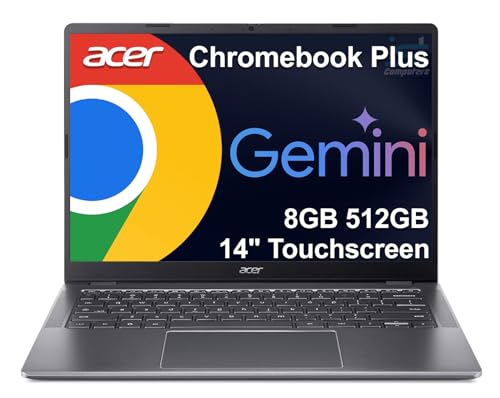
Acer 15.6-inch Touch Chromebook
A 15.6 inch FHD touchscreen Chromebook with an Intel N50 processor, 8 GB of DDR5 memory, 128 GB of storage, USB-C and HDMI.
View on Amazon
HP Chromebook 15 15.6-inch Laptop
A 15.6 inch Chromebook with an Intel N200 processor, 8 GB of DDR5 memory, 192 GB of storage, a numeric keyboard and USB-C with DisplayPort 1.4.
View on AmazonThese come from our ranked list Best Chromebook, which compares them spec by spec.
FAQ
Is 4 GB of memory enough for a Chromebook?
The Lenovo and HP 14 have 4 GB of memory, and the Acer and HP 15 have 8 GB. More memory leaves room for more apps and tabs open at once. Check the requirements published for the software you plan to use before you choose.
Do Chromebooks run Android apps?
Yes. The HP 14 comes with the Google Play Store and a huge selection of Android apps, and Chrome OS includes thousands of apps. Check that the apps you need are in the store before you buy.
What screen size should I choose?
A 14 inch screen suits carrying the machine around, and a 15.6 inch screen suits desk work with more room on screen. The Lenovo and HP 14 have 14 inch screens, and the Acer and HP 15 have 15.6 inch screens.