
Are Chromebooks Touchscreen?
 By Theo LangUpdated
Not every Chromebook has a touchscreen. Touch is a hardware option, so some Chromebooks ship with a touchscreen display and others do not. The four Chromebooks below each list a touchscreen in their specs, and you should check for the word touchscreen in the spec sheet before you buy.
Not every Chromebook has touch
Chromebooks run ChromeOS, and touch is a hardware choice made for each model, not a part of the operating system. A Chromebook with a standard display still runs the same ChromeOS apps and browser, but it takes keyboard and mouse input only. Two laptops can look the same in photos while only one has a touchscreen, so the model name alone does not settle it.
Check the spec sheet first
Open the spec sheet for the exact model and read the display line. Look for the word touchscreen next to the screen size and resolution, such as a 15.6-inch 1920x1080 touchscreen or a 14-inch 1920x1200 touchscreen. If the display line only says FHD display, confirm with the maker before you buy, since a standard FHD panel and a touch FHD panel share the same resolution.
What touch adds on a Chromebook
Touch lets you tap, scroll and pinch on the screen instead of reaching for the trackpad, which suits tapping links and swiping through pages. On a convertible, the hinge folds the screen flat so the laptop works as a tablet. The ASUS Chromebook Flip CX1 flips 360 degrees and works in clamshell, tent, stand and tablet modes, so the touchscreen stays useful when the keyboard is folded away.
What the touchscreen models share
The four touchscreen Chromebooks below run ChromeOS and each list a touchscreen display. Screen sizes run 14 inches on the Lenovo, Acer Chromebook Plus 514 and ASUS Flip CX1, and 15.6 inches on the Acer. Resolutions are 1920x1080 except the Acer Chromebook Plus 514 at 1920x1200. Memory is 8GB on three of them and 4GB on the Lenovo, with storage from 64GB to 512GB.
What you need

Acer 15.6-inch Touch Chromebook
A 15.6-inch 1920x1080 touchscreen Chromebook with an Intel N50 processor, 8GB RAM and 128GB eMMC storage.
View on Amazon
Lenovo Flagship Chromebook
A 14-inch 1920x1080 touchscreen Chromebook with a MediaTek Kompanio 520 processor, 4GB RAM, 64GB eMMC and Wi-Fi 6.
View on Amazon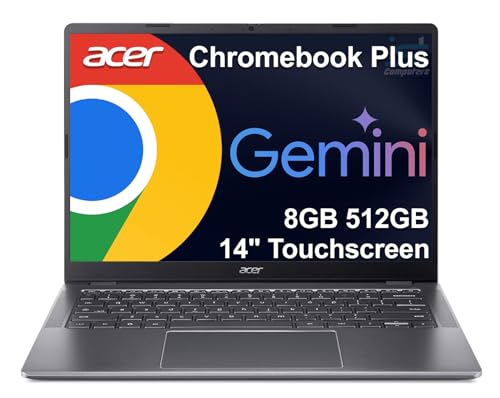
Acer Chromebook Plus 514 Laptop
A 14-inch 1920x1200 touchscreen Chromebook with an Intel Core i3-N355, 8GB RAM, 512GB storage and a 1080p webcam.
View on Amazon
ASUS Chromebook Flip CX1 Convertible Laptop
A 14-inch 1920x1080 touchscreen convertible with a 360-degree hinge, Intel Celeron N4500, 8GB RAM and 128GB eMMC storage.
View on AmazonThese come from our ranked list Best Chromebook with Touchscreen, which compares them spec by spec.
FAQ
Are all Chromebooks touchscreen?
No. Touch is a hardware option, so some Chromebooks have a touchscreen and some do not. Check the display line in the spec sheet for the word touchscreen before you buy.
How do I check if a Chromebook has a touchscreen?
Read the display line in the model's spec sheet and look for the word touchscreen. The four models in the list below each show a touchscreen display in their specs, with screen sizes of 14 inches or 15.6 inches.
What is a 2-in-1 Chromebook?
A 2-in-1 Chromebook has a hinge that folds the screen flat so the laptop works as a tablet. The ASUS Chromebook Flip CX1 flips 360 degrees and works in clamshell, tent, stand and tablet modes.

