
How to Install a CPU Cooler Fan
 By Theo LangUpdated
Spring screws hold a CPU cooler down against the processor. You fit the backplate behind the motherboard, set the cooler on the processor with thermal compound between them, then tighten the spring screws a little at a time in a diagonal pattern until the screws stop. Plug the fan cable into the CPU fan header on the motherboard and switch it on to check the fan spins.
Shut down and prepare the case
Shut the PC down, unplug it from the wall and open the case following the instructions in the case manual. Lay the case on its side so the motherboard faces up, which keeps the cooler steady while you work. Keep the cooler, its backplate, the mounting brackets and the screws from the box close by, and read the cooler manual before you start so you know which parts fit your socket.
Fit the backplate and mounting brackets
Hold the backplate against the rear of the motherboard so its holes line up with the mounting holes around the processor socket. Push the mounting brackets through from the front and fasten them with the parts the cooler manual shows, keeping the backplate from slipping. Check the socket list in the cooler manual and use the bracket position for your socket, since Intel and AMD boards use different holes.
Apply thermal compound and seat the cooler
Check the cooler base, then spread a thin layer over the center of the processor as the cooler manual shows when the base is bare. Lower the cooler straight down onto the processor so the base sits flat, and do not slide it around once it touches the compound. Line up the spring screws with the holes in the mounting brackets before you tighten anything.
Tighten the spring screws in a diagonal pattern
Turn each spring screw a few turns at a time, moving diagonally across the cooler so the pressure stays even. The springs compress as you tighten and a screw stops when it reaches the end of its travel, so do not force it further once it stops. Once the screws stop turning, the cooler base sits flat against the processor and the mount is done.
Connect the fan and check it spins
Plug the fan cable into the CPU fan header on the motherboard, following the motherboard manual. Route the cable away from the fan blades so it cannot catch while the fan runs. Close the case, plug the PC back in and switch it on, then check that the fan starts and the cooler stays seated.
What you need
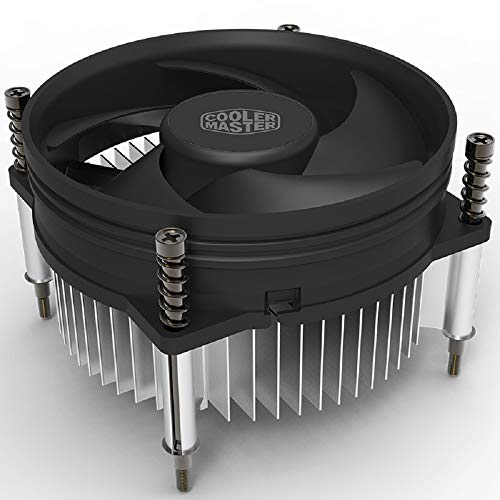
Cooler Master i30 CPU Cooler
A 92mm cooler with a 3-pin fan and pre-pasted thermal compound, listed for Intel LGA 1150, 1151, 1155 and 1156 sockets.
View on Amazon
Thermalright Peerless Assassin 120 SE CPU Cooler
A dual-tower cooler with two 120mm PWM fans and 6 heat pipes, listed for AMD AM4 and AM5 and Intel LGA 1700, 1150, 1151, 1200 and 1851.
View on Amazon
Thermalright Assassin X120 Refined SE CPU Air Cooler
A cooler with a 120mm PWM fan and 4 heat pipes, listed for AMD AM4 and AM5 and Intel LGA 1150, 1151, 1155, 1200, 1700 and 1851.
View on Amazon
Cooler Master Hyper 212 Black II CPU Air Cooler
A cooler with 4 heat pipes and a 120mm PWM fan, listed for AMD AM5 and AM4 and Intel LGA 1851 and 1700, with a 2-year warranty.
View on AmazonThese come from our ranked list Best CPU Fan Cooler, which compares them spec by spec.
FAQ
How tight should the spring screws be?
Tighten them until the screws stop at the end of their travel. The springs set the pressure, so forcing them further can damage the board or the cooler. If one screw stops much earlier than the rest, loosen them and start the diagonal pattern again.
Do I need thermal compound with a new cooler?
Check the base of your cooler before you add anything. Some coolers ship with compound already on the base, and adding more on top of it makes a mess. If the base is bare, spread a thin layer over the center of the processor as the cooler manual shows.
What if the fan does not spin after install?
Check that the fan cable is fully pushed into the CPU fan header and that the cable stays clear of the blades. If the fan still does not spin, shut the PC down, unplug it and reseat the cable, then check the motherboard manual. If it still does not spin, contact the cooler maker.


