Best Pen Tablets Screenless Graphics Tablets (2026): 6 Picks Compared
 By Theo LangUpdated
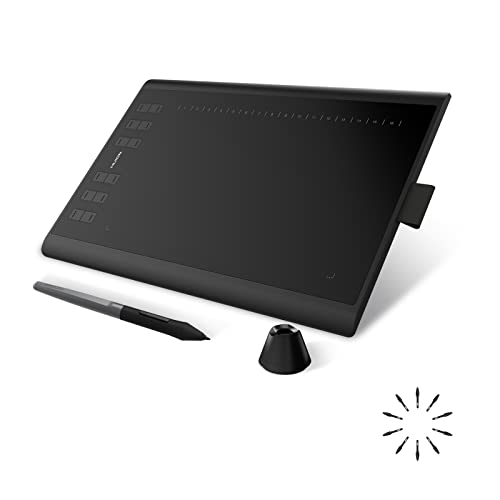
The HUION HS610 10x6.25 inch Drawing Tablet 8192 Pen Pressure is the pick for animators and designers who want a large 10x6.25 inch active area, 8192 levels of pressure sensitivity and 12 press keys on Windows, Mac or Android. Its battery-free stylus, plus or minus 60-degree tilt and touch ring cover detailed drawing without a battery to charge.
Your shortlist at a glance
PCKitHQ scores range from 9.2 to 9.8. See how we pick.
| Product and key specifications | Score and retailer |
|---|---|
01 | 9.8PCKitHQ scoreView on Amazon |
02 Second Pick HUION HS64 OSU Drawing Tablet for Beginner | 9.7PCKitHQ scoreView on Amazon |
03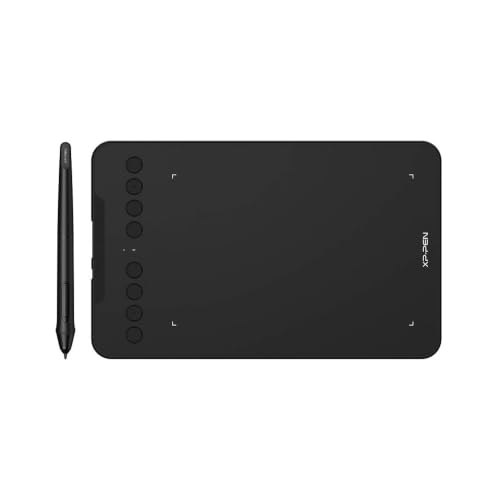 | 9.6PCKitHQ scoreView on Amazon |
04 Also Consider Graphic Drawing Tablet | 9.4PCKitHQ scoreView on Amazon |
05 Also Consider VEIKK VK850 Drawing Tablet | 9.3PCKitHQ scoreView on Amazon |
06 Also Consider VEIKK VK430 Drawing Tablet 4x3-inch OSU Tablet | 9.2PCKitHQ scoreView on Amazon |
A closer look at each configuration
HUION HS610 10x6.25-inch Drawing Tablet 8192 Pen Pressure
score
The 10x6.25 inch active area, 8192 pressure levels and 12 press keys suit animation and design work on Windows, Mac and Android.
- Active area
- 10x6.25
- Weight
- 1.32 lb
- Warranty
- one-year warranty
The HS610 pairs a 10x6.25 inch active area with 8192 levels of pressure sensitivity, 5080 LPI pen resolution and a battery-free PW100 stylus that needs no charging. The stylus supports plus or minus 60 degrees of tilt. Twelve press keys and a touch ring handle canvas zoom, brush adjustment and page scrolling. At 1.32 lb, it travels with a phone for Android drawing through an OTG adapter. It works with Windows 7 and above and macOS 10.12 and above, for Photoshop, SAI and Illustrator. A one-year warranty covers the tablet.
Choose it if
- You draw on Windows 7 or later, macOS 10.12 or later, or Android 6.0 or later
- You want 12 press keys and a touch ring for canvas zoom and brush control
Consider another if
- You need 16384 levels of pressure sensitivity for finer pen control
- You need a 4x3 inch tablet that fits a laptop case
HUION HS64 OSU Drawing Tablet for Beginner
score
The 6.3x4 inch active area, 8192 pressure levels and 0.3 lb weight suit beginners who draw in a small desk space.
- Active area
- 6.3x4
- Weight
- 0.3 lb
- Warranty
- 1 year warranty
The HS64 gives beginners a 6.3x4 inch active area with 8192 levels of pressure sensitivity and 5080 LPI pen resolution in a battery-free PW100 stylus. Four programmable express keys take shortcuts through the Huion driver, and the pen side buttons switch between pen and eraser. At 0.3 lb, it fits limited desktop areas and carries easily. It works with Linux, Mac, Windows and Android 6.0 or later through an included OTG adapter, and it works for both left and right-handed users. It supports Photoshop, SAI and Illustrator, plus Word, PowerPoint and OneNote for notes and signatures. A 1 year warranty covers the tablet.
Choose it if
- You want a 6.3x4 inch tablet for a limited desktop area
- You draw on Linux, Mac, Windows or Android 6.0 or later
Consider another if
- You need the 10x6.25 inch active area of the HS610
- You need 12 press keys and a touch ring for shortcuts
Drawing Tablet-XPPen Deco mini7W 7 x 4-inch Bluetooth 5.0 Graphic Tablet Pen Tablet
score
The 7 x 4 inch active area, Bluetooth 5.0 connection and 8 press keys suit wireless drawing on Windows, Mac, Android, Chrome and Linux.
- Active area
- 7 x 4
- Wireless
- Yes
- Weight
- 0.73 lb
- Warranty
- 1-YEAR
The Deco mini7W connects by Bluetooth 5.0 through an included USB dongle or by a USB-C to USB-C connection with the included adapter. Its 7 x 4 inch active area weighs 0.73 lb, with a battery-free stylus that has tilt response. Eight customizable press keys take shortcut combinations for a faster workflow. It works with Windows 7 and above, Mac OS X 10.10 and higher, Android 6.0 and higher, Chrome OS 88.0.4324.109 or above, and Linux. The tablet suits online teaching and e-learning. A 1-YEAR warranty covers the tablet.
Choose it if
- You want a Bluetooth 5.0 tablet that connects through a USB dongle
- You draw on Chrome OS 88.0.4324.109 or above
Consider another if
- You need the 10x6.25 inch active area of the HS610
- You need 12 press keys and a touch ring for shortcuts
Graphic Drawing Tablet
score
The 10x6.25 inch active area, 22 shortcut keys and adjustable stand suit teaching, sketching and design on Windows, Mac and Android.
- Active area
- 10x6.25
- Weight
- 1.1 lb
- Warranty
- One Year
The ienRon tablet pairs a 10x6.25 inch active area with a battery-free stylus, 60-degree tilt recognition and 30 replacement nibs. Twelve physical keys and 10 multimedia keys switch brushes, zoom, undo and media controls. An adjustable stand moves from 15 to 60 degrees. At 1.1 lb, it works with Windows XP, 7, 8, 10 and 11, Android 5.0 and above, and Mac OS 10.7.0 and later. It does not work with iPhone, iPad or Chromebook. The box includes the tablet, stylus, stand, 30 nibs and a Type-C cable. A One Year warranty covers the tablet.
Choose it if
- You want 12 physical keys and 10 multimedia keys for a keyboard-free workflow
- You want a stand that adjusts from 15 to 60 degrees
Consider another if
- You need a 4x3 inch tablet that fits a laptop case
- You need a tablet that works with iPhone, iPad or Chromebook
VEIKK VK850 Drawing Tablet
score
The 8x5 inch active area, 16384 pressure levels and 10 keys with a quick dial suit digital art, design and sketching on Mac, PC and mobile.
- Active area
- 8×5
- Weight
- 0.57 lb
- Warranty
- 1 Year
The VK850 pairs an 8x5 inch active area with 16384 levels of pressure sensitivity, plus or minus 60 degrees of tilt and a 290 PPS rate. The P05 battery-free pen has two side buttons for pen and eraser switching, and the box adds 20 replacement nibs. Ten shortcut keys and one quick dial handle drawing controls for left-handed and right-handed users. A Type-C port gives plug-and-play operation. At 0.57 lb with a 2mm body, it works with Windows 11, 10, 8 and 7, macOS 10.12 and later, and Linux, plus Android 6.0 and higher through an OTG adapter, with Samsung devices excluded. A 1-year warranty covers the tablet.
Choose it if
- You want 10 shortcut keys and a quick dial for drawing controls
- You draw on Windows 11, 10, 8 or 7, macOS 10.12 or later, or Linux
Consider another if
- You need the 10x6.25 inch active area of the HS610
- You need 12 press keys and a touch ring for shortcuts
VEIKK VK430 Drawing Tablet 4x3-inch OSU Tablet
score
The 4x3 inch active area, 16384 pressure levels and 4 express keys suit signatures, notes and online teaching in a laptop case.
- Active area
- 4x3
- Warranty
- 1 Year
The VK430 pairs a 4x3 inch active area with 16384 levels of pressure sensitivity, a 290 PPS report rate and a P05 battery-free pen for signatures, notes and online teaching. Four customizable express keys switch programs and shortcuts such as undo and zoom. At 82.5g with a 2mm surface thickness, the tablet fits a laptop case or schoolbag, with a USB-C port. It works with Windows 7 or later, Mac OS 10.12 or later, Android 6.0 or later and Linux, and it supports right and left-handed users. A one-year hardware warranty covers the tablet.
Choose it if
- You want a 4x3 inch tablet that fits a laptop case or schoolbag
- You sign documents or teach online on Windows, Mac, Android or Linux
Consider another if
- You need the 10x6.25 inch active area of the HS610
- You need 12 press keys and a touch ring for shortcuts
Make the choice for your setup
Match the active area to your desk
The HS610 and the ienRon tablet share a 10x6.25 inch active area, while the VK850 gives 8x5 inches, the Deco mini7W gives 7 x 4 inches, the HS64 gives 6.3x4 inches and the VK430 gives 4x3 inches. A larger area gives more room for broad strokes, and a smaller area fits a crowded desk or a laptop case. The HS64 is built for limited desktop areas, and the VK430 fits a laptop case or schoolbag at 82.5g. Keep the tablet size separate from its weight: the HS610 weighs 1.32 lb, the ienRon weighs 1.1 lb, the Deco mini7W weighs 0.73 lb, the VK850 weighs 0.57 lb and the HS64 weighs 0.3 lb.
Choose wired or wireless connection
The Deco mini7W connects by Bluetooth 5.0 through an included USB dongle, and it also takes a USB-C to USB-C connection with the included adapter. The HS64 uses a Micro USB interface, and the VK850 and VK430 use a Type-C port. The HS610 connects to Android 6.0 or later through an OTG adapter, the HS64 through an included OTG adapter, and the VK850 through an OTG adapter on Android 6.0 and higher with Samsung devices excluded. The ienRon tablet needs a connection to a computer, laptop, or an Android-based tablet or smartphone to work. Pick the connection your computer and phone already support. Shoppers with a related need can compare our guide to the Best Pen Tablet for Mac Type C.
Count keys, tilt and pressure together
Shortcut keys range from 4 on the HS64 and VK430 to 8 on the Deco mini7W, 10 plus a quick dial on the VK850, 12 on the HS610 and 22 on the ienRon tablet. Tilt runs to plus or minus 60 degrees on the HS610 and the VK850, and 60 degrees on the ienRon tablet. Pressure sensitivity is 8192 levels on the HS610 and HS64 and 16384 levels on the VK850 and VK430. The HS610 and HS64 pair that pressure with 5080 LPI pen resolution. Keys, dial, tilt and pressure together decide how much of your workflow stays on the tablet instead of the keyboard.
Comparing more options? See Best Creative Pen Tablet.
FAQ: Pen Tablets Screenless Graphics Tablets
Which tablets here have a 10x6.25 inch active area?
The HUION HS610 and the ienRon tablet share a 10x6.25 inch active area. The VEIKK VK850 gives 8x5 inches, the Deco mini7W gives 7 x 4 inches, the HUION HS64 gives 6.3x4 inches and the VEIKK VK430 gives 4x3 inches.
Which tablet here connects by Bluetooth?
The Deco mini7W, through Bluetooth 5.0 and an included USB dongle. It also takes a USB-C to USB-C connection with the included adapter. The other tablets connect through their own ports and adapters, so check your computer ports before choosing.
Which tablets here work with Android phones?
The HS610, HS64 and VK850 work with Android 6.0 or later through an OTG adapter, the Deco mini7W and VK430 work with Android 6.0 or later, and the ienRon tablet works with Android 5.0 and above. The ienRon tablet does not work with iPhone, iPad or Chromebook, and the VK850 excludes Samsung devices on Android.