
Best NVMe SSD Docking Station USB 3.2 (2026): 8 Picks Compared
 By Theo LangUpdated
You have bare NVMe and SATA drives to read and clone, and you want one dock that takes them all. Choose the ICY BOX M.2 NVMe & SATA SSD/HDD Hard Drive Docking Station: its three bays take M.2 NVMe plus 2.5-inch and 3.5-inch SATA drives, and one-touch offline cloning copies drives with no software. The Rosewill RS-N2-CL runs USB 3.2 Gen 2x2 at up to 20Gbps, and the MAIWO dock clones at up to 16Gbps.
Your shortlist at a glance
PCKitHQ scores range from 9.2 to 9.8. See how we pick.
| Product and key specifications | Score and retailer |
|---|---|
01 | 9.8PCKitHQ scoreView on Amazon |
02 Second Pick M.2 NVMe & SATA Hard Drive Docking Station | 9.7PCKitHQ scoreView on Amazon |
03 | 9.6PCKitHQ scoreView on Amazon |
04 | 9.5PCKitHQ scoreView on Amazon |
05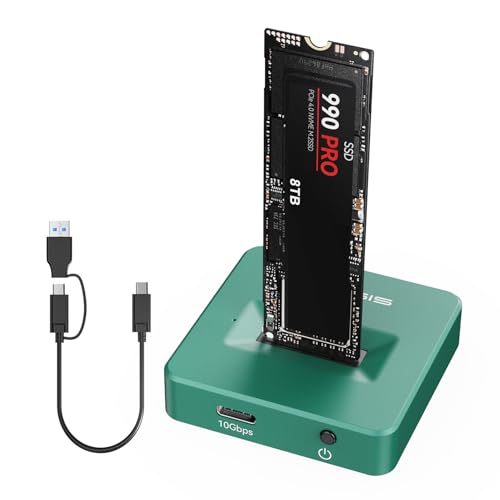 Also Consider ACASIS NVME to USB Docking Station | 9.5PCKitHQ scoreView on Amazon |
06 | 9.4PCKitHQ scoreView on Amazon |
07 Also Consider Rosewill Cloner | 9.3PCKitHQ scoreView on Amazon |
08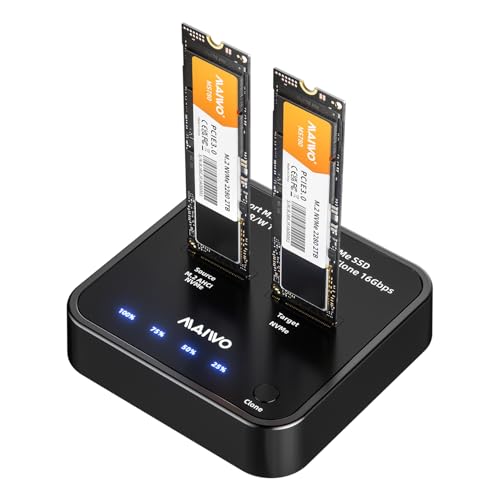 | 9.2PCKitHQ scoreView on Amazon |
A closer look at each configuration
M.2 NVMe & SATA SSD/HDD Hard Drive Docking Station
score
The ICY BOX TripleBay pairs three drive bays with one-touch offline cloning and USB 3.2 Gen 2 at up to 10Gbps.
- Interface
- USB 3.2 Gen 2
- USB-C
- Yes
- Weight
- 0.65 lb
- Warranty
- 2 year
The ICY BOX TripleBay holds three slots for M.2 PCIe NVMe SSDs and 2.5-inch and 3.5-inch SATA SSDs and HDDs, so three drives connect at once. One-touch offline cloning copies drives with no software, from NVMe to NVMe or from SATA to NVMe. USB 3.2 Gen 2 moves data at up to 10 Gbps, and the USB-C/USB-A combo cable connects without extra adapters. The tool-free design swaps drives fast, and the dock works with Windows and macOS. The warranty runs 2 years, and the dock weighs 0.65 lb.
Choose it if
- You want three bays for NVMe and SATA drives
- You want offline cloning with one touch
Consider another if
- You need 20Gbps USB like the Rosewill RS-N2-CL
- You need a dual-bay NVMe-only dock like the MAIWO
M.2 NVMe & SATA Hard Drive Docking Station
score
The ICY BOX single-bay dock reads M.2 NVMe and 2.5-inch and 3.5-inch drives at up to 10Gbps.
- Interface
- USB 3.2 Gen 2
- USB-C
- Yes
- Warranty
- 2 year
The ICY BOX single-bay dock works with 3.5-inch HDDs, 2.5-inch SSDs and M.2 NVMe SSDs, so one dock reads desktop and laptop drives. USB 3.2 Gen 2 moves data at up to 10Gbps through the JMS581DL chipset. The screwless, open-vertical design swaps drives with no tools, and the open-air layout keeps drives cool during long transfers. The box holds an 80cm 2-in-1 USB-C to C+A cable, and the dock works with Windows, macOS, Linux and Android. The warranty runs 2 years.
Choose it if
- You want one bay that reads NVMe and SATA
- You want a screwless open-vertical dock
Consider another if
- You need 20Gbps USB like the Rosewill RS-N2-CL
- You need three bays like the TripleBay
ACASIS 10Gbps M.2 NVMe & SATA SSD to USB Docking Station
score
The ACASIS M04 pairs an aluminum toaster-style dock with USB 3.2 Type-C at up to 10Gbps.
- Interface
- USB 3.2 Type-C
- USB-C
- Yes
- Weight
- 0.12 lb
- Warranty
- 1 Year
The ACASIS M04 reads M.2 PCIe NVMe M Key and B+M Key SSDs in 2230, 2242, 2260 and 2280 sizes, and SATA is also compatible. USB 3.2 Type-C moves data at up to 10Gbps, and the dock backs up up to 8TB. The aluminum body sheds heat, and the toaster-style open layout improves airflow. The tool-free, driver-free design swaps an M.2 SSD with no tools, and the dock works with Windows, Linux and macOS. The warranty runs 1 Year.
Choose it if
- You want a light 0.12 lb M.2 dock
- You want aluminum cooling for long transfers
Consider another if
- You need 2.5-inch and 3.5-inch drive bays
- You need 20Gbps USB like the Rosewill RS-N2-CL
WAVLINK Hard Drive Docking Station NVMe M.2 to SATA 2.5/3.5 SSD/HDD
score
The WAVLINK pairs two drive bays with offline cloning and USB 3.2 Gen 2 at up to 10Gbps.
- Interface
- USB 3.2 Gen 2
The WAVLINK holds two slots for M.2 NVMe SSDs in 2230, 2242, 2260 and 2280 sizes and 2.5-inch and 3.5-inch SATA HDDs and SSDs, so you can mix capacities and separate system storage from data. Offline clone copies a full disk without a computer, between M.2 NVMe drives and SATA drives in both directions. USB 3.2 Gen 2 moves data at up to 10Gbps. The aluminum alloy shell sheds heat and resists scratches and bumps, and the dock works with Windows, Mac and Linux.
Choose it if
- You want two bays for NVMe and SATA
- You want offline cloning in both directions
Consider another if
- You need three bays like the TripleBay
- You need 20Gbps USB like the Rosewill RS-N2-CL
ACASIS NVME to USB Docking Station
score
The green ACASIS dock pairs the same M.2 NVMe and SATA reader with USB 3.2 Type-C at up to 10Gbps.
- Interface
- USB 3.2 Type-C
- USB-C
- Yes
- Warranty
- 1 Year
This green ACASIS dock reads M.2 PCIe NVMe M Key and B+M Key SSDs in 2230, 2242, 2260 and 2280 sizes, and SATA is also compatible. USB 3.2 Type-C moves data at up to 10Gbps, and the dock backs up up to 8TB. The aluminum body sheds heat, and the open layout improves airflow. The tool-free, driver-free design swaps an M.2 SSD with no tools, and the dock works with Windows, Linux and macOS.
Choose it if
- You want a green M.2 dock for travel
- You want aluminum cooling for long transfers
Consider another if
- You need 2.5-inch and 3.5-inch drive bays
- You need 20Gbps USB like the Rosewill RS-N2-CL
Rosewill M.2 NVMe & SATA SSD / 2.5-inch & 3.5-inch HDD Hard Drive Cloner & Reader Docking Station
score
The Rosewill RS-N2S-CL pairs a triple bay with offline cloning and USB 3.2 Gen 2x1 at up to 10Gbps.
- Interface
- USB 3.2 Gen 2x1
- Weight
- 0.25 lb
- Warranty
- 1 Year
The Rosewill RS-N2S-CL works as a docking station and a duplicator for M.2 NVMe and SATA SSDs and 2.5-inch and 3.5-inch HDDs, with three bays for data management and cloning. Offline cloning copies drives with no host computer, and USB 3.2 Gen 2x1 moves data at up to 10Gbps. The tool-free design installs and removes M.2 SSDs and HDDs with no tools, and the compact, lightweight design at 0.25 lb carries easily. The warranty runs 1 Year.
Choose it if
- You want a triple bay at 0.25 lb
- You want offline cloning without a host computer
Consider another if
- You need 20Gbps USB like the Rosewill RS-N2-CL
- You need a dual-bay NVMe-only dock like the MAIWO
Rosewill Cloner
score
The Rosewill RS-N2-CL pairs dual NVMe bays with USB 3.2 Gen 2x2 at up to 20Gbps and one-click cloning.
- Interface
- USB 3.2 Gen 2x2
- USB-C
- Yes
- Weight
- 0.85 lb
- Warranty
- 1 Year
The Rosewill RS-N2-CL holds two NVMe bays for M Key and B+M Key NVMe SSDs, and its USB 3.2 Gen 2x2 interface moves data at up to 20Gbps. One-click cloning copies a drive with a single button press and no computer. Built-in S.M.A.R.T. The box holds a 20Gbps USB-C cable, a 10Gbps USB-A cable and a 12V/2A power adapter. The dock weighs 0.85 lb, and the warranty runs 1 Year.
Choose it if
- You want 20Gbps USB for NVMe transfers
- You want built-in S.M.A.R.T. monitoring for your NVMe drives
Consider another if
- You need 2.5-inch and 3.5-inch drive bays
- You need a triple bay like the ICY BOX TripleBay
MAIWO M.2 NVMe SSD Cloner Docking Station USB 3.2 Gen2 2000MB/s Clone-speed
score
The MAIWO dock pairs dual NVMe bays with one-key offline cloning at up to 16Gbps.
- Interface
- USB 3.2 Gen2×1
- USB-C
- Yes
- Weight
- 0.33 lb
- Warranty
- One Year
The MAIWO dock reads two M.2 PCIe NVMe M-Key SSDs at once, in 2230, 2242, 2260, 2280 and 22110 sizes, with simultaneous reads at up to 625MB/s and single-drive reads at up to 1250MB/s. One-key offline cloning copies a source SSD to a target SSD with no computer, at up to 16Gbps, and the target needs capacity equal to the source or greater. USB 3.2 Gen2x1 Type-C comes with a 2-in-1 10Gbps cable, and the dock works with Windows, macOS and Linux. It measures 3 by 3 by 0.75 inches, weighs 0.33 lb, and the warranty runs One Year.
Choose it if
- You want two NVMe SSDs read at once
- You want one-key cloning with no PC
Consider another if
- You need 2.5-inch and 3.5-inch drive bays
- You need 20Gbps USB like the Rosewill RS-N2-CL
Make the choice for your setup
Count the bays and drive types
Bay count decides how many drives you read at once on your desk. The ICY BOX TripleBay and the Rosewill RS-N2S-CL hold three bays each, for M.2 NVMe plus 2.5-inch and 3.5-inch SATA drives. The WAVLINK holds two bays for the same mix, while the Rosewill RS-N2-CL and the MAIWO hold two M.2 NVMe bays each. The ICY BOX single-bay dock and the two ACASIS docks hold one drive each, and the ACASIS docks take M.2 NVMe and M.2 SATA SSDs only. Three bays suit mixed collections, two NVMe bays suit M.2 pairs, and one M.2 bay backs up to 8TB.
Compare interface speed and cloning
USB speed runs at up to 10Gbps on the ICY BOX docks, the ACASIS docks, the WAVLINK and the RS-N2S-CL, and at up to 20Gbps on the RS-N2-CL with USB 3.2 Gen 2x2. The MAIWO interface runs USB 3.2 Gen2x1, while its one-key offline cloning runs at up to 16Gbps. Offline cloning sits in the TripleBay, the WAVLINK, the RS-N2S-CL, the RS-N2-CL and the MAIWO, with no computer: one touch on the TripleBay, one click on the RS-N2-CL, one key on the MAIWO. The ICY BOX single-bay dock and the two ACASIS docks read drives at up to 10Gbps. Pick the RS-N2-CL for 20Gbps USB transfers, and pick offline cloning when you copy disks without a PC. If that fits your setup better, see our guide to the Best USB Docking Station for Laptop.
Weight, warranty and cables
Weight runs from 0.12 lb on the ACASIS M04 to 0.85 lb on the Rosewill RS-N2-CL, with the Rosewill RS-N2S-CL at 0.25 lb, the MAIWO at 0.33 lb and the ICY BOX TripleBay at 0.65 lb. Warranty runs 2 years on both ICY BOX docks and 1 year on the ACASIS docks, the Rosewill docks and the MAIWO. The TripleBay box holds a USB-C/USB-A combo cable and a power adapter, and the single-bay box holds an 80cm 2-in-1 USB-C to C+A cable. The Rosewill RS-N2-CL box holds a 20Gbps USB-C cable, a 10Gbps USB-A cable and a 12V/2A power adapter, and the MAIWO box holds a 5V/3A power adapter.
Before you decide, also read Best Docking Station.
FAQ: NVMe SSD Docking Station USB 3.2
Which docks clone drives without a computer?
The ICY BOX TripleBay, the WAVLINK, the Rosewill RS-N2S-CL, the Rosewill RS-N2-CL and the MAIWO clone offline with no computer. The ICY BOX single-bay dock and the two ACASIS docks read drives at up to 10Gbps.
Which dock weighs the least here?
The ACASIS M04 weighs 0.12 lb, the lowest weight stated here. The Rosewill RS-N2S-CL weighs 0.25 lb, the MAIWO weighs 0.33 lb, the ICY BOX TripleBay weighs 0.65 lb and the Rosewill RS-N2-CL weighs 0.85 lb.
What USB speed do these docks offer?
The RS-N2-CL offers up to 20Gbps over USB 3.2 Gen 2x2. The ICY BOX docks, the ACASIS docks, the WAVLINK and the RS-N2S-CL offer up to 10Gbps, and the MAIWO interface runs USB 3.2 Gen2x1 with a 10Gbps cable.


