Best Laptop Stopped Recognizing Docking Station (2026): 4 Picks Compared
 By Theo LangUpdated
If your laptop stopped recognizing its docking station, the UANTIN USB C Docking Station Dual Monitor for Laptop restores your desk with dual HDMI outputs up to 4K@30Hz and up to 85W charging through one USB-C connection. It suits Windows users who want an extended display across two monitors; Mac OS mirrors the content on both. The hub adds two USB-C 5Gbps ports, three USB-A ports, and SD and Micro SD slots.
Your shortlist at a glance
PCKitHQ scores range from 9.2 to 9.8. See how we pick.
| Product and key specifications | Score and retailer |
|---|---|
01 | 9.8PCKitHQ scoreView on Amazon |
02 | 9.6PCKitHQ scoreView on Amazon |
03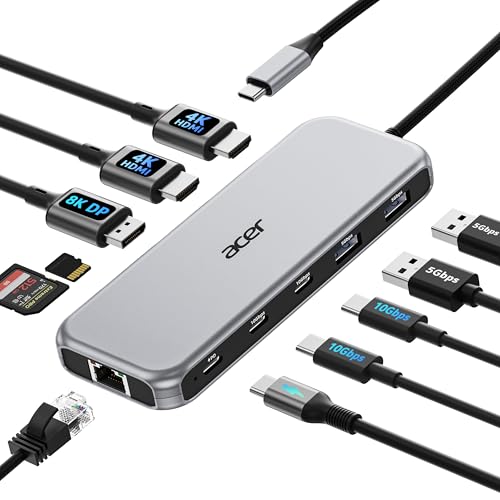 | 9.4PCKitHQ scoreView on Amazon |
04 | 9.2PCKitHQ scoreView on Amazon |
A closer look at each configuration
UANTIN USB C Docking Station Dual Monitor for Laptop
score
Dual 4K@30Hz HDMI outputs, up to 85W charging, and a 10-in-1 port set make this UANTIN dock the replacement for a two-monitor desk.
- Power delivery
- 85 W
- Interface
- USB-C
- HDMI
- Yes
- Warranty
- 2 Year
This UANTIN dock turns one USB-C port into ten connections: two HDMI ports, 100W PD, two USB-C 5Gbps data ports, one USB-A 3.0 port, two USB-A 2.0 ports, and SD and Micro SD slots. The USB-C PD port accepts up to 100W and delivers up to 85W to the laptop, since the dock reserves about 15W for its own operation. The two USB-C ports transfer data only, with no charging or video. The slim aluminum body carries a built-in 30 cm nylon braided cable, and no drivers are required. It works with USB-C and Thunderbolt 3/4/5 laptops, and the warranty is 2 Year.
Choose it if
- You run two monitors from a Windows laptop through one USB-C connection
- You charge your laptop with up to 85W while using every port
Consider another if
- You need the DisplayPort output of the WAVLINK
- You need the 2.5G Ethernet port of the WAVLINK
Laptop Docking Station
score
Triple-monitor support, a 130W adapter, and 100W charging suit Windows desks that run three displays at once.
- Power delivery
- 100 W
- Interface
- USB-C
- HDMI
- Yes
- DisplayPort
- Yes
- Ethernet
- Yes
- USB-C
- Yes
- Weight
- 0.73 lb
This WAVLINK dock connects up to three monitors through two HDMI ports and one DisplayPort. A single DisplayPort output reaches up to 4K@144Hz under a DP1.4 source, and dual monitors run at 4K@60Hz. The included 130W power adapter feeds 100W PD charging to the laptop and 7.5W to other Type-C devices. Data runs through two USB-C 10Gb ports and four USB-A 5Gb ports, alongside a 2.5G Ethernet port and a 3.5mm audio jack. The dock is not compatible with any Mac OS computer, and the host laptop USB-C port must support video output and charging. The dock weighs 0.73 lb, and the listed resolution figures assume a laptop that supports DP1.4 and DSC1.2.
Choose it if
- You connect three monitors to a Windows laptop
- You charge your laptop with 100W while driving dual 4K@60Hz displays
Consider another if
- You use a Mac, since this dock is Windows only
- You need the 8K@30Hz DisplayPort output of the Acer
Acer Laptop Docking Station 3 Monitors
score
Two HDMI ports at 4K@60Hz, an 8K@30Hz DisplayPort, and 10Gbps data ports cover a three-display desk.
- Power delivery
- 85 W
- Interface
- USB-C
- HDMI
- Yes
- Ethernet
- Yes
- USB-C
- Yes
- Warranty
- 1 Year
This Acer dock is an 11-in-1 hub with two HDMI ports at 4K@60Hz, one DisplayPort at 8K@30Hz, two USB-C 10Gbps ports, two USB-A 5Gbps ports, a 1 Gbps Ethernet port, and SD and MicroSD slots at 104Mbps. Triple-display output reaches up to 4K@60Hz plus 4K@60Hz plus 1080P@60Hz, while a single display reaches up to 8K@30Hz on DisplayPort or 4K@60Hz on HDMI. A 1000Mbps RJ45 Ethernet port gives a wired network connection. The dock accepts up to 100W input and delivers 85W to the laptop, but the power adapter and cable are not included. The laptop needs a full-featured USB-C port, and the warranty is 1 Year.
Choose it if
- You drive three displays from a full-featured USB-C laptop
- You move files through 10Gbps USB-C ports and a 104Mbps card reader
Consider another if
- You need a power adapter included in the box
- You need the 2.5G Ethernet port of the WAVLINK
USB C Docking Station Dual Monitor for Dell/HP/Lenovo/Mac Laptop
score
Fourteen ports, including VGA and a 3.5mm audio and mic jack, cover desks that still use an older VGA monitor.
- Power delivery
- 85 W
- Interface
- USB-C/Thunderbolt 3
- HDMI
- Yes
- Ethernet
- Yes
- USB-C
- Yes
- Weight
- 0.22 lb
- Warranty
- 1 Year
This Aoyvsktv dock converts one USB-C or Thunderbolt 3 port into 14 ports: two HDMI ports at 4K@30Hz, one VGA port at 1080P, one USB-A 3.1 port at 10Gbps, one USB-C 3.1 port at 10Gbps, two USB-A 3.0 ports, two USB-A 2.0 ports, 100W PD, 1000Mbps Ethernet, SD and TF card slots, and a 3.5mm audio and mic port. It supports up to three monitor outputs, with a single HDMI port at 4K@30Hz and VGA at 1080P@60Hz; when two or more outputs run together, each runs at 1080P@60Hz. Windows supports extended and mirror modes, while macOS supports mirror mode only. The PD port delivers up to 85W to the device and does not transfer data. The dock weighs 0.22 lb, and the warranty is 1 Year.
Choose it if
- You connect a VGA monitor alongside two HDMI displays
- You want a 0.22 lb hub with 1000Mbps Ethernet
Consider another if
- You need 4K@60Hz on both HDMI outputs at once
- You need the single 4K@144Hz DisplayPort output of the WAVLINK
Make the choice for your setup
Match the dock to your monitor count
Count the monitors on your desk before choosing. The UANTIN dock has two HDMI ports up to 4K@30Hz, so it covers a two-monitor desk. The WAVLINK dock adds a DisplayPort to its two HDMI ports and supports up to three monitors, with a single DisplayPort output up to 4K@144Hz under a DP1.4 source and dual monitors at 4K@60Hz. The Acer dock also supports three displays, up to 4K@60Hz plus 4K@60Hz plus 1080P@60Hz, with a single display up to 8K@30Hz on DisplayPort. The Aoyvsktv dock supports up to three outputs through two HDMI ports and one VGA port, with each output at 1080P@60Hz when two or more run together. On Windows the UANTIN, Acer, and Aoyvsktv docks extend the display, while macOS mirrors the same content on every external monitor.
Check charging power and what it delivers
Compare the charging figure each dock delivers to the laptop, not the figure it accepts. The UANTIN dock accepts up to 100W PD and delivers up to 85W, since it reserves about 15W for its own operation. The WAVLINK dock includes a 130W power adapter and delivers 100W PD charging to the laptop, plus 7.5W to other Type-C devices. The Acer dock accepts up to 100W input and delivers 85W to the laptop, but its power adapter and cable are not included, so the buyer supplies them. The Aoyvsktv dock has a 100W PD port that delivers up to 85W to the device, since the hub consumes 15W, and that PD port does not transfer data. Keep each delivered figure with its own dock. A related shortlist covers the Best Internal Hard Drive Docking Station.
Confirm your laptop port supports video and charging
Each dock in this guide states what the host laptop port must support. The UANTIN dock works with USB-C and Thunderbolt 3/4/5 laptops and needs no drivers. The WAVLINK dock requires a host USB-C port that supports video output and charging, and its highest resolution figures assume a laptop that supports DP1.4 and DSC1.2. The Acer dock requires a full-featured USB-C port, and its HDMI output performs best when the device HDMI version is 2.0 or higher. The Aoyvsktv dock requires DP 1.4 and a Thunderbolt 3/4 or USB-C port with video output function. Match the dock against the port on the laptop you own.
Before you decide, also read Best Docking Station.
FAQ: Laptop Stopped Recognizing Docking Station
Which docks here support three monitors at once?
The WAVLINK dock uses two HDMI ports and one DisplayPort for three monitor outputs. The Acer dock uses two HDMI ports and one DisplayPort for three monitor outputs. The Aoyvsktv dock uses two HDMI ports and one VGA port for three monitor outputs. The UANTIN dock supports two monitors through its two HDMI ports.
How much charging power does each dock deliver to a laptop?
The UANTIN dock delivers up to 85W from a 100W PD input. The WAVLINK dock delivers 100W from its included 130W adapter. The Acer dock delivers 85W from a 100W input, with the adapter not included. The Aoyvsktv dock delivers up to 85W from its 100W PD port.
Do these docks extend the display on macOS?
No. The UANTIN dock mirrors the same content on Mac OS, and Windows gives an extended display across two monitors. The Acer dock mirrors the same content for Mac users. The Aoyvsktv dock mirrors the same content on macOS, and Windows supports extended mode. The WAVLINK dock is not compatible with any Mac OS computer.