
Best Docking Station for Lenovo Laptop (2026): 4 Picks Compared
 By Theo LangUpdated
Choose the Lenovo ThinkPad Universal USB-C Dock-40AY0090 if your Lenovo laptop work runs through one USB-C cable with PXE boot, Wake-on-LAN and MAC Address Pass Through for managed office or remote setups. It charges USB-C notebooks and connects displays and PC accessories through that single cable, with automatic firmware updates for IT-managed desks.
Your shortlist at a glance
PCKitHQ scores range from 9.2 to 9.8. See how we pick.
| Product and key specifications | Score and retailer |
|---|---|
01 Best Overall Lenovo ThinkPad Universal USB-C Dock-40AY0090 | 9.8PCKitHQ scoreView on Amazon |
02 Second Pick Lenovo ThinkPad USB-C Dock Gen 2 (40AS0090) | 9.6PCKitHQ scoreView on Amazon |
03 Also Consider Lenovo 40AN0135US Thunderbolt 3 Dock Gen 2 | 9.4PCKitHQ scoreView on Amazon |
04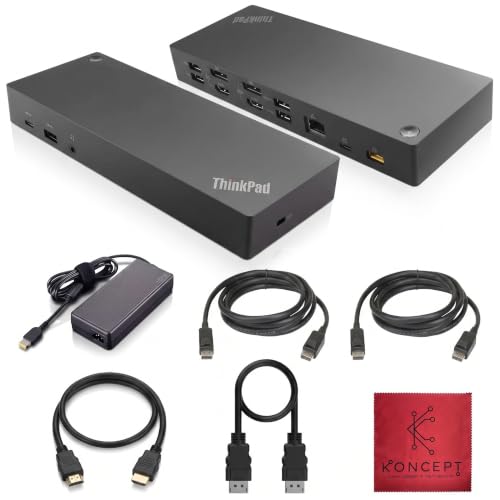 Also Consider 40AF0135US Lenovo Docking Station Dual Monitor | 9.2PCKitHQ scoreView on Amazon |
A closer look at each configuration
Lenovo ThinkPad Universal USB-C Dock-40AY0090
score
This USB-C dock centers on one-cable notebook charging, automatic firmware updates and PXE boot with Wake-on-LAN support.
- Interface
- USB-C
- USB-C
- Yes
- Weight
- 1.98 lb
The Lenovo ThinkPad Universal USB-C Dock-40AY0090 uses a USB-C interface and weighs 1.98 lb. Its documented management features include automatic firmware updates, PXE boot, Wake-on-LAN and MAC Address Pass Through, which suit office-based and remote working desks. The dock charges USB-C notebooks and connects displays and other PC accessories through one cable. Match your notebook power requirement against your own charger rating before relying on dock charging for a larger machine. The one-cable design is the deciding feature here: displays and accessories connect through the same USB-C cable that charges the notebook.
Choose it if
- You want one USB-C cable to charge your notebook and connect desk accessories
- Your workplace uses PXE boot, Wake-on-LAN or MAC Address Pass Through
Consider another if
- You need the DisplayPort 1.4 and HDMI 2.0 outputs of the Gen 2 dock
- You need the 3 Years warranty term of the Gen 2 dock
Lenovo ThinkPad USB-C Dock Gen 2 (40AS0090)
score
This USB-C dock adds DisplayPort 1.4 and HDMI 2.0 video, 10Gbps USB data and a 3 Years warranty at 0.72 lb.
- Interface
- USB-C
- HDMI
- Yes
- DisplayPort
- Yes
- USB-C
- Yes
- Weight
- 0.72 lb
- Warranty
- 3 Years
The Lenovo ThinkPad USB-C Dock Gen 2 (40AS0090) uses a USB-C interface, weighs 0.72 lb and carries a 3 Years warranty. It supports DisplayPort 1.4 and HDMI 2.0 for max 1 x 4K@60Hz, with the real video output depending on the system output. USB data transfers are rated at 10Gbps, and ThinkPad control features include PXE Boot, System Wake-on-LAN and MAC address pass through. At 0.72 lb it suits a dock that moves between desks with the laptop.
Choose it if
- You want DisplayPort 1.4 or HDMI 2.0 video up to 1 x 4K@60Hz
- You want a 3 Years warranty term on your docking station
Consider another if
- You need the Thunderbolt 3 interface of the 40AN0135US dock
- You need the dual 4K display support of the 40AN0135US dock
Lenovo 40AN0135US Thunderbolt 3 Dock Gen 2
score
This Thunderbolt 3 dock provides dual 4K display support with 2x HDMI and 2x DisplayPort plus RJ-45 Ethernet.
- Interface
- Thunderbolt 3
- HDMI
- Yes
- DisplayPort
- Yes
- Ethernet
- Yes
- USB-C
- Yes
- Warranty
- 1 year
The Lenovo 40AN0135US Thunderbolt 3 Dock Gen 2 uses a Thunderbolt 3 interface with 1x USB-C port that is Thunderbolt 3 compatible, and carries a 1 year warranty. Display connections are 2x HDMI and 2x DisplayPort with dual 4K display support. USB ports include 4x USB 3.1 Gen 2 rated at 10Gbps, and networking is a 1x RJ-45 Ethernet port rated 10Base-T, 100Base-TX and 1000Base-T. A security-lock slot and a 3.5mm audio connector are also included. It supports Windows 7 and Windows 10.
Choose it if
- You want dual 4K display support from 2x HDMI and 2x DisplayPort
- You need an RJ-45 Ethernet port for a wired network connection
Consider another if
- You want the 3 Years warranty term of the USB-C Dock Gen 2
- You want the 0.72 lb weight of the USB-C Dock Gen 2
40AF0135US Lenovo Docking Station Dual Monitor
score
This USB-C dock provides 2 x DisplayPort 1.2 and 2 x HDMI ports with a 10/100/1000 Mb/s Ethernet port.
- Interface
- USB-C
- HDMI
- Yes
- DisplayPort
- Yes
- Ethernet
- Yes
- Warranty
- 1 year
The 40AF0135US Lenovo Docking Station Dual Monitor uses a USB-C interface and carries a 1 year warranty. It has 2 x DisplayPort 1.2 ports, 2 x HDMI ports, 1 x USB 3.1 Gen 2 Type-C port, 3 x USB 3.1 Gen 2 Type-A ports and 2 USB 2.0 Type-A ports. Networking is a 1 x 10/100/1000 Mb/s Ethernet port, and a stereo and mic combo audio port is included. The package includes an HDMI cable, a Displayport cable and USB-C cables, so the display leads for a two-monitor desk are in the box.
Choose it if
- You want 2 x DisplayPort 1.2 and 2 x HDMI ports for two monitors
- You need a 10/100/1000 Mb/s Ethernet port at your desk
Consider another if
- You want the Thunderbolt 3 interface of the 40AN0135US dock
- You want the 3 Years warranty term of the USB-C Dock Gen 2
Make the choice for your setup
Match the dock interface first
Three docks here use a USB-C interface: the Lenovo ThinkPad Universal USB-C Dock-40AY0090, the Lenovo ThinkPad USB-C Dock Gen 2 (40AS0090) and the 40AF0135US Lenovo Docking Station Dual Monitor. The Lenovo 40AN0135US Thunderbolt 3 Dock Gen 2 uses a Thunderbolt 3 interface with a Thunderbolt 3 compatible USB-C port. Start with the port on your Lenovo laptop. A Thunderbolt 3 dock belongs with a Thunderbolt 3 laptop port, while the USB-C docks belong with USB-C notebook connections. Keep the interface name exact when you compare, because a port name alone does not establish charging wattage or every protocol version. Check the exact interface wording for each dock before you order, and keep Thunderbolt 3 separate from plain USB-C when you read the port list.
Count display and network ports
The Lenovo ThinkPad USB-C Dock Gen 2 (40AS0090) supports DisplayPort 1.4 and HDMI 2.0 for max 1 x 4K@60Hz. The Lenovo 40AN0135US Thunderbolt 3 Dock Gen 2 provides 2x HDMI and 2x DisplayPort with dual 4K display support. The 40AF0135US provides 2 x DisplayPort 1.2 ports and 2 x HDMI ports. For wired networking, the 40AN0135US has an RJ-45 Ethernet port and the 40AF0135US has a 10/100/1000 Mb/s Ethernet port. Count the monitors and the network cable you will actually plug in, then match those counts to the ports on each dock. A dock with two display ports of one type still needs matching inputs on your monitors, so read the port types rather than the monitor count alone. A related shortlist covers the Best Docking Station for Business.
Weigh warranty and carrying weight
Warranty terms differ across these docks. The Lenovo ThinkPad USB-C Dock Gen 2 (40AS0090) carries a 3 Years warranty. The Lenovo 40AN0135US Thunderbolt 3 Dock Gen 2 carries a 1 year warranty. The 40AF0135US Lenovo Docking Station Dual Monitor also carries a 1 year warranty. Stated weights also differ: the Gen 2 dock weighs 0.72 lb and the Lenovo ThinkPad Universal USB-C Dock-40AY0090 weighs 1.98 lb. If the dock stays on one desk, weight matters less than ports and warranty. If it travels in a laptop bag, the 0.72 lb figure is the one to compare against your carry limit. Read the warranty term as whole-device coverage for the dock you order, and keep the term attached to the exact model you order.
Comparing more options? See Best Docking Station.
FAQ: Docking Station for Lenovo Laptop
Which dock here uses Thunderbolt 3?
The Lenovo 40AN0135US Thunderbolt 3 Dock Gen 2 uses a Thunderbolt 3 interface. It provides 2x HDMI and 2x DisplayPort with dual 4K display support, 4x USB 3.1 Gen 2 ports rated at 10Gbps, and an RJ-45 Ethernet port. Its warranty term is 1 year.
Which dock has the longest warranty term?
Of the three docks that state a warranty term, the Lenovo ThinkPad USB-C Dock Gen 2 (40AS0090) carries the longest at 3 Years. The Lenovo 40AN0135US carries a 1 year warranty, and the 40AF0135US Lenovo Docking Station Dual Monitor also carries a 1 year warranty.
Which dock fits a two-monitor desk?
The 40AF0135US provides 2 x DisplayPort 1.2 ports and 2 x HDMI ports, and includes an HDMI cable and a Displayport cable. The Lenovo 40AN0135US Thunderbolt 3 Dock Gen 2 provides 2x HDMI and 2x DisplayPort with dual 4K display support. Match your monitor inputs to those ports.


