
Best Gaming Laptop USB Dock (2026): Top 8 by the Specs
 By Theo LangUpdated
Choose the Umaniy Laptop Stand with Docking Station if you want a dock that also lifts the laptop: its 9-level height adjustment, 0.9 lb frame and 4K@30Hz HDMI output suit a business professional or content creator working on the go. The ABIWAZY dock adds two HDMI ports at 4K@60Hz.
Your shortlist at a glance
PCKitHQ scores range from 9.2 to 9.8. See how we pick.
| Product and key specifications | Score and retailer |
|---|---|
01 | 9.8PCKitHQ scoreView on Amazon |
02 | 9.7PCKitHQ scoreView on Amazon |
03 | 9.6PCKitHQ scoreView on Amazon |
04 | 9.5PCKitHQ scoreView on Amazon |
05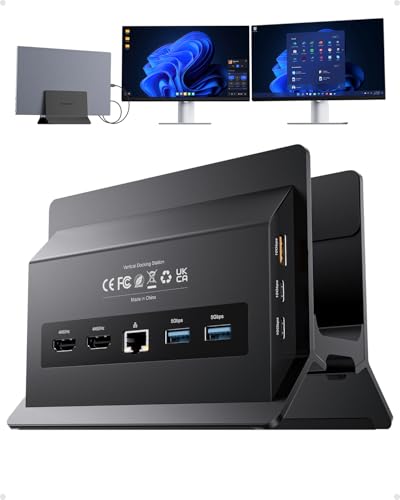 | 9.5PCKitHQ scoreView on Amazon |
06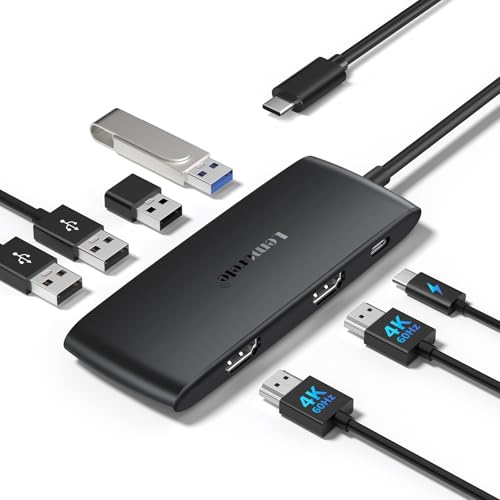 | 9.4PCKitHQ scoreView on Amazon |
07 Also Consider Docking Station for HP Omen 17 16 15 15t Transcend 14 16 MAX 16 Victus 15 16 Gaming LaptopPower delivery: 100 W | 9.3PCKitHQ scoreView on Amazon |
08 | 9.2PCKitHQ scoreView on Amazon |
A closer look at each configuration
Umaniy Laptop Stand
score
9-level height adjustment, 4K HDMI output and 85W charging define this folding stand.
- Power delivery
- 85 W
- Interface
- USB-C 3.0
- HDMI
- Yes
- USB-C
- Yes
- Weight
- 0.9 lb
This 8-in-1 stand combines a laptop riser with a dock. Its HDMI output runs 4K at 3840x2160 and 30Hz, while USB-A and USB-C 3.0 ports move data at 5Gbps. It delivers 85W to the laptop, reserving 15W for peripherals. The frame folds to 10.5 x 2.2 x 0.9 inches, weighing 0.9 lb. Height adjusts across 9 levels, and the laptop port must support DisplayPort Alt Mode.
Choose it if
- You want 9-level height adjustment built in
- Your laptop measures between 10 and 17 inches
Consider another if
- You need two HDMI outputs for two monitors
- You need 100W charging for the laptop
Laptop Docking Station Dual Monitor
score
Two HDMI ports at 4K@60Hz and a DisplayPort at 8K@30Hz cover three monitors.
- Power delivery
- 87 W
- Interface
- USB-C
- HDMI
- Yes
- DisplayPort
- Yes
- Ethernet
- Yes
- USB-C
- Yes
- Weight
- 0.35 lb
- Warranty
- 1 Year Manufacturer
This 15-in-1 dock turns one USB-C port into a workstation. Two HDMI ports run 4K@60Hz and the DisplayPort runs 8K@30Hz or 4K@144Hz, driving up to three 4K monitors. It delivers 87W, needing a charger above 65W. A 1 Gbps Ethernet port gives a wired connection. The dock weighs 0.35 lb and carries a 1 Year Manufacturer warranty. On macOS, all monitors show the same content.
Choose it if
- You want two HDMI ports and a DisplayPort
- You want a 1 Gbps Ethernet port
Consider another if
- You need 100W delivered to the laptop
- You need video from the dock USB-C ports
Laptop Docking Station
score
Dual HDMI, one DisplayPort, 100W charging and 2.5G Ethernet suit three monitors.
- Power delivery
- 100 W
- Interface
- USB-C
- HDMI
- Yes
- DisplayPort
- Yes
- Ethernet
- Yes
- USB-C
- Yes
- Weight
- 0.73 lb
This dock gives two HDMI ports and one DisplayPort output. A single DisplayPort runs up to 4K@144Hz and dual monitors run at 4K@60Hz. The included 130W adapter feeds a PD port that charges laptops at 100W. Two USB-C ports run at 10Gbps and four USB-A ports at 5Gbps. A 2.5G Ethernet port gives a wired connection. The dock is Windows only and weighs 0.73 lb.
Choose it if
- You want a 2.5G Ethernet port
- You run Windows and want three monitors
Consider another if
- You use a Mac; this dock is Windows only
- You need an 8K DisplayPort output
Laptop Docking Station
score
Dual DisplayPort, one HDMI and 100W charging give this dock three-monitor output.
- Power delivery
- 100 W
- Interface
- USB-C
- HDMI
- Yes
- DisplayPort
- Yes
- Ethernet
- Yes
- USB-C
- Yes
- Weight
- 0.73 lb
This dock gives dual DisplayPort and one HDMI output for up to three monitors. A single DisplayPort runs up to 4K@144Hz, and two monitors run at 4K@60Hz. The included 130W adapter feeds a PD port that charges laptops at 100W. A Gigabit Ethernet port gives a wired connection, and an SD and Micro SD reader takes memory cards. The dock is compatible with Windows 11.
Choose it if
- You want two DisplayPort outputs plus one HDMI
- You want Gigabit Ethernet and an SD card reader
Consider another if
- You use a Mac; this dock does not work with macOS
- You need a 2.5G Ethernet port
USB C Docking Station Dual Monitor 4K@
score
A vertical stand and two HDMI ports at 4K@60Hz combine into one.
- Power delivery
- 85 W
- Interface
- USB-C 3.2 Gen 2
- HDMI
- Yes
- Ethernet
- Yes
- USB-C
- Yes
This 11-in-1 dock pairs a vertical laptop stand with dual-monitor output. Two HDMI ports run 4K@60Hz through MST. USB-C Gen2 and USB-A Gen2 ports run at 10Gbps. The PD port takes up to 100W input and delivers 85W to the laptop, while a Gigabit Ethernet port gives a wired connection. A 65W or higher adapter is recommended. The dock is Windows only with data-only USB-C ports.
Choose it if
- You want a vertical stand built into the dock
- You want two 4K@60Hz displays from one cable
Consider another if
- You use a Mac; this dock is Windows only
- You need a power adapter in the box
Lemorele 7-in-1 USB-C Hub
score
Two HDMI ports at 4K@60Hz and 85W pass-through charging come in a 0.11 lb hub.
- Power delivery
- 85 W
- Interface
- USB-C 3.0
- HDMI
- Yes
- USB-C
- Yes
- Weight
- 0.11 lb
- Warranty
- 1 Year Manufacturer
This 7-in-1 hub gives two HDMI 2.0 ports, each running up to 4K@60Hz. A DP 1.4 host keeps 4K@60Hz on both ports; a DP 1.2 host may drop to 4K@30Hz. The PD port takes 100W input and passes up to 85W through to the laptop. The hub weighs 0.11 lb with a 1 Year Manufacturer warranty. On macOS, all external monitors show the same content.
Choose it if
- You want dual 4K@60Hz output from one hub
- You want a 0.11 lb hub for travel
Consider another if
- You need more than 85W delivered to the laptop
- You need three monitors from one dock
Docking Station for HP Omen 17 16 15 15t Transcend 14 16 MAX 16 Victus 15 16 Gaming Laptop
score
Two 4K HDMI ports and 100W charging sit on a rotating base for HP Omen laptops.
- Power delivery
- 100 W
- Interface
- USB-C
- HDMI
- Yes
- Ethernet
- Yes
- USB-C
- Yes
- Warranty
- 12-month warranty
This 15-in-1 dock gives two 4K@60Hz HDMI ports for dual displays. A 100W PD port keeps the laptop powered, and 10Gbps USB-C and USB-A ports move large files. A Gigabit Ethernet port gives a wired connection. The aluminum shell sheds heat, and a 360-degree rotating head and detachable base arrange the cables. A USB-C 4.0 cable is included with a 12-month warranty. A 3.5mm audio port is included.
Choose it if
- You use an HP Omen or Victus gaming laptop
- You want a rotating base for cables
Consider another if
- You need an 8K video output from the dock
- You need more than three external monitors
Docking Station for Asus ROG Strix Scar 18 16 17 15 Strix G18 G17 G16 G15
score
Two 4K HDMI ports and a rotating base fit Asus ROG Strix laptops.
- Interface
- USB-C
- HDMI
- Yes
- Ethernet
- Yes
- USB-C
- Yes
- Warranty
- 12-month warranty
This 15-in-1 dock gives two 4K@60Hz HDMI ports for dual displays. 10Gbps USB-C and USB-A ports move large files, and a Gigabit Ethernet port gives a wired connection. SD/TF readers take memory cards. The aluminum alloy shell sheds heat, and a 360-degree rotating head and detachable base arrange the cables. A USB-C 4.0 cable is included, and a 12-month warranty applies. A 3.5mm audio port is included.
Choose it if
- You use an Asus ROG Strix laptop
- You want a rotating base to arrange cables
Consider another if
- You need an 8K video output from the dock
- You need a dock built for HP Omen laptops
Make the choice for your setup
Match the monitor count to the dock
Count the external monitors. The Umaniy stand gives one HDMI output at 4K and 30Hz. The ABIWAZY dock gives two HDMI ports at 4K@60Hz plus a DisplayPort at 8K@30Hz or 4K@144Hz, and drives up to three 4K monitors. Both WAVLINK docks connect up to three monitors, with a single DisplayPort up to 4K@144Hz and dual monitors at 4K@60Hz. The PULWTOP dock gives two HDMI ports at 4K@60Hz through MST, and the Lemorele hub gives two HDMI 2.0 ports at 4K@60Hz. The FORCHN and Fjolsaz docks give two 4K@60Hz HDMI ports. On macOS, the ABIWAZY and Lemorele docks show the same content on all external monitors.
Check charging watts and the adapter
Charging watts differ across the docks. The Umaniy stand delivers 85W to the laptop and reserves 15W for peripherals. The ABIWAZY dock delivers 87W and needs a charger above 65W. Both WAVLINK docks support 100W charging and include a 130W adapter. The PULWTOP dock delivers 85W from a PD port rated to 100W input, and its adapter is not included, so a 65W or higher PD adapter is recommended. The Lemorele hub passes up to 85W through from a 100W input. The FORCHN dock has a 100W PD charging port. Check the adapter in the box before judging the charging figure. Shoppers with a related need can compare our guide to the Best USB Docking Station for Laptop.
Weigh the stand, the weight and the ports
Two docks include a stand and two include a rotating base. The Umaniy stand adjusts across 9 levels, folds to 10.5 x 2.2 x 0.9 inches, weighs 0.9 lb and includes a storage bag. The PULWTOP dock is a vertical stand. The FORCHN and Fjolsaz docks have a 360-degree rotating head and a detachable base. The Lemorele hub weighs 0.11 lb and the ABIWAZY dock weighs 0.35 lb, against 0.73 lb for each WAVLINK dock. For ports, the WAVLINK UMD05MR Pro and the PULWTOP dock give USB-C at 10Gbps. The WAVLINK UMD05MR Pro gives 2.5G Ethernet and the ABIWAZY dock gives 1 Gbps Ethernet.
For a wider shortlist, start with Best Docking Station.
FAQ: Gaming Laptop USB Dock
Which dock here drives three external monitors?
The ABIWAZY dock drives up to three 4K monitors with a DP1.4 DSC source. Both WAVLINK docks connect up to three monitors, and the FORCHN and Fjolsaz docks give triple 4K@60Hz displays. The Umaniy stand gives one HDMI output.
Which docks in this guide charge the laptop at 100W?
Both WAVLINK docks support 100W charging and include a 130W adapter; the FORCHN dock has a 100W PD port. The ABIWAZY dock delivers 87W. The Umaniy stand, the PULWTOP dock and the Lemorele hub each deliver 85W.
Which docks work with a Mac?
The Umaniy stand lists MacBook Pro and MacBook Air models as compatible. The ABIWAZY dock and the Lemorele hub work with Mac, but all external monitors show the same content. The WAVLINK UMD05MR Pro and the PULWTOP dock are Windows only. The WAVLINK UMD01R Pro works with Windows, Chrome OS, Linux, Harmony OS and Android with OTG.


