
Best Thunderbolt Dock (2026): Our 4 Picks Ranked
 By Theo LangUpdated
Choose the Anker Prime TB5 Docking Station when your laptop has Thunderbolt 5 and your work moves large files. Its Thunderbolt 5 ports carry up to 120 Gbps, drive one 8K display at 60 Hz or dual 8K displays on Thunderbolt 5 Windows laptops, and charge the laptop at up to 140 W. Two Thunderbolt 5 downstream ports, HDMI 2.1 or DisplayPort 2.1, and 2.5 Gbps Ethernet cover a desk setup.
Your shortlist at a glance
PCKitHQ scores range from 9.2 to 9.8. See how we pick.
| Product and key specifications | Score and retailer |
|---|---|
01 | 9.8PCKitHQ scoreView on Amazon |
02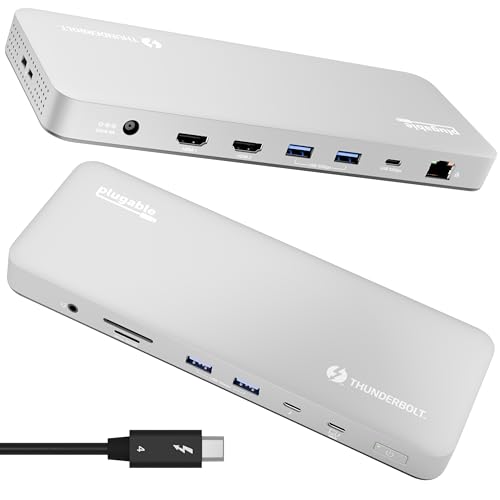 | 9.6PCKitHQ scoreView on Amazon |
03 | 9.4PCKitHQ scoreView on Amazon |
04 | 9.2PCKitHQ scoreView on Amazon |
A closer look at each configuration
Anker TB5 Docking Station
score
The Anker Prime TB5 pairs Thunderbolt 5 speed with 14 ports, dual 8K display support, and 140 W charging.
- Power delivery
- 140 W
- Interface
- Thunderbolt 5
- HDMI
- Yes
- DisplayPort
- Yes
- Ethernet
- Yes
- USB-C
- Yes
- Weight
- 2.37 lb
- Warranty
- 24 month Manufacturer
This Anker Prime TB5 is a 14-in-1 Thunderbolt 5 dock with one upstream port, two Thunderbolt 5 downstream ports, two USB-C ports, three USB-A ports, SD and TF card readers, an AC input, a 2.5 Gbps Ethernet port, an audio jack, and an HDMI 2.1 or DisplayPort 2.1 port. The Thunderbolt 5 port moves a 150GB file in 25 seconds. It supports one HDMI or DisplayPort output and two Thunderbolt 5 downstream video outputs, with up to 8K at 60 Hz for a single display and dual 8K at 60 Hz for Thunderbolt 5 Windows laptops. The upstream port charges at up to 140 W, and the front-facing dual USB-C ports share 45 W. It weighs 2.37 lb and carries a 24-month manufacturer warranty. A 3.3 ft Thunderbolt 5 cable and a 6 ft AC power cable are included.
Choose it if
- You want Thunderbolt 5 at up to 120 Gbps
- You need 140 W charging for your laptop
Consider another if
- You need more than 140 W of charging
- You need a dock for a Thunderbolt 3 laptop
Plugable Thunderbolt 4 Dock for M4/M5 MacBook Air & Pro
score
The Plugable TBT-UDM pairs Thunderbolt 4 with 13 ports, dual 4K HDMI, and 100 W charging for MacBooks.
- Power delivery
- 100 W
- Interface
- Thunderbolt 4
- HDMI
- Yes
- Ethernet
- Yes
- USB-C
- Yes
- Weight
- 2.85 lb
- Warranty
- 2 Year Limited Parts and Labor
This Plugable TBT-UDM is a 13-in-1 Thunderbolt 4 dock in a space gray aluminum case, built for M4 and M5 MacBook Air and Pro. It supports two 4K 60 Hz HDMI displays on M4 and M5 systems, Pro and Max M-series Macs, and M3 Macs in clamshell mode, plus a single 6K display. Its 13 ports include one downstream Thunderbolt 4 port at 40 Gbps, one USB-C port, four USB-A ports, SD and microSD UHS-II slots, Ethernet, 3.5 mm audio, and 100 W host charging. No drivers are required. It also supports Windows systems with Thunderbolt 4 or USB4. Base M1 and M2 MacBooks support only a single external display. It weighs 2.85 lb and carries a 2 Year Limited Parts and Labor warranty, with lifetime support.
Choose it if
- You want dual 4K displays on an M4 or M5 MacBook
- You need driverless setup over Thunderbolt 4
Consider another if
- You need more than 100 W of charging
- You need dual displays on a base M1 MacBook
UGREEN 8-in-1 Thunderbolt 4 Docking Station
score
The UGREEN Revodok Max 208 pairs Thunderbolt 4 with three downstream ports, dual 4K displays, and 85 W charging.
- Power delivery
- 85 W
- Interface
- Thunderbolt 4
- Ethernet
- Yes
- Weight
- 3.09 lb
- Warranty
- 2 year
This UGREEN Revodok Max 208 is an 8-in-1 Thunderbolt 4 dock with one upstream and three downstream Thunderbolt 4 ports, three USB-A 3.2 ports at 10 Gbps, a gigabit Ethernet port, and a 140 W DC power port. Data moves at up to 40 Gbps, and display output reaches up to 8K. It extends two 4K displays at 60 Hz or a single 8K display at 30 Hz for Windows laptops, and two 4K displays at 60 Hz or a single 4K display at 60 Hz for MacBooks with Pro or Max M-chips and Intel chips. MacBooks with basic M-chips extend to one 4K display at 60 Hz. The included 140 W GaN charger charges the laptop at up to 85 W. It weighs 3.09 lb and carries a 2 year warranty.
Choose it if
- You want three Thunderbolt 4 downstream ports
- You need 85 W charging from an included GaN charger
Consider another if
- You need more than 85 W of charging
- You need dual displays on a basic M-chip MacBook
UGREEN Maxidok Thunderbolt 5 Docking Station
score
The UGREEN Maxidok pairs Thunderbolt 5 with 17 ports, triple display support, and a built-in M.2 storage slot.
- Power delivery
- 140 W
- Interface
- Thunderbolt 5
- Ethernet
- Yes
- USB-C
- Yes
- Warranty
- 2 year
Intel-certified Thunderbolt 5 provides up to 120 Gbps of bandwidth. A built-in NVMe PCIe Gen4x4 M.2 slot supports 2230 to 2280 SSDs up to 8 TB. It supports triple independent displays on Windows and dual displays on Mac, with dual or single 8K at 60 Hz. It charges at up to 140 W, two USB-C ports share 60 W of charging, and total system power is up to 240 W. AI smart cooling with a 60 mm fan keeps the aluminum chassis cool. It carries a 2 year warranty.
Choose it if
- You want a built-in M.2 slot for up to 8 TB
- You need triple displays on a Windows laptop
Consider another if
- You need more than 140 W of charging
- You need triple displays on a Mac
Make the choice for your setup
Match Thunderbolt speed to your laptop
The Anker Prime TB5 and the UGREEN Maxidok use Thunderbolt 5 at up to 120 Gbps, while the Plugable TBT-UDM and the UGREEN Revodok Max 208 use Thunderbolt 4 at up to 40 Gbps. Thunderbolt 5 docks connect to laptops with Thunderbolt 5 ports, and the Anker dock also works with Thunderbolt 4 laptops. The Plugable dock supports Windows systems with Thunderbolt 4 or USB4, and the UGREEN Revodok Max 208 works with Thunderbolt 4, Thunderbolt 3, USB4, or USB-C computers and tablets. The Anker dock moves a 150GB file in 25 seconds through its Thunderbolt 5 port, while the UGREEN Revodok Max 208 moves data at up to 40 Gbps. Match the dock interface to the port your laptop carries.
Count displays and their resolutions
The Anker Prime TB5 delivers up to 8K at 60 Hz for a single display, or dual 8K at 60 Hz for Thunderbolt 5 Windows laptops. The UGREEN Maxidok supports triple independent displays on Windows and dual displays on Mac, with dual or single 8K at 60 Hz. The Plugable TBT-UDM supports two 4K 60 Hz HDMI displays on M4 and M5 systems, Pro and Max M-series Macs, and M3 Macs in clamshell mode, plus a single 6K display. The UGREEN Revodok Max 208 extends two 4K displays at 60 Hz or a single 8K display at 30 Hz for Windows laptops. Count the displays you run and check the resolution each dock gives your system. Shoppers with a related need can compare our guide to the Best Powered Docking Station.
Weigh charging, ports, and storage
The Anker Prime TB5 charges at up to 140 W, and the UGREEN Maxidok charges at up to 140 W with 240 W of total system power. The Plugable TBT-UDM charges at 100 W, and the UGREEN Revodok Max 208 charges at up to 85 W from its included 140 W GaN charger. The Anker dock has two USB-C ports, three USB-A ports, SD and TF card readers, and a 2.5 Gbps Ethernet port. The UGREEN Maxidok adds a built-in M.2 slot for SSDs up to 8 TB. The Plugable dock has four USB-A ports and SD and microSD UHS-II slots. Compare the charging wattage, the port mix, and the storage option against the devices on your desk.
Before you decide, also read Best Docking Station.
FAQ: Thunderbolt Dock
Which Thunderbolt dock suits a Thunderbolt 5 laptop?
The Anker Prime TB5 and the UGREEN Maxidok use Thunderbolt 5 at up to 120 Gbps. The Anker dock drives dual 8K displays at 60 Hz on Thunderbolt 5 Windows laptops and charges at up to 140 W. The UGREEN Maxidok adds triple displays on Windows and a built-in M.2 slot for SSDs up to 8 TB.
Which dock is built for MacBook Air and Pro?
The Plugable TBT-UDM is built for M4 and M5 MacBook Air and Pro, with dual 4K 60 Hz HDMI displays and 100 W charging. It also works with M1, M2, and M3 MacBooks with Pro or Max CPUs, and with Windows systems with Thunderbolt 4 or USB4. Base M1 and M2 MacBooks support only a single external display.
What charging power do these docks provide?
The Anker Prime TB5 and the UGREEN Maxidok charge at up to 140 W. The Plugable TBT-UDM charges at 100 W, and the UGREEN Revodok Max 208 charges at up to 85 W from its included 140 W GaN charger. The UGREEN Maxidok also has 240 W of total system power, and two of its USB-C ports share 60 W of charging.

