
Best Docking Station for Both Mac and Windows (2026): 4 Picks Compared
 By Theo LangUpdated
If you switch between a Mac laptop and a Windows laptop at one desk, choose the LIONWEI Docking Station Dual Monitor 4K HDMI 13-in-1 USB C Hub for its 2 HDMI ports, DisplayPort and 87W of laptop charging. On Windows it supports MST and SST extend modes, while on Mac it extends one monitor at 4K@60Hz. The other three docks trade Mac extended displays, driver requirements and charging wattage against that mix.
Your shortlist at a glance
PCKitHQ scores range from 9.2 to 9.8. See how we pick.
| Product and key specifications | Score and retailer |
|---|---|
01 | 9.8PCKitHQ scoreView on Amazon |
02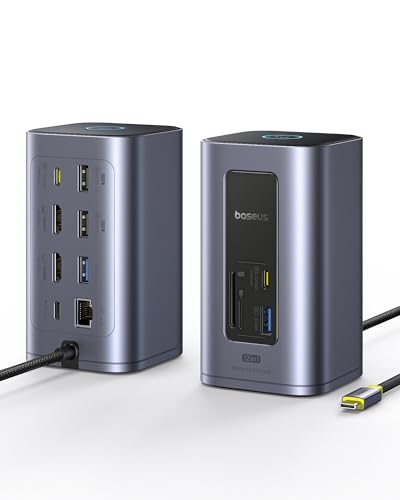 | 9.6PCKitHQ scoreView on Amazon |
03 | 9.4PCKitHQ scoreView on Amazon |
04 Also Consider TobenONE Displaylink Docking Station 3 Monitors for Mac(M1-M6/Neo)&Power delivery: 100 W | 9.2PCKitHQ scoreView on Amazon |
A closer look at each configuration
Docking Station Dual Monitor 4K
score
A 13-in-1 USB C dock with 2 HDMI ports, DisplayPort, Gigabit Ethernet and 87W of laptop charging.
- Power delivery
- 87 W
- Interface
- USB C
- HDMI
- Yes
- DisplayPort
- Yes
- Ethernet
- Yes
- USB-C
- Yes
- Weight
- 0.31 lb
- Warranty
- 18 month
This LIONWEI dock has 2 HDMI ports and a DisplayPort, each supporting up to 4K@60Hz. On Windows it supports MST and SST mirror and extend modes, while on Mac it extends one monitor at 4K@60Hz. The USB-C ports support 100W power delivery input and 10Gbps data transfer, with 87W reaching the laptop after the dock uses 13W. Ports also include USB 3.1 at 10Gbps, 3 USB 3.0 ports, 2 USB 2.0 ports, Gigabit Ethernet and a 3.5mm audio and mic jack. The dock weighs 0.31 lb and carries an 18 month warranty.
Choose it if
- You run dual monitors from a Windows laptop
- You want 10Gbps USB ports with Ethernet
Consider another if
- You need extended displays on Mac beyond one monitor
- You need 100W of charging to the laptop
Baseus Spacemate Nomos Air Docking Station 12-in-1 for Dual Monitor
score
A 12-in-1 dock with dual 4K@60Hz HDMI outputs, 100W input and a privacy and power-saving button.
- Power delivery
- 100 W
- Interface
- USB-C
- HDMI
- Yes
- Ethernet
- Yes
- USB-C
- Yes
- Weight
- 0.92 lb
- Warranty
- 24-month
This Baseus dock has dual HDMI outputs at up to 4K@60Hz, and extended display mode on Mac is not supported. It has 7 USB ports, with 6 ports for data transfer only and a PD input port that charges the laptop at 100W input. The host cable measures 31.5 inches. A top button locks the screen with a 1 second press and enables a power-saving mode with a 2 second hold. The charger is not included, and a charger of 100W or higher is recommended. The dock weighs 0.92 lb and carries a 24-month warranty.
Choose it if
- You run dual 4K monitors from a Windows laptop
- You want SD and TF card slots with Ethernet
Consider another if
- You need extended display mode on Mac
- You need a charger included in the box
WAVLINK Displaylink Docking Station 3 Monitors
score
A 15-in-1 DisplayLink dock with 3 HDMI ports, 2 DisplayPort ports and 100W power delivery.
- Power delivery
- 100 W
- Interface
- USB-C
- HDMI
- Yes
- DisplayPort
- Yes
- Ethernet
- Yes
- USB-C
- Yes
- Weight
- 0.76 lb
- Warranty
- 1 year
This WAVLINK dock uses DisplayLink to drive three monitors, with 3 HDMI ports and 2 DisplayPort ports, and HDMI and DisplayPort on the same display channel cannot be used at the same time. Output runs up to dual 2K@60Hz through the Display 1 and 2 ports. A DisplayLink driver must be installed before use, and the dock does not support plug-and-play operation. The 130W adapter delivers up to 100W to the laptop. Ports include 2 USB-C at 10Gbps, 3 USB-A at 5Gbps, Gigabit Ethernet, SD and TF slots and audio ports. The dock weighs 0.76 lb and carries a 1 year warranty.
Choose it if
- You run three monitors from a Mac laptop
- You want SD and TF readers at 104MB/s
Consider another if
- You need plug-and-play use without a driver
- You need 4K output on three monitors at once
TobenONE Displaylink Docking Station 3 Monitors for Mac(M1-M6/Neo)&
score
A 14-in-1 DisplayLink dock that drives three extended displays on Mac and Windows laptops.
- Power delivery
- 100 W
- Interface
- DisplayLink
- HDMI
- Yes
- Ethernet
- Yes
- USB-C
- Yes
- Weight
- 2.25 lb
- Warranty
- 2 Year Warranty
This TobenONE dock drives three extended displays through DisplayLink on Mac and Windows, with a maximum of 1x4K@60Hz plus 2x2K@60Hz on both systems. The included 120W adapter sends 100W to the laptop. Five USB ports run at 5Gbps, with 4 USB-A ports and 1 USB-C port, plus Gigabit Ethernet and SD and microSD slots. The laptop needs a full-featured USB-C port with DisplayPort Alt Mode, or Thunderbolt 3, 4 or 5, or USB4. HDCP-protected streaming does not play on the extended displays, and lag runs roughly 30 to 50ms. The aluminum dock weighs 2.25 lb and carries a 2 year warranty.
Choose it if
- You run three extended displays from an M1 Mac
- You want 100W charging from a 120W adapter
Consider another if
- You need HDCP streaming on extended displays
- You need USB ports above 5Gbps
Make the choice for your setup
Mac and Windows display modes
Display modes differ by operating system across these docks. The LIONWEI dock supports MST and SST extend modes on Windows and extends one monitor at 4K@60Hz on Mac. The Baseus dock supports dual 4K@60Hz outputs, and extended display mode on Mac is not supported. The WAVLINK and TobenONE docks use DisplayLink for three monitors on Mac and Windows, with the WAVLINK reaching dual 2K@60Hz and the TobenONE reaching 1x4K@60Hz plus 2x2K@60Hz. The TobenONE dock drives three extended displays on M1 to M6 Macs. The figures to hold apart are one extended Mac monitor on the LIONWEI dock and three extended displays on the TobenONE dock.
Charging wattage and adapters
Charging wattage reaches the laptop at different levels across these docks. The LIONWEI dock takes 100W power delivery input and passes 87W to the laptop, since the dock uses 13W to work. The Baseus dock takes 100W input through its PD port, and the charger is not included. The WAVLINK dock includes a 130W adapter and delivers up to 100W to the laptop. The TobenONE dock includes a 120W adapter and sends 100W to the laptop. The Baseus USB ports are for data transfer and cannot charge peripherals. The WAVLINK adapter is rated at 130W and the TobenONE adapter at 120W, and both docks state 100W of power delivery to a compatible laptop. The figures to hold apart are 87W to the laptop on the LIONWEI dock and 100W on the WAVLINK and TobenONE docks. If that fits your setup better, see our guide to the Best Dual Displayport Docking Station.
Ports, Ethernet and drivers
Port counts and driver needs differ across these docks. The LIONWEI dock has USB 3.1 at 10Gbps, 3 USB 3.0 ports and 2 USB 2.0 ports, with Gigabit Ethernet and a 3.5mm audio and mic jack. The Baseus dock has 7 USB ports, Ethernet and SD and TF slots. The WAVLINK dock has 2 USB-C ports at 10Gbps, 3 USB-A ports at 5Gbps, Gigabit Ethernet and SD and TF readers at up to 104MB/s. The TobenONE dock has 5 USB ports at 5Gbps. The WAVLINK and TobenONE docks need a DisplayLink driver installed before use. Ethernet is Gigabit on the LIONWEI, WAVLINK and TobenONE docks. The figures to hold apart are 10Gbps USB-C ports on the WAVLINK dock and 5Gbps USB ports on the TobenONE dock.
Before you decide, also read Best Docking Station.
FAQ: Docking Station for Both Mac and Windows
Which docks extend displays on a Mac laptop?
The WAVLINK and TobenONE docks drive three extended displays on Mac through DisplayLink, with the TobenONE reaching 1x4K@60Hz plus 2x2K@60Hz. The LIONWEI dock extends one monitor at 4K@60Hz on Mac, and extended display mode on Mac is not supported on the Baseus dock. The WAVLINK dock reaches dual 2K@60Hz through its Display 1 and 2 ports.
How much charging power reaches the laptop?
The LIONWEI dock passes 87W to the laptop from a 100W input, since the dock uses 13W to work. The WAVLINK dock delivers up to 100W from its 130W adapter, and the TobenONE dock sends 100W from its 120W adapter. The Baseus dock takes 100W input, with the charger not included.
Which docks need a driver installed before use?
The WAVLINK and TobenONE docks use DisplayLink and need the DisplayLink driver installed before use, and the WAVLINK dock does not support plug-and-play operation. The TobenONE dock also needs a full-featured USB-C port with DisplayPort Alt Mode, or Thunderbolt 3, 4 or 5, or USB4.


