
Best Ar Glasses for Office Work (2026): 6 Picks Compared
 By Theo LangUpdated
The VITURE Luma Pro XR/AR Glasses suit office work built around a large virtual display: a 152-inch screen at 1200p, 1000 nits brightness, and a 120Hz refresh rate. Its SpaceWalker software places up to three virtual screens from a Mac or PC, and built-in myopia adjustment reaches -4.0D. At 0.17 lb with USB-C, it connects to compatible laptops and phones for desk work anywhere.
Your shortlist at a glance
PCKitHQ scores range from 9.2 to 9.8. See how we pick.
| Product and key specifications | Score and retailer |
|---|---|
01 | 9.8PCKitHQ scoreView on Amazon |
02 | 9.7PCKitHQ scoreView on Amazon |
03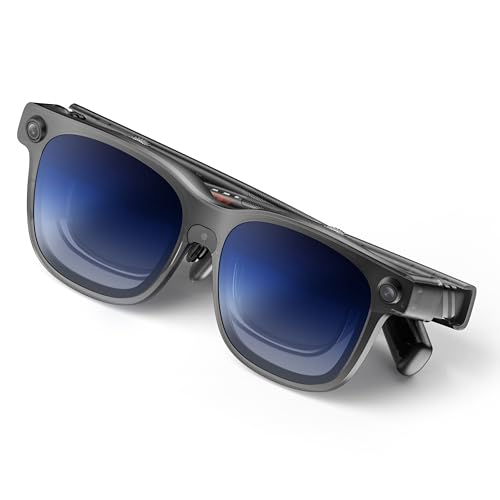 Also Consider VITURE Luma Ultra XR Glasses | 9.6PCKitHQ scoreView on Amazon |
04 | 9.4PCKitHQ scoreView on Amazon |
05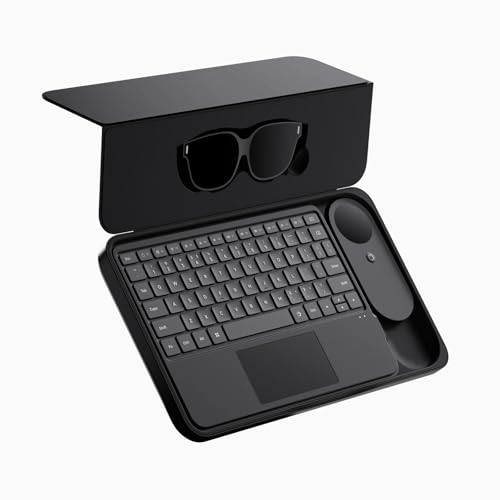 | 9.3PCKitHQ scoreView on Amazon |
06 | 9.2PCKitHQ scoreView on Amazon |
A closer look at each configuration
VITURE Luma Pro XR/AR Glasses
score
The 152-inch 1200p screen at 1000 nits and 120Hz anchors this Best Overall pick for office work.
- Native refresh rate
- 120 Hz
- Resolution
- 1200p
- USB-C
- Yes
- Weight
- 0.17 lb
- Warranty
- 1 Year
The Luma Pro shows a 152-inch virtual screen at 1200p with 1000 nits brightness, a 52-degree field of view, and a 120Hz refresh rate. HARMAN audio handles calls and media without separate earbuds. Built-in myopia adjustment reaches -4.0D, and the electrochromic film darkens the lenses with one tap. Two sizes cover IPD ranges around 64.0 mm and 68.0 mm. SpaceWalker on Mac or PC arranges up to three virtual screens. It weighs 0.17 lb, connects through USB-C, and carries a 1 Year warranty.
Choose it if
- You want a 152-inch virtual screen at 1200p for documents and code
- You want three virtual screens from a Mac or PC through SpaceWalker
Consider another if
- You need a virtual screen larger than 152 inches
- You need brightness above 1000 nits
THIИKAЯ AiRA XR AR Glasses 160-inch Big Screen USB-C for Steam Deck ROG
score
A 160-inch virtual screen, up to 5000 nits, and 120Hz define this lightweight second choice.
- Native refresh rate
- 120 Hz
- USB-C
- Yes
- Weight
- 0.14 lb
- Warranty
- One Year
The AiRA shows a 160-inch virtual screen with a 45-degree field of view and a 120Hz refresh rate. Its Micro-OLED display reaches up to 5000 nits brightness. The glasses weigh 63 grams, and soft adjustable nose pads fit most face shapes. Built-in myopia adjustment covers 0 to -6.00D, so many nearsighted users skip prescription lenses. It connects by USB-C plug-and-play to iPhone 15, 16, and 17, Android phones, Mac and Windows PCs, Steam Deck, and ROG Ally.
Choose it if
- You want a 160-inch virtual screen for focused work away from a desk
- You want myopia adjustment from 0 to -6.00D without prescription lenses
Consider another if
- You want a field of view wider than 45 degrees
- You need a virtual screen larger than 160 inches
VITURE Luma Ultra XR Glasses
score
The 152-inch 1200p screen at 1500 nits adds 6DoF tracking with the Pro Neckband.
- Resolution
- 1200p
- USB-C
- Yes
- Weight
- 0.18 lb
- Warranty
- 1 Year
The Luma Ultra shows a 152-inch virtual screen at 1200p, with 1500 nits brightness, up to 120Hz refresh rate, and a 52-degree field of view. SpaceWalker on Mac and Windows places multiple virtual screens side by side for documents, browsers, chat, coding, editing, or streaming, with 3DoF head tracking. Full 6DoF tracking and hand gesture control work when the glasses pair with the VITURE Pro Neckband. Built-in myopia adjustment reaches -4.0D. It weighs 0.18 lb, connects through USB-C, and carries a 1 Year warranty.
Choose it if
- You want 1500 nits brightness for work in bright rooms
- You want 6DoF tracking and hand gestures through the Pro Neckband
Consider another if
- You want 6DoF tracking without buying the Pro Neckband
- You want a virtual screen larger than 152 inches
TOZO VIZO Z1 AR Glasses 160-inch Virtual Screen
score
A 160-inch 1920x1080 Micro-OLED screen at 120Hz and 63 grams suit mobile work.
- Native refresh rate
- 120 Hz
- Resolution
- 1920×1080
- Weight
- 0.14 lb
The VIZO Z1 shows a 160-inch virtual screen with a 47.5-degree viewing angle on a 1920x1080 Micro-OLED panel. Perceived brightness is 1800 nits, with peak brightness reaching 6000 nits, and the 120Hz refresh rate keeps motion smooth. It weighs 63 grams. The 2D picture is Full HD 1920x1080, and 3D expands to 3840x1080. A quick-release prescription lens frame is available as a separate accessory. USB-C DisplayPort plug-and-play connects compatible iPhone, Android phones, laptops, and handheld consoles without extra apps.
Choose it if
- You want a 160-inch screen at 1920x1080 for mobile work
- You want 1800 nits perceived brightness for outdoor use
Consider another if
- You want a field of view wider than 47.5 degrees
- You want a virtual screen larger than 160 inches
INAIR 2 Pro Elite Suite
score
The six-screen spatial system with an AI Pod and PC streaming turns the glasses into a portable workstation.
- Native refresh rate
- 120 Hz
- Warranty
- 1 Year
The Elite Suite centers on a 135-inch Micro-OLED display at 120Hz with electrochromic dimming that shifts transparency from 0.1 percent to near 100 percent. The included AI Pod runs an Android environment in AR and arranges up to six floating windows at once, with 3DoF Hover and 0DoF Follow modes. The Wakey PC Dongle mirrors a Windows 11 PC or macOS desktop to the display. The box holds the INAIR 2 Pro Glasses, AI Pod, Spatial Keyboard, Wakey Dongle, and INAIR Hub. The warranty is 1 Year.
Choose it if
- You want up to six floating windows from the included AI Pod
- You want to mirror a Windows 11 PC or Mac desktop wirelessly
Consider another if
- You want a single pair of glasses without a separate AI Pod
- You want a virtual screen larger than 135 inches
XREAL One Pro AR Glasses
score
The 171-inch screen, 57-degree field of view, and native 3DoF tracking suit a large anchored workspace.
- Native refresh rate
- 120 Hz
- Resolution
- FHD
- USB-C
- Yes
- Weight
- 0.19 lb
- Warranty
- 1 Year
The One Pro projects a 171-inch virtual screen with a 57-degree field of view from Sony 0.55-inch Micro-OLED panels at FHD resolution and a 120Hz refresh rate. The X1 spatial computing chip delivers native 3DoF tracking with 3ms M2P latency, and pairing with the optional XREAL Eye adds full 6DoF spatial anchoring. Brightness reaches up to 700 nits, and electrochromic dimming adjusts the lens tint. It weighs 0.19 lb, connects through USB-C, and carries a 1 Year warranty.
Choose it if
- You want a 171-inch virtual screen with a 57-degree field of view
- You want native 3DoF tracking with 3ms M2P latency
Consider another if
- You want a virtual screen larger than 171 inches
- You want brightness above 700 nits
Make the choice for your setup
Match the virtual screen to office work
Office work puts text in front of you for hours, so compare the virtual screen each pair of glasses shows. The VITURE Luma Pro and Luma Ultra both show a 152-inch screen at 1200p. The THIИKAЯ AiRA and the TOZO VIZO Z1 both show a 160-inch screen, and the TOZO states 1920x1080 resolution. The XREAL One Pro shows a 171-inch screen at FHD resolution for wide office documents. The INAIR 2 Pro shows a 135-inch screen. Match the screen size to the documents, spreadsheets, and code windows you keep open, and compare the resolution figure each pair of glasses states alongside its screen size.
Compare brightness and field of view
Brightness decides whether text stays readable under office lighting. The VITURE Luma Pro states 1000 nits, the VITURE Luma Ultra states 1500 nits, and the XREAL One Pro states up to 700 nits. The THIИKAЯ AiRA states brightness up to 5000 nits. The TOZO VIZO Z1 states a perceived brightness of 1800 nits with peak brightness reaching 6000 nits. Field of view shapes how much of the virtual screen sits in front of you at once: the Luma Pro and Luma Ultra state 52 degrees, the AiRA states 45 degrees, the VIZO Z1 states a 47.5-degree viewing angle, and the XREAL One Pro states 57 degrees. Check both figures together before choosing. A related shortlist covers the Best Ar Glasses for Phone.
Check workspace software and tracking
Multi-screen software decides how many windows you can keep open. The VITURE Luma Pro and Luma Ultra work with SpaceWalker on Mac and PC, which arranges up to three virtual screens on the Luma Pro and multiple virtual screens on the Luma Ultra. The INAIR 2 Pro Elite Suite includes an AI Pod that runs an Android environment and arranges up to six floating windows, plus a Wakey PC Dongle for mirroring a Windows 11 PC or macOS desktop. Tracking differs too: the XREAL One Pro has native 3DoF tracking with 3ms M2P latency, and the Luma Ultra supports full 6DoF tracking and hand gesture control when paired with the VITURE Pro Neckband. Check the software each setup needs first.
For a wider shortlist, start with Best Video Glasses.
FAQ: Ar Glasses for Office Work
What virtual screen size does each pair show?
The XREAL One Pro shows a 171-inch virtual screen at FHD resolution. The THIИKAЯ AiRA and the TOZO VIZO Z1 show 160-inch screens, the VITURE Luma Pro and Luma Ultra show 152-inch screens, and the INAIR 2 Pro shows a 135-inch screen.
Which picks support multiple virtual screens for office work?
The VITURE Luma Pro arranges up to three virtual screens from a Mac or PC through SpaceWalker, and the VITURE Luma Ultra places multiple virtual screens through SpaceWalker. The INAIR 2 Pro Elite Suite arranges up to six floating windows through its included AI Pod.
What myopia adjustment do these glasses offer?
The VITURE Luma Pro and Luma Ultra adjust focus up to -4.0D, and the THIИKAЯ AiRA adjusts from 0 to -6.00D. The TOZO VIZO Z1 uses a quick-release prescription lens frame sold separately, and the INAIR 2 Pro supports official prescription lenses.


