
Best Display Glasses for Productivity (2026): 4 Picks Compared
 By Theo LangUpdated
Choose the THIИKAЯ AiRA XR AR Glasses 160" Big Screen 120Hz USB-C if you want a large private screen for focused work. Its 160-inch virtual screen, 120Hz refresh rate, and brightness up to 5,000 nits suit long document and browser sessions on a Mac or Windows PC. The VITURE Luma Ultra models follow with 1200p Sony Micro-OLED panels, while the XREAL One Pro adds native 3DoF tracking and a 171-inch screen.
Your shortlist at a glance
PCKitHQ scores range from 9.2 to 9.8. See how we pick.
| Product and key specifications | Score and retailer |
|---|---|
01 | 9.8PCKitHQ scoreView on Amazon |
02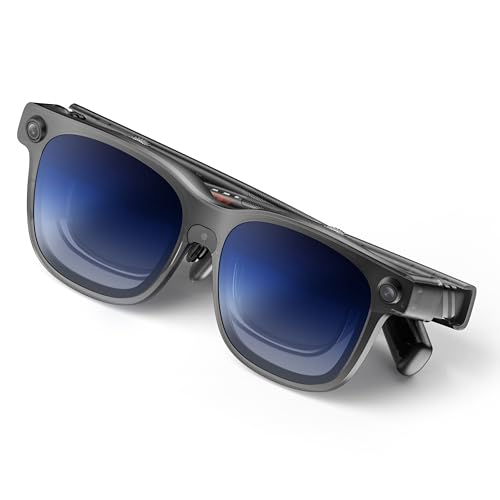 Second Pick VITURE Luma Ultra XR Glasses | 9.6PCKitHQ scoreView on Amazon |
03 | 9.4PCKitHQ scoreView on Amazon |
04 | 9.2PCKitHQ scoreView on Amazon |
A closer look at each configuration
THIИKAЯ AiRA XR AR Glasses 160-inch Big Screen USB-C for Steam Deck ROG
score
The 160-inch virtual screen at 120Hz and brightness up to 5,000 nits make this a strong choice for a private work display.
- Native refresh rate
- 120 Hz
- USB-C
- Yes
- Weight
- 0.14 lb
- Warranty
- One Year
The THIИKAЯ AiRA XR AR Glasses 160" Big Screen 120Hz USB-C create a 160-inch virtual screen with a 45-degree field of view and a native 120Hz refresh rate. The Micro-OLED display reaches brightness up to 5,000 nits, which keeps text readable in bright rooms. Dual built-in stereo speakers handle audio without separate earbuds. At 0.14 lb with adjustable nose pads and myopia adjustment from 0 to -6.00D, the glasses fit many nearsighted users without prescription lenses. Connection runs through USB-C with no app or setup, and the glasses work with iPhone 15, 16, and 17, iPads, DisplayPort-enabled Android phones, Steam Deck, ROG Ally, and Mac and Windows PCs. Both 2D and 3D content are supported, and the one-year warranty covers the device.
Choose it if
- You want a 160-inch virtual screen for documents and browser work
- You connect a Mac or Windows PC through USB-C
Consider another if
- You need the 1200p resolution of the VITURE Luma Ultra
- You need the 171-inch screen of the XREAL One Pro
VITURE Luma Ultra XR Glasses
score
The 1200p Sony Micro-OLED panel and 152-inch screen give this VITURE model sharp text for reading and document work.
- Resolution
- 1200p
- USB-C
- Yes
- Weight
- 0.18 lb
- Warranty
- 1 Year
The VITURE Luma Ultra XR Glasses show a 152-inch virtual screen at 1200p through Sony Micro-OLED panels, with brightness of 1500 nits and a refresh rate up to 120Hz across a 52-degree field of view. SpaceWalker on Mac and Windows places multiple virtual screens side by side for documents, browsers, chat, coding, editing, or streaming, and supports 3DoF head tracking, an ultra-wide display, and one-click 3D where supported. The electrochromic film darkens the lenses to reduce distractions, and built-in myopia adjustment up to -4.0D helps nearsighted users see clearly without prescription inserts. HARMAN-tuned open-ear audio plays sound without earbuds. The glasses weigh 0.18 lb, connect through USB-C, and carry a one-year warranty.
Choose it if
- You want a 1200p display with sharp text for reading
- You work on Mac or Windows with multiple virtual screens
Consider another if
- You need the 160-inch screen of the THIИKAЯ AiRA
- You need the 171-inch screen of the XREAL One Pro
VITURE Luma Ultra XR/AR Glasses
score
This VITURE Luma Ultra combines a 1200p Sony Micro-OLED panel with a 152-inch screen and SpaceWalker multi-screen support.
- Native refresh rate
- 120 Hz
- Resolution
- 1200p
- USB-C
- Yes
- Weight
- 0.18 lb
- Warranty
- 1 Year
The VITURE Luma Ultra XR/AR Glasses present a 152-inch virtual screen at 1200p with Sony Micro-OLED panels, 1500 nits of brightness, a native 120Hz refresh rate, and a 52-degree field of view. SpaceWalker adds multi-screen workspaces, 3DoF head tracking, an ultra-wide display, and one-click 3D on supported platforms, and on Mac and Windows you can place several virtual screens side by side for documents, browsers, chat, coding, editing, or streaming. With the VITURE Pro Neckband, the glasses support full 6DoF tracking and hand gesture control. The electrochromic film darkens the lenses to cut distractions, and myopia adjustment up to -4.0D sharpens the view for nearsighted users without prescription inserts. HARMAN-tuned open-ear audio keeps sound available without earbuds. The glasses weigh 0.18 lb, connect through USB-C, and include a one-year warranty.
Choose it if
- You want 1200p text clarity across a 152-inch screen
- You use SpaceWalker multi-screen workspaces on Mac or Windows
Consider another if
- You need the 160-inch screen of the THIИKAЯ AiRA
- You need the 57-degree field of view of the XREAL One Pro
XREAL One Pro AR Glasses
score
The X1 chip brings native 3DoF tracking and a 171-inch screen at 120Hz to a wide 57-degree field of view.
- Native refresh rate
- 120 Hz
- Resolution
- FHD
- USB-C
- Yes
- Warranty
- 1 Year
The XREAL One Pro AR Glasses with X1 Chip use X-Prism optics and a Sony 0.55-inch Micro-OLED display to project a 171-inch virtual screen with a 57-degree field of view at a 120Hz refresh rate and FHD resolution. The X1 spatial computing chip delivers native 3DoF tracking with 3ms M2P latency, and pairing with the optional XREAL Eye adds full 6DoF spatial anchoring. REAL 3D turns content into 3D with a single switch. Two size options cover IPD ranges of 57 to 66mm and 66 to 75mm, with three-stage adjustable arms and zero-pressure nose pads in three sizes.
Choose it if
- You want a 171-inch screen with a 57-degree field of view
- You want native 3DoF tracking from the X1 chip
Consider another if
- You need the 160-inch screen of the THIИKAЯ AiRA
- You need the 1200p resolution of the VITURE Luma Ultra
Make the choice for your setup
Match the screen to your work
Start with the size of the virtual screen and its resolution, since both shape how long you can read and write comfortably. The THIИKAЯ AiRA gives you a 160-inch screen with a 45-degree field of view and a native 120Hz refresh rate. Both VITURE Luma Ultra models give you a 152-inch screen at 1200p with a 52-degree field of view. The XREAL One Pro gives you a 171-inch screen with a 57-degree field of view at FHD resolution and 120Hz. A larger field of view fills more of your sight, while higher resolution keeps small text legible. Compare these figures against the documents, spreadsheets, and code you read each day, and choose the combination that keeps text clear without constant zooming.
Plan multi-screen work on Mac and Windows
A single virtual screen suits reading and video, but the VITURE Luma Ultra models place documents, a browser, and chat side by side through SpaceWalker multi-screen workspaces. The VITURE Luma Ultra models work with SpaceWalker on Mac and Windows to place multiple virtual screens side by side for documents, browsers, chat, coding, editing, or streaming, with 3DoF head tracking and an ultra-wide display where supported. The THIИKAЯ AiRA and the XREAL One Pro connect to Mac and Windows PCs through USB-C and present one large virtual screen. Check whether your workflow depends on several screens at once or one large screen, then match that need to the software support each model documents. For a closely related choice, read our guide to the Best Virtual Display Glasses.
Check fit, vision, and connections
Comfort decides whether display glasses stay useful through a workday, so check weight, fit, and vision adjustment before you buy. The THIИKAЯ AiRA weighs 0.14 lb, uses adjustable nose pads, and offers myopia adjustment from 0 to -6.00D. Both VITURE Luma Ultra models weigh 0.18 lb, offer myopia adjustment up to -4.0D, and include three nose pad sizes. The XREAL One Pro offers two size options for IPD ranges of 57 to 66mm and 66 to 75mm, with three-stage adjustable arms and zero-pressure nose pads in three sizes. All four models connect through USB-C, and direct USB-C connection on the THIИKAЯ AiRA requires DisplayPort output support, so confirm your device supports it.
For a wider shortlist, start with Best Video Glasses.
FAQ: Display Glasses for Productivity
Which virtual screen sizes do these models give?
The XREAL One Pro projects a 171-inch virtual screen with a 57-degree field of view. The THIИKAЯ AiRA follows with a 160-inch screen and a 45-degree field of view, and both VITURE Luma Ultra models show a 152-inch screen with a 52-degree field of view.
Which models support multi-screen workspaces on Mac and Windows?
Both VITURE Luma Ultra models work with SpaceWalker on Mac and Windows to place multiple virtual screens side by side for documents, browsers, chat, coding, editing, or streaming. Support varies by OS, app, content, and connection method, so confirm your setup before you buy.
How do these glasses handle nearsightedness?
The THIИKAЯ AiRA offers myopia adjustment from 0 to -6.00D, and both VITURE Luma Ultra models offer myopia adjustment up to -4.0D. The XREAL One Pro offers two size options for IPD ranges of 57 to 66mm and 66 to 75mm, with built-in IPD adjustment software.


