
Best Display Glasses for My Mac Computer (2026): 5 Picks Compared
 By Theo LangUpdated
Choose the VITURE Beast XR/AR Glasses for your Mac when you want a 174-inch virtual screen at 1200p and 120Hz. Its Sony Micro-OLED display reaches 1250 nits, and its built-in VisionPair 3DoF lets you pin, resize, and lock that screen in mid-air. The glasses connect to Mac and PC through USB-C, with 9-level dimming and Auto Transparency.
Your shortlist at a glance
PCKitHQ scores range from 9.2 to 9.8. See how we pick.
| Product and key specifications | Score and retailer |
|---|---|
01 | 9.8PCKitHQ scoreView on Amazon |
02 | 9.7PCKitHQ scoreView on Amazon |
03 | 9.5PCKitHQ scoreView on Amazon |
04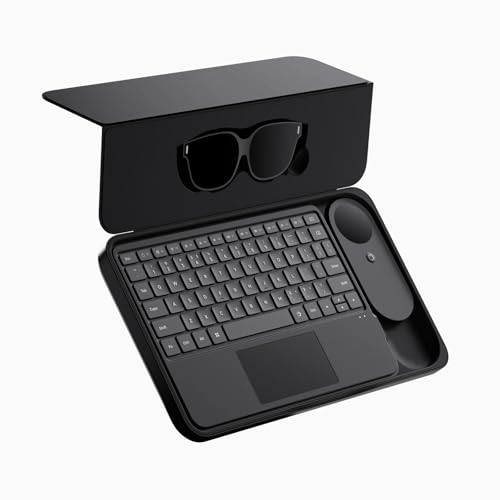 | 9.3PCKitHQ scoreView on Amazon |
05 | 9.2PCKitHQ scoreView on Amazon |
A closer look at each configuration
VITURE Beast XR/AR Glasses
score
The VITURE Beast XR/AR Glasses pair a 174-inch 1200p screen with 1250 nits and 120Hz for Mac use.
- Native refresh rate
- 120 Hz
- Resolution
- 1200p
- USB-C
- Yes
- Weight
- 0.19 lb
- Warranty
- 1 Year
The VITURE Beast XR/AR Glasses show a 174-inch screen at 1200p, with a 58-degree field of view and a 120Hz native refresh rate. The Sony Micro-OLED display reaches 1250 nits, with HARMAN AudioEFX for audio. Built-in VisionPair 3DoF supports Anchor, Smooth Follow, 32:9 UltraWide, and Side Mode, with Smart Re-Centering. The glasses connect through USB-C to Mac and PC, with SpaceWalker multi-screen use across macOS and Windows. Two sizes are available: Regular up to 70 IPD and Large up to 74 IPD, with tilt-adjustable arms and magnetic nose pads. The weight is 0.19 lb, and the warranty is 1 Year.
Choose it if
- You want a 174-inch virtual screen at 1200p for your Mac
- You want 9-level dimming with Auto Transparency in changing light
Consider another if
- You want a 152-inch virtual screen instead of a 174-inch screen
- You want 1000 nits brightness instead of 1250 nits
VITURE Luma Pro XR/AR Glasses
score
The VITURE Luma Pro XR/AR Glasses combine a 152-inch 1200p screen with 1000 nits and built-in myopia adjustment.
- Native refresh rate
- 120 Hz
- Resolution
- 1200p
- USB-C
- Yes
- Weight
- 0.17 lb
- Warranty
- 1 Year
The VITURE Luma Pro XR/AR Glasses show a 152-inch screen at 1200p, with a 52-degree field of view, 1000 nits brightness, and a 120Hz native refresh rate. Built-in myopia adjustment reaches up to minus 4.0 diopters, and a magnetic prescription lens frame is also available for stronger prescriptions or astigmatism. One tap activates the electrochromic film. SpaceWalker supports up to three virtual screens from a Mac or PC, in horizontal, vertical, or code mode. The glasses connect through USB-C, weigh 0.17 lb, and carry a 1 Year warranty. Two sizes are available, Regular at IPD 64.0 plus or minus 6.0 mm and Large at IPD 68.0 plus or minus 6.0 mm.
Choose it if
- You want a 152-inch 1200p screen at 120Hz for your Mac
- You want myopia adjustment up to minus 4.0 diopters without inserts
Consider another if
- You want a 174-inch virtual screen instead of a 152-inch screen
- You want 1250 nits brightness instead of 1000 nits
THIИKAЯ AiRA XR AR Glasses 160-inch Big Screen USB-C for Steam Deck ROG
score
The THINKAR AiRA XR AR Glasses offer a 160-inch screen at 120Hz with brightness up to 5000 nits.
- Native refresh rate
- 120 Hz
- USB-C
- Yes
- Weight
- 0.14 lb
- Warranty
- One Year
The THINKAR AiRA XR AR Glasses show a 160-inch virtual screen with a 45-degree field of view and a 120Hz native refresh rate. The Micro-OLED display reaches brightness up to 5000 nits, and dual built-in stereo speakers provide audio. Built-in myopia adjustment covers 0 to minus 6.00 diopters, and soft adjustable nose pads adjust for fit. The weight is 0.14 lb, or 63 grams, and the warranty is One Year. The glasses connect through USB-C to Mac and Windows PCs, with direct USB-C connection requiring DisplayPort output support. The glasses support both 2D and 3D content, with no apps or setup required for plug-and-play use.
Choose it if
- You want a 160-inch virtual screen at 120Hz for your Mac
- You want myopia adjustment from 0 to minus 6.00 diopters without inserts
Consider another if
- You want a 174-inch virtual screen instead of a 160-inch screen
- You want a 58-degree field of view instead of a 45-degree field
INAIR 2 Pro Elite Suite
score
The INAIR 2 Pro Elite Suite adds an AI Pod, keyboard, and dongle to 135-inch 120Hz glasses.
- Native refresh rate
- 120 Hz
- Weight
- 0.88 lb
- Warranty
- 1 Year
The INAIR 2 Pro Elite Suite includes INAIR 2 Pro glasses, an AI Pod, a Spatial Keyboard, a Wakey Dongle, and an INAIR Hub. The glasses show a 135-inch Micro-OLED screen at 120Hz, with 49 PPD, and electrochromic dimming from 0.1 percent to near 100 percent by a swipe on the left temple. The AI Pod runs an Android environment and supports up to six floating windows, with 3DoF Hover and 0DoF Follow modes. The Wakey Dongle mirrors a Windows 11 PC or macOS desktop and can wake a home computer from sleep mode. Real-time 2D-to-3D rendering covers photos, video, and streaming. The weight is 0.88 lb, and the warranty is 1 Year.
Choose it if
- You want up to six floating windows through the included AI Pod
- You want to mirror a macOS desktop through the included Wakey Dongle
Consider another if
- You want a 160-inch virtual screen instead of a 135-inch screen
- You want glasses weighing 0.14 lb instead of 0.88 lb
XREAL One Pro AR Glasses
score
The XREAL One Pro AR Glasses combine a 171-inch FHD screen with native 3DoF and the X1 chip.
- Native refresh rate
- 120 Hz
- Resolution
- FHD
- USB-C
- Yes
- Warranty
- 1 Year
The XREAL One Pro AR Glasses show a 171-inch FHD screen with a 57-degree field of view and a 120Hz native refresh rate, using Sony 0.55-inch Micro-OLED display technology and X-Prism Optics. The X1 spatial computing chip delivers native 3DoF tracking with 3ms M2P latency, and the optional XREAL Eye supports 6DoF spatial anchoring. REAL 3D transforms content into 3D with a single switch. Two sizes are available, M at IPD 57 to 66 mm and L at IPD 66 to 75 mm, with three-stage adjustable arms and zero-pressure nose pads in three sizes. The glasses connect through USB-C to MacBook and Windows PCs, and the warranty is 1 Year.
Choose it if
- You want a 171-inch FHD screen with a 57-degree field of view
- You want native 3DoF tracking with 3ms M2P latency from the X1 chip
Consider another if
- You want a 174-inch virtual screen instead of a 171-inch screen
- You want a 152-inch virtual screen instead of a 171-inch screen
Make the choice for your setup
Match the virtual screen size
Compare the virtual screen sizes for each pair: 174 inches for the VITURE Beast, 152 inches for the VITURE Luma Pro, 160 inches for the THINKAR AiRA, 135 inches for the INAIR 2 Pro, and 171 inches for the XREAL One Pro. Keep each screen size with its own field of view and resolution, where a resolution is given. A larger screen does not change the refresh rate, which is 120Hz for each pair in this guide. Choose the screen size that fits the workspace you want from your Mac, and keep the field of view beside it when you compare.
Check Mac connection and multi-screen support
Connect the VITURE Beast, VITURE Luma Pro, THINKAR AiRA, and XREAL One Pro directly to a Mac. The INAIR 2 Pro Elite Suite mirrors a macOS desktop through its Wakey Dongle instead. The THINKAR AiRA connects directly with DisplayPort output support required. The VITURE Beast and VITURE Luma Pro offer SpaceWalker for multi-screen use from a Mac or PC, with the Luma Pro offering up to three virtual screens. The INAIR suite offers up to six floating windows through its AI Pod. Check the connection and the multi-screen support for each pair before choosing, and keep each feature with the pair that offers it. If that fits your setup better, see our guide to the Best Ar Glasses to Use As A Monitor.
Compare dimming, focus, and fit
Dimming, focus, and fit differ across these pairs. The VITURE Beast offers 9-level dimming and Auto Transparency, while the VITURE Luma Pro and INAIR 2 Pro offer electrochromic dimming. The VITURE Luma Pro offers myopia adjustment up to minus 4.0 diopters, and the THINKAR AiRA offers myopia adjustment from 0 to minus 6.00 diopters. For fit, the THINKAR AiRA offers soft adjustable nose pads, the VITURE Beast offers Regular up to 70 IPD and Large up to 74 IPD, the Luma Pro offers Regular and Large IPD ranges, and the XREAL One Pro offers M at 57 to 66 mm and L at 66 to 75 mm.
Before you decide, also read Best Video Glasses.
FAQ: Display Glasses for My Mac Computer
What virtual screen size does the VITURE Beast offer?
The VITURE Beast XR/AR Glasses offer a 174-inch virtual screen at 1200p, with a 58-degree field of view and a 120Hz refresh rate. The XREAL One Pro offers a 171-inch screen, and the THINKAR AiRA offers a 160-inch screen.
Which pairs offer myopia adjustment without prescription inserts?
The VITURE Luma Pro offers built-in myopia adjustment up to minus 4.0 diopters, and the THINKAR AiRA offers built-in myopia adjustment from 0 to minus 6.00 diopters. The Luma Pro also offers a magnetic prescription lens frame for stronger prescriptions or astigmatism.
Which pairs offer multi-screen use from a Mac?
The VITURE Beast and VITURE Luma Pro offer SpaceWalker for multi-screen use from a Mac or PC, with the Luma Pro offering up to three virtual screens. The INAIR 2 Pro Elite Suite offers up to six floating windows through its included AI Pod.


