What Is a Multipoint Bluetooth Headset?
 By Theo LangUpdated
A multipoint Bluetooth headset is a headset that stays connected to more than one Bluetooth device at the same time, such as a phone and a laptop. It plays audio from one device at a time and moves to the other when that device needs it, for example when a call comes in. You do not need to unpair and pair again each time you change devices.
What multipoint does
Multipoint means the headset holds a Bluetooth link to more than one device at once, so both stay paired and ready. You might keep it linked to a phone for calls and to a laptop for video meetings. The headset takes audio from one device at a time, and when the other device starts a call, the headset moves the audio to the call.
How switching works
When audio plays on one device, the headset plays no audio from the other device until that device sends audio. A call takes priority, so an incoming call pauses music or a meeting on the first device and the headset switches to the call. When the call ends, the headset returns to the audio that was playing before.
Pair each device in turn
Pair the headset with the first device in the normal way, through that device's Bluetooth settings, and confirm it connects. Then pair it with the second device the same way. Some headsets need a button press to enter pairing mode again for the second device, so follow the steps in the headset manual.
Check multipoint is listed
Not every Bluetooth headset supports multipoint, so check that the headset states it before you buy. Look for the word multipoint, and check which devices it pairs with, since some headsets pair by Bluetooth with phones and laptops but not with game consoles. A headset without multipoint links to one device at a time.
What you need
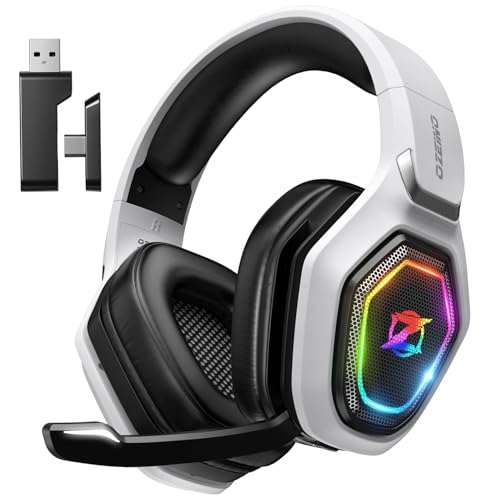
Ozeino Wireless Gaming Headset For PS5
A wireless gaming headset with 2.4GHz and Bluetooth, a flip mic, 50 mm drivers and a 3-year warranty, for PS5, PS4, PC, Mac, laptop, mobile and Switch.
View on Amazon
HyperX Cloud III S Wireless Gaming Headset
A headset with 2.4GHz and Bluetooth, a detachable mic, 53 mm drivers and up to 120 hours of battery on 2.4GHz, for PC, PS5, PS4, Switch, Mac and mobile.
View on Amazon
WESEARY Wireless Gaming Headset for PS5
A headset with 2.4GHz and Bluetooth 5.4, 50 mm drivers, up to 50 hours of battery and a 1-year warranty, for PS5, PS4, PC, phone, laptop, Switch and Mac.
View on Amazon
Razer BlackShark V3 Wireless PC Gaming Headset
A headset with 2.4 GHz, Bluetooth and wired USB-C that mixes 2.4GHz and Bluetooth audio at the same time, 50 mm drivers and a detachable mic.
View on AmazonThese come from our ranked list Best Bluetooth Gaming Headset, which compares them spec by spec.
FAQ
Can a multipoint headset connect to a phone and a laptop?
Yes, if the headset states multipoint support. Pair it with each device once, and both stay linked so the headset can move between a call on the phone and audio on the laptop.
Does multipoint play audio from both devices at once?
No. The headset plays audio from one device at a time, and a call takes priority over music or a meeting on the other device. When the call ends, the headset returns to the audio that was playing.
Why does my headset only link to one device?
The headset may not support multipoint. Check the headset description for the word multipoint, and check which devices it pairs with by Bluetooth before you buy.